



Your home-country news shouldn’t disappear when you cross a border. A VPN for international news access encrypts your internet traffic and routes it through a server elsewhere. Connect through a server in your home country, and your IP address may appear to be located there, helping you access news sites and services that restrict visitors by region.
Losing access to familiar coverage while traveling is frustrating, and public Wi-Fi can raise privacy concerns. A VPN encrypts traffic between your device and the VPN server, helping protect it from people monitoring the local network. It can’t guarantee access to every site or override local rules.
This guide explains how VPN encryption works, why a home-country server may help you access familiar services abroad, and what to consider in regions that restrict or monitor VPN use. It also covers a VPN’s limits and how to browse unfamiliar news sites more safely.
Key Takeaways
- Compare a VPN’s privacy policy and encryption technology to understand what protection it provides.
- Before connecting in a restricted region, consider local rules and how VPN use may be monitored.
- Choose a server location that suits the news service you want to reach, and favor a faster connection for smoother browsing.
- A VPN doesn’t make illegal activity legal, and unfamiliar news sites still deserve caution with sensitive information.
Encryption and secure VPN connections
A VPN encrypts your connection and routes it through a remote server. This can help protect your traffic and change the location associated with your IP address.
Encryption and Connection Protection
Encryption scrambles traffic between your device and the VPN server, making it unreadable to others monitoring that connection. With the VPN connected, your internet service provider can’t read that traffic or see its final destination.
For example, when you open an international newspaper on a café network, the VPN encrypts traffic between your device and its server. It doesn’t control what the newspaper website collects once you visit. Check a provider’s privacy policy and encryption details when choosing a service.
Gateway and Privacy Features
A secure web gateway is a separate service that applies security rules to web traffic, such as blocking access to restricted or risky destinations. It isn’t the same as a VPN, so don’t assume a VPN includes gateway filtering.
Privacy features vary by service. A privacy policy describes how a provider handles connection data, while encryption protects traffic in transit. Check what each feature does. A virtual server location, for example, refers to the apparent location of your connection, not protection against every online risk.
VPN use is legal in many countries, but some with strict internet regulations may restrict or monitor it. A VPN doesn’t make illegal activity legal, so local rules still apply when you travel.
VPN pricing, trial availability, and refund terms vary by provider and plan. Read the subscription terms before paying, and don’t assume a trial or refund is included.
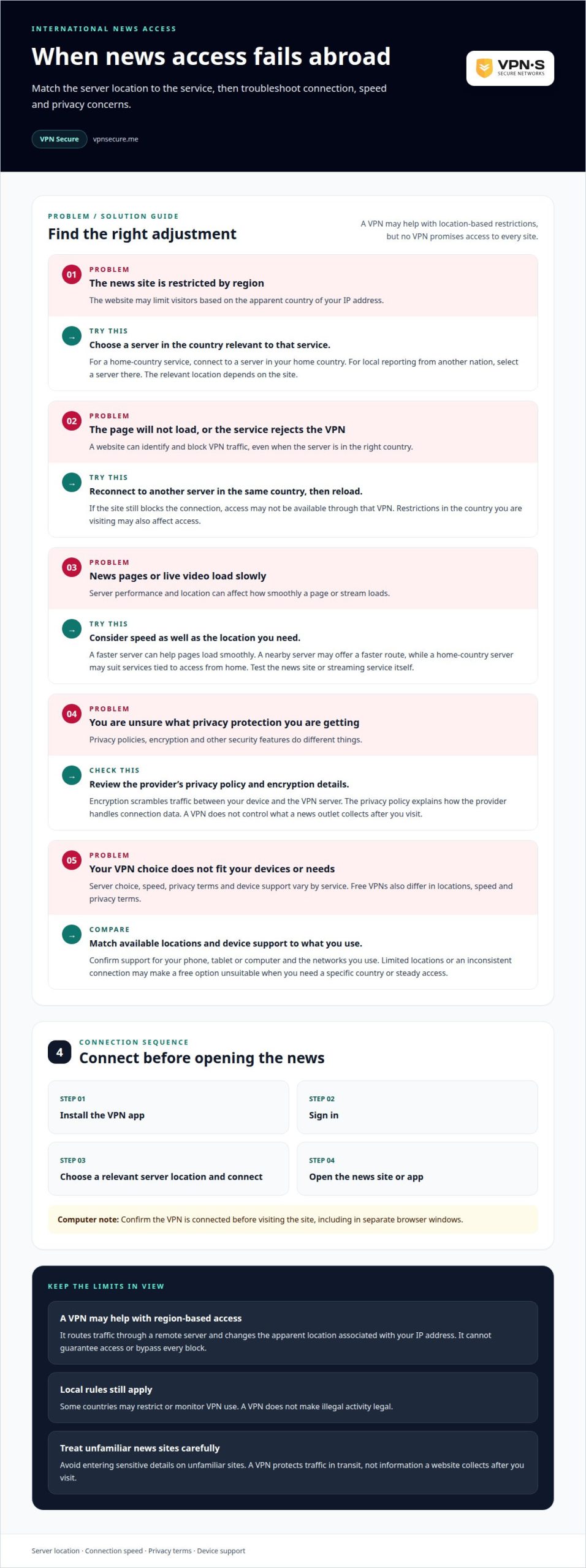
To read news on a phone or computer, install the VPN app, sign in, choose a server location, and connect. Then open the news site in your browser or app. On a computer, confirm the VPN is connected before visiting the site, including in separate browser windows.
Choosing a VPN for restricted regions
A VPN for international news access should suit the countries and services you need. Before choosing one, consider server locations, connection speed, privacy terms, and the devices you use.
Reliable Access to News and Streaming
Reliability depends on server performance and location, as well as whether a service blocks VPN traffic. A faster server can help news pages load smoothly, but news and streaming platforms may still reject IP addresses they identify as VPN traffic. If a page won’t load, reconnect to another server in the same country and try again.
If you use a phone and computer, check that the VPN supports both devices and works on your networks. A suitable VPN for international news access balances speed, encryption, and clear privacy terms rather than promising access to every platform.
VPN Countries and Server Locations
For a home-country service, connect to a server in your home country. To read local reporting from another nation, select a server there. This can change the apparent location of your IP address, which may matter when a news site restricts access by region.
There’s no single country that suits every reader. Choose a server location relevant to the specific news site, then consider connection speed. A nearby server may offer a faster route, while a home-country server may suit services tied to access from home.
Access to Region-Blocked News
A VPN routes your connection through a remote server, changing the IP address a news website sees. This may help when a site restricts visitors based on their apparent country, but it won’t bypass every block. A website can identify and reject VPN traffic.
If your VPN for international news access isn’t working, reconnect to another server in the relevant country, then reload the page. Restrictions in the country you’re visiting may also affect access.
Free VPNs vary in server choice, speed, and privacy terms. Limited locations or an inconsistent connection may make a free option unsuitable when you need a particular country or reliable access. Compare the available locations and terms with your reading or viewing needs before relying on one.
Which VPNs reliably access international news websites and streaming services?
No VPN can promise access to every news site or streaming platform. A VPN may help when a website restricts visitors by location, but the site can still block VPN connections. Assess a service by how well its server locations, speed, privacy policy, and device support meet your needs.
Start with the service you need. If you’re abroad and want to access a home-country broadcaster, choose a VPN with a server in that country. To read domestic coverage from another nation, select a server there instead. The relevant location depends on the site’s regional restrictions, not a universal list of “best” VPN countries.
Speed matters for live video and busy news pages. A faster server can make access smoother, while a distant or congested route may slow loading. Test the connection with the news website or streaming service you use. If access is blocked, reconnect through another server in the same country and reload the page.
Privacy is another important consideration. Read the provider’s privacy policy and review its encryption technology before choosing a service. A VPN protects traffic between your device and its server, but doesn’t control what a news outlet collects after you visit. Avoid entering sensitive details on unfamiliar news sites.
Device support matters if you switch between a phone, tablet, and computer. Confirm the VPN supports the devices you plan to use, then connect before opening the news app or browser. For streaming, test the service itself rather than assuming its video player will work just because the news homepage loads.
Free VPNs differ in server choice, speed, and privacy terms. These limitations may make them unsuitable when you need a specific country or a steady connection. Compare their available locations and terms with your actual reading or viewing needs, and don’t assume free access means dependable service.
How VPNs change access to blocked news
A news website may estimate your location from your IP address and restrict visitors from certain regions. A VPN routes your connection through a server elsewhere, changing the IP address the site sees. For example, a traveler can connect through a server in their home country so their apparent location matches it.
Changing your apparent location may help with geographic restrictions, but it doesn’t guarantee access. A news outlet may block IP addresses associated with VPNs, and national restrictions can apply regardless of the website’s location. A VPN doesn’t make prohibited activity legal.
Russia illustrates why access and local rules must be considered together. Russia’s Law № 276-FZ prohibits VPN services and internet anonymizers from providing access to websites banned in Russia, according to Human Rights Watch. The BBC explains that the law did not directly ban VPNs, but restricted their use to access banned websites.
Before using a VPN while traveling, consider the rules where you’re physically located. Then connect to a server in the country relevant to the news site and try loading the page. If it remains blocked, reconnect through another server in that country. The site may still identify or reject the new IP address.
Access depends on the type of restriction. If a news site limits content by country, an IP address associated with another country may help. If a network blocks the site itself or local rules restrict access, changing your apparent location may not solve the problem. Treat unfamiliar websites cautiously and avoid entering sensitive information on untrusted pages.
For encrypted connections while traveling, explore VPN access options for your news-reading needs.
VPNSecure
VPNSecure helps travelers protect their internet traffic and access home-country services through an encrypted VPN connection. If you want to read familiar news abroad, connect through a server in the relevant country so your IP address may appear to be there.
Choose a Monthly VPN Subscription or Annual VPN Subscription to suit how you want to access the service. A Dedicated IP is also available for readers who need a consistent IP address. A VPN can support privacy and regional access, but it can’t override local restrictions or guarantee that every news site will work.
If you’re weighing your options for secure news access while traveling, contact VPNSecure to discuss your needs.
Make your next connection count
Before your next trip, decide which news services and home-country accounts you’ll need. This gives you a clear reason to choose a server location before a familiar site fails to load. Keep local restrictions in mind, and use trusted networks and websites when handling sensitive information.
A VPN for international news access can help you stay informed abroad while adding privacy and flexibility. Treat it as one part of your travel routine, not a way to override website controls or local rules. Your destination, the service you need, and the network you use all shape the right approach.
If you want to discuss a VPN setup for reading news while traveling, contact VPNSecure about your access needs. A little preparation can help you stay connected to the reporting that matters, wherever your travels take you.
Frequently Asked Questions
How does a VPN work?
A VPN app creates an encrypted connection between your device and a VPN server, then routes your internet traffic through it. For international news access, the server location can affect what a website sees about your connection. Signing in to a news account still identifies you to that service, and a VPN doesn’t replace careful account security.
What is a VPN?
A virtual private network, or VPN, routes your device’s internet connection through a remote server. Think of it as a protected connection layer for online activity, not a separate browser or news source. You still visit the same websites and apps, but your traffic takes a different route to reach them.
How should I choose a VPN in 2026?
Choose a VPN based on your needs, not a ranking. For example, travelers reading news from home should prioritize a server location relevant to that country. Also consider connection speed, supported devices, the provider’s privacy policy, and encryption technology. Test whether your essential news services work over VPN connections before relying on them abroad.
When should I use a VPN?
Use a VPN when you want an encrypted connection on a network you don’t trust, such as airport public Wi-Fi. It may also help when a news service restricts access based on your apparent location. Don’t treat it as complete protection: use strong, unique passwords and avoid entering sensitive details on unfamiliar websites.
When should the VPN be used?
Connect before opening the news app or signing in to a service that depends on your apparent location. If you’re traveling and need a home-country account, for example, connect through a server in the relevant country first. Keep the VPN connected while using the service, and reconnect if your network changes or the connection drops.
Where is a VPN required?
You don’t need a VPN simply to read international news, but access needs and local rules vary. Some countries with strict internet regulations may restrict or monitor VPN use, so consider the rules where you’re traveling. Workplaces may also require a VPN to access internal systems. A VPN doesn’t make prohibited online activity legal.