



A region lock can keep a game or early release out of reach, but your apparent location can change. A VPN for gaming without geo-blocks routes your connection through a server in another region, replacing the IP address games see with the VPN server’s address. This may help you access games offered there, although platform rules and other location checks may still apply.
It’s frustrating when a game is available elsewhere but not where you are. This guide explains how gaming geo-blocks work, when a VPN may help, and what it cannot change. You’ll also learn how server location and connection speed affect your experience, so you can weigh access against a smooth session.
Key Takeaways
- A VPN routes your connection through a server in another region, changing the IP address games may use to estimate your location.
- Regional access can still depend on a game’s platform rules, licensing, and other location checks.
- To limit added latency, choose a VPN server close to the game’s servers while considering the region you’re trying to access.
- Learn how regional restrictions work before trying to access a game or early release, so you understand what a VPN can and can’t change.
Can a VPN help bypass geo-restrictions?
Yes. A VPN can help get around regional restrictions by changing the IP address a game uses to estimate your location. Connecting through a server in another country can make your traffic appear to come from that region, but platform rules and other checks may still prevent access.
Changing IP Addresses to Bypass Regional Limits
A VPN routes your internet traffic through a remote server, so a game sees the server’s IP address instead of your usual one. That change may help you reach a game or release limited to another region. The VPN also encrypts traffic between your device and the VPN server, but it does not change licensing terms or guarantee access.
Comparing Geo-Restriction Bypass Methods
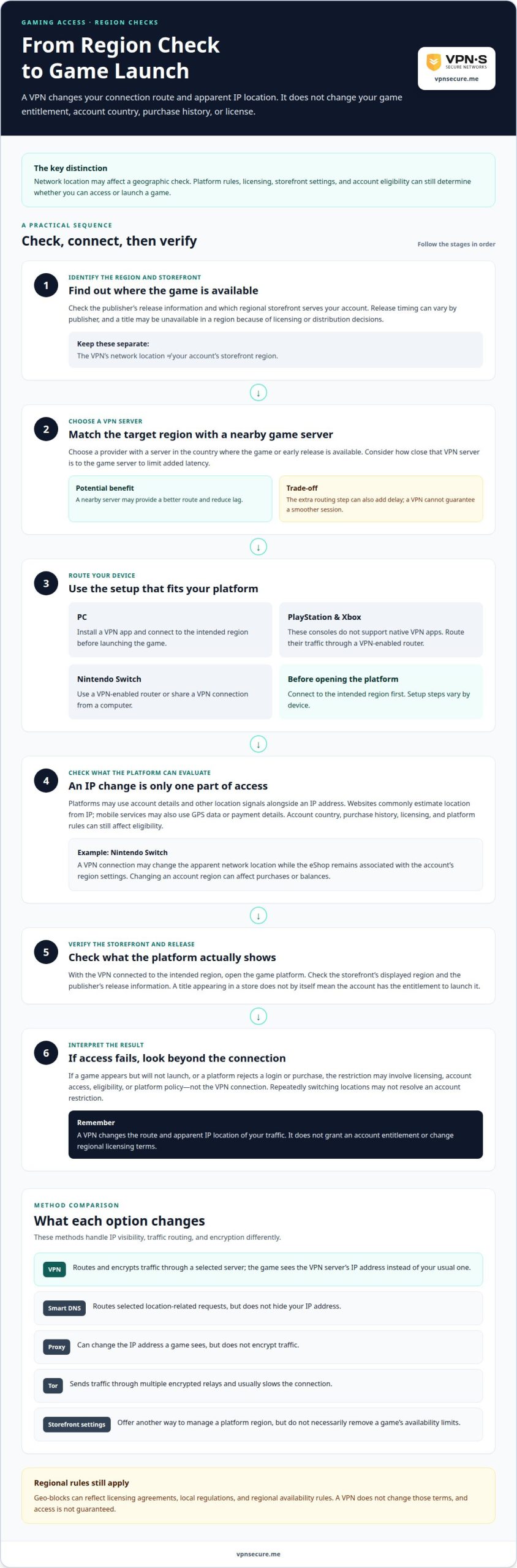
VPNs, Smart DNS, proxies, and Tor handle location and traffic differently. A proxy can change the IP address a game sees, but does not encrypt traffic. Smart DNS can route selected location-related requests, but does not hide your IP address. Tor sends traffic through multiple encrypted relays and usually slows the connection. A VPN routes and encrypts traffic through a selected server. Official storefront region settings are another option, but they do not necessarily remove a game’s availability limits.
Legal Considerations for Bypassing Geo-Blocks
Geo-blocking can enforce licensing agreements, local regulations, and regional availability rules. The EU Geo-Blocking Regulation, adopted in 2018, prohibits unjustified discrimination based on nationality or residence when customers buy general goods and services online; copyright-protected content is largely exempt. A VPN doesn’t change those terms. Intentionally bypassing a block to access illegal content or infringe copyright can be illegal, and VPN use is restricted in places including China and Russia.
Choosing a VPN for Gaming Access
Choose a VPN provider with a server in the country where the game or early release is available, and consider how close that server is to the game server to limit added latency. On PC, install a VPN app and connect to the region before launching the game. PlayStation and Xbox consoles do not support native VPN apps, so you can route their traffic through a VPN-enabled router. For Nintendo Switch, use a VPN-enabled router or share a VPN connection from a computer. Setup steps vary by device.
Accessing region-locked games and early releases
A VPN can change your apparent network location, but it cannot change a game account’s country, purchase history, or license. Access to an early release may depend on the publisher’s launch schedule and the platform’s regional storefront. A VPN for gaming without geo-blocks may help with geographic checks, but it cannot grant an entitlement your account does not have.
Keep network location separate from storefront settings. Before trying to access a game, find out which region the publisher lists and which storefront serves your account. For example, connecting a Nintendo Switch through a VPN may still leave the eShop associated with the account’s region settings. Changing an account region can affect purchases or balances, so account and platform rules matter alongside your VPN connection.
Release timing varies by publisher. A game may launch at different local times or remain unavailable in a region because of licensing or distribution decisions. A VPN does not change those arrangements; it changes the route and apparent IP location of your traffic. If a platform rejects a login or purchase, repeatedly switching locations may not resolve an account or eligibility restriction.
Keep gaming access separate from streaming access. Netflix and other streaming platforms may offer different regional catalogs, while a game store can also consider account details and purchase eligibility. Mobile games may follow their own app-store region or account rules. Treat each service separately: changing location for one platform does not automatically unlock another.
For a practical test, connect to the intended region before opening the game platform, then check the storefront’s displayed region and the publisher’s release information. If the title appears but will not launch, the restriction may involve licensing, account access, or platform policy rather than your connection. A VPN for gaming without geo-blocks changes your connection route, not your game entitlement, helping you tell a location check from an account restriction.
Geo-blocking in gaming
Gaming geo-blocks use network and account signals to limit access by region. Websites commonly estimate location from an IP address, while mobile services may also use GPS data or payment details. A game platform can compare these signals with its regional catalog, so changing your apparent location does not necessarily change account eligibility.
Regional restrictions can reflect licensing, local regulations, or availability rules. A publisher, for example, may release a title in one market first, while another region’s store does not list it. Some countries restrict content such as gambling, adult, or political material. A VPN changes the route of internet traffic, not the rules behind those restrictions.
These methods change different things. A VPN sends traffic through a virtual server and encrypts the connection between your device and that server. Smart DNS redirects selected location-related requests but does not hide your IP address. A proxy can change the address a website sees but does not encrypt traffic. Tor sends traffic through multiple encrypted relays, which usually slows browsing and downloads.
A VPN may reduce lag if a nearby server gives you a better route to the game server, but the extra routing step can also add delay. When game peers see the VPN endpoint, it can conceal your home IP address from them. It cannot stop attacks against the game service or the VPN server.
Protocol choice affects the connection. WireGuard can offer better performance and lower lag for gaming; IKEv2 can reconnect when a device switches networks, but doesn’t match WireGuard’s gaming speed. Split tunneling sends selected apps through the VPN while other traffic uses the regular connection. For PlayStation and Xbox, router-level VPN routing carries console traffic because those consoles lack native VPN apps. A router therefore changes how the console connects, while the chosen server and protocol influence the route and performance.
Which VPNs have the lowest gaming latency and fastest speeds?
No VPN provider is fastest for every player or game. For gaming, look for servers near both the game server and the region you need to access. A shorter route usually means less distance for data to travel, while server locations need to suit your access goal, not just make a network map look large.
Protocol choice also affects speed. WireGuard is recommended for gaming because it can provide better performance and lower lag. A VPN connection may reconnect when your device switches networks, but performance can vary. OpenVPN can run slower, especially on older devices. If your device supports WireGuard, it’s a strong starting point for a gaming connection.
Connect to a server near the game server, then judge the connection while playing. Watch for delayed inputs, instability, or interruptions, not just download speed: a fast download does not guarantee low latency. If a regional server adds noticeable delay, try another server in that region if available. Switching locations may sometimes help when a game blocks VPN traffic, but access and performance are separate issues.
For a console such as PlayStation or Xbox, router-level VPN routing can cover devices without native VPN apps. A PC can usually connect through a VPN app directly. Keep the route focused: split tunneling can send the game through the VPN while other apps use your regular connection. To choose a plan for gaming and regional access, explore VPN subscription options and prioritize server location and protocol support.
VPNSecure
VPNSecure offers a private, no-log VPN that encrypts internet traffic across major devices and can help bypass geo-restrictions. Its server network spans 40+ countries, giving gamers regional server locations to consider when a game’s availability depends on apparent location. Choose a server near the game’s region, while remembering that a VPN can’t change account eligibility, licensing terms, or a platform’s access rules.
Monthly and annual subscriptions provide options for using the VPN over different periods. The right fit depends on how often you game across regions and whether you also want encrypted traffic for everyday browsing. VPN access can change your connection route, not guarantee that every game or early release will unlock.
If you want to discuss VPNSecure’s options for gaming access, contact VPNSecure.
Make your next gaming move with confidence
Before changing your setup, decide what matters most: reaching a particular market, keeping a stable connection, or protecting routine internet traffic. Then test whether a connection through the relevant region fits your gaming habits, without assuming it will override account or platform restrictions.
A VPN for gaming without geo-blocks should fit your play style, not lead you to change account settings without considering the consequences. Keep platform terms and connection performance in view. VPNSecure offers a Dedicated IP as an add-on to its VPN subscription. Access still depends on the game and account, so treat a VPN as a connection tool, not a promise of entry.
Discuss your gaming VPN options with VPNSecure. Take your next step with your priorities clear and your setup in your control.
Frequently Asked Questions
What Is Geo-Blocking?
Geo-blocking is how a game publisher or platform limits content or features by region. A title may appear in one country’s digital storefront but not another’s, or an online feature may differ between regional versions. This can reflect release planning, licensing, or local rules. Geo-blocking affects access to specific games and services, not just what appears during ordinary web browsing.
Is it legal to use a VPN to access geo-restricted content?
Using a VPN is not automatically illegal, but the content and local rules matter. Geo-blocking can enforce licensing agreements and other legal contracts. Intentionally bypassing a block to access illegal content or infringe copyright can be illegal. For a game, distinguish the VPN connection from the purchase or use itself, and consider both applicable law and the platform’s terms before changing regions.
Which VPNs are best for gaming and bypassing geo-blocks in 2026?
Choose a VPN based on the region you need, proximity to the game server, protocol options, and device support. VPNSecure supports WireGuard, which is a strong protocol choice for gaming performance. A server near the game server may help limit added latency. Test the connection in the game itself, since general speed claims cannot show how a particular route performs during your session.
How much do gaming VPNs cost, and which offer free trials or money-back guarantees?
These are VPNSecure’s listed subscription prices, not industry-wide rates. The service is paid, not free.
How do VPNs unblock region-locked games, game servers, and digital storefronts?
A game platform may see the VPN server’s IP location instead of your usual network location, which can affect the regional storefront or server you can reach. It does not change your account’s country, purchase eligibility, game license, or matchmaking rules. Reaching a different storefront, for example, does not give you ownership of a title or change its release schedule.
Can using a VPN violate a game’s terms of service or lead to account bans?
Changing location may create account risk if a game or platform’s terms prohibit VPN use or region-based purchases. Rules differ by service, so no single ban policy applies to every game. A VPN connection alone does not determine whether a particular action violates those terms. Read the game and storefront rules before changing your account region or making a region-specific purchase.