




Your ISP isn’t just a service provider. They’re a silent landlord in your digital home, watching every site you visit and throttling your speeds the moment you start a VOIP call or stream a movie. By 2026, government data retention mandates have exploded to 47 countries, turning your desktop into a glass house. Finding a secure vpn for pc isn’t just about convenience anymore; it’s about reclaiming your right to exist online without a chaperone.
We know the frustration of hitting a geo-block or watching your connection crawl because your provider decided you’ve streamed enough for one day. You’ve worked hard for your digital autonomy, and you shouldn’t have to sacrifice it for a fast connection. This guide shows you how to turn your PC into an impenetrable fortress that bypasses surveillance and unlocks global content effortlessly. We’ll break down the Bahamas offshore advantage, show you how to kill ISP monitoring for good, and explain why a set-and-forget security solution is the only way to navigate the web on your own terms.
Key Takeaways
- Plug the data leaks inherent in Windows and macOS by funneling your desktop traffic through an impenetrable, encrypted tunnel.
- Understand why jurisdiction is your first line of defense and how a Bahamas-based provider shields you from Five Eyes surveillance.
- Master the setup of a secure vpn for pc using bank-grade AES-256 encryption and a fail-safe kill switch to prevent accidental exposure.
- Unblock restricted VOIP services like FaceTime and WhatsApp while bypassing the regional filters that limit your digital freedom.
- Transform your desktop into a private fortress with a simple, five-step stealth configuration designed for immediate autonomy.
Your PC is a Data Sieve: Why You Need a Secure VPN for PC in 2026
Your desktop isn’t the private sanctuary you think it is. Every time you boot up your machine, Windows and macOS begin a background conversation with dozens of third-party servers. They leak telemetry data, location pings, and update requests without your permission. A secure vpn for pc acts as an encrypted tunnel, wrapping all your desktop traffic in a layer of protection that neither your OS nor your ISP can penetrate. This goes far beyond the basic security of a web browser.
Most users mistake browser-level protection for actual privacy. While an incognito window might hide your history from your household, it does absolutely nothing to stop your ISP from logging your activity. A Virtual Private Network (VPN) provides system-wide encryption that is fundamentally different. It secures every byte leaving your machine, whether it is coming from a browser, a gaming client, or a background cloud sync. Your data shouldn’t be a commodity for your ISP to sell; it should be your private property.
The ISP Problem: What Your Provider Sees
Your Internet Service Provider is the ultimate voyeur. They track your DNS queries to see every site you visit, log your timestamps, and monitor your bandwidth usage to build a profile of your habits. They use this intelligence to punish you for your high-speed needs. ISP Throttling is the intentional slowing of your internet based on activity. If they see you streaming 4K video or engaging in high-bandwidth gaming, they squeeze your connection to save themselves money. Using a secure vpn for pc hides your traffic type, making it impossible for them to discriminate against your data or sell your browsing patterns to the highest bidder.
Beyond Browsing: Securing Apps and VOIP
Privacy isn’t just about websites. Desktop apps like Skype, WhatsApp, and Zoom carry your most sensitive conversations, yet they often bypass browser security entirely. In regions like the UAE or Saudi Arabia, governments frequently block these VOIP services to force users toward monitored platforms. A dedicated PC VPN bypasses these digital borders, allowing you to use FaceTime or WhatsApp as if you were sitting in a cafe in Nassau. This is about more than just hiding; it is about maintaining the functionality of the tools you rely on for work and family. For instance, healthcare providers who need to explore télésecrétariat médical for their practice can ensure their communications remain confidential and professional. You deserve a connection that doesn’t dictate which apps you are allowed to open.
The Anatomy of an Unbreakable Desktop Connection
Your PC is a high-performance machine. It deserves a high-performance shield. When you look for a secure vpn for pc, you aren’t just buying an app. You are investing in a cryptographic fortress. The foundation of this fortress is AES-256 bit encryption. It is the same standard used by global banks and military intelligence because it is mathematically impossible to crack with current technology. But encryption alone isn’t enough. If your connection flickers for even a millisecond, your true IP address is exposed. That is why a Kill Switch is non-negotiable. It acts as an emergency circuit breaker, instantly severing your internet if the VPN drops.
By 2026, desktop hardware has evolved to handle massive data loads. We are dealing with 4K streaming and heavy background syncs that demand unlimited bandwidth. A cheap service will throttle your CPU and choke your connection. You need a solution that keeps pace with your rig. Whether you are running a high-end Windows tower or a sleek Mac Studio, your privacy shouldn’t be limited to one screen. Total autonomy means securing every device you own under one umbrella. For those still asking What Is A VPN and how it fits into their setup, it is the invisible layer that makes your hardware truly yours.
Protocols That Matter: OpenVPN vs. WireGuard
Not all protocols are created equal. OpenVPN is the battle-tested veteran, known for its ability to penetrate tough firewalls. WireGuard is the modern speed demon, offering lean code and lightning-fast handshakes. We prioritize protocols that can bypass Deep Packet Inspection (DPI), the tech governments use to sniff out VPN traffic. Choosing the right one depends on your hardware. If you have an older PC, the efficiency of WireGuard might save your processor. For maximum stealth, OpenVPN remains the gold standard for bypassing state-level surveillance.
DNS and IPv6 Leak Protection
A DNS leak is the ultimate betrayal. It happens when your PC sends a request to your ISP’s servers instead of the VPN’s, revealing exactly what you are doing. Cheap services often ignore IPv6 leaks too, which can reveal your physical location even while the VPN says it is connected. Finding a secure vpn for pc that actually plugs these holes is the difference between true privacy and a false sense of security. Our “Silent Shield” approach handles these vulnerabilities in the background. It forces every request through private, encrypted DNS servers. You can secure your desktop today with a service built for total invisibility.
The Jurisdiction Trap: Why Your VPN’s Home Base Dictates Your Privacy
Your VPN’s physical location is its greatest weakness or its strongest armor. Most users ignore the fine print about where their provider is incorporated, but this detail determines whether your data is actually private. If you use a secure vpn for pc based in the US, UK, or Australia, you are operating within the “Five Eyes” intelligence alliance. These countries share data like neighbors sharing a cup of sugar. A subpoena in London can end up on a desk in Washington within hours. This isn’t a conspiracy; it’s a legal framework designed for mass surveillance.
A provider based in these jurisdictions is legally obligated to cooperate with data requests. They can be served with National Security Letters or gag orders that prevent them from even telling you your data has been seized. By 2026, data retention mandates have tightened across the West. Even the most robust encryption can’t save you if the provider is forced to hand over their keys or log your traffic at the source. This is why “offshore” isn’t just a buzzword; it’s a tactical necessity for anyone serious about digital autonomy. Before committing to any provider, use our 2026 secure VPN checklist to spot real privacy from expensive placebos and avoid being misled by hollow marketing claims.
Bahamas: The Offshore Advantage
The Bahamas sits outside the reach of major intelligence alliances. It is a true privacy haven. Unlike Switzerland, which faces increasing pressure from EU data sharing agreements, the Bahamas maintains a legal framework that prioritizes individual anonymity. We chose this jurisdiction specifically to protect our users from state-level overreach. It allows us to operate without the constant threat of secret warrants or mandatory logging. When you use a secure vpn for pc from a Bahamian provider, you are moving your digital life to a territory that respects your right to be left alone.
Verifying No-Log Claims
A no-log policy is a pinky-promise without the right jurisdiction. When a company says they don’t keep logs, you have to ask: “What happens when the police show up?” In a Five Eyes country, they might be forced to start logging in secret. In the Bahamas, we simply don’t have the data to give. Since 2012, we’ve maintained a strict policy: no timestamps, no IP logs, and no session data. You need both a solid policy and a defensive home base to ensure your desktop remains a private fortress. True security means having nothing to hand over when the authorities come knocking.
Hardening Your Windows or Mac: A 5-Step Stealth Setup
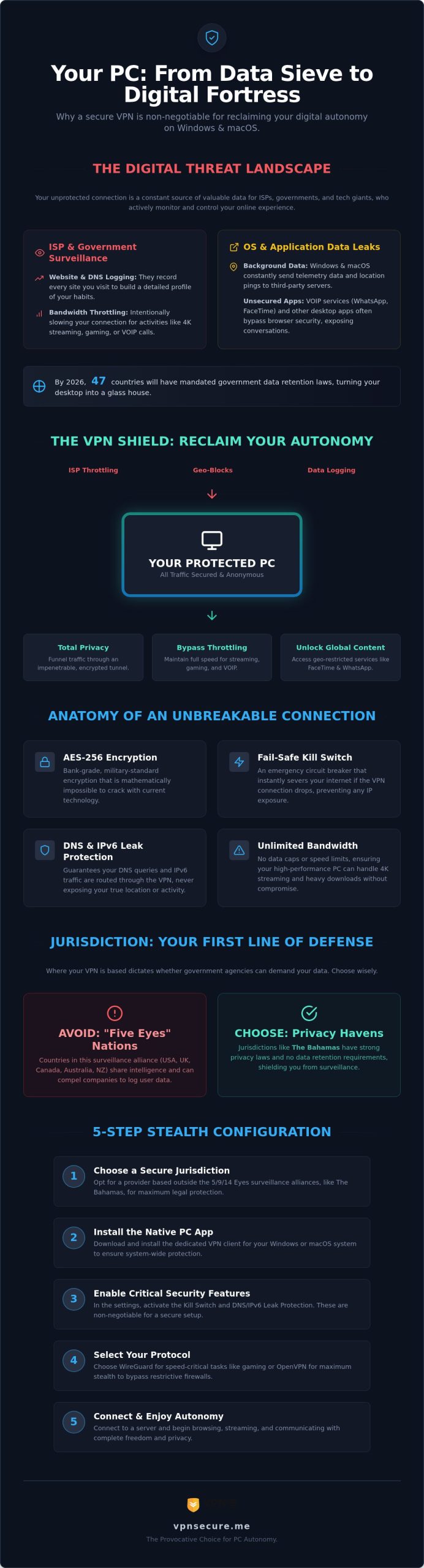
Don’t just install and pray. A secure vpn for pc requires a tactical setup to ensure your operating system doesn’t betray you the moment you look away. Windows and macOS are notorious for trying to “help” you by bypassing security layers for the sake of convenience. Follow this 5-step blueprint to lock down your desktop and claim your digital autonomy.
- Step 1: Choose your mission. Select a subscription plan and secure your account with a unique, high-entropy password. Avoid reusing credentials from other sites.
- Step 2: Get the right gear. Download the native client built specifically for your OS. Browser extensions are just toys; you need a system-wide application to capture all background traffic.
- Step 3: Arm the defenses. Head straight to the settings. Enable the Kill Switch and DNS Leak protection immediately. These are your fail-safes that prevent your real IP from leaking if the connection flickers.
- Step 4: Deploy your location. Select a server based on your immediate goal. Use a local server for raw speed, or hop to a Bahamian server for maximum privacy outside Five Eyes reach.
- Step 5: Confirm stealth. Run an independent IP leak test before opening any sensitive apps. If you see your ISP’s name or your actual city, your shield isn’t active yet.
Optimizing for High-Performance Desktops
High-end rigs demand a configuration that doesn’t bottleneck your hardware. Set your VPN to launch on startup to ensure “always-on” protection from the second you log in. If you are using the latest ARM-based Windows devices or M-series Macs, ensure you are running the optimized native client to avoid the performance tax of emulation. You can also use split tunneling to exclude low-risk apps, like local game launchers, from the VPN tunnel while keeping your browser and VOIP traffic strictly encrypted. This keeps your pings low and your privacy high.
Dedicated IP: The Private Lane for Your PC
Total anonymity can sometimes trigger security alarms on sensitive sites. Banking platforms and corporate networks often flag the shared IPs used by standard VPNs, forcing you through a gauntlet of CAPTCHAs or account freezes. A Dedicated IP provides a static, private lane that belongs only to you. It offers the perfect balance for remote work, allowing you to access secure databases without being mistaken for a bot. Learn more about Dedicated IP VPN to see how a static address can streamline your professional life. You can secure your dedicated address today and stop the constant verification loops.
VPN Secure: The Provocative Choice for PC Autonomy
Choosing a secure vpn for pc shouldn’t feel like a compromise between your bank account and your basic human right to privacy. Most “premium” providers charge a luxury tax for the mere illusion of safety, all while operating in surveillance-heavy territories. We do things differently. Since 2012, we’ve stood as a vigilant ally for the individual, providing a professional-grade shield that actually works where others fail. Our Bahamas-based jurisdiction isn’t a coincidence; it is a strategic choice to keep your data outside the reach of the Five Eyes and their invasive data-sharing agreements.
While competitors obsess over being the “expert” choice for a high price, we focus on unblocking the services you actually use. We specialize in bypassing VOIP restrictions, ensuring that FaceTime, WhatsApp, and Skype work flawlessly regardless of where you are in the world. Your desktop should be a gateway to global communication, not a restricted terminal monitored by a state-level chaperone. We provide the tools to reclaim that gateway, backed by a strict no-log policy that has been our foundation for over a decade. If there’s no data to find, there’s no data to seize.
Affordability Without Compromise
The digital landscape is shifting toward more regulation and less freedom. You can’t afford to wait for the next data breach or a new government mandate to secure your desktop. VPN Secure stands with you in this “us vs. them” narrative, acting as the guardian of your digital borders. We invite you to test our “Shield” with a 30-day money-back guarantee. It’s a completely risk-free way to see how a secure vpn for pc can transform your online experience. Stop being a passive participant in your own surveillance. Get Secure VPN for PC Now and reclaim your digital freedom today.
Reclaim Your Digital Sovereignty
Your desktop shouldn’t be an open book for your ISP or government agencies. By moving your traffic into a Bahamian jurisdiction, you effectively exit the global surveillance machine and reclaim your autonomy. We’ve provided the blueprint to turn your machine into an impenetrable fortress with a secure vpn for pc that stops throttling and plugs every background leak. You now have the power to bypass VOIP restrictions and access global content without a chaperone.
We’ve maintained our verified no-log policy since 2012 to ensure that your data remains yours alone. This isn’t just about security; it’s about the freedom to use your hardware on your own terms. Our offshore protection and global server network are ready to act as your vigilant ally in an increasingly monitored world.
Secure Your PC for Just $2.99/mo – Start Your 30-Day Risk-Free Trial
The tools for digital liberation are ready for you. Take the first step toward a private future today.
Frequently Asked Questions
Is a VPN for PC really necessary if I only use it at home?
Yes. Your ISP sees everything you do on your home network and often throttles your speed for streaming or gaming. By 2026, data retention laws have expanded globally, making your home connection a target for government monitoring. A secure vpn for pc encrypts your data at the source, preventing your provider from building a profile of your habits or selling your browsing history to third parties.
Will using a secure VPN slow down my PC’s internet speed?
Not noticeably if you use high-performance protocols like WireGuard. While encryption adds a small layer of overhead, a high-quality VPN often improves performance by stopping ISP throttling. We provide unlimited bandwidth across 40+ countries, ensuring your 4K streams and gaming sessions stay smooth. The slight millisecond difference in ping is a small price for total digital autonomy and protection against bandwidth manipulation.
Can I use VPN Secure on my PC and my phone at the same time?
Absolutely. One subscription covers multiple devices, allowing you to protect your desktop and your mobile life simultaneously. You don’t have to choose between securing your workstation or your pocket. Whether you’re working from a PC at home or using a phone on public Wi-Fi, your encrypted tunnel stays active. This ensures a consistent shield against surveillance across your entire digital ecosystem without needing extra accounts.
How do I know if my PC VPN is actually working and my IP is hidden?
Use an independent IP leak test or a DNS leak tool to verify your connection. If the test shows a server location in the Bahamas or another country instead of your actual city, the tunnel is active. Our desktop client includes built-in protection against IPv6 and DNS leaks to ensure your true identity never slips through the cracks. It’s a “silent shield” approach that provides constant, verifiable reassurance.
What makes the Bahamas a better jurisdiction than Switzerland or the USA?
The Bahamas is outside the Five Eyes and Nine Eyes surveillance alliances, unlike the USA. While Switzerland is often praised, it has faced increasing pressure from EU data sharing mandates. Bahamian laws prioritize individual privacy and absolute anonymity, meaning we aren’t legally forced to log your data or cooperate with secret warrants. It’s the ultimate offshore advantage for anyone who values their right to be left alone.
Can a secure VPN for PC help me unblock WhatsApp and FaceTime calls?
Yes, this is one of our primary specialties. Many regions block VOIP services to force users onto monitored platforms, but a secure vpn for pc bypasses these digital borders effortlessly. By masking your traffic as standard web data, we enable FaceTime and WhatsApp calls even in restrictive countries. You get to use the tools you love for family and business without asking for anyone’s permission.
Does VPN Secure work on both Windows 10/11 and macOS?
Yes, we provide native clients for both Windows and macOS versions. This includes optimization for the latest ARM-based Windows devices and M-series Macs to ensure peak performance. You don’t need to be a tech expert to get started; the installation is straightforward and designed for immediate protection. Whether you’re running a legacy system or the newest hardware, your desktop privacy is our priority.