




You are being punished for digital crimes you didn’t commit. One minute you’re trying to check your savings, and the next, your bank has locked you out because your shared VPN address looks suspicious to their automated filters. It’s a systemic failure where high-security users are treated like botnets simply because they share a server with a bad neighbor. Using a dedicated IP for secure banking is the only way to escape this cycle and ensure your financial institutions recognize you as a trusted user every time you log in.
You’re likely tired of the endless CAPTCHAs and the anxiety of wondering if your corporate login will actually work this morning. It’s exhausting to deal with a security tool that creates more problems than it solves. We’ll show you how to take back control and navigate the web on your own terms. This guide explains how a personal, static address provides a private lane for your data, ensuring you never get flagged by mistake again. We will break down exactly how to secure your digital footprint, maintain uninterrupted access to sensitive networks, and enjoy high-level encryption without the baggage of a shared reputation.
Key Takeaways
- Stop being penalized for the digital mistakes of others. Learn how shared VPN servers trigger “bad neighbor” flags and how to stop the cycle of constant CAPTCHAs.
- Use a dedicated IP for secure banking to build a trusted reputation with financial institutions. This unique, static address ensures you bypass frozen accounts and intrusive verification requests.
- Learn to balance your privacy needs by knowing when to use a shared connection for browsing and when to switch to a dedicated lane for high-stakes tasks.
- Optimize your digital access by selecting server locations that match your bank’s requirements. A few simple dashboard tweaks can eliminate geo-blocking and suspicious login flags instantly.
- Protect your static footprint with the Bahamas advantage. Discover why operating outside of surveillance alliances is critical when your IP address remains consistent.
The Shared IP Trap: Why Your VPN Gets Flagged and Blocked
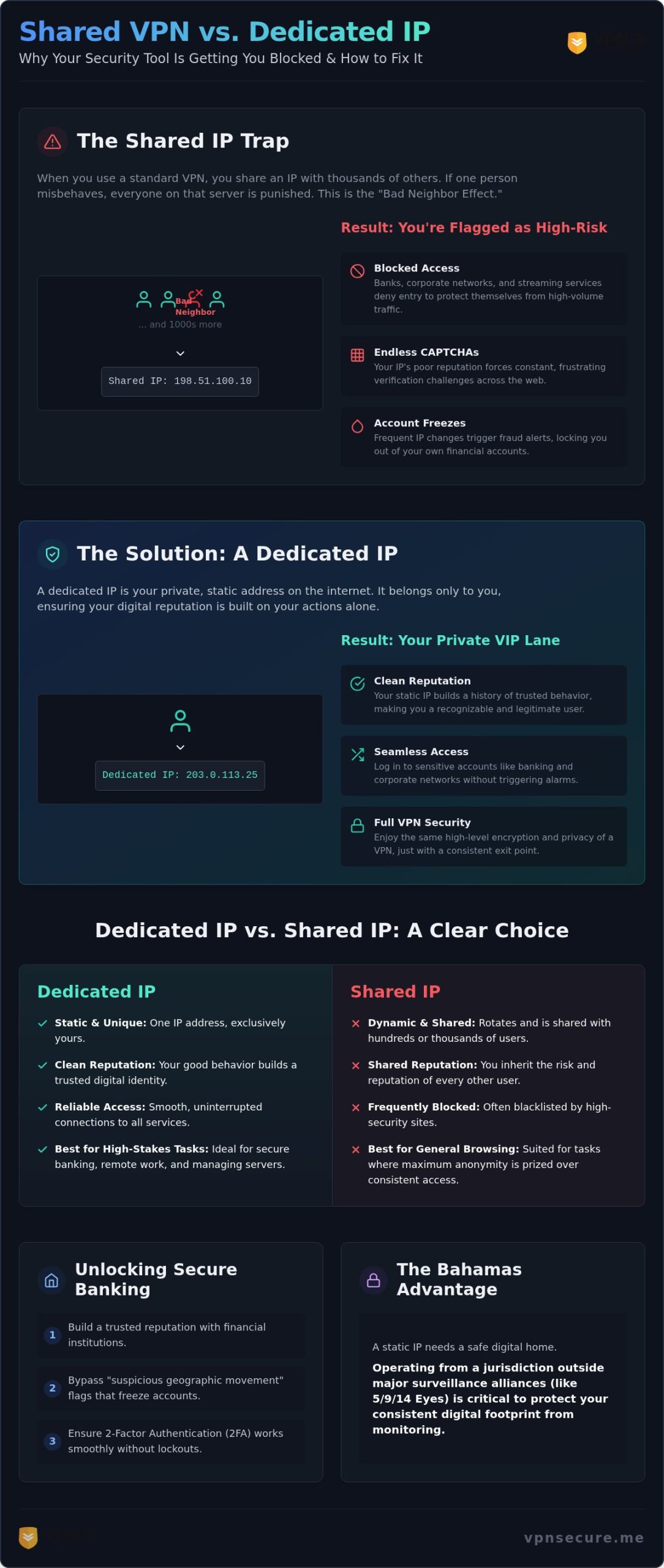
Most VPN users think they’re buying invisibility. In reality, they’re often buying a target on their back. When you use a standard VPN, you share an IP address with hundreds, sometimes thousands, of other people. This creates the “Bad Neighbor Effect.” If just one person on your server decides to engage in spamming, scraping, or suspicious activity, the entire IP address gets scorched. You didn’t do anything wrong, but the algorithms don’t care. They see the address, not the individual, and they shut the door on everyone.
By 2026, automated security systems have become judge, jury, and executioner. Banks and streaming platforms now use advanced “velocity checks” to monitor how many different accounts are accessing their services from a single point. When they see a massive spike in traffic from one IP, they flag it as a botnet or a proxy. The result? You’re met with a wall of infinite CAPTCHAs. These aren’t just minor annoyances; they’re a clear signal that your IP reputation is in the gutter. Your digital footprint is now associated with high-risk behavior, making a dedicated IP for secure banking the only logical move for those who value their time and access.
The Mechanics of IP Reputation
Security databases like MaxMind and Spamhaus maintain massive, real-time lists of known VPN exit nodes. These services categorize IPs based on their history and behavior. Shared VPN IPs are almost always flagged as “commercial” or “proxy” traffic by default. This makes you an immediate outlier to any site that prioritizes residential traffic. Unlike a shared server, a static IP address assigned only to you allows you to build a clean, consistent reputation over time. You stop looking like a bot and start looking like a legitimate, returning user.
Why Banking Apps are Aggressive Against Shared VPNs
Financial institutions are in a state of constant war against credential stuffing attacks. In these attacks, hackers use bots to test thousands of stolen passwords from a single IP. Because shared VPNs mimic this high-volume pattern, banks often block them outright to mitigate risk. Using a dedicated IP for secure banking solves this by providing a consistent digital identity that doesn’t trigger these “red alert” protocols.
Frequent IP changes also wreck your two-factor authentication (2FA) experience. If your IP jumps from New York to London between logins, your bank’s fraud detection will likely lock your account for “suspicious geographic movement.” It’s a massive headache that requires phone calls and identity verification to fix. A dedicated IP keeps your location stable, ensuring your 2FA remains a tool for protection rather than a barrier to your own money.
What is a Dedicated IP and How Does It Stop Blacklisting?
Think of a dedicated IP as your private VIP lane in a digital traffic jam. While a standard VPN shuffles you through a deck of shared addresses, a dedicated IP belongs to you and you alone. It is a personal digital identifier that remains constant across sessions. This consistency is your shield against the “bad neighbor” effect we discussed earlier. Instead of appearing as a random, anonymous face in a crowd of suspicious traffic, you present a stable and recognizable identity to the web.
The technical difference is simple but profound. A standard VPN uses dynamic IPs that change every time you connect or disconnect. In contrast, a dedicated IP is a unique, static address assigned exclusively to your account. This allows you to build a “clean” reputation over time. Because you’re the only one using the address, your actions are the only ones that dictate its reputation. If you use your dedicated IP for secure banking and legitimate work, security filters begin to trust you. You aren’t just another VPN user; you’re a trusted entity with a verifiable history of good behavior.
Switching to a static exit point doesn’t mean you sacrifice security. You still get the full benefits of a VPN tunnel. Your data is still scrambled by high-level encryption, and your ISP still can’t see what you’re doing. You’re simply choosing a consistent exit point to shield your identity from being lumped in with malicious actors. It’s the perfect middle ground between total anonymity and total accessibility.
Static vs. Dynamic: The Technical Edge
Corporate firewalls and high-security databases often rely on whitelisting. If you need to access a sensitive company network, your IT department can authorize your specific IP address. This is impossible with a standard VPN because your address changes constantly. A dedicated IP also bypasses the aggressive proxy detection used by many websites. Since the traffic volume isn’t coming from thousands of different accounts, it doesn’t trigger the “botnet” alarms that plague shared servers.
The Privacy Paradox: Is a Dedicated IP Less Secure?
There is a common myth that a static IP makes you easier to track. While it’s true that your address remains the same, it doesn’t mean your privacy is compromised. At VPN Secure, we maintain our strict no-log policy for all users, regardless of their IP type. We don’t track your activity, and we don’t store your history. You’re trading a small amount of “crowd anonymity” for a massive boost in usability and trust. It’s about taking back your digital autonomy. If you’re tired of being blocked by your own security tools, you can add a dedicated IP to your plan and experience the web without the friction.
Dedicated IP vs. Shared IP: Choosing Your Priority
Choosing between a shared and dedicated IP isn’t about which is “better.” It’s about what you’re trying to achieve right now. If you’re just browsing the web and want to disappear into a crowd, a shared IP is your best friend. It provides safety in numbers. But if you’re trying to get work done, access your bank, or manage a server, that crowd becomes a liability. You don’t want to be locked out of your life because of someone else’s digital noise.
The difference in friction is massive. On a shared server, your CAPTCHA frequency is through the roof. You’re constantly proving you’re human because the IP you’re using is under fire. With a dedicated IP for secure banking, that friction disappears. You have a low risk of blacklisting because your reputation is entirely in your hands. You aren’t sharing a reputation with a spammer in another country; you’re operating in your own private lane. The same proxy detection logic that locks you out of your bank account is also what triggers the dreaded “Anonymous Proxy” error when you try to use a VPN for Hulu abroad, making a dedicated IP equally valuable for streaming services that aggressively block shared VPN traffic.
The Professional Choice: Remote Work and Corporate Access
For the modern professional, a VPN with static IP for remote access is the industry gold standard. IT departments hate the chaos of shared VPNs. They want to whitelist a single, unchanging address to grant access to secure databases and CMS platforms. Using a dedicated IP reduces the constant “suspicious login” alerts that plague remote teams. It provides a consistent location signature that tells your company’s security protocol exactly who you are. This stability is non-negotiable when you’re managing sensitive assets or high-stakes corporate accounts. For those who also rely on remote desktop connections, understanding how a VPN for secure remote desktop shields exposed RDP ports from brute-force attacks is equally critical to your overall remote work security strategy.
The Privacy Trade-off
Privacy isn’t a one-size-fits-all solution. There’s a debate between the “Bad Neighbor” effect and the “Digital Fingerprint.” A shared IP offers better crowd anonymity but higher risk of being blocked. A dedicated IP offers perfect accessibility but a more consistent fingerprint. The smart play is to switch between both modes. Use your shared connection for casual, high-anonymity browsing. Switch to your dedicated IP for secure banking and professional tasks where access is the priority. You shouldn’t have to choose between being invisible and being able to pay your bills. A versatile VPN setup gives you the tools to do both on your own terms.
How to Use a Dedicated IP for Secure Banking and Beyond
Setting up your private digital lane is a straightforward process, but it requires a tactical approach to be effective. You aren’t just toggling a switch. You’re establishing a new, trusted identity that financial institutions will recognize. Follow these steps to ensure your transition from a shared mess to a dedicated powerhouse is seamless.
- Step 1: Choose your location wisely. Don’t pick a server halfway across the globe. If your bank is headquartered in New York, choose a New York or East Coast dedicated IP. Banks hate geographic jumps. A login from a consistent, local IP looks legitimate; a login from a random country triggers an immediate freeze.
- Step 2: Enable the IP in your dashboard. Once you’ve secured your add-on, log into the VPN Secure dashboard. You’ll see your unique address waiting for you. Activate it to ensure all your outgoing traffic is funneled through this specific exit point.
- Step 3: Whitelist your address. Some high-security banking portals allow you to register “trusted IPs.” If your bank offers this, add your new static address immediately. This tells their system that any traffic from this IP is authorized by you.
- Step 4: Perform a leak test. Before you log into your sensitive accounts, visit a leak test site. Ensure that your dedicated IP is the only one visible and that your ISP’s real address isn’t peeking through the tunnel.
Ready to stop the lockout cycle? You can get your dedicated IP today and start banking without the friction of shared server baggage.
Banking Workflow: A Step-by-Step Guide
Your first login with a dedicated IP for secure banking is the most critical. Before you start, clear your browser cookies. Old cookies often contain metadata from your previous shared IP sessions, which can confuse fraud detection algorithms. When you log in for the first time, expect a two-factor authentication (2FA) prompt. This is normal. Your bank sees a “new device” or location signature. Once you verify this session, the bank’s system will associate your static IP with your account. Future logins will be significantly faster and carry much less risk of being flagged.
Troubleshooting Common IP Issues
Even with a dedicated IP, you might occasionally hit a wall. If your IP is still flagged, it’s often because a specific bank has blocked an entire data center range. This is rare but possible. In these cases, you can contact support to request an IP refresh. We’ll swap your address for a fresh one from a different range. Most importantly, always keep your VPN kill switch active. If your connection drops for even a second, your real IP could leak. This sudden shift from a trusted static IP to a residential one is a massive red flag for banking security. Protect your reputation by ensuring the tunnel never stays open without encryption.
The Bahamas Advantage: Why Privacy Jurisdiction Matters for Static IPs
A static IP is a double-edged sword. While it fixes the blacklisting problem, it also creates a persistent target. If your VPN provider operates in a country that belongs to the Five Eyes, Nine Eyes, or Fourteen Eyes alliances, your static footprint is at risk. These governments can compel companies to hand over metadata or set up backdoors. In the Bahamas, we operate under a legal framework that respects individual privacy. We aren’t subject to the same intrusive data-sharing treaties that plague providers in the US or Europe. Using a dedicated IP for secure banking requires this extra layer of jurisdictional armor. You aren’t just hiding from hackers; you’re shielding your financial life from state-level overreach.
Trust is a commodity that must be verified. This is why we emphasize the importance of a no-log VPN audit. A zero-logs claim is just marketing fluff if it isn’t backed by independent proof. For a dedicated IP user, this audit is your guarantee that even though your address is static, your activity remains invisible to us and anyone else. We’ve built our infrastructure to ensure that your personal exit point doesn’t become a liability.
Offshore Security for the Modern Professional
Privacy as a Service is our core mission. Since 2012, VPN Secure has leveraged its Bahamian base to provide a sanctuary for digital autonomy. Our jurisdiction doesn’t just allow for a no-log policy; it practically demands it. We don’t store your history because we have no legal obligation to do so. This offshore advantage ensures that your metadata stays protected from foreign subpoenas that would easily crack open a US-based provider. When you use our dedicated IP for secure banking, you’re benefiting from over a decade of experience in fighting for user rights.
Taking Control of Your Digital Sovereignty
It’s time to stop settling for the leftovers of shared, blacklisted IPs. Moving to a dedicated lane isn’t just about convenience or avoiding CAPTCHAs. It’s about taking control of your digital sovereignty. You deserve a connection that works for you, not against you. Positioning your static IP in a safe jurisdiction is the final piece of the security puzzle. You’ve seen how shared IPs fail and how a dedicated lane restores your access. Now, you need the peace of mind that your provider won’t fold under pressure. Stop the friction. Secure your access. Reclaim your digital freedom on your own terms.
Take Control of Your Digital Identity
You don’t have to be a victim of the “bad neighbor” effect anymore. Shared VPN IPs are a gamble that often ends in frozen bank accounts and endless verification loops. By choosing a dedicated IP for secure banking, you build a trusted reputation that stays with you. It’s the professional standard for anyone who values uninterrupted access to their financial life and corporate networks. This consistency isn’t just a convenience; it’s a necessity in a digital landscape that is increasingly hostile toward anonymous traffic.
We’ve provided these “private lanes” since 2012, operating under a strict no-logs policy from our Bahamas-based jurisdiction. This means your static footprint is shielded from international surveillance alliances that thrive on data sharing. With servers in over 40 countries, you get the stability you need without sacrificing the speed you expect. Stop letting automated filters dictate your online experience. You have the tools to reclaim your digital sovereignty and navigate the web on your own terms.
Get your Dedicated IP from VPN Secure and stop the blocks today.
Frequently Asked Questions
Does a dedicated IP hide my identity as well as a shared IP?
A dedicated IP offers a different type of privacy. It doesn’t provide the “safety in numbers” that a shared IP does, where thousands of people hide behind one address. However, it still encrypts your data and hides your activity from your ISP. You’re trading crowd anonymity for a stable reputation. This is essential when you want your bank to recognize you without losing your encryption.
Can I use a dedicated IP on multiple devices simultaneously?
You can use your dedicated IP across multiple devices at once. VPN Secure supports multi-device connectivity, which means your laptop, smartphone, and tablet can all share the same trusted address. This is a huge advantage for security. It prevents your bank from seeing multiple different IPs logging into your account simultaneously, which is a common red flag that leads to automated account freezes and identity verification requests.
Will a dedicated IP prevent all CAPTCHAs?
A dedicated IP won’t stop every single CAPTCHA, but it will eliminate the ones caused by “bad neighbors.” Most CAPTCHAs appear because a shared IP has been flagged for suspicious activity by other users. Since you’re the only person using your dedicated address, your reputation is clean. You’ll stop being treated like a bot by search engines and banking portals, making your daily browsing significantly smoother and faster.
Is a dedicated IP for banking safer than using public Wi-Fi?
Using a dedicated IP for secure banking is vastly superior to relying on public Wi-Fi alone. Public networks are notoriously insecure and easy for hackers to monitor. When you connect via a dedicated IP, you’re wrapped in a layer of high-level encryption that shields your sensitive data. Your bank sees a consistent, trusted address instead of a high-risk public hotspot, which keeps your account from being flagged for suspicious login locations.
What happens if my dedicated IP gets blacklisted?
If your dedicated IP is blacklisted, it’s usually because a website has blocked an entire range of data center addresses. This is uncommon, but it’s not a permanent problem. If you encounter issues accessing a specific service, our support team can investigate. We can often refresh your IP or move you to a different server range to ensure your access remains uninterrupted and your digital reputation stays pristine.
Can I change the location of my dedicated IP after purchase?
Typically, a dedicated IP is assigned to one specific server location at the time of purchase. If you need to change your location, you’ll usually need to set up a new dedicated IP in that region. We offer servers in over 40 countries; it’s best to choose a location that matches where your bank or corporate headquarters is located to avoid triggering any geographic fraud alerts.
Do I still need a no-log VPN if I have a static IP?
A no-log policy is actually more important when you have a static IP. Because the address is unique to your account, you need to be certain your provider isn’t tracking what you do with it. VPN Secure is based in the Bahamas, outside the reach of major surveillance alliances. We don’t store your activity or metadata. Even though your IP is consistent, your browsing history remains your business and no one else’s.
How does a dedicated IP help with remote work security?
Remote work security relies on “whitelisting,” which is only possible with a static address. Your company’s IT department can authorize your specific dedicated IP for secure banking and corporate access, ensuring only you can reach sensitive databases. This removes the friction of constant identity checks. It provides a stable, encrypted key to your office network that won’t change every time you reconnect, making your remote workflow both safer and more efficient. Teams that also rely on remote desktop sessions should explore how a VPN for secure remote desktop closes the critical vulnerabilities that leave exposed RDP ports open to brute-force attacks.