




What if a VPN protects your connection without making you invisible online? If you’re searching for an “encrypt internet traffic VPN service,” the useful answer is more precise than many big promises: a VPN creates an encrypted tunnel between your device and its server, helping shield traffic on the way there. But that protection doesn’t automatically cover everything that happens after traffic leaves the server.
That distinction matters when you connect on café Wi-Fi or want to limit what your internet provider can see. A VPN isn’t a magic cloak. Websites may still identify you through accounts, cookies, or other data, and an app or connection that bypasses the VPN may not be protected by it.
This guide explains VPN encryption in plain language, what your provider, network, and websites may still learn, and where the tunnel’s protection ends. You’ll also learn what to check, from leak protection to a provider’s privacy policy and supporting evidence, so you can choose and use a VPN with clear expectations rather than blind trust.
Key Takeaways
- Trace the connection from your device to the VPN server to see where encryption begins and ends.
- Compare what the local network, your internet provider, the VPN provider, and websites can see. Encryption doesn’t make you invisible.
- When choosing an encrypt internet traffic VPN service, look beyond security slogans and review current technical documentation and privacy evidence.
- Check app settings and run leak tests to confirm that your traffic is using the VPN connection as expected.
- Choose a provider carefully. Your traffic exits through its server, so transparency and trust matter alongside device support and ease of use.
What Does It Mean for a VPN Service to Encrypt Internet Traffic?
Encryption turns data into a form that outsiders can’t readily understand without the right key. A VPN applies encryption to the connection between your device and a VPN server, creating a protected path across the network. If someone on the same café Wi-Fi tries to inspect traffic traveling through that path, its contents should be unreadable. They may still see that your device is communicating with a VPN server, along with some connection details.
Definition: VPN traffic encryption encodes data sent between your device and a VPN server, making intercepted traffic harder to read. It does not make you completely anonymous.
A search for an “encrypt internet traffic VPN service” is really asking what gets protected, and from whom. The Virtual private network overview explains how VPN technology uses tunnelling to route traffic through a server. The key limitation is that a VPN protects the route to that server, not every step your data takes online.
What happens when you connect to a VPN server?
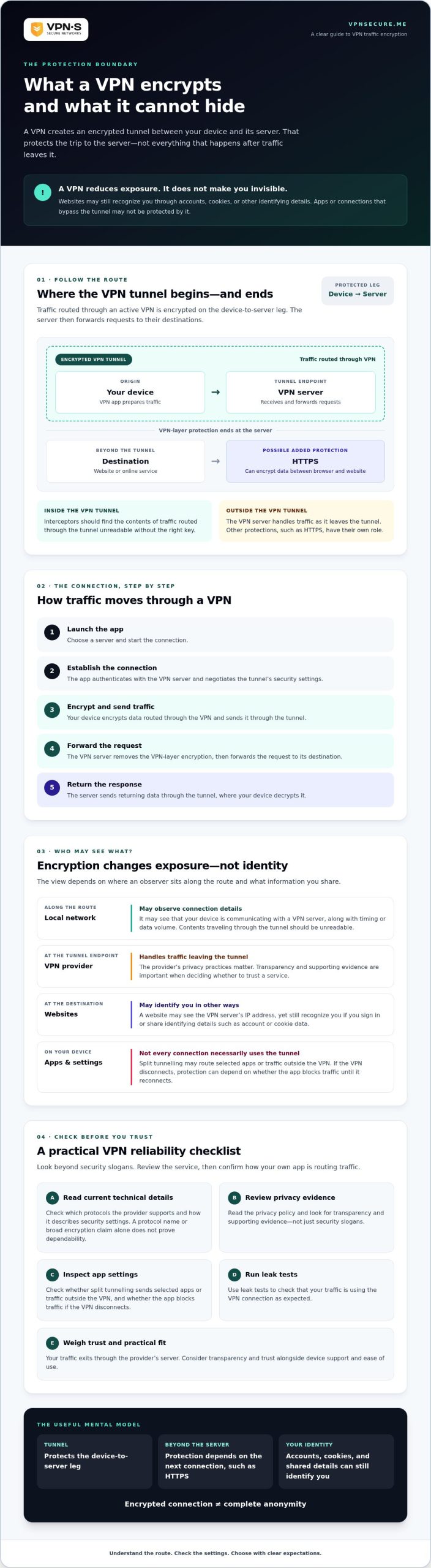
When you connect, the VPN app establishes an encrypted tunnel between your device and the server you selected. Internet requests routed through the tunnel travel to that server first, then onward to their destinations. Think of it as putting a message inside a sealed envelope for the trip across the café network. The analogy has limits: the VPN server is a stop along the way, not an invisible courier, and the connection beyond it has its own protections, such as HTTPS.
Which parts of internet traffic does a VPN encrypt?
Traffic routed through an active VPN connection is encrypted on the device-to-server leg. That can include requests from browsers and apps, but it doesn’t mean every app automatically uses the tunnel. Split tunnelling settings may send selected apps or traffic outside it. If the VPN disconnects, protection may also depend on whether the app blocks traffic until the connection returns.
Encryption protects content in transit, but it doesn’t erase every clue about a connection. The local network may see that you connected to a VPN server and observe timing or data volume. The VPN provider handles your traffic as it leaves the tunnel, so its privacy practices matter. Destination websites may see the VPN server’s IP address, but can still recognize you if you sign in or share identifying details. A VPN reduces exposure; it doesn’t make you invisible.
How VPN Encryption Protects Data Between Your Device and the Server
A VPN connection follows a clear route: your device encrypts traffic for the trip to the VPN server, and the server removes that VPN-layer protection to forward requests onward. The New Jersey Cybersecurity and Communications Integration Cell explains how VPNs create secure connections by encrypting data. The practical boundary matters: the tunnel protects the device-to-server connection, not every leg of the journey.
From VPN app to encrypted tunnel
Protocols are rule sets for establishing and maintaining a VPN connection. The app uses the selected protocol to authenticate the connection and negotiate a secure tunnel with the server. Before choosing a provider, check its current technical documentation to see which protocols it supports and how it describes its security settings.
- 1. You launch the app. Choose a server and start the connection.
- 2. The app establishes the connection. It authenticates with the VPN server and negotiates the tunnel’s security settings.
- 3. Your device prepares traffic. Data routed through the VPN is encrypted and sent through the tunnel.
- 4. The server receives it. The server removes the VPN-layer encryption, then forwards the request to its destination.
- 5. The response travels back. The server sends the returning data through the tunnel, where your device decrypts it.
Encryption strength, keys, and connection protocols
Encryption keys let authorized endpoints encode and decode data. The VPN tunnel uses them to protect traffic between your device and the server. But a protocol name or encryption claim alone doesn’t prove that a connection is dependable. Configuration, implementation, and software updates matter too. When comparing an encrypt internet traffic VPN service, look for current technical details rather than broad promises of “military-grade” security.
There’s another layer: HTTPS. If you visit a website over HTTPS, your browser and that website also encrypt data between them. After the VPN server forwards your request, HTTPS can continue protecting page contents in transit. The VPN tunnel and HTTPS do different jobs: one shields the device-to-server path, while the other protects the browser-to-website connection. A VPN server handles traffic as it exits the tunnel, but it doesn’t automatically expose the contents of HTTPS-protected sessions.
In short, a VPN encrypts the connection from your device to its VPN server, helping prevent nearby network observers from reading traffic on that leg. To assess a service’s claims, review its current protocol and privacy information. You can also review VPN Secure’s VPN service information as part of your comparison.
What a VPN Encrypts and What It Cannot Hide
A VPN changes who can observe parts of your connection, but it doesn’t erase your digital identity. Encryption helps keep traffic contents unreadable to people watching the local network or your internet provider on the device-to-server leg. After traffic reaches the VPN provider, that provider handles the connection onward. The Washington University in St. Louis information security office explains the role VPNs can play in privacy protection, especially on public Wi-Fi. The limits matter just as much as the benefits.
| Who’s observing? | What they may typically see |
|---|---|
| Local network | Your device connects to a VPN server, plus connection timing and data volume. It generally can’t read contents inside the encrypted tunnel. |
| Internet provider | A connection to a VPN server and related traffic patterns, but generally not the contents carried through the tunnel. |
| VPN provider | Your connection to its server and information needed to handle traffic. What it records or can observe depends on its systems and privacy practices. |
| Destination website | Your requests, the VPN server’s IP address, and information you reveal through sign-ins, cookies, or browser signals. |
VPN encryption versus HTTPS
These protections cover different links in the chain. A VPN encrypts traffic between your device and its server. HTTPS encrypts data between your browser or app and the destination service. Used together, they can protect both legs: the VPN tunnel shields the route to its server, while HTTPS protects the web session beyond it. But a VPN can’t make an untrustworthy or unsafe website reliable. Check the site and its address before sharing sensitive information.
Who can still see your online activity?
Your internet provider may know you’re connected to a VPN, even if it generally can’t read the contents inside the tunnel. The VPN provider becomes a party you must trust to handle your connection. Don’t assume a “no-logs” label means zero visibility. Review the provider’s privacy policy and look for evidence supporting its claims. VPN Secure describes its service as no-log, but check the current policy to understand exactly what that means.
Websites can still recognize you when you log in, accept tracking cookies, or share identifying details. Browser fingerprinting may also help a site distinguish your device. Encryption isn’t a cure for phishing, malware, or unsafe downloads, either. A malicious file can arrive through an encrypted connection and still harm your device. An encrypt internet traffic VPN service can reduce exposure on the network path, but it doesn’t make you anonymous or replace careful browsing and device security.
How to Check Whether a VPN Service Encrypts Traffic Reliably
Don’t let a polished security slogan make the decision for you. To choose an encrypt internet traffic VPN service with confidence, check what the provider documents, what its privacy policy commits to, and how the app behaves on your devices. Claims are useful only when you can assess the details behind them.
Questions to ask before choosing a VPN
- What encryption and protocols does it use? Look for current technical documentation that identifies supported protocols and explains the encryption approach. If details are missing or unclear, ask the provider rather than assuming a particular standard is in use.
- What information does it collect? Read the privacy policy for specifics about connection records, diagnostic data, account details, and how long information is kept. “No logs” can mean different things, so check the wording carefully.
- What evidence supports its privacy claims? Look for independent verification where available. Check what was reviewed, when it happened, and what the review concluded. A claim without supporting evidence is still just a claim. This no-log VPN audit guide explains what to scrutinize.
- Who operates the service, and where? Seek clear information about ownership and jurisdiction. These details help you understand the provider behind the tunnel and the context for its privacy policy.
Settings that help protect your connection
Good documentation is one part of the check. Test the app you’ll actually use, since features and settings can vary by device.
- Connect the VPN before signing in to sensitive accounts on public Wi-Fi.
- Check whether your device’s app offers automatic connection on untrusted networks and a kill switch. Confirm that the options are available and enabled where you need them.
- After connecting, compare your public IP address before and after. It should show the VPN server’s address, not your usual one. Run DNS, WebRTC, and IPv6 leak tests to check whether traffic may be taking another route.
- Review app or split-tunnelling settings so the apps you intend to protect use the VPN. Test what happens if the connection drops, and confirm whether traffic is blocked or continues outside the tunnel.
VPN Secure describes its service as no-log, but review the current privacy policy and available evidence rather than relying on the label alone. Review VPN Secure’s service details as one step in your comparison.
Choosing an Encrypt Internet Traffic VPN Service with Confidence
The right choice depends on what you need protection from and how much you trust the provider. Your traffic exits the encrypted tunnel through the VPN server, so the provider is part of the privacy decision, not just a technical middleman. Compare what the service documents about encryption, what its privacy policy says it collects, and whether its apps work on the devices you use.
Match VPN protection to your real privacy needs
Start with your main concern. Public Wi-Fi exposure, limiting what your internet provider can see, and safer browsing while traveling are different priorities. A VPN can help protect traffic on its route to the server, but it won’t make you anonymous or prevent every online threat. If you often connect while traveling, this secure VPN travel guide offers public-network context. For remote-access needs, see the VPN with static IP guide.
A practical next step for comparing VPN services
Use the same questions for each provider, then compare the answers side by side:
- Technical details: Are encryption and protocol information current and clearly explained?
- Privacy transparency: Does the policy define what connection, diagnostic, and account data may be collected? Is there credible verification to support privacy claims?
- Device support: Are your current devices and operating systems supported? Confirm this in the provider’s current documentation.
- Usability: Can you find the connection, privacy, and protection settings you need and understand how they work?
VPN Secure describes its service as no-log and based in the Bahamas. Treat both as claims to assess: review the current privacy policy, look for supporting evidence, and check current company information. The service supports major device platforms, but verify compatibility with your own devices before choosing. That’s a more meaningful comparison than relying on a slogan or assuming every service works the same way.
Choosing an encrypt internet traffic VPN service is ultimately a trust decision backed by evidence and practical fit. If you’d like to review the provider’s current information, explore VPN Secure’s encrypted VPN service.
Make Your Next VPN Choice with Clear Eyes
VPN encryption can make traffic harder to read between your device and the VPN server, but it doesn’t make you invisible or protect you from every online threat. Choose an encrypt internet traffic VPN service by checking its current technical details, privacy policy, device support, and evidence behind its claims. The provider matters because your traffic passes through its server.
VPN Secure states that it has operated since 2012 and describes its service as no-log and based in the Bahamas. Treat those as claims to verify against current company information, its privacy policy, and available supporting evidence. Strong privacy decisions come from informed trust, not slogans.
Ready to compare the details for yourself? Explore VPN Secure’s encrypted VPN service and review the current information before deciding whether it fits your needs. You’re better equipped to choose protection that matches how you actually use the internet.
Frequently Asked Questions
Does a VPN encrypt all internet traffic on my device?
Not necessarily. A VPN typically encrypts traffic routed through its active tunnel, but app settings, device configuration, and split tunnelling can send some traffic another way. If the VPN connection drops, protection may change unless the app blocks traffic during the interruption. Check the VPN settings on each device, confirm which apps use the tunnel, and test the connection rather than assuming every app is covered automatically.
Can my internet provider see what I do when I use a VPN?
Your internet provider can generally see that your device connects to a VPN server, along with connection details such as timing or data volume. It generally can’t read the contents carried inside a properly encrypted tunnel. A VPN doesn’t erase all metadata, though, and it can’t stop websites from recognizing you through accounts or cookies. It changes what your provider can observe, but it doesn’t make all online activity invisible.
Does a VPN encrypt HTTPS traffic too?
Yes. HTTPS and VPN encryption can protect different parts of the same connection at once. HTTPS protects data between your browser or app and the website, while the VPN tunnel protects traffic between your device and the VPN server. These layers complement each other. A VPN doesn’t make a fraudulent or unsafe website trustworthy, so check the site address and pay attention to browser security warnings before entering sensitive information.
Is a VPN enough to make me anonymous online?
No. A VPN can mask your original IP address from destination websites and reduce what your local network or internet provider can see about your traffic. It can’t prevent account-based tracking, cookies, or browser fingerprinting, and it doesn’t protect you from phishing or malware. Treat a VPN as one privacy and security layer. Use careful account and browsing habits, keep your device updated, and avoid suspicious links and downloads.
What happens if my VPN connection drops?
If the VPN disconnects, your device may resume using its ordinary internet connection. Traffic that would otherwise have traveled through the tunnel could then be exposed to the local network or internet provider. Some VPN apps offer a kill switch that blocks internet access during a connection failure, but availability and behavior vary by platform. Check the setting on your device and test what happens when the VPN disconnects.
How can I tell whether a VPN service uses strong encryption?
Review the provider’s current technical documentation for clearly identified protocols, encryption details, supported platforms, and information about security updates. An encrypt internet traffic VPN service should explain its technical approach, not rely only on vague slogans or absolute promises. Read the privacy policy separately: encryption doesn’t tell you what data the company collects or retains. Look for credible independent verification where available, and confirm product details before relying on them.
Should I use a VPN on public Wi-Fi?
A VPN can add an encrypted connection between your device and its server on café, hotel, or airport Wi-Fi. Connect before using sensitive services, then confirm the VPN stays active and routes the apps you intend to protect. It’s one useful layer, not a substitute for HTTPS, software updates, strong account authentication, or caution with unfamiliar links. If a site or app raises a security warning, don’t ignore it just because your VPN is connected.