




What if the privacy tool you trust simply shifts your trust from your internet provider to a VPN company? VPN software for privacy can encrypt the connection between your device and a VPN server, helping shield your activity on public Wi-Fi and limiting what your internet provider can see. But it doesn’t make you invisible. Websites can still recognize you through cookies or accounts, and a VPN won’t stop malware or phishing.
That’s why skepticism matters. A “no-logs” label is a claim, not proof, and strong encryption alone doesn’t tell you how a provider handles your data. The right VPN can improve your privacy, but no service should be sold as complete anonymity.
This guide explains what a VPN hides from websites, networks, and internet providers, and where its protection ends. You’ll learn how to assess no-logs and encryption claims, compare practical factors such as protocols, jurisdiction, and ease of use, and choose a service for everyday browsing, travel, or public Wi-Fi. The goal is simple: look past bold promises and find a provider whose privacy practices and limits you can understand.
Key Takeaways
- Use VPN software for privacy to reduce specific exposures, not as a promise of total anonymity.
- Check what a provider means by “no logs,” including whether it collects connection, activity, diagnostic, or payment data.
- Compare privacy policies, supporting evidence, security controls, usability, and support. Treat server count as a convenience, not proof of stronger privacy.
- Start with your main risk, choose safeguards that address it, then test whether the VPN works smoothly for everyday browsing or travel.
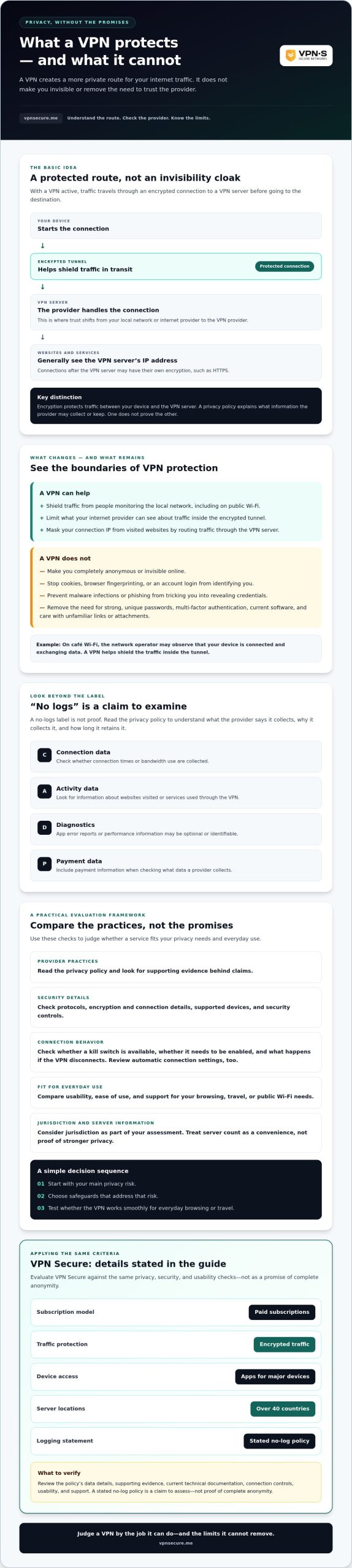
- Evaluate VPN Secure against the same criteria: it offers paid subscriptions, encrypted traffic, apps for major devices, servers in over 40 countries, and a stated no-log policy.
What VPN software for privacy protects, and what it does not
VPN software encrypts internet traffic between your device and a VPN server, helping protect that connection from people monitoring the local network. It also routes your traffic through the server, so websites generally see the server’s IP address rather than the IP address assigned to your internet connection. That can reduce exposure, but it doesn’t erase your identity or make you fully anonymous.
Think of a VPN as a protected route, not an invisibility cloak. A Virtual Private Network (VPN) creates a connection between your device and another network. For everyday browsing, the VPN server acts as an intermediary between your device and the sites you visit.
How a VPN changes the path your internet traffic takes
Without a VPN, your device connects to websites through your internet provider or the Wi-Fi network you’re using. With a VPN active, your device first sends traffic through an encrypted tunnel to the VPN server, which then passes it on to the destination. Encryption helps keep the contents of that traffic from being read by someone monitoring the connection between your device and the server.
On café Wi-Fi, for example, the network operator may be able to observe that your device is connected and exchanging data, but the VPN helps shield the traffic inside the tunnel. The VPN provider sits at a different point in the route and handles your connection to its server, so you’re placing trust in that provider’s privacy practices. After traffic leaves the server, website connections may have their own encryption, such as HTTPS.
Which privacy risks a VPN cannot solve
A changed IP address doesn’t stop websites from recognizing other clues. Cookies can connect visits, browser fingerprinting can distinguish a device based on its settings, and logging in ties activity to an account. If you sign in to a social network or shopping account, a VPN won’t hide that activity from the service you’re using.
Nor does a VPN block every online threat. Phishing can still trick you into revealing credentials, malware can still infect an unprotected device, and weak or reused passwords can put accounts at risk. Use separate safeguards, including strong, unique passwords, multi-factor authentication, current software, and care with unfamiliar links or attachments.
The practical value of VPN software for privacy is narrower, but still useful: it can limit what local network operators can see and mask your connection IP from visited websites. Judge it by that job and by the provider’s handling of data. Don’t mistake a private route for complete anonymity.
How VPN privacy features work, from encryption to logging
Encryption and data retention answer different questions. Encryption protects traffic as it travels between your device and a VPN server; a provider’s privacy policy explains what information it may collect or keep. Strong encryption doesn’t prove a no-logs claim, and a no-logs claim doesn’t explain how the connection is secured.
Encryption and connection security in everyday use
On shared café or hotel Wi-Fi, an encrypted VPN tunnel can make intercepted traffic harder for someone on that network to read. The New Jersey Cybersecurity and Communications Integration Cell discusses VPNs as a tool for reducing interception risks, particularly on public networks, where their use is highly advised for unsecured networks.
Don’t assume every VPN handles connections identically. Check the provider’s current technical documentation for its encryption and connection details, supported devices, and how the app behaves if the VPN connection drops. A kill switch is designed to block internet access if the VPN disconnects, but its availability and behavior can vary by app and device. Verify whether it’s included, whether you need to enable it, and what happens during a real connection interruption. Check automatic connection settings, too, including whether the app can connect on startup or when you join an unfamiliar network.
No-log claims, privacy policies, and evidence
“No logs” can sound simple while hiding important distinctions. Read the policy to see what the provider says it collects, why it collects it, and how long it retains it. Look for separate explanations of:
- Connection data: Details such as connection times or bandwidth use.
- Activity data: Information about websites visited or services used through the VPN.
- Diagnostics: App error reports or performance information, which may be optional or identifiable.
- Payment information: Billing records, which may be handled by a payment processor and retained separately from browsing activity.
A provider’s stated policy is a claim about its practices, not independent proof. Look for meaningful supporting evidence, such as a clearly described independent assessment, and check what it covered and when it took place. Our no-log VPN audit guide explains what to look for. VPN Secure, for example, states that it follows a no-log policy. Assess that statement against its published policy and available evidence. You can review VPN Secure’s privacy information as part of that check.
Compare VPN software for privacy with a practical evaluation framework
Choose a VPN by checking how its claims hold up, not by counting flags on a server map. This framework helps you compare VPN software for privacy across the details that affect trust and everyday use. The FTC guidance on VPNs also encourages consumers to examine what an app collects and how it handles information.
| What to compare | What to look for |
|---|---|
| Privacy policy | Clear descriptions of collected data, retention periods, and sharing practices. |
| Independent evidence | Public reports or assessments that explain what was checked and when. If none is available, record the claim as unverified, not proven. |
| Security controls | Published technical details, connection settings, and clear explanations of features such as a kill switch. |
| Usability | Apps for your devices, understandable privacy settings, and connection behavior that fits your routine. |
| Support | Help options and guidance that are easy to find when you have a setup or privacy question. |
Privacy and transparency questions to ask before subscribing
Use direct questions to separate clear answers from marketing language:
- What data do you collect, how long do you keep it, and who can it be shared with?
- What public evidence supports your privacy claims, and what exactly did it review?
- Where is the company based, and how does that fit into your overall data-handling policy?
A company’s location is useful context, but it doesn’t guarantee how data is handled. Read the policy and look for evidence rather than treating a country name as a privacy credential.
Security, usability, and support criteria worth comparing
Check app availability for the phone, computer, or tablet you actually use. Then assess whether privacy controls are easy to understand and whether you can find help if a setting behaves unexpectedly. Compare bandwidth and server coverage against your needs. Coverage in the places you travel may be useful, while a larger server count alone doesn’t prove stronger privacy.
Before choosing a subscription, note what each provider can document, what remains unclear, and which practical features matter most to you. Apply the same checklist to VPN Secure’s published service information, including its stated privacy policy and available service details.
Match privacy software to your browsing habits and threat model
The right choice depends on the risk you’re trying to reduce. Before comparing features, map your use case to the protection you need, then check whether the VPN fits your routine.
- Identify the risk. Are you concerned about a network operator seeing your connection, exposing your IP address to websites, or accessing work systems remotely? Name the specific concern.
- Choose relevant safeguards. Match the risk to VPN features, then add protections the VPN can’t provide, such as updated software and strong account security.
- Test usability. Check that the app works on your devices, the settings make sense, and the connection suits your usual browsing before relying on it.
A VPN can shift trust rather than remove it. It may reduce what a local network operator can observe, but your provider handles the connection to its servers. Review that provider’s privacy policy and available evidence, then decide whether its practices make sense for your needs.
Choosing protection for public Wi-Fi and travel
If you regularly connect through shared networks at airports, hotels, or other public places, a VPN may add a layer of protection for traffic traveling to its server. It doesn’t replace HTTPS, device updates, or account protections. Keep software current, use strong, unique passwords, and turn on multi-factor authentication where available. For trip planning, see this VPN privacy guide for travelers. Local laws and network restrictions vary, so check current guidance for your destination and the networks you expect to use.
Choosing protection for home browsing and remote access
At home, ask what you want to protect against: visibility on a shared local network, exposure of your connection IP to websites, or access to a private work system. These needs aren’t interchangeable. A consumer VPN may route personal browsing through a VPN server, but it doesn’t automatically provide secure access to company resources.
If you work remotely, follow your employer’s approved tools and security policies. Workplace access may depend on systems configured by the organization; a personal VPN isn’t a substitute for those controls. Choose VPN software for privacy based on the specific task it can support, not on a promise to cover every risk.
Compare your needs with the provider’s published features and privacy information. Review VPN Secure’s subscription details as one option to assess against your checklist.
Choose VPN Secure only if its privacy criteria fit your needs
A provider’s feature list is a starting point, not a verdict. VPN Secure is one option to compare against the privacy and usability criteria in this guide. Its service information describes paid subscriptions, encrypted traffic, apps for major devices, and servers in over 40 countries. It also describes multiple-device use and unlimited bandwidth, which may suit everyday browsing or streaming across your devices. Check the current service details to confirm supported apps, server coverage, and features before subscribing.
Where VPN Secure may fit, and what to verify
VPN Secure states that it follows a no-log policy. Treat that as the company’s claim, not independent verification. Read the current privacy policy to understand what data it collects, how long it keeps it, and whether public evidence supports the policy. The company is based in the Bahamas, but location alone doesn’t prove how data is handled or guarantee privacy.
Before choosing a plan, confirm that the apps support the devices you actually use and that the connection controls meet your needs. Check current subscription terms, too. If a 30-day money-back guarantee is advertised, review its current eligibility rules and conditions rather than assuming every purchase qualifies. Server coverage and unlimited bandwidth may matter for travel or frequent streaming, but neither proves stronger privacy or anonymity.
Take the next step without guessing
Keep your final comparison focused on three checks: data practices, including the provider’s privacy policy and available evidence; relevant safeguards, based on the risks you want to reduce; and day-to-day usability, including app support and connection behavior. If plan flexibility matters, review this guide to affordable monthly VPN plan guidance before deciding.
VPN software for privacy should fit your needs without asking you to take broad claims on faith. Explore VPN Secure and check whether it fits your privacy needs.
Choose privacy protection with clear eyes
The right VPN is the one that fits the risks you actually face. VPN software for privacy can encrypt traffic in transit and help conceal your connection IP, but it doesn’t erase account activity or protect you from every online threat. Check a provider’s privacy policy and supporting evidence, then weigh security settings, device support, and ease of use against your daily needs.
VPN Secure states that it does not log user activity and reports servers in over 40 countries. Treat the no-log statement as a provider claim, not independent verification, and check current service details before choosing. The service also lists a 30-day money-back guarantee, so review its current terms and eligibility before relying on it.
Compare those details with your checklist, not just the marketing. Explore VPN Secure and check whether it fits your privacy needs. A thoughtful choice puts you in greater control without mistaking any VPN for complete anonymity.
Frequently Asked Questions
Does VPN software protect your privacy online?
Yes, VPN software can improve privacy by encrypting traffic between your device and a VPN server and masking your connection IP from websites. This can reduce what your internet provider or a shared Wi-Fi operator can observe about your connection. The protection has limits: websites may still recognize you through cookies, browser fingerprints, or accounts you sign into, and the VPN provider handles your connection.
Can a VPN make you completely anonymous?
No. A VPN changes how your traffic reaches websites, but it doesn’t erase identifiers tied to your browser or online accounts. For example, signing in to an account can associate your activity with your profile even when a VPN masks your connection IP. Cookies and browser fingerprinting can also help services recognize visits. Think of a VPN as one privacy safeguard, not a guarantee of anonymity or invisibility.
What should I look for in VPN software for privacy?
Look for a clear privacy policy, meaningful evidence that supports the provider’s claims, and technical details explaining how its connection works. Check whether the apps support your devices and whether controls such as a kill switch are available and easy to configure. Consider the provider’s support options and test the app’s usability. Server coverage and bandwidth should fit your needs, but aren’t proof of stronger privacy.
Is a no-log VPN safer than other VPNs?
A no-log policy can be a useful privacy commitment, but the label alone doesn’t prove what a provider does. Read the policy to see whether it covers connection records, browsing activity, diagnostics, and payment information, and how long any collected data is retained. Look for public evidence that explains what was independently assessed and when. If supporting evidence is unavailable, treat the claim as unverified rather than proven.
Can my internet provider see what I do when I use a VPN?
Your internet provider can generally see that your device is connected to a VPN server, along with connection timing and data volume. If the VPN is working and your traffic is routed through its tunnel, the provider generally can’t read the contents of that traffic or directly see the sites you visit through it. A VPN doesn’t hide activity from websites where you’re logged in or from the VPN provider itself.
Does a VPN protect me on public Wi-Fi?
A VPN can help protect traffic traveling between your device and the VPN server on shared Wi-Fi by encrypting that connection. It’s a useful layer at a café, hotel, or airport, but it won’t make a malicious network trustworthy or stop phishing and malware. Use HTTPS, keep your device updated, and protect accounts with strong, unique passwords and multi-factor authentication where available.
How do I know whether a VPN privacy policy is trustworthy?
Check whether the policy clearly explains what data is collected, why it’s needed, how long it’s kept, and whether it’s shared. Look for separate details on connection data, activity, diagnostics, and payment records. Then seek public evidence, such as an independent assessment, and read what it covered and when. Clear wording helps, but a policy is still the provider’s statement, so distinguish documented evidence from claims that remain unverified.