




A VPN can hide the route your data takes, but it can’t erase every trace you leave online. A VPN for bypassing online surveillance can encrypt your connection and reduce what your internet provider or a café’s Wi-Fi operator can see. That’s a meaningful layer of privacy, not an invisibility cloak.
If you’re unsure who can monitor your browsing, look beyond bold claims of “total anonymity.” A VPN won’t stop a website from recognizing you when you sign in, or apps and tracking technologies from collecting information about your activity. To choose the right protections, first understand where a VPN helps and where its protection ends.
This guide explains what a VPN can and can’t shield, how to configure one, and which complementary habits help close the gaps. It also covers how to assess a provider through its privacy policy, transparency, and data-handling claims. The goal isn’t to disappear from the internet. It’s to have more control over who can see what.
Key Takeaways
- A VPN for bypassing online surveillance changes what observers can see along your connection, but it can’t hide everything websites and devices may reveal.
- Compare a VPN with HTTPS, private browsing, and tracker controls to understand which privacy gaps each tool addresses.
- Use a setup checklist to choose a server, enable available connection safeguards, and confirm that the VPN is active.
- Assess a VPN’s logging policy, independent scrutiny, jurisdiction, and app support instead of trusting absolute privacy promises.
- Build a layered privacy routine that accounts for activity linked to your accounts, apps, and browsing habits.
What a VPN for bypassing online surveillance can, and cannot, do
Your connection passes through networks and services that may collect different kinds of information, but they don’t all see the same things. A VPN for bypassing online surveillance can reduce what your internet provider and nearby network operators learn from your traffic. It can’t make every part of your online life private.
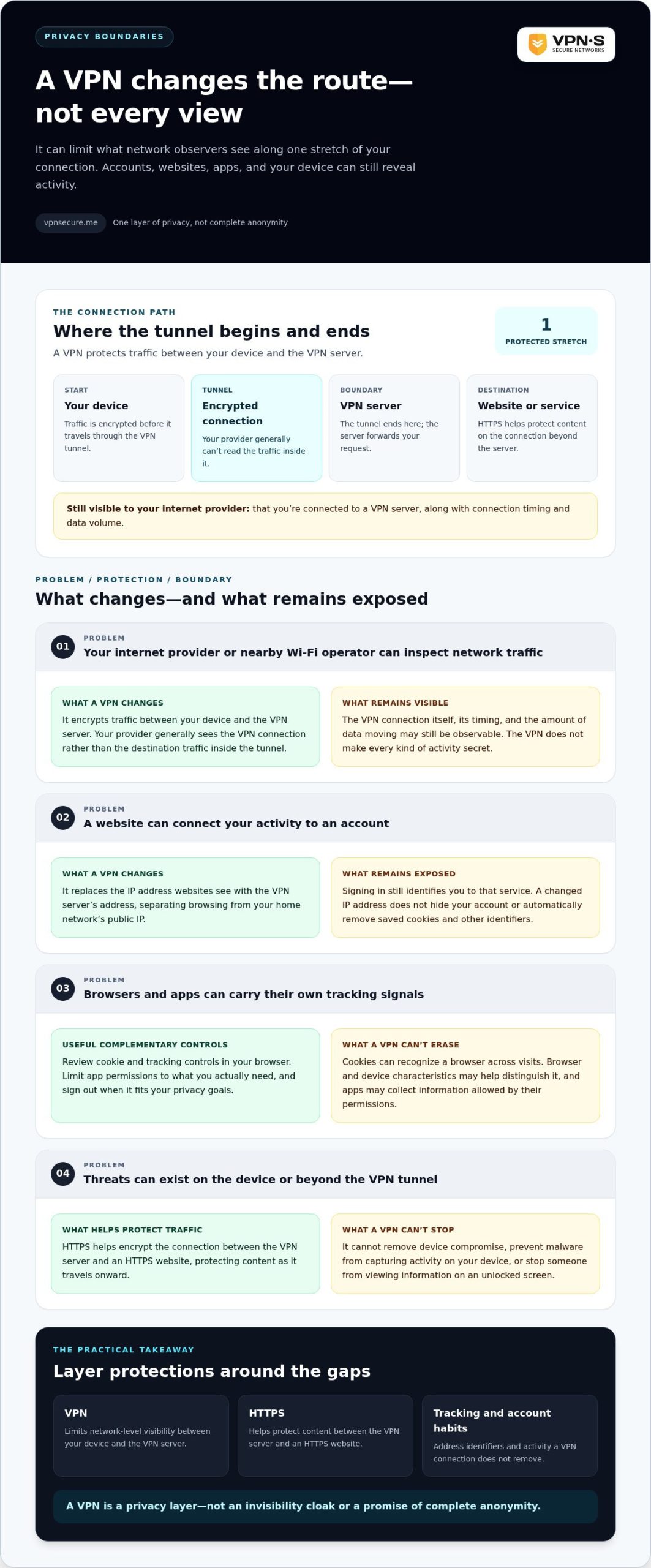
A virtual private network creates an encrypted connection between your device and a VPN server. Your traffic travels through that protected tunnel before continuing to its destination. For a foundational overview of how this technology works, see Virtual Private Network (VPN). To understand the privacy benefit, consider what each observer can see along the route.
Which observers can see what you do online?
Without a VPN, your internet provider can generally see which services or destinations you connect to, along with connection timing and data volume. HTTPS usually protects the contents of your connection from being read in transit, but it doesn’t hide every detail. With a VPN active, your provider primarily sees an encrypted connection to the VPN server, rather than the destination traffic inside the tunnel.
A café Wi-Fi operator has a similar vantage point: a VPN can limit what the local network can inspect. But it doesn’t prevent a website, app, or logged-in service from collecting information through your account or activity. Each observer sees a different part of the connection, and a VPN changes only some of those views.
Does a VPN make you anonymous?
No. A VPN improves privacy, but it doesn’t make you invisible. It replaces the IP address websites see with the VPN server’s address, which can separate your browsing from your home network’s public IP. It doesn’t conceal your identity if you sign in to an account, and it can’t automatically remove cookies or other identifiers saved by your browser.
Websites may also recognize patterns in your browser or device settings, while apps can associate activity with an account or device. If your device is compromised, a VPN won’t remove that threat or stop monitoring that happens directly on the device.
A VPN can shield your network traffic from some observers; it cannot promise complete anonymity. Treat it as one layer in a privacy routine, not a switch that erases your digital footprint. Knowing where the tunnel ends helps you set realistic expectations and choose additional protections for the tracking it doesn’t address.
How a VPN changes what surveillance systems can observe
Follow the connection to see where the privacy boundary lies. Your device encrypts traffic and sends it through a VPN tunnel to a VPN server. The server forwards your request to the destination website. The website’s response travels back through the server and tunnel to your device.
This changes what different observers can inspect. Your internet provider can generally see that you’re connected to a VPN server, along with connection timing and data volume. It can’t ordinarily read the traffic carried inside the encrypted tunnel. The VPN server sits at the other end, so your provider’s view and the VPN provider’s view aren’t identical.
What encryption hides, and what it leaves exposed
Encryption makes intercepted traffic harder to read while it moves between your device and the VPN server. But it doesn’t encrypt every endpoint or make every kind of activity secret. The VPN connection itself may be visible, and observers may still infer when you connect and how much data moves.
The tunnel ends at the VPN server. HTTPS remains important because it encrypts the connection between that server and an HTTPS website, helping protect the content as it travels onward. Without HTTPS, traffic beyond the VPN server may not have the same protection. A VPN also can’t stop malware from capturing activity on your device or someone from viewing information on an unlocked screen.
With a VPN active, your internet provider can generally see the encrypted connection to the VPN server, not the contents of the traffic inside the tunnel. That’s useful protection against network-level visibility, not a promise that no one can observe your activity.
Why websites and apps may still track you
Your IP address is only one signal. When you sign in to an account, the service can associate activity with your profile regardless of which VPN server you use. Cookies can recognize a browser across visits, while browser fingerprinting may use a combination of device and browser characteristics to help distinguish it. Apps may also collect information permitted by their device permissions.
Changing your IP address doesn’t reset those identity signals. Review browser cookie and tracking controls, limit app permissions to what you actually need, and sign out when that fits your privacy goals. These steps complement a VPN connection for private browsing, but don’t replace careful account and device habits.
Use a VPN for bypassing online surveillance with a clear view of its role: it protects one stretch of the connection. HTTPS helps protect the next stretch, while tracking controls address identifiers that encryption alone doesn’t remove.
VPNs compared with other ways to reduce online surveillance
Privacy tools solve different problems. A VPN can protect traffic between your device and its VPN server, while other controls focus on website connections, browser history, or trackers. Match each tool to the exposure you want to reduce, then combine protections where they complement each other.
| Tool | What it helps protect | What it can’t do | When it helps |
|---|---|---|---|
| VPN | Encrypts traffic between your device and the VPN server and can limit what your internet provider or local Wi-Fi operator sees about destinations. | Doesn’t erase account activity, stop all tracking, or protect a compromised device. | On public Wi-Fi or when you want to reduce your provider’s view of the destinations you connect to. |
| HTTPS | Encrypts data between your browser and an HTTPS website. | Doesn’t hide all connection details or prevent a site from identifying and tracking you. | Whenever you visit a website, with or without a VPN. |
| Private browsing | Limits some browsing data, such as history and cookies, saved locally after a session. | Doesn’t hide activity from websites, your network, or your internet provider. | When you don’t want a session’s browsing history retained in your browser. |
| Tracker controls | Can block or limit some known trackers, cookies, or tracking requests. | May not stop every tracking method or activity tied to an account. | For reducing some web tracking during everyday browsing. |
VPN vs. incognito mode, HTTPS, and tracker controls
Private browsing, often called incognito mode, mainly limits what your browser saves on your device after the session. It isn’t a network privacy shield. HTTPS protects the connection from your browser to a website, while tracker controls address some data collection that VPN encryption doesn’t. These tools aren’t interchangeable. A VPN for bypassing online surveillance can reduce network visibility, but it won’t replace HTTPS or tracking controls.
When a VPN is the useful layer
On café Wi-Fi, a VPN adds an encrypted tunnel between your device and the VPN server. It can also reduce the destination details your internet provider sees. Because websites see the VPN server’s IP address, your apparent IP-based location may change. Results vary, and accounts or device signals can still reveal other location clues.
Tor and encrypted DNS address different parts of online privacy; neither is simply another name for a VPN. When assessing a provider’s claims, look beyond slogans and examine the evidence. This no-log VPN audit guide explains what scrutiny can reveal. No single privacy tool stops every form of monitoring, because each protects a different part of your digital activity.
How to use a VPN for surveillance-conscious browsing
A VPN works best when it’s set up before you need it. Use this checklist to make connecting part of your routine rather than a last-minute guess.
Set up and check the VPN connection
- Choose a provider thoughtfully. Look for clear privacy information and an app that supports the devices you use. A VPN can reduce network visibility, but it can’t replace good account and device security.
- Install the official app. Get it from the provider’s official source or your device’s trusted app store. Review the privacy and connection settings before connecting.
- Enable available safeguards. Turn on options designed to help protect your connection if it drops, such as a kill switch or automatic connection. Feature names and availability vary by app and device.
- Connect before browsing. Start the VPN before joining an untrusted network or beginning activity you want to keep more private from network observers.
- Check that it’s active. Confirm the app shows a connected status. Review its settings for what happens if the VPN connection is interrupted. Don’t assume traffic remains protected after a disconnect.
- Keep your software current. Install updates for your operating system, browser, and apps. A VPN doesn’t fix weaknesses in outdated software.
VPN Secure provides an encrypted VPN service for major devices. Learn about VPN Secure.
Add privacy habits a VPN cannot replace
Protect the accounts and devices at either end of the connection. Use unique passwords and multifactor authentication for important accounts. Review app permissions and remove access an app doesn’t need. Sign out of accounts when it makes sense, especially on a shared device.
These habits matter when you’re away from home, too. Read about secure VPN use while travelling for more public-network context.
A VPN for bypassing online surveillance is most useful when it’s active consistently and paired with sensible account and device habits. Check the connection before relying on it, and treat a disconnect as a signal to pause sensitive browsing until protection is restored.
Choose a VPN for online privacy without believing absolute promises
“No logs” and “anonymous browsing” sound decisive, but they aren’t proof by themselves. A thoughtful choice considers what a provider says it collects, what evidence supports its claims, and whether its apps work on the devices you use. No VPN can protect you from every observer, account-based tracking, or risks on a compromised device.
Use this checklist to compare privacy claims:
- Logging policy: Does the policy clearly explain what connection or activity data is collected, retained, or deleted?
- Independent scrutiny: Is there credible outside evidence examining real-world practices, rather than only a published promise?
- Jurisdiction: Where is the provider based, and what legal setting applies to its operations? Treat this as context, not a guarantee.
- App support: Can you use the provider’s apps on the devices you rely on, and do the available settings meet your needs?
How to assess privacy claims and trade-offs
A privacy policy is a useful starting point, not independent proof. Look for specific descriptions of retained data and public scrutiny that explains what was examined and what it concluded. VPN Secure offers an encrypted, no-log VPN service and is based in the Bahamas, outside the Five Eyes intelligence alliance. These details can inform your decision, but they don’t establish that every form of surveillance is impossible. Provider trust depends on evidence and operational transparency, not absolute promises.
For a closer look at how to assess a zero-logs claim, read the no-log VPN audit guide.
What VPN jurisdiction means for your decision
Jurisdiction is the legal setting relevant to a provider and its operations. The Five Eyes refers to an intelligence-sharing alliance, and a provider’s base can be one factor to consider when weighing privacy. But geography alone doesn’t reveal every applicable obligation, prove how data is handled, or guarantee protection from surveillance. Consider it alongside policy clarity, independent scrutiny, and the provider’s actual practices.
A VPN for bypassing online surveillance can reduce some network visibility, but your choice should rest on credible information and realistic expectations. VPN Secure offers monthly and annual subscriptions to its encrypted VPN service. Explore VPN Secure subscription options.
Make privacy a deliberate habit
A VPN can reduce what your internet provider and local network observers see, but it won’t erase account activity, browser tracking, or risks on your device. The strongest approach is layered: use a VPN for network privacy, keep HTTPS enabled, review tracking and app permissions, and protect your accounts with unique passwords and multifactor authentication.
A VPN for bypassing online surveillance should be a practical safeguard, not a promise of invisibility. Look for clear privacy policies and meaningful evidence behind a provider’s claims. VPN Secure offers an encrypted service with a no-log positioning, is based in the Bahamas outside the Five Eyes alliance, and has servers in over 40 countries.
Use those details as part of an informed decision, alongside your own privacy needs and habits. Explore VPN Secure and take a more deliberate approach to online privacy. Small, consistent steps can give you more control over your digital life.
Frequently Asked Questions
Can a VPN bypass online surveillance?
A VPN can limit what some network observers see, but it can’t bypass every form of surveillance. It encrypts traffic between your device and the VPN server, making it harder for a local network operator or internet provider to read that traffic. Websites may still recognize you through accounts, cookies, or device signals, and a VPN can’t protect a compromised device. Think of it as one useful privacy layer, not invisibility.
Does a VPN hide my browsing history from my internet provider?
A VPN generally prevents your internet provider from reading the contents of traffic inside the encrypted tunnel or seeing destination details in the usual way. Your provider may still see that you connected to a VPN, plus connection timing and data volume. Your VPN provider becomes part of the trust relationship, so read its data practices and look for evidence supporting its privacy claims rather than relying on slogans alone.
Can governments still track me if I use a VPN?
Yes. A VPN isn’t a guarantee against government surveillance. It can reduce the visibility of some network activity to certain observers, but authorities may obtain information from other sources, through legal processes, from online services, or through access to a device or account. Laws and capabilities vary by location. Use a VPN as a network privacy layer, follow applicable laws, and make choices based on your actual risks.
Does a VPN stop websites from tracking me?
No, not by itself. A VPN can change the IP address a website sees, but sites and apps may still connect activity to you through account sign-ins, cookies, browser fingerprinting, or other identifiers. Review browser privacy settings, manage cookies and account sessions, and limit app permissions you don’t need. These steps complement a VPN by addressing some web tracking, but they don’t replace the protection of encrypted network traffic.
Is incognito mode enough to avoid online surveillance?
No. Private or incognito browsing mainly limits some browsing data saved locally after a session. It doesn’t hide activity from websites, internet providers, or network operators on its own. A VPN can add network-level privacy, while tracker controls can address some web tracking. Choose protections based on who you’re concerned about and what information you want to limit; no single setting covers every source of monitoring.
What should I look for in a VPN for privacy?
Look for a clear logging policy that explains what connection or activity data is retained, and seek meaningful evidence for the provider’s claims, such as independent scrutiny where available. Consider jurisdiction, supported devices, connection security, and how clearly the provider explains its limits. No single feature guarantees anonymity. For practical guidance on evaluating zero-logs claims, read this no-log VPN audit guide.
Can a VPN protect me on public Wi-Fi?
A VPN can encrypt traffic between your device and its server, adding a layer of protection on a network you don’t control. It can’t make every website or device interaction safe, and it won’t prevent phishing, malware, or account compromise. Connect the VPN before handling sensitive tasks, use HTTPS, keep your software updated, and avoid suspicious links. The VPN helps protect the connection, while these habits address other risks.