




Using an airport wifi VPN starts with a step that can feel backward: connect to the airport’s network and complete its sign-in page before turning on the VPN. Captive portals often need that initial connection to load. Once you’re authenticated, the VPN can encrypt your traffic for the rest of the session.
It’s reasonable to be cautious about a public network, especially if you’re unsure whether it’s genuine or whether your passwords and payment details are exposed. A VPN adds a layer of privacy, but it isn’t a magic shield. It can’t tell a real website from a convincing fake, stop you from entering details on a phishing page, or replace HTTPS and basic device security.
This guide explains what a VPN protects on airport Wi-Fi, how to connect in the right order, and what to try when a captive portal won’t load. You’ll also learn when mobile data may be the simpler choice for sensitive tasks, so you can follow a clear routine instead of guessing at the gate.
Key Takeaways
- Choose between airport Wi-Fi, an airport wifi VPN, and cellular data based on the task, coverage, and sign-in requirements.
- Use airport signage or official airport information to identify the network before connecting.
- A VPN encrypts the connection, but careful browsing and checking website addresses still matter.
- Prepare your device before travel so you can connect in a deliberate, repeatable order.
- VPN Secure encrypts traffic across major devices and describes its VPN service as no-log.
Why airport Wi-Fi is convenient, and why your connection still deserves care
Your gate changes. A family member wants an update. Your booking needs attention before boarding. Airport Wi-Fi can help with these time-sensitive tasks without using mobile data. You don’t need to fear every public network. Instead, identify the network and understand what your connection does, and does not, protect.
Airport Wi-Fi is a shared wireless access network that lets travelers connect their devices to the internet through equipment managed by the airport or its network provider. Since many people use the same public service, you have less visibility into how it’s configured and managed than you would on a private home network. That doesn’t make it automatically unsafe, but it does call for care.
A network password or welcome portal controls access; it doesn’t necessarily encrypt your browsing. An overview of a Virtual Private Network (VPN) explains how a VPN creates an encrypted connection between your device and a VPN server. An airport wifi VPN can add a privacy layer after you connect, but it can’t prove that the network or every website you visit is legitimate.
What makes airport Wi-Fi different from a private home network?
At home, you usually recognize the network and have some control over its router and password. In a terminal, users change constantly, and the airport or its provider manages the equipment. You may have little insight into its settings. A familiar-looking name alone isn’t proof that the network is genuine. Check the name on airport signage or in the airport’s official information before joining.
Which activities deserve extra care on public Wi-Fi?
Take extra care before signing in to important accounts, sending sensitive messages, or handling financial tasks. HTTPS encrypts information between your browser and the website, helping protect it in transit. But it doesn’t confirm that the site is genuine. A scam page can use HTTPS too, so inspect the web address rather than relying on the padlock alone.
- Check the web address before entering a password or payment details.
- Avoid unfamiliar downloads, especially if a page urges you to install something to get online.
- Don’t bypass unexpected browser or device security warnings just to reach a page faster.
These checks don’t need to turn a quick gate check into a security project. Verify the network, take an extra moment with sensitive sign-ins, and treat unexpected prompts with suspicion. A password, portal, or VPN doesn’t make every online action risk-free, but these steps give you a practical baseline for using the terminal’s connection.
What an airport Wi-Fi VPN protects, and what it cannot
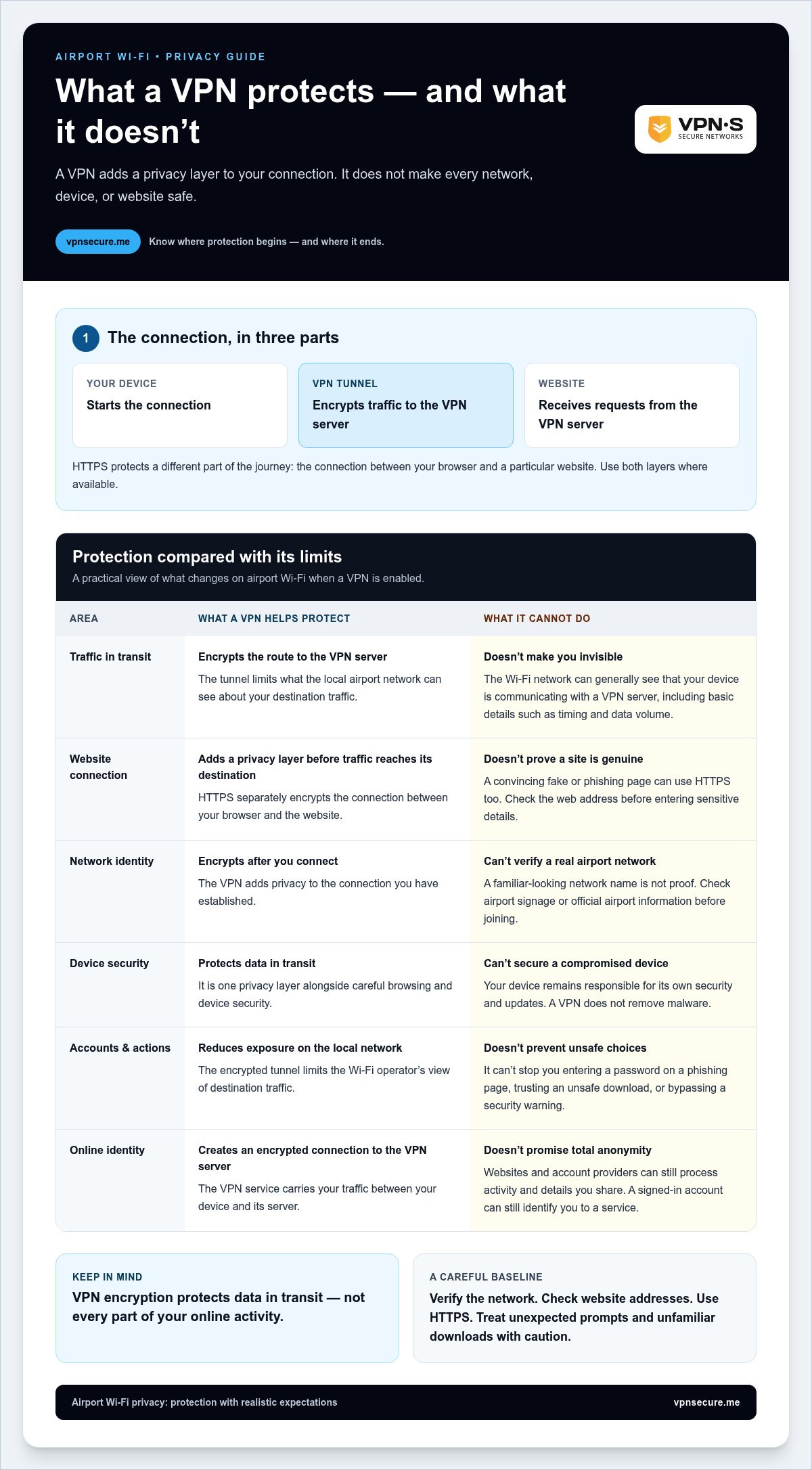
A VPN creates an encrypted connection, often called a tunnel, between your device and a VPN server. When you browse through it, the airport Wi-Fi network can generally see that your device is communicating with a VPN server, but the tunnel limits what the local network can see about your destination traffic. An airport wifi VPN adds privacy to the connection, not invisibility to everything online.
VPN encryption protects data in transit; it doesn’t secure a compromised device or make you anonymous. That distinction sets realistic expectations. A VPN can reduce exposure on the local network, while your device, the websites you visit, and the services you sign in to remain part of the privacy picture.
How VPN encryption changes an airport Wi-Fi session
Without a VPN, your device sends traffic through the airport network toward online destinations. With a VPN enabled, your traffic first travels through an encrypted tunnel to the VPN server, which then connects to the destination website. The airport network can still observe the connection to that VPN server, along with basic details such as timing and data volume. It generally has less visibility into where your traffic goes inside the tunnel.
HTTPS still matters. It encrypts the browser-to-website connection, protecting the content of that exchange beyond the VPN server. A VPN and HTTPS protect different parts of the journey: the VPN protects traffic between your device and the VPN server, while HTTPS protects the connection between your browser and a particular website. Use both layers where available.
What a VPN does not fix on public Wi-Fi
A VPN can’t tell you whether a network is fake, remove malware from your device, or stop you from entering a password on a convincing phishing page. It also can’t make an unsafe download trustworthy. If a page asks you to install an unfamiliar file or your device shows an unexpected security warning, stop and assess the request instead of assuming the VPN makes it safe.
Different services see different parts of your activity. The Wi-Fi operator can see that you connected and may see the VPN connection, but the encrypted tunnel limits its view of destination traffic. The VPN service carries your traffic between your device and its server, so choosing a provider means considering how it handles that role. A website can see requests that reach it, while an account provider can associate activity with the account you use. A VPN doesn’t erase those relationships or prevent a site from recognizing a signed-in user.
- Your device: Remains responsible for its own security and updates.
- The VPN: Encrypts the connection to its server, but doesn’t promise total anonymity.
- Websites and account providers: Can still process the activity and account details you share with them.
Use the VPN as one privacy layer alongside HTTPS, careful sign-ins, and caution with links and downloads. VPN Secure encrypts internet traffic across major devices and describes its service as no-log. To learn more about its encrypted connection for travel, visit VPN Secure’s VPN service.
Airport Wi-Fi, mobile data, or a VPN: which connection fits the moment?
No single connection suits every stop in the terminal. The right choice depends on what you’re doing, your signal strength, and what the airport network requires. A VPN adds encryption to an existing internet connection; it doesn’t provide internet access by itself. If you aren’t connected to Wi-Fi or cellular service, the VPN has no connection to carry your traffic through.
| Connection | Convenience | Privacy layer | Coverage dependence | Login friction |
|---|---|---|---|---|
| Airport Wi-Fi alone | Useful where airport Wi-Fi is available | No VPN tunnel between your device and a VPN server | Depends on the airport network’s signal | May require a portal or sign-in |
| Airport Wi-Fi with VPN | Combines airport access with VPN encryption | Adds an encrypted connection to a VPN server | Depends on airport Wi-Fi and VPN connectivity | Portal authentication may be needed before the VPN connects |
| Cellular data | Can bypass the airport Wi-Fi portal | Uses your mobile connection rather than the public Wi-Fi network | Depends on local cellular coverage and your plan | Usually avoids the airport Wi-Fi sign-in page |
Use the comparison as a decision aid, not as a promise that any connection removes every risk. For routine tasks, such as checking travel updates or coordinating a pickup, airport Wi-Fi with a VPN may be practical if the network works and you can sign in. For sensitive activity, consider connection quality and available alternatives before proceeding.
When airport Wi-Fi with a VPN is a practical choice
If public Wi-Fi is the connection available, an airport wifi VPN can add an encrypted layer to your session. It won’t make browsing risk-free, but it can reduce what the local network sees about destination traffic. The sign-in portal is the main sequencing issue: authenticate to the airport network first, then connect the VPN. Until the portal grants access, the VPN may not be able to connect.
When cellular data may be simpler
Switch to cellular data if Wi-Fi is unreliable or the portal keeps blocking access. Your signal, roaming terms, and data allowance depend on your location and mobile plan, so consider them before using cellular data for tasks that use a lot of data. If you need to connect another device, a personal hotspot can help when appropriate. Protect it with a strong password and share it only with devices you trust.
Choose based on the task, signal, and access requirements. If airport Wi-Fi is steady and you can complete its sign-in, connect the VPN afterward. If the portal fails or the connection is poor, cellular data may be simpler if your plan and coverage support it.
Airport Wi-Fi VPN checklist: connect safely in the right order
A smooth airport connection comes down to sequence. Prepare your device before travel, verify the network, complete its sign-in, and then switch on your VPN. Connect, authenticate, encrypt, then browse. This gives a captive portal a chance to load before the VPN routes your traffic through its encrypted connection.
Before joining the airport network
Check your device before you reach the terminal. Install available system and VPN app updates when practical, set a strong device passcode, and turn off automatic connection to unfamiliar Wi-Fi networks. Keep cellular data available as a fallback if the airport portal won’t open. Preparing ahead can help you avoid rushed security decisions while boarding is called.
- Prepare your device. Check that Wi-Fi and your VPN app are ready to use. Confirm that automatic joining of unknown networks is disabled, and keep your device locked whenever you’re not using it.
- Identify the airport network. Use terminal signage or the airport’s official information to find the correct network name. Don’t rely on a familiar-sounding name alone.
- Authenticate to Wi-Fi. Select the verified network and follow its sign-in or captive-portal instructions. The portal may need to accept your session before internet access is available.
- Enable the VPN. Once the portal confirms access, turn on your VPN and wait for the app to show that the connection is active. Don’t assume it’s protecting traffic while it’s still connecting.
- Browse with care. Use the connection for your task, while staying alert to suspicious links, unexpected download prompts, or browser warnings. A VPN adds a privacy layer, not a substitute for careful browsing.
After the captive portal accepts your connection
Once the portal accepts your sign-in, let the VPN connect before you continue browsing. If the portal interrupts setup or the VPN can’t connect, disconnect from Wi-Fi only if needed to complete authentication. Rejoin the verified network, confirm that access works, and try the VPN again. Portal screens vary, so follow the airport’s stated steps and avoid entering extra information in unexpected prompts.
If VPN access remains blocked, don’t try to bypass the network’s restrictions. Use another permitted connection, such as cellular data, if available and suitable for your needs. If you switch between Wi-Fi and cellular, check the VPN app again before browsing so you know whether its connection is active.
Repeat the airport wifi VPN routine each time: prepare before departure, authenticate through the official portal, and confirm the VPN is connected before browsing. Learn more about an encrypted connection on major devices by visiting VPN Secure’s VPN subscriptions.
Use VPN Secure on airport Wi-Fi for an encrypted travel connection
You’ve checked the network, completed the airport sign-in, and considered what a VPN can and can’t do. You can now add an encrypted connection to your routine. VPN Secure encrypts internet traffic across major devices and describes its service as no-log. It offers access to servers in more than 40 countries and unlimited bandwidth, but neither server choice nor bandwidth guarantees a particular airport connection speed. Wi-Fi quality, portal rules, and local network conditions still matter.
Set up your VPN before you reach the terminal
Prepare ahead rather than troubleshooting from a crowded gate. Subscribe and get the service ready on the device you plan to use. Before traveling, sign in to the app and familiarize yourself with the server-selection screen. At the airport, join the verified Wi-Fi network and complete its captive portal first. Then return to the VPN app, choose a server, and connect.
- Before travel: Install the VPN app, sign in, and check that you can reach its connection controls.
- At the airport: Authenticate through the official Wi-Fi portal before starting the VPN connection.
- Before browsing: Wait for the app to show an active connection. If it doesn’t connect, check that Wi-Fi access is working and retry. Don’t assume the tunnel is active just because you tapped connect.
If the portal won’t load, reconnect to the verified network or use another permitted connection, such as cellular data. If the VPN app reports that it isn’t connected, pause browsing until the status changes or you switch to an alternative. These checks help you troubleshoot access and connection status without assuming anything about speed or airport performance. For more travel preparation, read this guide to secure VPN use for travel.
Understand the privacy claim behind a no-log VPN
A no-log statement describes the VPN provider’s data practices. It doesn’t mean websites stop recording visits, account providers can’t associate activity with your signed-in account, or a VPN makes you anonymous. Sites may still use account details and other tracking methods to recognize activity. Keep checking website addresses and browse carefully, even with the VPN connected.
When assessing a no-log claim, consider what the provider’s privacy statements mean and what supports them. The no-log VPN audit guide explains why evidence matters when evaluating provider privacy statements. A VPN remains one layer of protection for the connection, not a replacement for device security or sound judgment online.
Ready to add an encrypted connection to your airport routine? Explore VPN Secure and prepare your VPN before your next trip.
Make privacy part of your next trip plan
Before your next departure, decide which connection you’ll use for the tasks that matter most. That way, you won’t have to weigh privacy, signal strength, and time pressure while standing in a crowded terminal. A simple plan lets you focus on the journey instead of reacting to every connection prompt.
Treat your airport wifi VPN setup as part of your travel routine, like checking your boarding pass or saving your booking details. Prepare before you leave, and decide when you’ll switch to cellular data if public Wi-Fi isn’t working. The goal isn’t to avoid every shared network. It’s to connect deliberately and stay in control of your choices.
As you prepare for your next airport connection, explore VPN Secure and protect your airport Wi-Fi sessions.
Travel with a plan, connect on your terms, and move through the terminal with greater confidence.
Frequently Asked Questions
Is airport Wi-Fi safe for online banking?
For banking, cellular data is generally the more practical choice if you have a reliable signal and your plan allows it. If airport Wi-Fi is your only option, use the bank’s official app or enter its known website address yourself, and connect your VPN after signing in to the network. Don’t proceed if you see an unexpected security warning, and never follow a banking link sent in an unsolicited message.
Can airport Wi-Fi see what websites I visit when I use a VPN?
A VPN limits what the airport network can see about your destination traffic, but it doesn’t make every part of your online activity invisible. The network can still observe that your device connects to a VPN server and may see details such as timing. The websites you visit can process your requests, and services can associate activity with an account you’re signed into.
Does a VPN make airport Wi-Fi faster?
No. A VPN isn’t a speed booster, and the added route through a VPN server can affect connection performance. Airport congestion, a weak signal, and the website or app you’re using can also affect loading times. If pages stall, check that Wi-Fi is connected and the VPN app shows an active session. For a non-sensitive task, compare performance with and without the VPN.
What should I do if airport Wi-Fi blocks my VPN connection?
First, make sure the airport Wi-Fi sign-in is complete and your device can load a webpage. Then retry the VPN connection and check its status. If access is still blocked, don’t try to evade the network’s restrictions. Switch to cellular data or another permitted connection if available, especially before handling a sensitive task. Avoid entering extra personal details into unfamiliar portal pages.
Should I connect to airport Wi-Fi before turning on my VPN?
Usually, yes. Connect to the verified airport network and complete any required portal sign-in first. The portal may need internet access before the VPN can connect. Then activate the VPN and confirm its status before browsing. If the portal won’t load, temporarily use cellular data to check whether your device has internet access, then return to Wi-Fi and finish the sign-in.
Can I use airport Wi-Fi without a password if I have a VPN?
You may be able to join an open airport network without a password, but a VPN doesn’t verify that the network is genuine or replace any required sign-in. Confirm the network name using airport signage or official information. Once connected, follow any portal instructions, then enable your airport wifi VPN. Treat unexpected download prompts or requests for unrelated personal information as reasons to stop.