




What if strong encryption protects your connection but still doesn’t make you anonymous? A data encryption VPN service creates a protected tunnel between your device and a VPN server, helping shield your internet traffic along the way. But the tunnel has an endpoint. Websites, apps, account logins, and traffic that bypasses the VPN can still reveal information about you.
It’s reasonable to want a clear answer about what a VPN protects, especially when encryption claims are packed with technical terms. Look beyond the cipher: how a service handles your data and what happens if traffic leaves the tunnel matter too.
This guide explains VPN encryption in plain language, where its protection starts and stops, and what to look for when choosing a service for your privacy needs. You’ll also learn how to use a VPN with realistic expectations, so you can protect your connection without mistaking it for complete anonymity. VPN Secure offers encrypted connections across major devices through its subscription service.
Key Takeaways
- Trace the route your data takes, from your device through the VPN server to its destination, to see where the encrypted tunnel ends.
- Use the café Wi-Fi example to understand how an encrypted connection can reduce exposure, and what it cannot protect.
- Compare encryption, protocol, logging policy, and visible IP address as separate parts of a data encryption VPN service.
- Match a VPN to your needs, whether you’re protecting routine browsing, connecting while traveling, or handling sensitive remote access.
- Assess privacy beyond encryption by reviewing the provider’s policy, device coverage, and data practices.
What a data encryption VPN service protects, and what it does not
A VPN encrypts traffic between your device and the VPN server. Information traveling along this part of the connection is scrambled, so people monitoring the local network can’t readily read it. The protection has a clear boundary: once traffic reaches the VPN server, it leaves that encrypted tunnel and continues toward its destination.
Imagine joining café Wi-Fi to check your bank account. A VPN can make traffic between your laptop and its VPN server harder for someone on that shared network to interpret. It doesn’t make a compromised laptop safe, erase activity saved by your bank, or stop a website from recognizing you after you sign in. For a broader overview of the technology, see this guide to the Virtual Private Network (VPN).
What does VPN encryption mean in everyday language?
Encryption turns readable information into scrambled data that requires the right key to interpret. Think of putting a message in a locked pouch: someone might see a package moving, but can’t easily read its contents as it travels between your device and the VPN server. The comparison has limits. Encryption reduces exposure in transit; it doesn’t make every device, account, or destination invulnerable.
Which online activity does a VPN encrypt?
While the VPN is active, traffic routed through its connection is protected between your device and the server. This can include requests from a browser or internet-connected app, provided they use the VPN connection. Traffic that bypasses the connection, or activity after the VPN disconnects, isn’t protected by that tunnel. The route your data takes matters as much as the encryption claim.
Some apps also encrypt messages separately, including after they travel beyond the VPN server. App-level protection and VPN encryption serve different purposes: the VPN protects one stretch of the network path, while an app may protect the message itself. Neither changes what a service knows when you use your account. If you sign in to a social platform, it can still associate your activity with that account.
Encrypted traffic is not complete protection against every online threat. A VPN doesn’t remove account identifiers, fix malware, prevent phishing, or conceal information you deliberately share. It also doesn’t promise total anonymity. The VPN server becomes the point where your traffic exits the tunnel, so encryption alone doesn’t explain how a provider handles connection data.
That distinction helps set realistic expectations. A data encryption VPN service can add protection to traffic in transit, especially across networks you don’t control. It works alongside, rather than instead of, secure accounts, updated devices, careful browsing, and an understanding of the service’s privacy practices.
How VPN encryption works from your device to the server
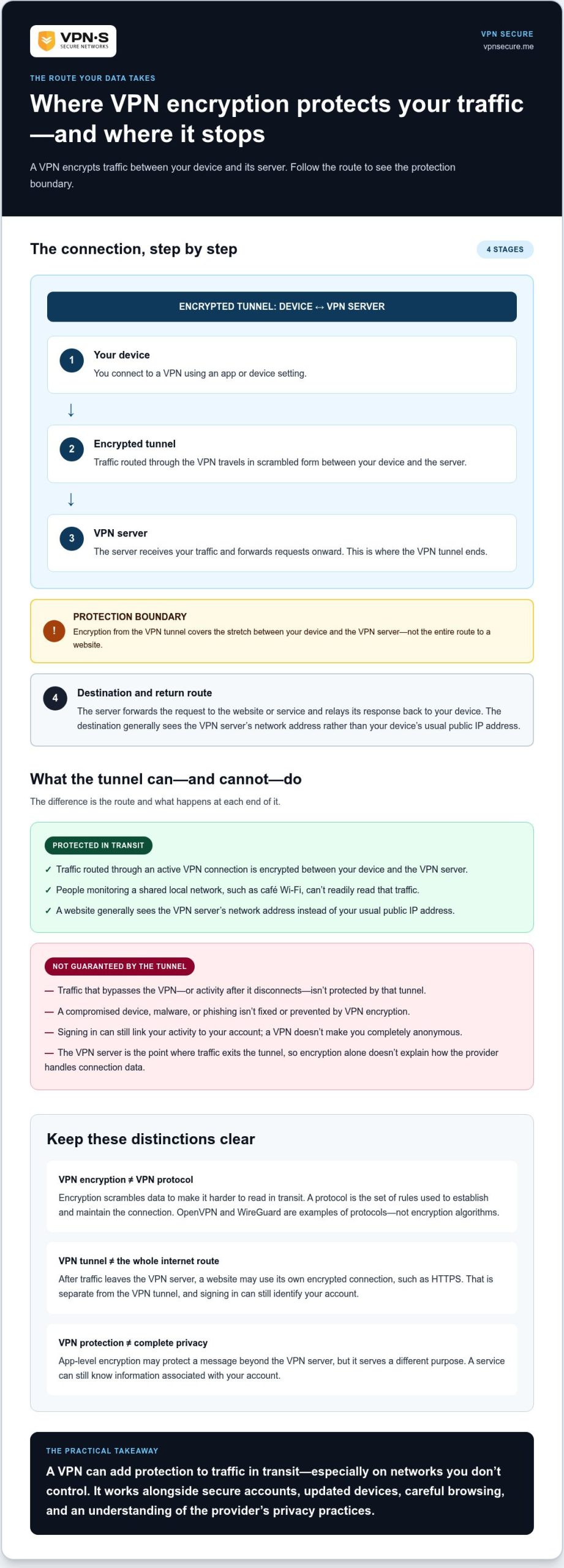
A VPN changes the route your internet traffic takes. Instead of sending it directly from your device toward a website or app, the VPN sends it through a server first. The basic path is:
- Device: You connect to a VPN using an app or device setting.
- Encrypted tunnel: The VPN establishes a protected connection for traffic routed through it.
- VPN server: The server receives that traffic and forwards it onward.
- Destination: The website or service responds through the route back to your device.
The destination generally sees the VPN server’s network address rather than your device’s usual public IP address. But the server is a handoff point, not an invisible passage all the way to a website. As Thales explains in its overview of encrypted VPNs for data protection, encryption helps protect data as it travels through a VPN connection. What happens beyond that connection depends on the destination and the service handling your traffic.
What happens when you connect to a VPN?
When you select a server and connect, your device and the VPN service establish a connection using a shared set of rules. Traffic routed through it travels in encrypted form to the VPN server. The server then forwards requests to their destinations and relays the responses back. Connection setup can vary by service, but the key boundary stays the same: the VPN tunnel protects the segment between your device and that server.
The VPN tunnel’s protection begins at your device and ends at the VPN server. After that, your traffic continues to its destination outside the tunnel. A website may use its own encrypted connection, such as HTTPS, for the next stretch. That protection is separate from the VPN tunnel, and signing in can still link your activity to your account.
How do encryption and VPN protocols relate?
Encryption describes how data is scrambled to make it harder to read in transit. A VPN protocol is the set of rules that governs how the connection is established and maintained. OpenVPN and WireGuard are examples of VPN protocols, not encryption algorithms. Their names alone don’t reveal every detail of a provider’s setup, so don’t assume a specific protocol or technical specification is included unless the service materials say so.
Think of the protocol as the connection rules, while encryption protects the data moving through the connection. Both matter, but they answer different questions. When evaluating a data encryption VPN service, separate what it says about encryption from what it says about protocols and privacy practices. A protocol name is not proof of anonymity or a substitute for understanding where the tunnel ends.
For an encrypted connection across your devices, explore VPN Secure’s subscription VPN service.
How to compare VPN encryption with logging and IP privacy
VPN privacy isn’t a single setting. Encryption, connection protocols, provider logging, and the IP address a website sees answer different questions. Compare them separately to avoid mistaking one technical feature for complete privacy.
Encryption
Protects data while it travels through the encrypted connection. It doesn’t explain what records the provider keeps.
Protocol
Sets the rules for establishing and maintaining the VPN connection. It’s distinct from the provider’s data-retention policy.
Logging policy
Describes what information the provider collects or retains about accounts, connections, or activity.
Visible IP address
A VPN can make a destination see the VPN server’s IP address instead of your usual network-facing address. That doesn’t conceal every identifier.
Strong encryption alone doesn’t prove a service is trustworthy. It describes protection in transit, not how the provider handles records, secures its systems, or explains its privacy practices. Treat technical claims and privacy claims as separate things to evaluate. Assess a data encryption VPN service on both fronts, rather than judging it by one impressive-sounding feature.
Does encryption mean a VPN keeps no logs?
No. Encryption concerns how traffic is protected as it moves between your device and the VPN server. Logging concerns whether the provider records information, such as connection details or activity. One doesn’t establish the other. Read the privacy policy for specific explanations of what data is collected, why it is collected, and how long it is retained. This no-log VPN audit guide explains what evidence may support a no-log claim.
Does a VPN make you anonymous online?
A VPN can change the IP address a website sees, but it doesn’t erase other clues to your identity. Sign in to an account and the service can associate activity with your profile. Cookies may link browsing sessions, while browser signals and your own choices can also help identify you. A VPN can improve privacy in specific ways, but it can’t promise anonymity or make you untraceable.
Keep these distinctions in mind when reviewing claims: encryption protects traffic in transit, a privacy policy describes provider practices, and an IP address is only one signal a destination may see. The full picture matters.
How to choose and use a data encryption VPN service
Start with the risk you want to manage, not a list of impressive-sounding technical terms. Public Wi-Fi, routine browsing, travel, and sensitive remote access can call for different priorities. If you often connect from airports or hotels, for example, focus on a service that’s practical to use on your devices and clearly explains its privacy practices. A VPN travel privacy guide can help you think through the risks of connecting away from home.
What should you check before subscribing?
Assess each part separately. Look for a plain-language explanation of what the encryption covers, a privacy policy that describes data handling, and clear information about supported devices. Check that the service fits the way you browse and connect, rather than choosing based on technical jargon alone.
- Protection: Can you tell where the encrypted connection begins and ends?
- Privacy practices: Does the policy explain what information the provider collects and retains?
- Device coverage: Can you use the service on the devices you rely on?
- Practical usability: Can you connect easily in the situations where you need protection?
- Limitations: Does the service explain what a VPN won’t protect, such as account activity or an infected device?
Don’t treat an algorithm name as a complete quality score. Encryption is one part of the picture; it doesn’t establish a provider’s logging practices, the clarity of its policies, or how well the service fits your needs. A data encryption VPN service should make its protections understandable, not rely on jargon to do the convincing.
How can you use VPN protection more effectively?
A VPN works best as one layer in a broader security routine. Connect before joining a network you don’t trust, then check that the VPN shows an active connection before browsing. If it disconnects, pause sensitive activity until you’ve confirmed the connection is protected again.
- Connect first: Start the VPN before using public or unfamiliar Wi-Fi.
- Confirm the connection: Check the app or device setting to make sure the VPN is active.
- Keep devices current: Install software updates to address security issues in your operating system and apps.
- Protect accounts: Use strong, unique passwords and secure account settings.
- Choose suitable messaging: For private message contents, use an app that provides end-to-end encryption. A VPN’s network protection is separate and doesn’t replace that feature.
These habits work together. A VPN can protect traffic routed through its connection, but it can’t fix an outdated device or stop you from sharing sensitive information with the wrong account. VPN Secure subscriptions provide encrypted connections across major devices as one part of your privacy routine. Explore VPN Secure’s VPN subscriptions.
How VPN Secure fits into an encrypted connection strategy
Encryption protects traffic while it travels through the VPN connection. It doesn’t erase account activity, secure a compromised device, or guarantee anonymity. Privacy depends on more than a tunnel: provider data practices, account habits, and the way you use each app all matter. Keep those boundaries in view, and judge a VPN by the protection it provides, not by promises of total security.
What VPN Secure brings to everyday browsing
VPN Secure encrypts internet traffic across major devices. Its subscription service is an option for people who want an encrypted connection for everyday browsing, streaming, or connecting over public Wi-Fi. The service includes unlimited bandwidth and servers in more than 40 countries. These details describe the service, not a promise of specific speeds, access to every website, or complete protection from online threats.
VPN Secure describes its service as private and no-log. That claim relates to provider data practices, which are separate from encryption itself. A VPN can help protect traffic in transit, but it doesn’t make signed-in activity anonymous or replace secure account habits. Treat it as one layer in your setup, alongside current device software, strong passwords, and care with the information you share.
Choose your next step with realistic expectations
A data encryption VPN service makes the most sense when it fits your routine. Consider which devices you use, where you connect, and whether the service’s privacy explanation is clear to you. Then weigh its role realistically: it can add an encrypted connection layer, but it can’t control every part of your online experience or guarantee that every threat is blocked.
If that added protection fits your needs, review VPN Secure’s monthly and annual subscription options. Choose a plan that suits your use, and pair the VPN with sensible security habits. That’s a practical way to make an informed choice without expecting one tool to do everything.
Make your next privacy choice with confidence
Turn what you’ve learned into a simple personal standard. Decide which online situations matter most to you, what kind of provider transparency you expect, and which everyday security habits you’re ready to maintain. That gives you a clearer basis for judging any data encryption VPN service, without getting distracted by technical language that doesn’t address your real concerns.
Keep that standard close as your devices, routines, and privacy priorities change. Revisit your settings from time to time, and make sure the tools you use still fit the way you connect. A VPN can be a useful part of that plan, not a substitute for informed choices.
Ready to add an encrypted connection to your privacy routine? Explore VPN Secure’s subscription options and choose a plan that fits your needs.
Frequently Asked Questions
What does a data encryption VPN service do?
A data encryption VPN service creates a protected connection between your device and a VPN server, helping shield traffic as it travels across that segment. For example, it can reduce the exposure of a browser request on a shared network. It doesn’t secure a device already infected with malware or hide who you are after you sign in. VPN encryption also doesn’t replace end-to-end encryption, which protects message contents between communicating users.
Does a VPN encrypt all internet traffic?
Not necessarily. A VPN can protect traffic routed through its active connection, but settings may exclude specific apps or traffic types, and coverage can change if the connection drops. Services can also handle routing differently, so understand how the VPN behaves on your devices. For instance, if you use a work app alongside personal browsing, verify whether both are routed through the VPN instead of assuming one connection covers everything.
Can a VPN provider see my data if it is encrypted?
Encryption on the route from your device to the VPN server doesn’t automatically prevent the provider’s server from processing traffic. However, HTTPS or encryption built into an app can continue protecting content beyond the VPN tunnel. A provider may still handle connection information, depending on its practices. The encryption claim alone can’t tell you what records are collected or retained, so read the privacy policy for details about data handling.
Is VPN encryption enough to make me anonymous?
No. A VPN may replace the IP address destinations see with the VPN server’s address, but other signals can still identify you. Signing in, retaining cookies, using a distinctive browser setup, or sharing personal details can connect activity to you. For example, opening a familiar account in a new location still tells that service who you are. Treat a VPN as a privacy tool, not a promise of invisibility.
Does a VPN encrypt text messages and calls?
A VPN protects internet traffic that travels through its connection, but message and call contents may also depend on the app’s own encryption. Ordinary SMS uses cellular messaging rather than an internet messaging app, so don’t assume its contents are protected by a VPN tunnel. Internet-based messages or calls may travel through the VPN, while their content protection depends on the app. Check the app’s security information for specifics.
How do I know whether a VPN service uses strong encryption?
Look for a clear technical explanation of how the connection is protected, which protocols the service supports, and whether its privacy documentation explains data handling plainly. Compare those details with your needs instead of choosing based on jargon. A familiar algorithm name alone doesn’t establish the quality of the software, server practices, or privacy policy. If a claim is unclear, treat it as unanswered rather than assuming the strongest interpretation.
Does a VPN protect me on public Wi-Fi?
An active VPN can encrypt traffic between your device and its server while you use public Wi-Fi, adding protection on a network you don’t control. It won’t fix a compromised device, stop you from entering credentials on a phishing page, or replace HTTPS and strong account security. Before checking email or banking, connect to the VPN and confirm it’s active. Keep your device software updated, too.