




A VPN is a shield, not a force field. A VPN for internet security encrypts data in transit and routes your traffic through a VPN server, helping protect your connection on public Wi-Fi and limiting what your internet provider can see about your browsing. It doesn’t make you completely anonymous or stop malware, phishing, or cookie tracking.
That distinction matters. Encryption can strengthen privacy, but protection depends on what the VPN covers, how it handles data, and whether it works reliably on your devices. A dropped connection or an app that doesn’t support your phone or computer can leave gaps.
This guide explains how VPN encryption works, what it can and can’t protect, and which security features to look for. You’ll also learn how protocols affect speed and how to compare compatibility across phones, computers, and other devices. The goal is to find an option that fits your everyday use without mistaking one privacy tool for complete protection.
Key Takeaways
- Understand how encryption and IP masking help protect traffic, and where their limits matter.
- Compare VPN protocols with your priorities for speed, reliability, and everyday use.
- Assess device and platform compatibility so protection fits the way you connect.
- Learn which privacy practices to examine when judging a VPN’s security.
- See why public Wi-Fi calls for extra care, and what a VPN can do to reduce exposure.
Are VPNs safe and secure?
A VPN can protect data in transit, but it isn’t an all-purpose security shield. On café Wi-Fi in the United States, for example, encryption can make intercepted traffic harder to read. It can’t secure every app or website you use.
Data Encryption and IP Masking
A VPN encrypts your internet traffic and routes it through a remote server, which replaces your public IP address with its own. That makes your browsing harder for someone on the same network to inspect and can make it harder for your internet provider to track visited sites. AES 256-bit encryption is identified as a current gold standard, but encryption doesn’t hide every clue about your identity.
VPN Protection and Its Limits
A VPN supports internet security by protecting the connection between your device and its VPN server. It doesn’t make you completely anonymous or stop cookies, browser fingerprinting, viruses, malware, or phishing. For example, a malicious file can still reach your device through an encrypted connection. Treat a VPN as one layer of protection, alongside updated software, careful downloads, and strong account security.
Legality and Privacy Rules
VPN technology is legal and accessible in the United States. A VPN doesn’t make unlawful online activity lawful or remove your responsibility for what you do online. For privacy, examine the provider’s logging, data-retention, and disclosure practices. A no-logging claim concerns how the provider handles activity data; it doesn’t stop websites from collecting information through account logins or cookies.
For streaming, a VPN routes traffic through a server, which may change the apparent location of your connection. Streaming platforms can still apply their own access rules, and encryption doesn’t guarantee a particular catalog or uninterrupted playback. Gaming involves a similar trade-off: routing can add latency, so a distant server may make responsive play harder. For torrenting, a VPN can encrypt traffic in transit, but it doesn’t verify a file’s safety or usage rights.
Organizations use VPNs to protect company data and let remote workers securely access private files and applications. A remote-access VPN connects an individual device to a private corporate network; a site-to-site VPN links separate networks, such as offices. These tools are part of layered security, not a replacement for firewalls or other protections.
Travelers can use a VPN on hotel or airport Wi-Fi to help protect logins and personal data. Smart TVs are a different case: check that the VPN app or supported setup works with the TV’s operating system, since phone compatibility doesn’t guarantee TV compatibility. When streaming away from home, the server location, connection speed, and platform rules all affect the experience.
Choosing a VPN for security, speed, and compatibility
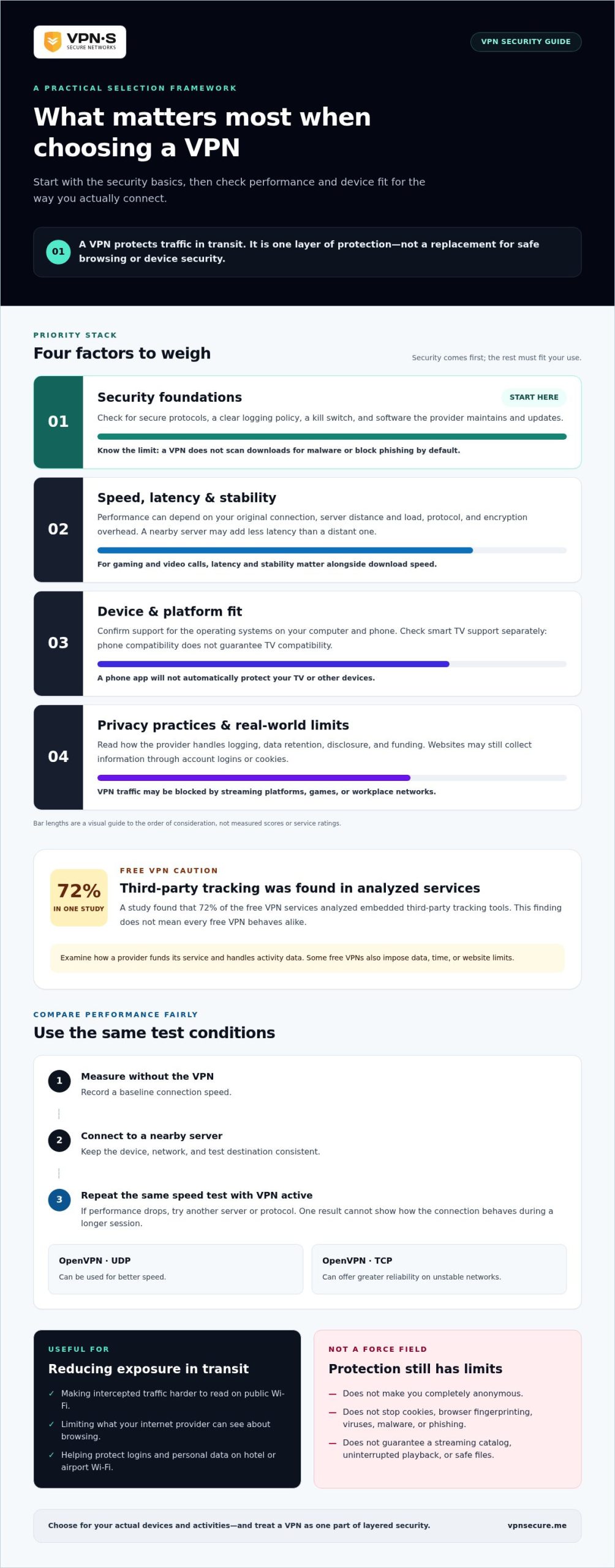
Choosing a VPN for internet security means weighing privacy, device support, and connection performance. A VPN adds encryption and routes traffic through a VPN server, which can increase latency. Look for a service that supports your operating systems, clearly explains its logging practices, and works reliably for your usual activities.
Start with security. Look for a clear logging policy, secure protocols, and a kill switch that can cut off internet access if the VPN session drops. Choose a VPN client from a provider that maintains and updates its software. A VPN protects traffic in transit, but it doesn’t scan downloads for malware or block phishing by default. Don’t treat an encrypted connection as a substitute for safe browsing habits.
Speed depends on your original connection, server distance, server load, protocol, and encryption overhead. A nearby server may add less latency than a distant one. OpenVPN can use UDP for better speed or TCP for greater reliability on unstable networks. For gaming or video calls, latency and stability matter as much as download speed. For streaming, test playback quality and buffering on the services you actually use.
Run a simple comparison before settling on a configuration. Measure your connection without the VPN, connect to a nearby server, then repeat the same speed test with the VPN active. Keep the device, network, and test destination consistent; otherwise, changing Wi-Fi conditions may affect the results. Try another server or protocol if performance drops. A single result won’t show how the connection behaves during a longer session.
VPN use can bring practical drawbacks. A streaming platform, game, or workplace network may block VPN traffic, while unstable Wi-Fi can interrupt a session. Some free VPNs impose data, time, or website limits. A study found that 72% of the free VPN services analyzed embedded third-party tracking tools. Examine how a provider funds its service and handles activity data. Don’t assume every free option behaves alike. Compare billing terms without judging security by price alone.
A VPN for internet security should also fit the devices you use. Confirm the VPN software supports your computer and phone operating systems, and consider whether your smart TV supports a VPN app. A phone app won’t automatically protect a TV or other devices. Before choosing, review the provider’s VPN security and privacy details alongside your device requirements.
VPN definition and encrypted connections
A virtual private network creates an encrypted connection between your device and a remote VPN server. Its tunnel changes how traffic travels, affecting both privacy and connection performance.
VPN Tunneling and Encryption
A VPN tunnel carries your internet traffic between your device and a VPN server, while encryption scrambles the data in transit. That matters on networks you don’t control, because someone monitoring the connection has a harder time reading the traffic. The tunnel doesn’t make every website or app secure; it protects the path to the VPN server, not the destination itself.
Consider opening a banking website on public Wi-Fi. The VPN encrypts traffic traveling to its server, then forwards it toward the website. The site still handles your login and account data, so HTTPS and a strong password remain important. The encryption and protocol managing the tunnel both affect how the connection is protected.
Encryption and Protocol Choices
A VPN protocol sets the rules for creating and maintaining an encrypted connection. OpenVPN supports AES-256 and ChaCha20 encryption, and can use UDP for speed or TCP for better reliability on unstable networks. IKEv2/IPsec can use AES-256 and may re-establish a session when a device switches between Wi-Fi and mobile data. These differences matter when balancing speed, stability, and protection.
WireGuard mainly uses UDP and cryptographic tools such as ChaCha20, Poly1305, and BLAKE2s. By contrast, PPTP uses weak encryption and is vulnerable to attacks. Protocol names alone don’t describe a provider’s entire security setup, but they help you understand the technology behind the tunnel. Match the option to your network: reliability may matter more than speed on an unstable connection.
Encryption and IP Address Masking
Encryption hides the readable content of traffic in transit; IP masking changes the public IP address websites see. A VPN server routes your traffic outward using its own public IP address instead of your device’s regular one. This can make it harder for a website to connect a visit with your network address, but it doesn’t erase other identifying details.
For example, signing in to the same account can identify you even when your connection uses a different IP address. Cookies and browser fingerprinting can also help websites recognize your device. Treat IP masking as one privacy layer, not invisibility. A VPN encrypts the route and substitutes the visible address, while websites can still use account and browser information.
VPN Security Features
Look for strong encryption, a kill switch, and DNS leak protection when comparing VPN security features. A kill switch can cut off internet access if the VPN connection drops, reducing the chance that apps send traffic outside the tunnel. DNS leak protection helps keep DNS requests within the VPN connection instead of exposing them through another route.
These features address different gaps. Encryption protects traffic in transit, the kill switch responds to a dropped session, and DNS leak protection addresses name-lookup requests. Test the setup during ordinary use, and check that a dropped connection doesn’t quietly restore unprotected access. No single feature replaces secure websites or careful account practices.
Use the protocol and feature settings as a package. For a phone moving between Wi-Fi and cellular service, IKEv2/IPsec can re-establish a VPN session after a network change. For an unstable connection, OpenVPN’s TCP option prioritizes reliability over UDP’s speed advantage. Those choices shape how the encrypted tunnel behaves in real use.
What Is a VPN – Virtual Private Network?
On airport Wi-Fi, your device shares a public network with other travelers. A VPN adds an encrypted route for your traffic, helping reduce exposure while you browse remotely.
VPN Use on Public Wi-Fi
A VPN on public Wi-Fi encrypts traffic between your device and a VPN server. This matters because coffee shops, hotels, and airports can expose connections to data sniffing. For example, connect the VPN before checking email or opening a work account on a shared network.
Use a simple routine: open the VPN app, connect, then begin browsing. If the VPN session drops, pause sensitive activity until the protected connection returns. A kill switch can cut off internet access during a drop, reducing the chance that an app sends data outside the encrypted tunnel. This helps protect logins and personal data in transit.
A VPN changes the public IP address websites see, but it doesn’t erase your identity. Signing in to a social account still identifies you to that service. Cookies and browser fingerprinting can also help websites recognize a browser, even when its IP address changes. Keep account security and cautious browsing in mind.
Protection on Public Networks
VPN protection on a public network adds privacy to the connection, not immunity from every attack. Encryption makes intercepted traffic harder to read between your device and the VPN server. It doesn’t stop phishing, malware, or weaknesses in an app you use. A fake login page can still trick you into revealing credentials.
When working remotely from a hotel, connect the VPN before opening company files or applications. Organizations use remote-access VPNs to let employees securely reach private company resources from outside the office. A VPN can protect that traffic in transit, but businesses still need other security layers. Firewalls and intrusion detection address risks a VPN alone doesn’t cover.
Choose a VPN based on its security practices, not the word “premium” in an advertisement. Read its logging policy to understand how it handles browsing activity and user information. A provider’s privacy practices matter because the VPN routes traffic through its server. Encryption shifts trust away from the local Wi-Fi network and toward the VPN operator.
Public Wi-Fi calls for care beyond using a VPN. Avoid unexpected links, use secure account sign-ins, and keep your device software updated. For example, if a hotel network displays a suspicious login prompt, don’t enter your email password. A VPN can protect traffic on the connection, but it can’t confirm that a network prompt is genuine.
Use the VPN consistently on shared networks, especially before accessing email, financial accounts, or remote work tools. If your device disconnects from Wi-Fi and reconnects elsewhere, confirm that the VPN session is active before resuming sensitive activity. This quick check helps keep your browsing inside the intended encrypted connection.
VPN compatibility across devices and platforms
A VPN protects a device only when its traffic passes through the VPN connection. Before choosing one, map where you browse, work, stream, and play, then match those devices to supported apps and connection methods.
Start with the device you use most. A VPN app installed on an Android phone protects that phone’s traffic, not automatically a laptop, smart TV, or game console on the same Wi-Fi. Check support for each operating system and device model. A Windows laptop and an iPhone may need separate apps, even when they use the same VPN account.
Network changes matter on mobile. A phone can switch from Wi-Fi to cellular data while you’re walking out of a café. IKEv2/IPsec can automatically re-establish a VPN session after a device changes networks. That helps keep the connection continuous, but confirm the VPN app shows an active session after switching. Don’t assume the icon or the Wi-Fi symbol means VPN protection is still running.
Smart TVs and consoles need special attention. Some devices support VPN apps directly; others may need a different network setup to route their traffic through a VPN. That affects which applications are covered and how easy it is to manage the connection. If you stream on a television but browse on a phone, check each device separately rather than treating the household as one protected unit.
Use this quick compatibility check before settling on a VPN:
- Phones and tablets: Match the app to the device’s operating system and consider Wi-Fi-to-cellular switching.
- Computers: Confirm the desktop app supports the operating system you use for browsing or remote work.
- TVs and consoles: Check whether the device can run a VPN app or needs another supported setup.
Compatibility also affects everyday reliability. A VPN app that works on a laptop may not cover a browser extension, a smart TV app, or every device on your home network. Decide which applications need the encrypted connection, then monitor the VPN status while using them. If a video app stops working after you connect, try another server or review the app’s network settings.
Choose for your actual device mix, not a feature list built around someone else’s setup. If phones, computers, and streaming devices all matter, compare how each connects before committing. Explore VPN options for your devices and choose a setup that fits how you use them.
VPN Secure: Monthly VPN Subscription
VPN Secure’s Monthly VPN Subscription provides encrypted internet traffic on your devices through its private, no-log VPN service. It’s designed to protect connections, including on public Wi-Fi. Choose the monthly subscription for a shorter commitment, or consider the Annual VPN Subscription for longer-term use. A Dedicated IP is another option when a consistent IP address suits your needs.
A VPN can strengthen privacy, but it doesn’t replace protections against malware, phishing, or unsafe account practices. Match your choice to your devices and how you connect. Explore VPN Secure’s subscription and Dedicated IP options to find a setup that fits your needs.
Make Your Privacy Choices Deliberate
Security works best as a choice you make before a risky moment, not a scramble afterward. Decide which online activities deserve extra privacy, and make protection part of your usual routine. A VPN for internet security can support that intention, but your choices about accounts, downloads, and personal information still matter.
Review your needs whenever your habits change. A new work device, more frequent travel, or streaming on another screen can change what you need from a VPN. Revisit your priorities and choose a setup that fits your actual use rather than paying for features you won’t use. Keep the decision practical and privacy-conscious.
If you want help considering your VPN needs, contact VPN Secure about your setup. Take the next step with clarity, and build a more intentional approach to your online privacy.
Frequently Asked Questions
What is VPN protection?
VPN protection adds privacy to the connection between your device and a VPN server. It can help on shared Wi-Fi or limit how much your internet provider can see about your browsing activity. It doesn’t secure every part of your digital life: an infected device, a deceptive email, or a compromised account still requires other security measures.
Do VPNs really work?
Yes, a VPN can protect internet traffic in transit and change the public IP address websites receive. Its usefulness depends on the task: it can help protect a connection on a shared network, but it can’t make a scam message trustworthy or stop a website from recognizing an account you sign into. Use it as one part of a broader privacy routine.
How to Choose the Right VPN for Your Needs?
Choose a VPN by matching its features to your devices and activities. For remote work, prioritize stable access and a clear privacy policy; for gaming, focus on latency; for travel, check that your phone’s operating system is supported. Then compare app availability, connection options, and what happens if the VPN disconnects. A feature matters only if it suits how you use the internet.
Is a VPN Worth Getting?
A VPN can be useful if you regularly connect through networks you don’t control, travel with a laptop, or want to limit exposure of your browsing traffic. It may be less useful if you rarely use public networks and expect protection from malware or phishing. Decide by identifying the risk you want to reduce, then weigh that against speed and compatibility trade-offs.
What Does a VPN Do?
A VPN sends internet traffic through a provider’s server and encrypts the connection to that server. This can make traffic harder to inspect as it travels across a network and changes the IP address visible to websites. The VPN app’s settings determine whether it covers the whole device or only selected applications, so check its controls before relying on it for a specific task.
What is a VPN?
A VPN, or virtual private network, is software that creates an encrypted connection between your device and a VPN server. Picture a laptop connecting through a hotel network: the VPN creates a protected route before traffic continues to websites. The VPN server handles that onward connection, making the provider part of the trust relationship. The tool improves connection privacy, not complete anonymity.
Why Do I Need a VPN?
You may want a VPN when using shared Wi-Fi, working remotely, or reducing how directly your internet provider can associate browsing traffic with your connection. For example, a traveler checking personal email at an airport can add encryption to the network path. A VPN doesn’t replace secure passwords, software updates, or careful handling of links, so keep those protections active too.
Which VPN protocols are most secure: WireGuard, OpenVPN, or IKEv2?
All three can support secure connections, but they differ in design and use. WireGuard uses modern cryptographic tools including ChaCha20 and Poly1305. OpenVPN supports AES-256 and ChaCha20, with UDP for speed or TCP for reliability on unstable networks. IKEv2/IPsec can use AES-256 and re-establish a session when a device switches between Wi-Fi and mobile data. Choose based on device support and connection needs.