




A privacy label isn’t proof. A trusted VPN for privacy should meet the minimum recommended security level: AES-256 encryption with 2048-bit key lengths. The strongest choice is one you can assess through evidence, including independent audits, open-source apps, kill-switch behavior, and protection against IP, DNS, and other leaks.
It makes sense to expect more than a bold promise from a VPN provider. A VPN can hide your traffic from your internet provider, but it doesn’t make you anonymous. Trust depends on the service’s safeguards and what they can actually protect.
This guide explains how to compare VPN privacy without getting lost in technical jargon. Learn what audits and open-source apps can reveal, how kill switches and leak protection work, and which trade-offs matter when choosing a service. Then use the decision guide to match the evidence to the protection you need.
Key Takeaways
- Use independent audit reports to see what was examined, when, and whether the findings cover the apps or systems you rely on.
- Enable the kill switch so a dropped VPN connection doesn’t silently expose traffic through your regular internet connection.
- Check DNS, IP, and WebRTC leak protection separately; each can reveal identifying information through a different route.
- Compare privacy claims with practical evidence, then choose the safeguards that fit how and where you use the internet.
Independent audits and open-source apps
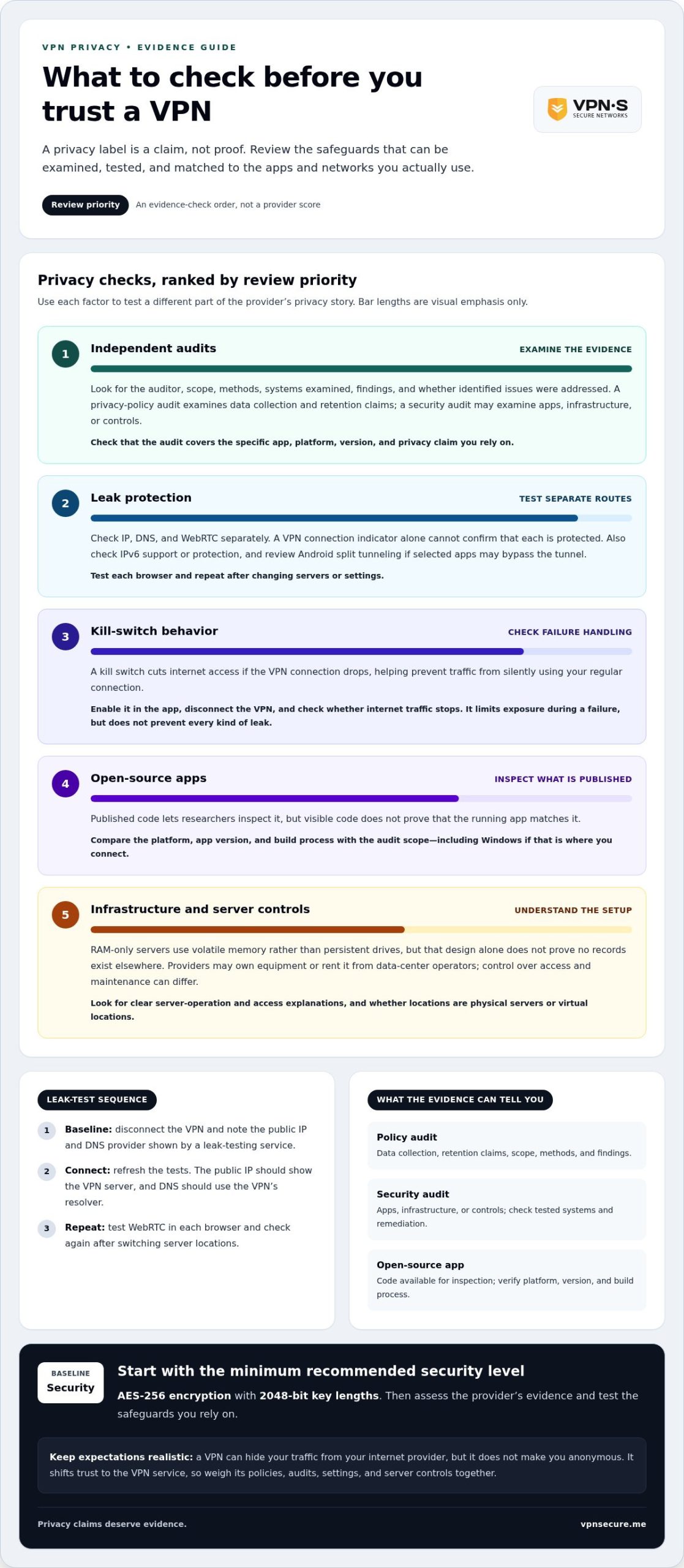
A no-logs policy is a claim about what a VPN records, not proof that it records nothing. Look for an independent audit that names the auditor, explains its scope, and describes the systems examined. Read the findings, not just a badge. Reviewing a privacy policy alone cannot establish how servers or apps behave in practice.
Open-source apps let researchers inspect published code, but visible code doesn’t prove the running app matches it. Check which platforms and versions the audit covered, including Windows if that’s where you connect. Compare the app’s listed protocols and privacy settings with the audit’s scope. A provider’s name or headquarters location isn’t evidence on its own.
Distinguish privacy-policy audits from technical security audits. The first examines statements about data collection, retention, and sharing. The second can assess app code, infrastructure, or security controls. For a trusted VPN for privacy, look for findings that explain the method and its limits, and whether the provider addressed identified issues. “Strict” no-logs language matters less than evidence testing the relevant systems.
Can a VPN provider be compelled to share user data under U.S. law? Yes. A provider can face legal demands for data it holds. A no-logs policy may limit the activity records available, but it doesn’t prevent a demand or establish what data exists.
| Evidence option | What it examines | What to look for |
|---|---|---|
| Privacy-policy audit | Data collection and retention claims | Scope, methods, and findings |
| Security audit | Apps, infrastructure, or controls | Tested systems and remediation |
| Open-source app | Code available for inspection | Platform, version, and build process |
Choose a provider whose evidence covers the specific app and privacy claim you rely on, not simply the one with the most polished assurances.
What are kill-switches?
A kill switch cuts internet access if the VPN connection drops. Without one, your device may reconnect through your regular network while an app continues sending data. Enable the switch in the VPN settings, then test it by disconnecting the VPN and checking whether internet traffic stops. A kill switch limits exposure during a failure, but doesn’t prevent every kind of leak.
RAM-only, or diskless, servers store active data in volatile memory rather than persistent drives. Restarting a server clears that memory, but this design alone doesn’t prove that a provider keeps no records elsewhere. Compare the infrastructure claim with an independent audit and the provider’s explanation of its logging practices.
Server ownership also matters. Providers may own equipment or rent it from data-center operators, so their control over access and maintenance can differ. Look for clear explanations of who operates the servers and how access is managed. Check whether listed network locations are physical servers or virtual locations, which assign an IP associated with a place even when the hardware is elsewhere.
Which VPN providers are based in privacy-friendly jurisdictions? Users often compare providers headquartered in places such as Switzerland or the Bahamas. A country label alone doesn’t establish how a provider handles data, so weigh jurisdiction alongside its policies, audits, and server controls.
Network size matters less than location transparency and performance where you need protection. A long list of cities doesn’t show whether every location uses the same safeguards. Check the provider’s location descriptions, then test a nearby and a distant server for connection stability. For everyday use, enable the kill switch and choose WireGuard in the app settings. OpenVPN is another secure protocol when available. These settings reduce exposure, but no server setup makes you completely anonymous.
DNS, IP, and WebRTC leak protection
A VPN encrypts traffic between your device and its server, but encryption alone doesn’t stop leaks. DNS requests can still reach your internet provider if your device uses its usual resolver. An IP leak can expose your actual public address, while WebRTC in a browser may reveal network details during calls. Test all three, not just the connection status shown in the app.
Start with a baseline. Disconnect the VPN and note the public IP and DNS provider shown by a reputable leak-testing service. Connect again, refresh the tests, and compare the results. The public IP should show the VPN server, and DNS requests should use the VPN’s resolver rather than your usual provider. Repeat after switching servers in different countries, as one location may behave differently from another.
Check WebRTC in each browser you use. A browser’s real-time communication feature can expose local or public network addresses, depending on its settings and the connection. Run a WebRTC test while connected, then review browser privacy controls if your address appears. Don’t assume a clean result in Chrome means Firefox or a mobile browser behaves the same way.
IPv6 needs its own check. If your network supports IPv6 but the VPN service only tunnels IPv4, IPv6 traffic may bypass the encrypted connection. Look for explicit IPv6 support or protection in the app, then test with IPv6 enabled. On Android, also review split-tunneling settings, which can send selected apps outside the VPN tunnel.
Finally, compare browsing speed with the VPN off and on, using the same device, network, and server. Encryption, server distance, congestion, and routing can affect performance. A slower result isn’t evidence of a leak; an exposed address or DNS request is. Repeat the test after changing settings, and check that normal traffic resumes when you disconnect.
VPN privacy and trust
A VPN shifts trust; it doesn’t erase it. Your internet provider can see that you connect to a VPN, while the VPN service handles traffic passing through its encrypted tunnel. A trustworthy choice makes this relationship clear through specific privacy policies, independent audits, and security settings you can inspect.
What makes a VPN trustworthy for privacy? Look for an independently reviewed no-logs policy, transparent audit findings, strong encryption, and apps with protections such as a kill switch. Check that the service supports secure protocols, including OpenVPN when available, and test that its connections don’t expose your IP or DNS requests.
Then match the evidence to your needs. A desktop user streaming at home may prioritize reliable connections and leak protection. Someone using public Wi-Fi may care more about safeguards when a connection drops. A trusted VPN for privacy should explain what it protects, what information it collects, and where its limits lie. Don’t treat a country name, server count, or polished privacy badge as a substitute for evidence.
What are the privacy risks and limitations of using a VPN? A VPN hides your traffic from your internet provider, but it doesn’t make you anonymous or stop websites identifying you through account logins, cookies, or browser fingerprinting. The VPN provider handles traffic passing through its tunnel, and encryption cannot protect data you submit directly to a website.
Think of a VPN as one layer, not a disguise. Use HTTPS websites, review browser permissions, and avoid signing into identifying accounts when anonymity matters. For work or streaming, choose a VPN connection that meets your privacy needs without assuming it prevents tracking by every site, app, or network operator.
Compare privacy claims with the evidence and safeguards that matter to you. Explore VPN privacy options as a next step toward protecting your internet connections.
VPN Secure: Monthly VPN Subscription
VPN Secure’s Monthly VPN Subscription is a practical next step if you want encrypted internet traffic while browsing, travelling, or using public Wi-Fi. It protects connections across major devices, giving you a private network option when you need one.
Choose a subscription after weighing the privacy evidence that matters to you. The monthly option suits readers who want time-limited access, while the Annual VPN Subscription is another available plan. A Dedicated IP meets a different connection need, and White Label VPN serves a separate use case.
Keep expectations grounded: a VPN can shield traffic in transit, but it doesn’t make you anonymous or replace careful app and account habits. Visit vpnsecure.me to explore VPN Secure’s subscription options.
Make your next privacy choice deliberate
Privacy decisions work best when they fit your real habits. Consider where you connect, which devices you use, and whether you need one consistent personal connection or a separate IP address. Set your priorities before choosing, then select an option that matches how you browse instead of chasing the biggest feature list. A trusted VPN for privacy should fit your routine and make your security choices easier to maintain.
VPN Secure offers a Monthly VPN Subscription and an Annual VPN Subscription for personal access, plus a Dedicated IP for a different connection need. Consider which option suits your use, then take the next step at your own pace.
Contact VPN Secure for VPN advice. Make a considered choice, and take greater control of your online privacy.
Frequently Asked Questions
What is the best VPN in 2026?
There’s no single best VPN for every user; the right choice depends on your priorities and devices. For remote work, focus on stable connections and clear account security controls. For travel, consider app usability and server access where you need it. Compare each service’s privacy evidence, features, and terms against your actual routine, rather than treating a ranking as a guarantee of fit.
Are VPNs legal?
VPN legality depends on the country and the activity involved, so there isn’t one worldwide answer. A VPN is a privacy tool, not permission to break laws or service rules. If you’re travelling or using a VPN for work, understand the rules where you are and follow the laws that govern your online activity, with or without a VPN.
Are free VPNs safe?
Some free VPNs can be useful, but “free” alone tells you nothing about privacy or security. Before installing one, review its business model, app permissions, data policy, and update history. Be cautious if the app requests access unrelated to VPN operation or explains its data practices vaguely. A subscription fee doesn’t prove trustworthiness either; judge the evidence and controls.
Can I Trust My VPN to Protect My Privacy?
A trusted VPN for privacy can reduce what your internet provider sees, but trust should rest on evidence rather than branding. Check whether the provider explains account information, payment handling, and app permissions in plain language. Use a separate email address for VPN accounts if you want to limit account linkage, and secure that account with a unique password.
Can You Trust The Top VPN Services?
Not automatically. A high ranking or familiar name doesn’t establish that a service suits your needs or handles every platform consistently. Compare the app you’ll use with the provider’s stated features, and review its account controls and update history. Treat rankings as a starting point, then choose based on the service’s documented practices and your use case.
Does a VPN make me anonymous?
No. A VPN changes the network path your connection takes, but websites can still identify you through details you provide, such as a name or email address. Apps may also use device identifiers or location permissions. For greater privacy, limit unnecessary permissions, avoid sharing identifying details, and review the privacy settings in the apps and accounts you use.