



A VPN for online anonymity can hide your real IP address from websites and encrypt traffic between your device and the VPN server. But it can’t make you completely untraceable: your VPN provider can see your real IP address, and accounts, cookies, or browser fingerprinting can still connect activity to you.
It’s reasonable to expect a VPN to make you harder to track. It adds a layer of privacy, but it does not erase every clue you leave online. This guide explains how IP masking and encryption work, what your internet provider and websites may still see, and how to choose a VPN with privacy in mind.
You’ll also learn why logging into an account or using a recognizable browser can expose your identity, and where Tor may fit into a privacy setup. The goal isn’t to promise invisibility. It’s to clarify what a VPN protects, what it doesn’t, and how to make a more informed choice.
Key Takeaways
- Think of a VPN as one privacy layer, not a cloak of invisibility; it changes which parties can see parts of your connection.
- For stronger privacy, weigh a provider’s audited no-logs policy and the data-retention laws where it operates.
- Keep identifying accounts separate from sessions where privacy matters, since logging in can link your activity to you.
- Consider browser fingerprinting, leaks, and your threat model when assessing whether tools such as Tor add useful protection.
How VPN encryption and IP-address masking work
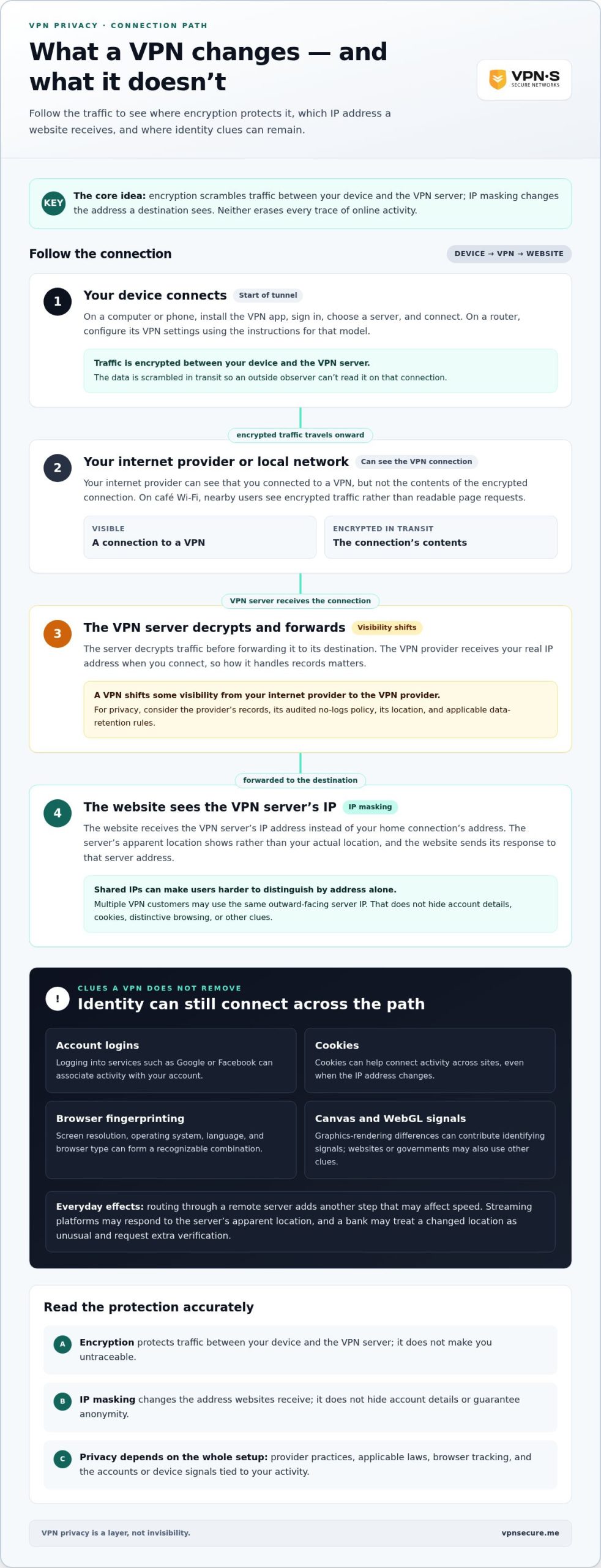
A VPN encrypts traffic, and websites see the VPN server’s IP address instead of yours. On a computer or phone, install the VPN app, sign in, choose a server, and connect. On a router, configure its VPN settings using the instructions for that model.
VPN Encryption Basics
VPN encryption scrambles data between your device and the VPN server, so an outside observer can’t read it in transit. Your internet provider can see that you connected to a VPN, but not the contents of the encrypted connection. On café Wi-Fi, for example, nearby users see encrypted traffic rather than readable page requests. The VPN server decrypts the traffic before forwarding it to its destination.
IP Address Visibility and Masking
IP masking replaces the address websites receive with the VPN server’s IP address. A website sends its response to that server address, not your home connection’s address. The server’s apparent location shows instead of your actual location. This can make online activity less directly tied to your network address, but it doesn’t hide account details or guarantee anonymity.
Shared IP Addresses
Multiple VPN customers may use the same shared IP address, so websites see the same outward-facing address for separate connections. For example, a site may see traffic from one server IP without seeing each customer’s home IP. Shared addresses make it harder to distinguish users by address alone. Logged-in accounts, cookies, or distinctive browsing can still identify someone, and governments or websites may use other clues.
Encryption protects the connection; IP masking changes the address a destination sees. The VPN provider receives your real IP address when you connect, so its handling of records matters. A VPN shifts some visibility from your internet provider to the VPN provider. It doesn’t erase every trace of your online activity.
How to be anonymous online?
In the United States, rules affecting VPN providers depend on the applicable jurisdictions; laws can shape what information providers must collect or share. A VPN can affect streaming and banking checks because services respond to the server’s apparent location. Traffic also takes an additional route, which may affect speed.
A VPN for online anonymity is only one layer of a broader privacy setup. Browser settings, account logins, and website tracking can still connect activity to you.
Browser and Website Tracking
Browser fingerprinting identifies a device through details such as screen resolution, operating system, language, and browser type. Websites can use a familiar combination to recognize the same device across visits, even when its IP address changes. Canvas and WebGL fingerprinting use graphics-rendering differences as identifying signals, while cookies can help connect activity across sites.
Review your browser’s privacy settings and remove extensions you don’t need. When you log into Google or Facebook, those services can associate your activity with your account.
Limits of VPN Anonymity
A VPN for online anonymity can change which network operator sees parts of your connection, but it can’t stop every service from identifying you. Your internet provider can see a VPN connection, and the VPN service receives your real IP address. Websites may associate activity with accounts, cookies, or device signals.
For critical privacy needs, look for a provider with an audited no-logs policy. The provider’s location and applicable data-retention rules also matter because laws can affect what information it may need to collect or share.
VPN Effects on Everyday Use
A VPN routes traffic through a remote server, adding another step that can affect connection speed. The result depends on the route, server, and your existing connection. Streaming platforms may respond to the server’s apparent location, while a bank may treat a changed location as unusual and request extra verification.
If an app has trouble, switch servers or adjust its settings, then try again. For an encrypted connection, explore VPN privacy protection as part of your setup.
5 Best Anonymous VPNs | Are VPNs untrackable/untraceable?
No VPN makes you completely anonymous: accounts, device signals, and provider records can still expose identity. Choose a service with strong encryption, leak protection, a kill switch, and an audited no-logs policy; these features address different risks.
Why VPNs Cannot Guarantee Anonymity
A VPN protects a connection, but it cannot erase every identifier attached to your online activity. Google and other platforms can associate browsing with logged-in accounts, while cookies and device fingerprints can support tracking. A VPN may help route traffic around network censorship, but access can still depend on the network and platform. Consider who can monitor each stage, including the VPN service itself.
Double-Hop VPNs and VPN Chaining
A double-hop VPN sends traffic through two VPN servers instead of one. VPN chaining adds another routing layer, making it harder to connect the starting IP address directly with the destination. The extra hop does not eliminate surveillance or account-based tracking. It also means you rely on the policies and security of each service or server in the chain. For nation-state threats, correct setup affects the level of protection.
Free and Paid VPNs
Free and paid plans differ in how they fund access, but price alone says little about privacy. Compare the logging policy, independent audits, operating location, and data-collection practices. A free service may have limits or rely on other revenue, while a paid subscription does not automatically mean stronger safeguards. Read how the provider handles connection records and whether its policy clearly explains what it retains.
Choosing VPN Protection Features
Strong encryption protects traffic in transit; leak protection helps prevent real IP or DNS details from escaping the VPN tunnel. A kill switch blocks internet access if the VPN connection drops, reducing accidental exposure during a brief outage. Check that these features are available in the apps you use, then test for leaks after connecting. For sensitive activity, weigh audited no-logs claims and the provider’s legal jurisdiction alongside technical settings.
Online anonymity threats
Anonymity can fail through small clues, not just a visible IP address. Edward Snowden’s surveillance revelations reached public attention in 2013, while the 2018 Cambridge Analytica scandal showed how personal data could be collected and used by outside companies. The lesson: identity risks include both network exposure and the information attached to everyday habits.
Public Wi-Fi adds another point of exposure. A VPN encrypts traffic between your device and its server, helping protect it on a shared network. But encryption does not hide what you choose to share with a website. Logging into an account, reusing a username, or posting a recognizable detail can connect browsing to your identity, even when your IP address is masked.
Tor has a different risk profile. Volunteers run its nodes, and anyone can add a node to the network. A malicious exit node may see unencrypted traffic and use its contents to try to identify the user. If you connect through three malicious Tor nodes, those nodes could see your activity, much as you rely on a VPN server to handle traffic. Avoid sending sensitive information over unencrypted connections.
Censorship creates pressure to reach blocked services, but a tool that changes your route cannot erase identifying habits. Reusing the same account, posting from familiar time zones, or sharing personal details can make separate sessions recognizable. For a critical privacy need, consider the VPN provider’s logs policy and the laws where its servers operate. The provider can still see your real IP address when you connect.
Make your threat model practical: identify who might observe your connection, what information would identify you, and where that information could appear. On public Wi-Fi, use encrypted connections and avoid account activity that links a private session to your name. For added protection on public networks, use a VPN to encrypt your traffic, while remembering that careful online habits still matter.
VPN Secure: Monthly VPN Subscription
VPN Secure’s Monthly VPN Subscription encrypts your connection for everyday browsing, including on public Wi-Fi. It can help hide your real IP address from websites, but it won’t prevent account logins, cookies, or browser fingerprints from identifying you. Pair it with careful account and browser habits for a more privacy-conscious setup.
Choose the Monthly VPN Subscription for monthly access or the Annual VPN Subscription for an annual option. A Dedicated IP gives you a specific IP address rather than one shared with other users, which may suit particular access needs. VPN Secure also offers White Label VPN for businesses building a VPN service under their own brand.
Explore the Monthly VPN Subscription to decide whether it fits your privacy needs. Visit VPN Secure to learn more.
Make privacy part of your routine
Make privacy a habit, not a one-time setting. Decide what you want to protect, then review the accounts, apps, and devices involved. A separate browser profile for sensitive tasks can help keep everyday logins from blending with other activity. Revisit app permissions and location access when your needs change. Small, repeatable choices give you more control over the information you share.
Choosing a VPN for online anonymity is one part of that decision. Match the service to your needs, read its privacy policy, and consider how its practices fit your expectations. No single tool replaces careful account use or thoughtful sharing. If you want to explore a VPN option for your setup, contact VPN Secure for help. Take the next step at your own pace, and build a privacy routine that works for you.
Frequently Asked Questions
Can you get a truly anonymous VPN?
No VPN can make your online presence completely anonymous. A VPN service receives the real IP address connecting to it, while websites may recognize accounts, cookies, or device characteristics. For a private browsing session, avoid signing into personal accounts and separate identifying activity from sensitive research. Think of anonymity as reducing links to your identity, not disappearing from the internet.
Are VPNs traceable?
Yes, some activity can still be traced through a VPN. Your internet provider can see a VPN connection, and the VPN provider receives your real IP address. Websites may connect visits to logins or browser identifiers. For example, paying a bill while signed into a named account creates an identity link that changing your network address won’t remove.
Aside from using a VPN, what else can you do to stay private online?
Reduce the personal details services can connect to you. Use separate browser profiles for personal accounts and sensitive research, review app permissions, and remove cookies after sessions if you’re concerned about cross-site tracking. Avoid reusing usernames across public forums. Before posting a photo, check its background for identifying details, such as a workplace badge or street sign.
Can you use a free anonymous VPN?
You can use a free VPN, but “free” doesn’t establish anonymity or strong privacy protections. Compare its logging policy, ownership, independent audits, and the laws affecting its operations. Read the privacy terms before connecting, and consider what information the provider can access. A paid plan also needs scrutiny; payment alone doesn’t prove that a service protects your identity.
Do VPNs really hide your identity?
A VPN hides your home IP address from destination websites by showing the VPN server’s address instead. It doesn’t hide your identity if you reveal it another way. Logging into an email account, entering your name in a form, or reusing a recognizable profile can identify you. Keep those actions separate when reducing the links between sessions matters.
How is privacy different from anonymity?
Privacy means limiting who can access or use information about you; anonymity means preventing activity from being connected to your identity. For example, a private account may protect messages from public view while still identifying you to the service. An anonymous visit aims to avoid that identity link. Decide which goal matters for each task before choosing tools or sharing information.