



Encryption protects the connection, not everything you do online. A VPN for data protection encrypts traffic between your device and a VPN server, helping keep information in transit harder for others to read and masking your IP address. It doesn’t stop malware or phishing, and it doesn’t necessarily prevent the VPN provider or a destination service from monitoring activity.
Can you trust a VPN provider? It’s worth asking what “private” really means. A VPN can reduce some exposure, but it isn’t an all-purpose shield. Understand what it protects, where its limits begin, and who may still see your activity.
This article explains how VPN encryption works, what it can and can’t keep confidential, and how VPN privacy differs from private browsing. You’ll get a clearer basis for deciding when a VPN helps, whether you’re browsing on public Wi-Fi or elsewhere, and what other protections matter.
Key Takeaways
- Use a VPN to encrypt traffic between your device and a VPN server, especially when connecting through public Wi-Fi.
- Remember that encryption doesn’t block phishing, malware, or tracking by the VPN provider or the websites you visit.
- Private browsing and a VPN do different jobs: one limits local browsing history, while the other encrypts network traffic.
- Choose a Monthly VPN Subscription when you want encrypted traffic as part of your online privacy approach.
VPN limitations and threats it does not prevent
A VPN protects traffic in transit, but it doesn’t make every device, account, or website safe. Its privacy benefits also depend on what happens at the VPN server and beyond.
VPN Privacy Limitations
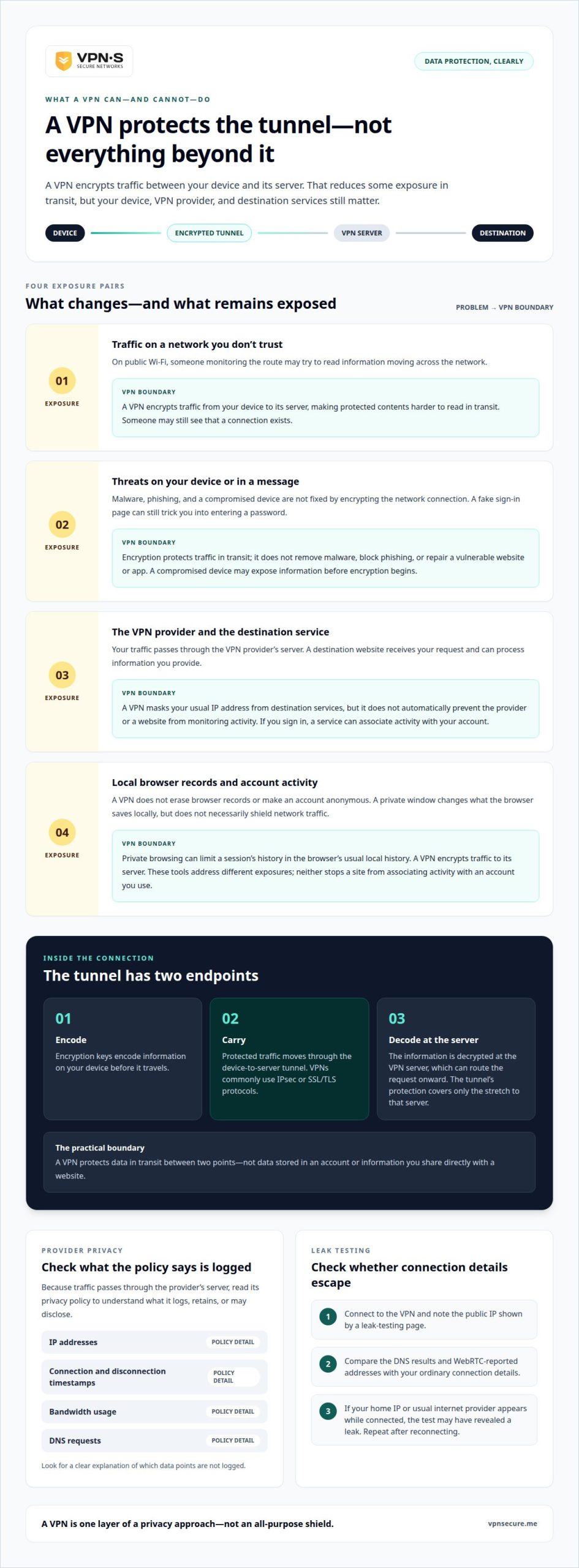
VPN privacy limitations are the gaps left outside the encrypted connection. Your VPN provider may still observe activity, while a website can associate visits with an account you sign into. A compromised device can also expose information before encryption begins. On Windows, macOS, iPhone, or Android, install the VPN app, sign in, choose a server, and connect; the exact screens vary by app. A VPN for data protection is one layer, not a cure-all.
Provider Privacy and Data-Retention Rules
When choosing a VPN, read its privacy policy to understand what it logs, retains, or may disclose. This matters because your traffic passes through the provider’s server after it leaves your device. Look for a clear explanation of which data points are not logged, including IP addresses, connection and disconnection timestamps, bandwidth usage, and DNS requests. VPNSecure’s policy is Zero Logging. Period. Read our full no-logging policy.
Data Protected and Unprotected by VPNs
A VPN encrypts traffic between your device and its VPN server, helping limit eavesdropping on public Wi-Fi. It doesn’t remove malware, block a phishing message, or fix a vulnerable website or app. For example, encryption can’t stop you from entering a password into a fake sign-in page. Free VPN data limits also vary by plan, so check the stated allowance and connection terms before relying on one for sustained use.
Testing for IP, DNS, and WebRTC Leaks
Leak testing checks whether identifying connection details escape the VPN tunnel. First, connect to the VPN and note the public IP shown by a leak-testing page. Then compare its DNS results and WebRTC-reported addresses with your ordinary connection details. If your home IP or usual internet provider appears while connected, the test may have revealed a leak. Repeat after reconnecting, since a dropped connection can change what is exposed.
VPN encryption and data confidentiality
A VPN creates an encrypted connection between your device and a VPN server. Encryption keys encode information before it travels, then decode it at the other end. Someone intercepting traffic along that route may see that a connection exists, but the protected contents are harder to read. This matters when messages, account details, or other information cross networks you don’t control.
VPNs commonly use IPsec or SSL/TLS encryption protocols. The protocol helps establish and protect the connection, while encryption keys transform readable information into encoded data. For example, a message sent through the VPN is encrypted on your device, carried through the tunnel, then decrypted when it reaches the VPN server. The server can route the request onward, but the tunnel’s protection covers only the device-to-server stretch.
That boundary is crucial. A VPN routes internet traffic through its server and masks your usual IP address from destination services. A website still receives your request and can process the information you provide. If you sign in to an account, the service can associate your activity with that account. Encryption protects data in transit, but it doesn’t stop a destination from reading information it needs to respond.
The VPN provider also sits at the tunnel’s exit. Its privacy practices matter because your traffic passes through its server after leaving your device. Encryption does not automatically prevent that provider or a destination service from monitoring activity. Think of the tunnel as a private passage between two points, not a cloak that follows every action across the internet.
For a practical privacy setup, consider what you need to shield: traffic from your device to a VPN server, or data stored in an account or shared directly with a website. Those are different protections. Explore encrypted VPN options as one way to protect traffic in transit, while keeping account security and careful sharing in your privacy plan.
VPN privacy compared with private browsing
Private browsing and a VPN protect different parts of your online activity. A private window changes what your browser keeps on your device; it doesn’t necessarily stop information passing between your device and internet service provider. A VPN instead encrypts network traffic between your device and its server. Opening a private window in Chrome, for example, doesn’t create an encrypted connection to your network.
Use private browsing when you share a computer and don’t want a session’s history saved in the browser’s usual local history. It can also keep a one-off search separate from other browser sessions. But private mode doesn’t make a website forget what you do there. If you sign in to an account, that service can still associate the visit with your account.
A VPN addresses a different observer: someone monitoring traffic on the path from your device to the VPN server. That can matter on public Wi-Fi, where you may not trust the network. Yet a VPN doesn’t erase browser records, make an account anonymous, or prevent the destination service from seeing information you send. The VPN provider may also be able to monitor activity.
Think of a café visit. Private browsing may keep the session out of your browser’s regular history on a shared laptop. A VPN can encrypt traffic between that laptop and its VPN server. Neither choice prevents a café website from recognizing an account after you log in. Choose based on the exposure you want to reduce, not the word “private” in a browser label.
You can use both tools together because they address separate risks. Start a private window to limit local browser history, then connect the VPN to encrypt traffic to its server. Private browsing doesn’t necessarily shield information from your internet service provider, while a VPN doesn’t control what a website records after receiving your information. Match each tool to the observer you want to limit.
How does a VPN protect data, and what data does it not protect?
A VPN protects internet traffic as it travels between your device and a VPN server. It encrypts information along the way, then the server decrypts it to route your request onward. On public Wi-Fi, this can make messages and account details harder for someone monitoring the network to read. The protection covers that connection, not every place your information goes.
Think of the difference between sending a file and storing one. A VPN can protect traffic carrying a file to a website, but it doesn’t encrypt a copy already saved on your laptop. It also doesn’t control what happens after a destination service receives the file. For example, a cloud service can process an upload according to its own systems and practices.
Some risks sit outside the network route entirely. A VPN doesn’t stop malware from reading information on an infected device or prevent a phishing page from tricking you into entering a password. It also can’t fix a vulnerability in a website or app. If a fake sign-in page looks like a familiar service, the VPN connection doesn’t verify that page’s identity.
- Traffic in transit: A VPN encrypts data moving between your device and its server.
- Files at rest: Documents already stored on your device need protection beyond the VPN connection.
- Information shared with websites: A destination service receives and processes the details you submit.
- Device and account risks: Malware, phishing, and weak account security require other safeguards.
Use a VPN when you want to protect traffic on its route, then pair it with careful account practices and device security. Choose a VPN connection for encrypted traffic as one layer of your data protection approach.
VPNSecure: Monthly VPN Subscription
VPNSecure’s Monthly VPN Subscription gives you an encrypted connection for everyday browsing, including on public Wi-Fi. It suits readers who want VPN protection without choosing an annual subscription. The service encrypts internet traffic across major devices, helping reduce exposure while information travels between your device and a VPN server.
A VPN supports data protection, but it doesn’t replace safeguards against phishing, malware, or account compromise. Keep those limits in view as you decide what protection fits your routine. VPNSecure also offers an Annual VPN Subscription for a longer subscription period, as well as a Dedicated IP for users who need a static, non-shared address.
Visit VPNSecure to explore the Monthly VPN Subscription.
Make privacy a deliberate habit
Your privacy needs change as you add apps, devices, and online accounts. Treat each new connection as a choice, not a default. Consider what information an app needs, which accounts hold sensitive details, and whether convenience is worth the access you grant. Consistent, thoughtful choices can shape a more considered digital routine.
Set a personal standard you can maintain. Review app permissions, sign out of accounts on shared devices, and keep software updated. Revisit those choices when your routine changes. A VPN for data protection can be one part of that approach, alongside habits that protect your accounts and devices.
Take the next step at your own pace. If you want to discuss VPN protection, contact VPNSecure about VPN protection. Build your privacy routine around the choices that matter to you, and keep moving forward with confidence.
Frequently Asked Questions
Can You Trust The Top VPN Services?
Trust depends on a provider’s practices, not its position on a list. Read its privacy policy to understand what it collects, how long it retains information, and whether it may disclose data. Look for clear explanations of encryption and independent audits when available. For a work trip, for example, consider whether the provider’s stated practices match your needs before connecting.
How do VPNs handle user privacy?
VPN providers route your traffic through their servers, so their privacy policies matter. Review what they say about activity logs, account details, data retention, and disclosure requests. Also consider the accounts and services you use: signing in can identify you to a website regardless of your network route. Keep these separate privacy questions in view when assessing a provider.
How do VPNs help secure data?
A VPN can reduce the chance that someone monitoring a network reads traffic travelling through its encrypted connection. For example, connecting before checking a work dashboard on hotel Wi-Fi helps protect that network exchange. It doesn’t secure a file already saved on your laptop or decide who can access the dashboard. Include device security and account permissions in your protection plan, or look to technology advisory resources like itworks.co.nz when aligning broader organisational IT systems.
How do VPNs help with access control?
A VPN can make access to a network resource depend on connecting through the VPN first. That helps keep a private company portal away from devices outside the VPN. But a VPN connection alone doesn’t define which files or systems each user may access. Organizations can pair network access with identity and access management to assign permissions by user and resource, often relying on managed IT and cybersecurity partners like spacecentersystems.com to secure their wider infrastructure.
What Does a VPN Do?
A VPN routes your internet connection through a VPN server, which changes the IP address destination services see. A site may see the server’s address instead of your usual public IP. That can alter how the site identifies your connection, but it doesn’t hide information you submit or make an account login anonymous. Treat it as a network-routing tool, not an identity switch.
What impact do VPNs have on network performance?
A VPN can add latency because traffic takes an additional route through its server, and a central server can become a bottleneck. You may notice this during a video call or while loading a large file. The effect depends on the connection route and server load. If a task feels slower, compare performance with the VPN connected and disconnected on the same network.