




A steadier address can make some online doors easier to open, but it changes how you appear online. A dedicated IP VPN gives you an address that isn’t shared with other VPN users. This can help reduce CAPTCHAs, access checks, and blocks tied to a shared IP’s reputation. The trade-off is that a consistent address can make your activity easier to associate over time than a rotating, shared one.
If shared VPN addresses keep disrupting your work, banking, or approved remote access, a more reliable option may help. But reliability shouldn’t come at the cost of understanding your privacy. A dedicated IP doesn’t replace VPN encryption, and it doesn’t provide the same anonymity as blending in with a pool of users.
This guide explains how dedicated and shared VPN addresses differ, where a dedicated address can help, and what privacy trade-offs to weigh before choosing. You’ll also learn when a shared IP may be the better fit, so you can match your VPN setup to the access you need without expecting one address to solve every problem.
Key Takeaways
- A dedicated IP VPN can make approved remote access more consistent, but it won’t guarantee that a website or network accepts the connection.
- Match the IP address to the task: personal browsing, banking, and workplace access can have different privacy and access needs.
- Before choosing, identify which workflow is causing friction and whether it truly requires the same VPN address each time.
- A dedicated address complements VPN encryption. Consider how a consistent IP may affect your anonymity compared with a shared address.
- VPN Secure’s dedicated IP is a static, non-shared option designed to support secure remote access.
What Is a Dedicated IP VPN, and What Problem Does It Solve?
A dedicated IP VPN routes your connection through a static IP address assigned to you rather than shared with other customers. Websites and networks see a more consistent address, which can help when frequent changes or a shared address trigger extra checks, CAPTCHAs, or blocks.
The address affects how your connection appears, not how VPN encryption works. A dedicated IP is an access and consistency feature, not a separate encryption method or a promise that every service will accept your connection.
How Does a Dedicated VPN IP Address Work?
When you connect through the dedicated IP option, your device creates an encrypted tunnel to the VPN server. Traffic routed through that server appears to online services as coming from its assigned IP address, rather than from the public address provided by your home or mobile internet connection.
With the dedicated option, that VPN address stays consistent when you connect through it. For background, a static IP address is one that remains assigned rather than changing periodically. Your internet provider’s address and the VPN address are separate: websites generally see the VPN address as the connection’s source.
Dedicated IP vs. Shared VPN IP: What Changes?
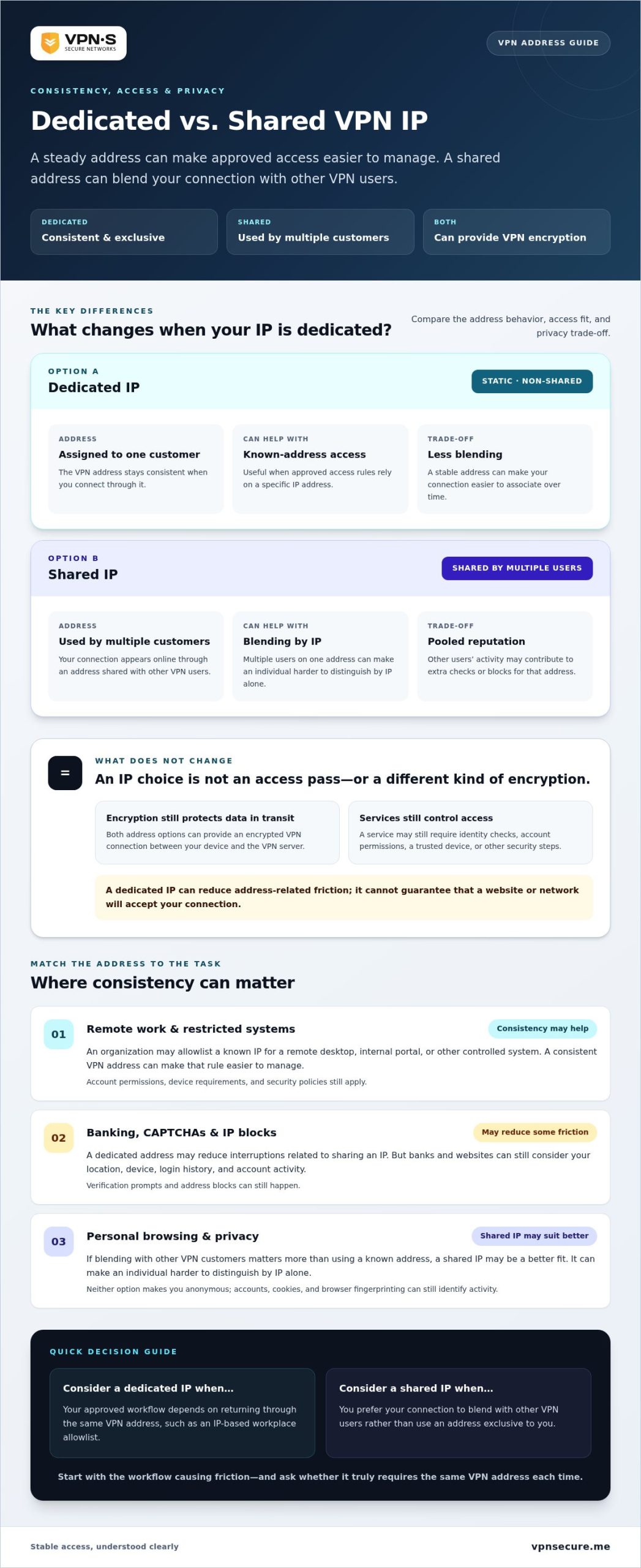
With a shared VPN IP, multiple customers may appear online through the same address. Their activity can affect how a website views that address, potentially prompting CAPTCHAs or other access checks. A dedicated IP gives one customer a non-shared address, so its reputation isn’t pooled with other VPN users in the same way.
That consistency can make approved access rules easier to maintain. For example, a workplace system may expect connections from a known address. A dedicated IP doesn’t eliminate security checks: services may still ask you to verify your identity, and the address can still be flagged. Use it to reduce address-related friction, not to bypass account or network rules.
Both options can provide an encrypted VPN connection. The difference is how the address is shared: a dedicated address is consistent and exclusive to you, while a shared one is used by multiple customers. Shared IPs may offer more anonymity by blending your connection with other users. A dedicated IP does not make you anonymous.
How a Dedicated IP VPN Supports More Consistent Access
Some workplace networks let administrators approve connections from specific IP addresses. If your VPN address changes, a rule built around the old one may no longer recognize your connection. A dedicated IP VPN gives you a consistent address to use for approved access, making that part of the setup easier to manage.
Consistency helps with recognition, not authorization. A system can still require your username, a one-time code, a trusted device, or another security check. If a website blocks an address for its own reasons, a dedicated IP can’t guarantee uninterrupted access.
Using a Dedicated IP for Remote Work and Restricted Systems
An organization may allowlist a known IP address so only connections from approved addresses can reach a remote desktop, internal portal, or other controlled system. For distributed workers and administrators managing infrastructure through providers like Twisted Servers, a consistent VPN address can make that rule more practical than updating the allowlist whenever a connection’s address changes.
The organization still controls who gets in. Account permissions, device requirements, and security policies remain in force. For a closer look at this setup, read the guide to using a VPN with a static IP for remote access.
Banking, CAPTCHAs, and IP Blocklisting
A bank or website may treat an unfamiliar or frequently changing address as a reason to verify your identity. Shared VPN addresses can also be affected by how other users’ activity shapes the address’s reputation. That may mean an extra CAPTCHA or login check, even when your own account activity is legitimate.
A dedicated address may reduce interruptions caused by sharing an IP, but it won’t remove every hurdle. Banks and online services can consider your location, device, login history, and account activity. Keep your authentication details secure, and follow any verification prompts from the service itself.
In short: an IP address can help a system recognize where a connection comes from. Encryption protects data in transit, while account security verifies who’s trying to get in. These safeguards do different jobs.
For approved access that needs a stable address, VPN Secure’s dedicated IP option provides a static, non-shared IP designed to support secure remote access.
Dedicated IP VPN Privacy Trade-Offs: What It Does and Does Not Protect
A dedicated address improves consistency, not anonymity. Because the same VPN exit IP is assigned to you, websites may see a stable address across visits. That can make access easier to manage, but it also means your connection is less blended with other VPN customers than it would be on a shared IP.
Both dedicated and shared VPN connections can encrypt traffic between your device and the VPN server. Encryption helps protect data in transit, but it doesn’t erase what happens after you reach a website. If you sign in to an account, that service can associate activity with your account. Cookies and browser fingerprinting can also help identify a browser, regardless of which VPN IP you use.
- Dedicated IP: A consistent address assigned to one customer, useful when access rules depend on a known IP.
- Shared IP: An address used by multiple VPN customers, which can make individual users harder to distinguish by IP alone, but may also bring friction from the address’s shared reputation.
Neither option guarantees privacy or prevents tracking. Your protection also depends on how the VPN provider handles data, what the sites you use record, and how you manage accounts and browser settings.
Does a Dedicated IP Make You Anonymous?
No. A dedicated IP remains a VPN exit address, but it’s consistently assigned to you. The VPN can mask your connection’s home or mobile IP from the sites you visit, while your logins, cookies, browser fingerprint, and activity recorded by those services may still identify or link your sessions.
Look beyond a “no logs” label. Read the provider’s logging policy and examine what evidence supports its claims. The no-log VPN audit guide explains what to look for when assessing those claims.
When Is a Shared VPN IP the Better Fit?
If you don’t need allowlisting or repeat access from one known address, a fixed IP may add little value. A shared address can suit everyday browsing, and sharing an IP may provide more address-level blending. That isn’t a promise of greater anonymity: accounts, cookies, browser signals, and provider practices still matter.
Choose based on the job. If consistent access is essential, weigh that convenience against the reduced blending of a dedicated address. If it isn’t, a shared IP may be the more suitable fit. Make the decision based on your actual access needs, not a blanket claim that one option is always more private.
How to Decide Whether a Dedicated IP VPN Fits Your Needs
Start with the access problem, not the feature. A dedicated IP VPN is most useful when a recurring task depends on connecting from a predictable VPN address. If you can’t identify a workflow that needs that consistency, a shared VPN connection may already fit.
Four Questions to Ask Before Choosing a Dedicated IP
- What workflow is being blocked or interrupted? Name the specific site, system, or task. An occasional CAPTCHA is different from repeated trouble reaching a work portal.
- Do you need the same VPN address each time? Consider whether access depends on a known, predictable address or whether your connection can vary.
- Does the service use an address allowlist? For workplace access, review the approved access rules and follow your organization’s VPN and security policies.
- Does a consistent address fit your privacy habits? A fixed address can make repeat access simpler, but it offers less address-level blending than sharing an IP with other VPN users.
Match the VPN Setup to Your Use Case
Different activities call for different trade-offs. Banking services may trigger checks based on location, device, or account activity, so a dedicated address may reduce some address-related friction without replacing identity verification. Everyday personal browsing often doesn’t require a fixed address. For work systems that rely on allowlisting, consistency may be a practical requirement.
Use this guide as a starting point, then follow the terms and access rules of each service. A dedicated IP won’t override them or guarantee access.
| Use case | Possible fit | Why |
|---|---|---|
| Recurring remote work with an approved IP allowlist | Dedicated IP | A predictable address can simplify approved access rules. |
| Banking with occasional extra verification | Shared or dedicated VPN | Either may work; the bank can still apply account, location, and device checks. |
| Everyday personal browsing without access restrictions | Shared VPN | A fixed address may not add useful access benefits. |
| A service that works normally without a VPN address requirement | No special IP requirement | There may be no address-related problem to solve. |
Choose a dedicated address for a clear, recurring need, not as a universal fix for blocks, CAPTCHAs, or regional restrictions. If consistent access is the missing piece, VPN Secure’s dedicated IP option offers a static address for secure remote access.
VPN Secure Dedicated IP: A Practical Next Step for Stable Access
A fixed address is useful only if it solves a real access problem. VPN Secure’s dedicated IP is a static, non-shared address designed to support secure remote access. It can give you a consistent connection point for approved access to sensitive corporate or banking systems, where changing or shared VPN addresses may create friction.
That consistency can also help avoid problems associated with a shared IP’s reputation, including potential blacklisting. But no address guarantees acceptance: the system you’re accessing still controls its own security checks, account requirements, and access rules.
What VPN Secure’s Dedicated IP Is Designed to Help With
The dedicated IP is an add-on for users who need the same VPN address when connecting. For example, a remote worker whose organization allows access from an approved address may find a stable IP easier to work with than one that changes. Someone accessing a sensitive banking system may also value a consistent connection, though the bank can still request verification or restrict access.
The dedicated address works alongside your VPN connection. It isn’t a separate form of encryption and doesn’t make you anonymous. Continue using strong account security and sound privacy practices. A stable IP addresses consistency, not every risk that comes with going online.
Decide on Your Next Step
Use this simple test: if a recurring task requires a predictable address, or access depends on an approved IP allowlist, a dedicated IP may be a practical fit. If you’re not facing an address-specific access problem, a shared VPN connection may meet your needs without adding a fixed address.
Don’t choose a dedicated IP expecting it to bypass every CAPTCHA, block, or regional restriction. Choose it when stable access is the missing piece, and keep following the policies of your workplace and the services you use.
If that matches your situation, explore VPN Secure and its dedicated IP option for a consistent address that supports secure remote access.
Choose the Address That Fits Your Needs
A dedicated IP VPN is a practical choice when recurring remote access depends on a consistent address. It may also reduce friction linked to shared-IP reputation, but it can’t guarantee access or make you anonymous. VPN encryption, account security, and a provider’s privacy practices still matter.
If you don’t need a predictable address for work or another approved system, a shared VPN connection may be enough. The right setup solves your actual access problem without promising more than an IP address can deliver.
VPN Secure has operated since 2012 and is based in the Bahamas. Its dedicated IP provides a static, non-shared address for secure remote access. If that consistency matches what you need, explore VPN Secure and find your private lane online.
Choose the connection that fits your access needs, protect your accounts, and use a dedicated IP when a consistent address is important. Explore VPN Secure’s dedicated IP.
Frequently Asked Questions
What is a dedicated IP VPN?
A dedicated IP VPN assigns you a consistent VPN exit address that isn’t shared with other customers. Your traffic still travels through the VPN, but websites see that VPN address rather than your home or mobile internet address. This can help with access systems that expect a predictable IP. It doesn’t make you anonymous, remove account-based tracking, or guarantee that every website or network will accept your connection.
Is a dedicated IP VPN better for online banking?
It may make repeated banking access more consistent if the bank reacts to changing or shared VPN addresses. But a dedicated IP VPN can’t guarantee acceptance or prevent identity checks. Banks may assess your account, device, location, and login behavior, regardless of your IP address. Use strong account security, follow your bank’s access rules, and treat a dedicated address as a possible access aid, not a shortcut around verification.
Can a dedicated IP VPN prevent IP blacklisting?
No. A dedicated IP may reduce exposure to problems caused by other customers sharing the same VPN address, but services can block or flag an address for many reasons. Your dedicated address could still be restricted, and access isn’t guaranteed. Don’t use it to evade a service’s rules. Its practical value is a consistent address assigned to you, not automatic entry to every website, account, or network.
Does a dedicated IP VPN make you anonymous?
No. A dedicated IP masks your regular internet address from the services you visit, but the VPN exit address remains consistent. Signing in, accepting cookies, or using a browser with identifiable characteristics can link activity to you or connect visits. Websites may also keep records of your account activity. Review your VPN provider’s privacy policy and any evidence supporting its logging claims, and don’t rely on an IP address as your only privacy safeguard.
What is the difference between a static IP and a dedicated IP VPN?
“Static” means an IP address stays the same, while “dedicated” means it’s assigned to one customer rather than shared among VPN users. A dedicated VPN IP is generally both static and non-shared, though providers may use these terms differently. Focus on what the service actually provides: whether your address stays consistent and whether other customers use it. Those details determine how well it fits your access needs.
Can I use a dedicated IP VPN for remote access?
Yes, a dedicated IP can support remote access if a workplace or system allows connections from a known address. An administrator may add that IP to an allowlist, helping keep access rules consistent. The network must still permit the connection, and you’ll need to meet its authentication requirements. Follow your organization’s security policies, and remember that a VPN address alone doesn’t grant access or replace account credentials.