




A VPN can hide your browsing destinations from your internet provider, but it can’t make you invisible. That distinction matters when you’re searching for “prevent ISP tracking VPN” advice: encryption limits what your ISP can see, but it doesn’t erase every trace of your online activity.
It’s reasonable to wonder whether your provider can record the sites you visit, build a profile, or share activity data. With a VPN connection active, your ISP generally can’t see your browsing destinations, search history, or the contents of your downloads. It can still see that you’re connected to a VPN server, along with connection timing and data volume. Websites may also identify you through cookies, browser fingerprinting, and accounts you’re signed into.
This guide explains what changes when VPN encryption is on, what connection metadata remains visible, and what a VPN can’t conceal. You’ll also learn why a no-log policy applies to the VPN company, not your ISP, and how to pair a VPN with practical privacy habits. The goal isn’t a promise of perfect anonymity. It’s a clearer view of your privacy and a practical way to take more control.
Key Takeaways
- A VPN can conceal browsing destinations from your ISP, but connection metadata such as VPN use and data volume may remain visible.
- Follow a simple setup process: install a VPN app, connect, and verify the connection before browsing.
- Distinguish ISP visibility from tracking by websites, apps, advertisers, and services where you’re signed in.
- To prevent ISP tracking, understand how encryption and the provider’s stated logging policy affect different parts of your online activity.
- Use a VPN as one layer of privacy, not as a promise of anonymity or protection from every online threat.
What Can Your ISP Track Without a VPN, and What Changes with One?
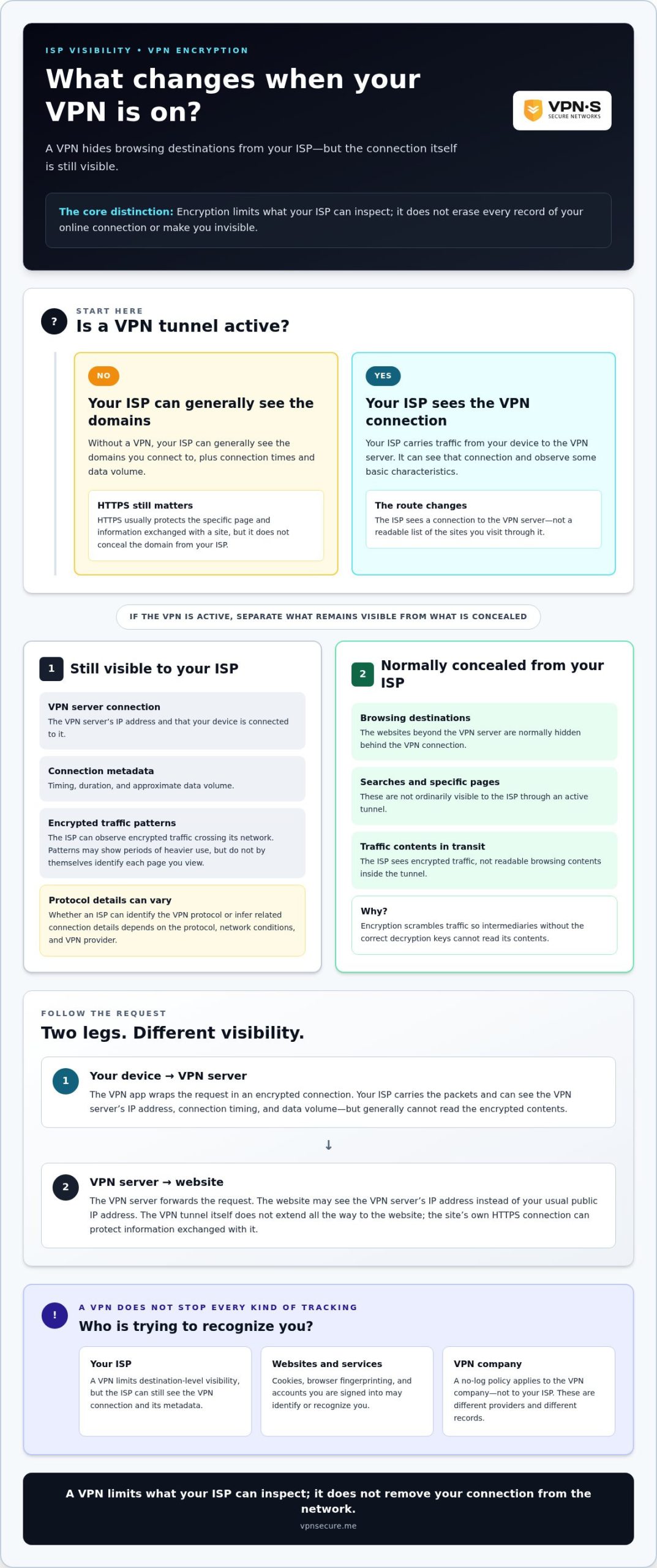
A VPN limits what your internet service provider can see about your browsing destinations, but it doesn’t erase every connection record. Your ISP still carries traffic between your device and the VPN server, so it can observe that connection and measure some of its basic characteristics. The key difference is what those records reveal: a connection to a VPN server, rather than a readable list of the sites you visit.
With an active VPN tunnel, your ISP can see the connection to the VPN and its traffic patterns, but it ordinarily can’t read the browsing destinations or contents inside the tunnel.
“ISP tracking” can mean several things: recording connection details, analyzing traffic patterns, or retaining browsing data such as domain names. Without a VPN, an ISP can generally see the domains you connect to, along with connection times and data volume. HTTPS usually protects the specific page and information exchanged with a site, but it doesn’t conceal the domain from the ISP. A VPN changes what the ISP can see.
| Information | What the ISP can generally see with a VPN |
|---|---|
| VPN connection | The VPN server’s IP address and that your device is connected to it |
| Connection metadata | Timing, duration, and approximate data volume |
| Traffic contents | Encrypted traffic, not readable browsing contents in transit |
| Browsing destinations | Normally concealed behind the VPN connection |
| Specific pages and searches | Not ordinarily visible to the ISP through the active tunnel |
What an ISP can still see during a VPN connection
Your ISP routes your traffic to the VPN server, so it can see the server’s IP address and when your connection begins and ends. It can also measure how much data moves and observe encrypted traffic crossing its network. These details may reveal patterns, such as periods of heavier use, but they don’t by themselves identify each page you view.
Whether an ISP can identify the VPN protocol or infer related connection details depends on the protocol, network conditions, and VPN provider. Don’t assume every VPN connection looks identical. The destination your ISP sees is the VPN server; the sites beyond that point are generally hidden from it.
What VPN encryption conceals from the ISP
Encryption scrambles traffic so intermediaries without the correct decryption keys can’t read its contents. Once your VPN tunnel is active, your browsing traffic travels inside that protected connection to the VPN server. Your ISP can observe the encrypted tunnel, but it generally can’t read your searches, page contents, or the individual website destinations carried through it.
This can reduce the destination-level visibility that concerns people looking for a way to prevent ISP tracking with a VPN. It doesn’t make you invisible. Your ISP still knows the connection is active and can see the VPN server you contact. A VPN also doesn’t promise anonymity or conceal every device identifier. Think of it as limiting what the ISP can inspect, not removing your connection from its network.
How a VPN Tunnel Changes the Path Your Internet Traffic Takes
A VPN changes who can see each part of an internet request. Without one, your device sends traffic through your ISP toward its destination. With a VPN active, the ISP carries an encrypted connection to the VPN server, which then forwards your request to the website. The ISP still provides the route, but it ordinarily can’t read what’s traveling inside the protected tunnel.
Encryption transforms data into unreadable text for anyone who doesn’t have the correct decryption keys. It protects traffic between your device and the VPN server from being read in transit. It doesn’t stop your ISP from routing data, or mean that every later connection is automatically encrypted by the VPN.
In one sentence: Your ISP sees your device connecting to a VPN server and carrying encrypted traffic, while the VPN server handles the onward request to the destination website.
From your device to the VPN server
Say you enter a website address on your phone. The VPN app wraps the request in an encrypted connection and sends it through your local network to the VPN server. Your ISP carries those data packets across its network as it does other internet traffic, but it can’t read the encrypted contents without the keys.
The VPN server’s IP address is the visible endpoint of this part of the journey. It tells your ISP where the connection is going, not which pages you later visit through that server. Connection timing and data volume remain visible, so the tunnel limits inspection rather than erasing network activity.
From the VPN server to a website
Once the request reaches the VPN server, that server forwards it to the destination website. The website may see the VPN server’s IP address as the source of the request instead of your usual public IP address. That changes the network address presented to the site, but it doesn’t change the identity you reveal by signing in to an account.
There are two separate legs: your device to the VPN server, then the VPN server to the site. The VPN encrypts the first leg. On the second, the site’s own HTTPS connection can protect information exchanged with it, but the VPN tunnel itself doesn’t extend all the way to the website. Cookies, account details, and other tracking methods can still identify or recognize you.
Keep that route in mind when considering how to prevent ISP tracking with a VPN. The aim is to limit what your ISP can inspect, not to remove every observer from the path. A service such as an encrypted VPN connection can create that protected route; your habits and the website’s own protections still matter.
What a VPN Does Not Stop: Websites, Accounts, and Other Tracking
A VPN can limit what your ISP learns about your browsing destinations. It doesn’t make you anonymous to the websites, apps, and services you use. These are separate observers, each with its own ways to recognize activity. Think of the VPN as changing what your ISP can see on the route, not wiping your identity from every place you go online.
A website still receives your request after it passes through the VPN server. It may see the VPN server’s IP address instead of your usual public IP, but that’s only one signal. If you sign in to an account, the service can associate your activity with that account, regardless of the IP address you use. Cookies, browser fingerprinting, and other device or browser signals can also help sites recognize returning visitors.
Why a VPN cannot hide activity from every website
Your VPN changes the network path, not your relationship with a service you choose to use. For example, if you connect to a VPN and then sign in to the same social or email account, that service can link your session to your existing profile. It may also record activity within its own service. A changed IP address isn’t a clean slate.
This distinction is central to a no-log VPN audit guide: a no-log policy concerns what the VPN provider says it retains, not what your ISP or a logged-in website can observe. Privacy depends on which observer you’re trying to limit.
How cookies and apps can keep recognizing you
Cookies can store identifiers in your browser, while an active account session can connect visits without relying on your ISP’s browsing records. Apps and services may also collect information directly through your use of them. A VPN doesn’t remove cookies, sign you out, or prevent every form of browser or device-based tracking.
On public Wi-Fi, a VPN can help protect the connection between your device and the VPN server, but it doesn’t replace careful account and device habits. The secure VPN travel guide offers related context for protecting privacy while using networks away from home.
To make the distinction practical, ask who you want to limit visibility for:
- Your ISP: A VPN can conceal ordinary browsing destinations inside the encrypted connection.
- A website: Signing in or retaining cookies can still associate activity with you.
- An app or service: It may collect information through your use of the app or account.
VPNs can reduce one kind of visibility, but they can’t block every tracking channel. Use other privacy habits too: review app permissions, manage cookies, and sign out of accounts when appropriate. The goal is to identify which observer you’re limiting, then choose protections that fit that risk.
Use a VPN to Reduce ISP Visibility: Practical Checklist
A VPN limits ISP visibility only while the connection is active and your device sends traffic through it. Setup takes a few steps, but don’t stop after installing the app. Confirm it’s connected, check whether your public IP changes, and remember that an IP check isn’t proof of complete privacy.
Use this routine on each device where you want to reduce ISP visibility:
- Choose a VPN. Look for a service that clearly describes its traffic encryption and logging policy and supports the devices you use. A stated no-log policy concerns the provider’s handling of data; it doesn’t mean your ISP or websites stop seeing all activity.
- Install the VPN app. Get the app for the device you plan to use and follow its setup instructions. If you browse on both a phone and laptop, setting up one doesn’t automatically protect the other.
- Connect before browsing. Open the app and connect to a VPN server before using websites or apps. Check that the app shows an active connection. If it disconnects, your device may return to its regular internet route.
- Verify the connection. Use a reputable IP-checking service before and during the VPN connection. Compare the results to see whether the visible IP address changes. Treat this as a basic check, not a guarantee that every traffic path is protected.
Connect consistently across the devices you use
Protection applies to the device using the VPN connection, not automatically to every device on your network. Install the app on each relevant device, connect before browsing, and confirm the connection is active. A tablet or computer that isn’t connected may still send traffic through your ordinary internet connection.
Build the check into your routine, especially after restarting a device, switching networks, or reopening the app. Verification tools and results can vary by device, operating system, and network. If a check looks unexpected, confirm that the VPN app is active and review the device’s connection settings before assuming the tunnel is working.
Check your expectations and privacy settings
An IP check can show the address presented to a website, but it can’t establish that every possible leak is absent or that you’re anonymous. Keep accounts, cookies, and browser privacy in view too. Sign-ins can still identify you, and cookies or other browser signals may connect visits even when your public IP changes.
For anyone looking for ways to prevent ISP tracking, a VPN works best alongside sensible privacy habits. VPN Secure offers encrypted VPN connections for major devices. Choose a VPN subscription to add an encrypted connection to your privacy routine.
Choose a VPN for ISP Privacy, and Know What VPN Secure Adds
Choosing a VPN for ISP privacy means looking beyond a changed IP address. Focus on what the service encrypts, what its privacy policy says it keeps, which devices it supports, and where the company is based. These details help you judge whether a VPN fits your needs, but no provider can promise complete anonymity across the internet.
Use this checklist to compare the essentials:
- Encryption: Confirm the provider states that it encrypts internet traffic. Encryption helps prevent your ISP from reading browsing contents carried through an active VPN connection.
- Logging policy: Read what the provider says it collects, retains, and uses. A no-log claim concerns the provider’s handling of data, not what your ISP or websites can observe.
- Device support: Check that the service supports the devices you use. A VPN on your laptop won’t automatically cover browsing on your phone.
- Jurisdiction: Consider where the company is based as context for understanding its operating environment. Location alone doesn’t prove what data a service retains or how it would respond to a legal request.
What to look for in a VPN privacy policy
Read the policy itself, not just a short “no logs” label. Look for clear descriptions of information collected during sign-up and use, how long it’s retained, and what purposes it serves. A provider’s statement describes its own practices. Don’t treat the wording as independent verification unless the provider supplies evidence of an audit or other outside review.
This distinction matters when researching how to prevent ISP tracking with a VPN. A VPN service can reduce your ISP’s view of browsing destinations, but the VPN provider becomes another party whose privacy practices matter. A no-log policy doesn’t erase connection records held by your ISP, nor does it stop websites from tracking you through accounts or browser signals.
What VPN Secure offers for encrypted browsing
VPN Secure provides an encrypted VPN service for major devices. The company describes its service as no-log; this is its stated policy, not a claim of independent audit. It operates servers in over 40 countries and is based in the Bahamas. VPN Secure markets this jurisdiction as outside the Five Eyes alliance. Treat that as context, not proof of anonymity or a guarantee about how any legal request would be handled.
That gives you concrete points to weigh: encrypted traffic, support for major devices, a stated logging policy, and the company’s location. Keep expectations grounded. A VPN can limit what your ISP sees while it’s active, but it doesn’t remove every record or tracking method elsewhere online.
If an encrypted connection fits your privacy goals, explore the VPN Secure service as a next step.
Make Your Next Connection a Deliberate Choice
Online privacy isn’t a switch that makes every observer disappear. It’s a series of choices about what you share, which services you trust, and where you want stronger boundaries. Start by deciding what matters most to you. Then make one practical change today, such as checking your VPN connection before browsing or reviewing which accounts stay signed in on shared devices.
Keep that habit flexible. Your needs may differ at home, on public Wi-Fi, or when using an app that requires your identity. Using a VPN to prevent ISP tracking works best when you understand what the tool can protect and keep expectations realistic. You don’t need perfect anonymity to make your connection more private; you need informed choices you can stick with.
Ready to add an encrypted connection to your privacy routine? Take control of your connection with VPN Secure. Choose your next step with confidence, and keep building better privacy habits as you go.
Frequently Asked Questions
Can my ISP see what websites I visit when I use a VPN?
Usually, your ISP can’t see the individual websites you visit through an active VPN connection. It can still observe that your device is connected to a VPN and see general connection details. For example, your provider may know when your connection is active, even if it can’t read the destination list inside the tunnel. Websites may still recognize you if you sign in or retain identifying browser data.
Can my ISP tell that I am using a VPN?
Often, yes. An ISP may be able to identify a connection to a VPN server, though what it can infer varies with the network and connection. It may observe the server’s IP address, connection timing, and data volume. A VPN is designed to protect traffic contents from the ISP, not necessarily conceal VPN use. To understand how a particular network handles a connection, check it while connected to that network.
Does a VPN hide my search history from my internet provider?
A VPN can limit your ISP’s ability to inspect searches sent through its active encrypted connection, but it doesn’t delete records stored by the search service or browser. For instance, searches made while signed in may be saved to that account’s history. Review the search provider’s history controls and browser settings separately. A VPN affects what the ISP can observe; it doesn’t erase data already stored elsewhere.
What happens if my VPN disconnects while I am browsing?
If the VPN disconnects, your device may continue online through its regular connection, potentially exposing traffic details normally visible to your ISP. Check the app’s status if a page suddenly stops loading or the connection changes. Whether traffic is blocked during a disconnection depends on the app and its settings, so don’t assume it is. Reconnect before continuing sensitive browsing, and review the app’s connection controls.
Can my ISP see my browsing history if I use HTTPS without a VPN?
HTTPS protects much of the information exchanged between your browser and a website, but it doesn’t conceal every connection detail from your ISP. Depending on the connection, the ISP may still be able to observe the destination domain and when you connected. HTTPS also doesn’t hide your traffic from the site itself. A VPN adds a separate encrypted connection, but it doesn’t make you anonymous to websites or services.
Does a VPN stop websites from tracking me?
No. A VPN can change the IP address a website receives, but it doesn’t prevent the site from recognizing a signed-in account or using stored cookies and browser signals. For example, using a VPN while logged in to a shopping account still links activity to that account. Review cookie settings, sign out when appropriate, and limit the information you share. Treat a VPN as one privacy measure, not a universal tracking blocker.
Is a no-log VPN enough to prevent ISP tracking?
No. A no-log policy describes what the VPN provider says it records; it doesn’t encrypt an ordinary connection by itself. To help prevent ISP tracking, VPN encryption must be active on your device and your traffic must pass through it. The policy addresses a separate question: how the VPN provider handles user data. Read the provider’s terms carefully, and don’t treat a no-log statement as proof of total anonymity.