




A VPN can help protect personal data by encrypting your internet traffic and routing it through a VPN provider’s connection. This makes it harder for your internet service provider and other observers to see your browsing activity. A VPN can also replace your visible IP address, but it won’t make you completely anonymous or stop every online threat.
That distinction matters. A VPN can add privacy on public Wi-Fi and may help you reach services restricted by location or censorship, but it won’t block phishing, malware, or cookie tracking by itself. It protects one part of your online activity, not everything you do.
Here, you’ll learn what a VPN can protect, where its limits begin, and how it compares with private browsing and proxy servers. You’ll also learn what to look for in a provider’s privacy policy and logging practices, so you can decide whether a VPN fits your needs and what other protections may still matter.
Key Takeaways
- A VPN encrypts and reroutes your traffic, but the privacy it adds depends on how its connection and protections are configured.
- Pair a VPN with other safeguards: it doesn’t stop phishing, malware, or cookie tracking on its own.
- Private browsing, proxy servers, and VPNs protect different parts of your online activity; choose based on what you need to keep private.
- Assess a VPN provider’s privacy policy, logging practices, and approach to data leaks before trusting it with your traffic.
- A VPN may help with regional restrictions, but understand what it can and cannot access before relying on it.
Are VPNs safe and secure?
VPNs can protect internet traffic from some observers, but they don’t make every online activity private. In the United States, using a VPN is generally legal, but it doesn’t change the laws that apply to your online actions.
Internet Traffic Encryption and Routing
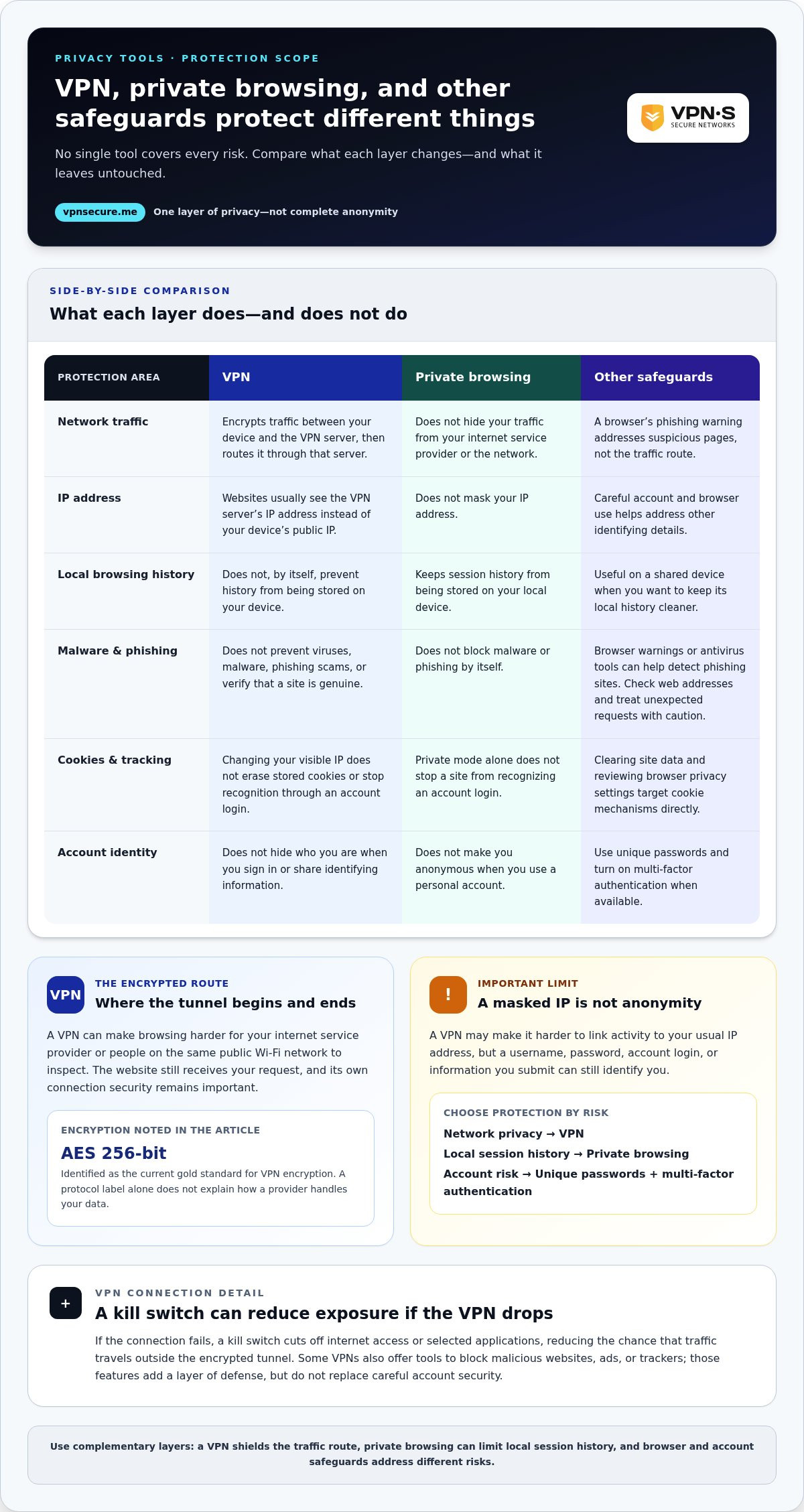
A virtual private network encrypts internet traffic between your device and a VPN server, then routes it through that server. This can make your browsing harder for your internet service provider or people on the same public Wi-Fi network to inspect.
For example, when you open a website at a café, the network sees an encrypted connection to the VPN server rather than readable traffic destinations. The website still receives your request, and its own connection security remains important.
IP Address Masking
A VPN routes your connection through a remote server, so websites usually see the server’s IP address instead of your device’s public IP address. This can make it harder to link your browsing activity to your usual network location.
For example, a site you visit may see an address associated with the VPN server, not the address assigned by your home internet provider. IP masking doesn’t erase identifying details you share directly, such as a username or password.
Encryption Methods and VPN Protocols
Encryption turns readable data into coded text, while a VPN protocol sets the rules for creating and maintaining the encrypted connection. AES 256-bit encryption is identified as the current gold standard for VPN encryption.
Protocols and encryption work together, but a protocol label alone doesn’t tell you how a provider handles your data. A secure tunnel protects traffic between your device and the VPN server; it doesn’t automatically secure every account or website you use.
Security features can help manage connection failures. A kill switch cuts off internet access or selected applications if the VPN connection drops, reducing the chance that traffic travels outside the encrypted tunnel. If the connection fails while you’re signing in to email, this feature can stop your device from sending traffic over its regular connection.
Some VPNs also offer tools that block malicious websites, ads, or trackers. These features add a layer of defense, but they don’t replace careful account security. Use a unique password for each website, and turn on multi-factor authentication when available.
Think of a VPN as one layer, not a complete security system. It can shield the route your internet traffic takes and obscure your IP address from websites, but your identity can still be revealed through account logins, browser activity, or information you submit. Knowing where the encrypted tunnel begins and ends helps you understand the protection it provides.
VPN limits against malware, cookies, and phishing
A VPN protects a connection, not every action you take on a device. It can reduce what people on a network observe, but it won’t stop every threat that reaches your browser or account.
Malware, phishing, and cookies
A VPN doesn’t prevent viruses, malware, phishing scams, or cookie tracking. For example, a fake bank email can still persuade you to enter your password on a fraudulent page while your VPN is active. An encrypted connection doesn’t verify that a message or website is genuine.
Some browsers and antivirus suites can detect phishing sites, addressing a different risk than a VPN does. Treat unexpected requests for payment details or account authentication as suspicious. Check the web address carefully, and don’t open a login page through an unsolicited message.
Cookies can identify returning browsers and support tracking across visits. A VPN may change the IP address visible to a website, but it doesn’t erase cookies already stored in your browser or stop a site from recognizing an account login. Clearing site data and reviewing browser privacy settings target those mechanisms directly.
Privacy is not complete anonymity
A VPN can make it harder to link your precise location and online activity to your regular IP address, but it can’t make you completely anonymous online. Signing in to a personal account can identify you regardless of the remote server address. Information you choose to share in a form or post can do the same.
Think of privacy as separate layers. A VPN protects the route between your device and its server; account authentication controls access to services such as email. Use unique passwords and multi-factor authentication where available. These steps reduce account risks that traffic encryption alone doesn’t address.
Private browsing, data limits, and speed
Private browsing and a VPN solve different problems. Private browsing prevents your history from being stored on your local device during that session, but it doesn’t hide your IP address. A VPN can mask that address, while private mode can help keep a shared device’s local history cleaner. Neither feature blocks malware or phishing by itself.
Connection trade-offs vary by service and network conditions. Routing traffic through a remote server may affect internet speed, and server distance or congestion can change how responsive a page feels. Free VPNs may also restrict data allowance, session time, or access to some websites, and may run slower than paid services.
Choose protections for the threat in front of you. A browser’s phishing warning helps with suspicious pages; careful link handling reduces exposure to scams; and a VPN helps shield network traffic. Combining these measures closes more gaps than expecting one privacy tool to do everything.
VPNs compared with private browsing and proxy servers
Private browsing, proxies, and VPNs affect different parts of your internet activity. Knowing which tool protects the browser, device, or connection helps you choose the right layer.
VPNs and Private Browsing
Private browsing keeps session history from being stored on your device, while a VPN routes your connection through a VPN server. Private mode doesn’t hide your IP address from websites or the network you use. For example, opening a bank site in a private window limits local history, but the bank can still see the address connecting to it.
Use private browsing on a shared computer when you don’t want your session history saved locally. Use a VPN when you want to route traffic through a remote server. Neither tool makes you anonymous if you sign in to an account or identify yourself in a form.
VPNs and Proxy Servers
A proxy server routes traffic for the specific application where you configure it, while VPN software can route a device’s internet connection through a VPN server. If you set a proxy in one browser, another application on that device may still connect directly. Depending on its settings, a VPN can cover traffic from multiple applications.
That difference matters when switching between apps. A browser proxy may handle requests from that browser, while a separate email app uses the regular network connection. When configured to cover the whole device, a VPN can route both through its server, helping avoid gaps between applications.
Free VPN Data Collection
Free access doesn’t automatically mean a service protects your privacy. An ICSI Networking and Security Group analysis found that 72% of the free VPN services analyzed embedded third-party tracking tools. Some VPN providers may also share users’ browsing activities with third parties, making privacy policies and logging practices important to assess.
A no-log VPN should clearly state what it does not collect or log, and how it handles network data. Compare the policy with the service’s actual data-handling statements. A privacy label alone doesn’t explain every practice, so look for clear descriptions of what information the software records and why.
Law-enforcement inquiries don’t turn a VPN into a guarantee of anonymity. A VPN changes the route and visible IP address, but services you use may still hold account details or activity associated with your login. The provider’s logging practices determine what network information it retains. Your own account activity, such as signing in to a named profile, can also identify you independently of the VPN connection.
Choose the tool for the job. Private browsing manages local browser history; a proxy handles configured application traffic; and a VPN routes traffic through a server. Before installing software, review its privacy policy and understand which applications and data its settings cover.
Choosing a trustworthy VPN provider
A VPN provider handles traffic that would otherwise travel through your internet service provider. To protect personal data with a VPN, assess its privacy policy, logging practices, and response to data leaks before trusting it with that role.
Assessing Provider Trust
Trusting a provider means understanding what information a virtual private network collects, stores, and shares. The privacy policy should explain whether it records connection details, browsing activity, or device identifiers, and how long it keeps them. Look for direct answers, not broad claims such as “complete privacy.” Clear policies help you judge what happens to your data.
Compare the policy with the provider’s stated technical protections. For example, check whether a kill switch can cut off internet access if the VPN connection drops. Review how the provider describes data leaks and whether its explanations match the protection it claims to offer. These details matter because a VPN shifts trust from your internet provider to the VPN provider.
Recognizing Provider Risks
A VPN can reduce what advertisers and network operators see, but the provider may have access to information passing through its servers. Some providers may share browsing activity with third parties, so vague data-sharing language deserves careful attention. A no-log statement should explain what “logs” means, rather than leaving you to guess which records remain. Choosing a VPN to protect personal data means considering who can access the traffic and what the provider says it retains.
Apps also deserve scrutiny. According to the ICSI Networking and Security Group, 38% of the 283 Android VPN apps studied contained some form of malware. That finding concerns the apps in that study, not every VPN service. Still, it shows why installing unfamiliar software without examining its source and privacy terms can create new risks.
Use a focused review rather than choosing based on a bold privacy slogan. Look for answers to these questions:
- What data does the provider collect, and does it log browsing activity?
- Does its policy explain data sharing with third parties?
- What does it say about responding to data leaks?
- Can its kill switch stop traffic if the VPN connection fails?
Speed is another practical factor. VPNs may limit internet speed, and server distance, network congestion, and encryption overhead can affect how responsive a connection feels. Test ordinary tasks, such as loading a work document or joining a video call, with the VPN connected. A privacy tool that disrupts essential tasks may lead you to leave it switched off.
Finally, separate privacy from total security. A trustworthy VPN can protect routed traffic, but it doesn’t replace unique passwords, multi-factor authentication, or careful handling of suspicious links. A VPN selected to protect personal data should fit your needs and have privacy practices you understand. Pair it with safeguards that cover account and device risks.
Censorship and regional restrictions
A VPN can change the route your internet connection takes and the IP address a website sees. That can help you reach some region-restricted services or avoid certain network blocks, but it doesn’t make every site accessible.
How a VPN can affect access
When you connect to a VPN server, websites see the server’s IP address instead of your usual one. If a service restricts content by location, an address associated with another region can change what it makes available. For example, a streaming application may show a different library based on the connection’s apparent location.
Censorship works differently. A network operator or internet service provider may restrict access to particular sites or services. A VPN encrypts traffic between your device and its server, making the contents harder for that network to inspect. The network can still see that you’re connecting to a VPN, and blocked VPN connections can prevent access.
Restrictions still have limits
Websites and applications can identify and block IP addresses associated with VPN servers. A service may also use account details, payment information, or device settings to determine eligibility. PayPal, for example, may flag account security when notified of a foreign IP address. A changed IP can therefore trigger extra account checks rather than smoother access.
Regional access also doesn’t change the rules that apply where you are. Before using a VPN to reach sensitive information or a service while traveling, consider local requirements and the service’s access policies. A reputable VPN can protect the connection, but it can’t override a website’s controls or make an unavailable application work.
Use a VPN thoughtfully on restricted networks
On public Wi-Fi, a VPN can help shield traffic from people sharing the network. It can also reduce what the local internet service provider sees about your browsing. Keep the VPN connection active while handling sensitive tasks, and use the service’s kill switch, if available, to stop traffic when the connection drops.
In Thailand, Indonesia, and China, as many as one in five internet users use a VPN. That figure shows VPN use can be common in places with restrictions, but it doesn’t mean every VPN connection works on every network. Blocking methods, server addresses, and individual application controls all affect access.
The practical takeaway: use a VPN for connection privacy and as one possible route around network restrictions, not as a promise of unrestricted access. If you want to protect traffic while connecting through different networks, explore VPN connection options.
VPN Secure: Monthly VPN Subscription
VPN Secure offers a Monthly VPN Subscription for people who want encrypted internet traffic on their devices, including when using public Wi-Fi. Its Zero Logging. Period. policy means it does not log IP addresses, connection/disconnect timestamps, bandwidth usage, or DNS requests. Read our full no-logging policy. A VPN protects the connection, not every part of your digital life, so keep using unique passwords and watch for phishing attempts.
Choose the Monthly VPN Subscription for time-limited access, or an Annual VPN Subscription for longer-term access. A Dedicated IP may suit users who need a consistent IP address. These options support different connection needs, but they don’t replace antivirus protection or good account security practices.
Contact VPN Secure to choose a subscription that fits your privacy needs.
Make privacy part of your routine
Online privacy works best as a habit, not a one-time setup. Decide which activity you want to keep more private, then build your everyday choices around that goal. Use a VPN to protect personal data while connecting, and protect your accounts and devices with separate, practical safeguards.
Revisit those choices when your routine changes. A new device, a different network, or travel can change where your information is exposed. Take a moment to review your settings so you stay deliberate rather than relying on defaults.
If you’re ready to take the next step, contact VPN Secure about VPN privacy. Choose the privacy habits and tools that fit your needs, and move forward with greater control over your online life.
Frequently Asked Questions
Do VPNs really work?
Yes, a VPN works when it establishes an active connection and routes the relevant traffic through its server. For example, a remote employee can use one to connect to workplace resources from a home network. It won’t fix an insecure account, protect a device from every threat, or ensure that a particular website loads. Check the VPN app’s connection status before sending sensitive information.
What is VPN protection?
VPN protection is a layer of privacy for internet traffic traveling through a VPN connection. It can help reduce what a local network or internet service provider can observe about your activity. It doesn’t control what you share with a website, secure a compromised device, or prevent account misuse. For an online banking session, use the bank’s security features and a strong, unique password alongside the VPN.
Can I download a VPN for my iPhone, Android, or other devices?
Yes, VPN apps are available for common devices and operating systems, including iPhone, Android phones, Windows computers, and Mac computers. VPN Secure supports Windows, macOS, Linux, iOS, and Android, as well as Chrome and Firefox. Install the app from a trusted source, sign in, and connect before using a public network. Check that the app supports your specific device and operating system version.
How do I install a VPN on my system?
Install a VPN by getting its app, signing in, and starting a connection. The exact steps depend on the provider and your operating system.
- Choose the VPN app for your device and install it.
- Open the app and sign in to your account.
- Select a server location and connect.
- Check the app’s status before opening sensitive websites.
For manual configuration, follow the provider’s instructions for your operating system.
The Verdict: Who Actually Needs a VPN?
A VPN can be useful for people who want more privacy on networks they don’t control, such as travelers using hotel Wi-Fi or employees accessing work resources remotely. It can also suit people who want to change the IP address websites see. Someone mainly concerned about saved browser history may need private browsing instead. Match the tool to your concern, and keep account and device protections in place.
What Are the Different Types of VPN?
Common VPN types include personal VPNs, remote-access VPNs, and site-to-site VPNs. A personal VPN routes an individual user’s traffic through a provider’s server. A remote-access VPN connects a user to an organization’s private network, while a site-to-site VPN links networks in separate offices. The right type depends on whether you’re protecting personal browsing, reaching workplace systems, or connecting business locations.
What Is a VPN and What Does It Stand For?
VPN stands for “virtual private network.” The name describes a private connection created over an existing internet connection, rather than a separate physical network cable. For example, a laptop can use a VPN app to connect to a remote server while using home broadband. The VPN software manages that connection, while the underlying internet service carries traffic between your device and the server.
What Is a VPN?
A VPN is a service or technology that creates a protected connection between your device and a VPN server. You control it through an app or system settings, and can disconnect when you no longer need it. A VPN may be used on a phone while traveling, or on a computer for remote work. It’s one privacy tool, not a replacement for careful browsing or account security.