



In short
A VPN makes browsing more private, not anonymous. A VPN encrypts traffic between your device and the VPN server and usually shows websites the VPN server's IP address, but cookies, browser fingerprints, account logins, DNS configuration and mistakes can still connect activity to you. Safer browsing needs both a VPN and careful browser and account habits. (vpnsecure.me)
Key takeaways
- A VPN can hide your home or mobile public IP address from a website by routing the connection through a VPN server, but a website can still recognize a signed-in account. (vpnsecure.me)
- Cookies can let a site recognize a browser across later visits because browsers send stored cookie data back to the same server. (developer.mozilla.org)
- Browser fingerprinting can use details such as browser configuration, language, time zone and device characteristics, so changing only an IP address is not enough for anonymity. (eff.org)
- Private or incognito windows reduce what remains on a local device after a session, but they do not by themselves hide activity from websites or network observers. (support.torproject.org)
- A stated no-logging policy matters because using a VPN shifts part of the privacy trust decision from the internet provider to the VPN provider. VPN Secure states that it does not log IP addresses, timestamps, bandwidth use or DNS requests. (vpnsecure.me)
Contents
- Does a VPN make you anonymous?
- What does a VPN hide, and who can still see something?
- What can still identify you after you connect?
- How do you set up safer private browsing?
- Should you use a VPN-private-browsing-or-tor-browser?
- What else do people ask about anonymous browsing?
Does a VPN make you anonymous?
No. A VPN can make it harder to connect browsing activity to your household or mobile IP address, but it cannot make an identified account, a unique browser setup or information you submit disappear.
Privacy and anonymity overlap, but they are not the same goal. Privacy reduces unnecessary exposure. Anonymity means a website or observer cannot reasonably connect an action to a specific person. A VPN helps most with the network part of that problem: it encrypts the connection between your device and the VPN server, and websites normally receive the VPN server's IP address instead of your ordinary public IP. VPN Secure's explanation of how VPN encryption works describes that routing model. (vpnsecure.me)
That protection is useful. It can reduce what a local network operator or internet provider can inspect about a full-device VPN connection, and it means a destination website does not automatically receive the public IP assigned by your home or mobile provider.
But a website does not need a home IP address to know that the same person has returned. If you sign in, use the same persistent cookie, disclose a name in a form or present a browser configuration that is distinctive enough to recognize, the VPN has not removed those signals.
Think of a VPN as a privacy layer around the route to a website. It is not a new identity, a browser reset, an account reset or protection against every tracking method.
A VPN is valuable because it changes the network path, but anonymous browsing requires reducing the other identity signals that travel beside that path.
What does a VPN hide, and who can still see something?
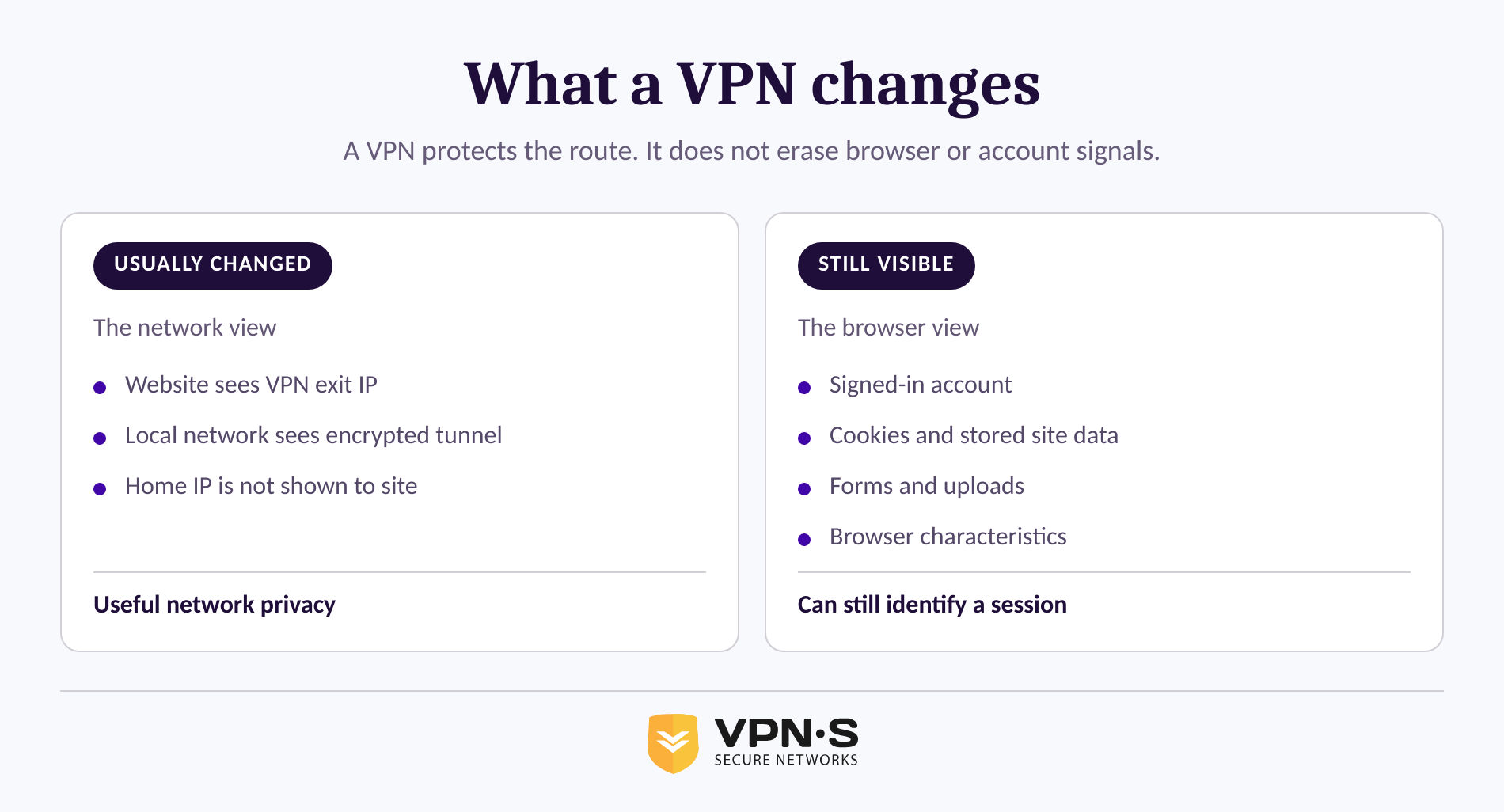
A VPN primarily changes the IP address shown to destination sites and encrypts the traffic between your device and the VPN server. It does not give every party the same view, and it does not erase information you voluntarily send to a service.
The useful question is not simply, "Does a VPN hide me?" Ask instead: "Hide what, from whom?" The answer changes depending on whether the observer is the website, the local Wi-Fi operator, your internet provider, the VPN provider or someone who already controls an account you use.
A destination website will generally see the VPN exit IP, not your ordinary public IP. However, the website can still see an account you sign in to, data entered in forms, its own cookies, browser behavior and the device information exposed by the browser.
Your local network and internet provider can generally see that your device is connected to a VPN service. With a full-device VPN connection, the VPN tunnel is intended to prevent those network operators from reading the destination browsing traffic inside that tunnel. The technical details matter, so use a provider's VPN privacy features and connection documentation to understand which traffic is routed through the service. (vpnsecure.me)
The VPN provider becomes part of the trust model because it operates the server that forwards the connection. Read the provider's policy rather than relying on a label alone. VPN Secure's stated no-logging policy says that it does not record customer IP addresses, connection timestamps, bandwidth use or DNS requests. (vpnsecure.me)
DNS deserves special attention. DNS translates a domain name such as a website address into the IP address a device needs to connect. NIST's 2026 DNS deployment guide specifically treats the confidentiality of client DNS queries as a security concern. (nist.gov)
A VPN changes an important observer relationship, but it cannot stop a website from recognizing the account, browser and information used inside that website.
What can still identify you after you connect?
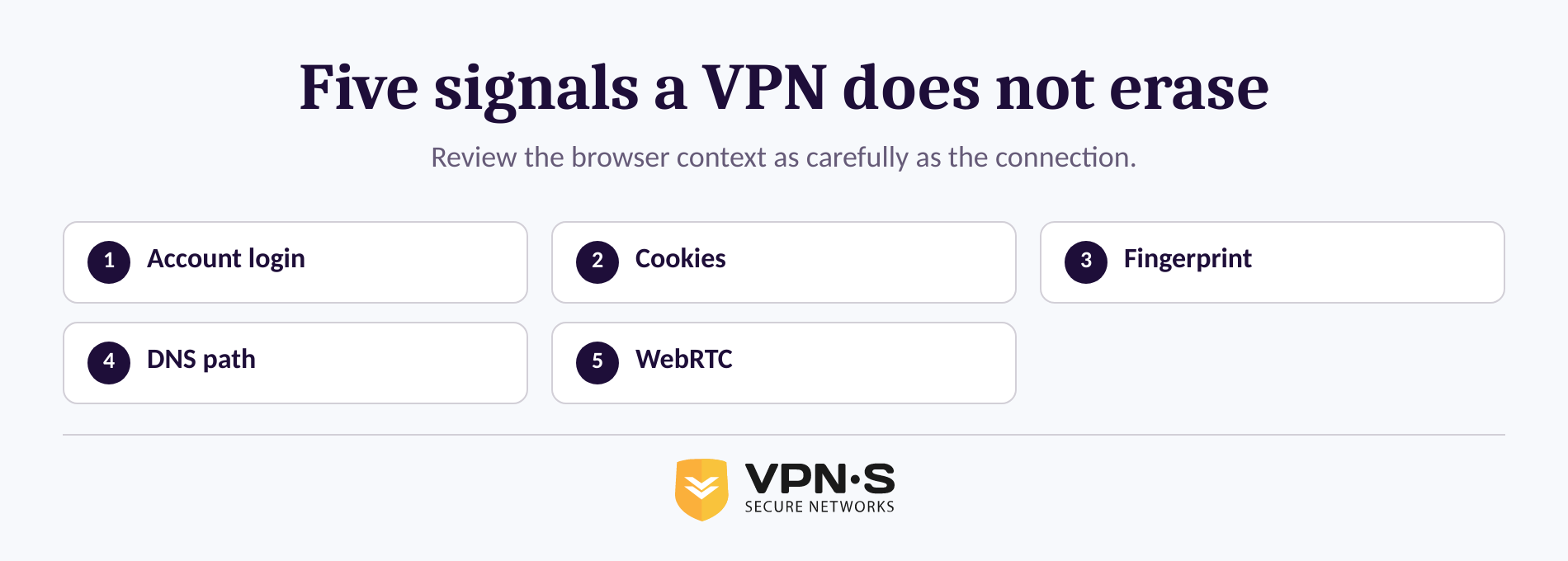
The biggest remaining identity signals are usually account logins, stored browser data and device characteristics. These signals can be enough to recognize the same browser or person even when the public IP address has changed.
An account login identifies the account holder
Signing in is often the clearest link between activity and identity. A VPN can hide the origin IP from the website, but it does not hide the fact that a particular account performed an action.
That does not make a VPN pointless. It means the VPN and the account solve different problems. Use a VPN when you want a more private network connection, and treat a signed-in session as identified activity unless the service says otherwise.
Cookies and site storage can carry recognition forward
A cookie is small data that a server asks a browser to store and return on later requests. Cookies have legitimate uses, including sign-in state and preferences, but they can also be used to recognize a browser and build a record of behavior. (developer.mozilla.org)
Clearing cookies, using separate browser profiles or using a fresh private window can reduce the amount of state carried from one session to the next. The trade-off is convenience: sites may sign you out, forget settings or request additional verification.
Browser fingerprinting can recognize a distinctive setup
Fingerprinting does not depend on one cookie. It can combine browser and device details, including language, time zone, screen characteristics, installed capabilities and settings, into a pattern that may distinguish one browser from others. The Electronic Frontier Foundation explains that fingerprinting can combine these characteristics and that fingerprints can persist across browsing activity. (eff.org)
Installing many extensions, changing unusual settings or trying to customize every privacy control can sometimes make a browser more distinctive rather than less. The goal is not to create a strange browser. The goal is to reduce unnecessary tracking while keeping a stable, secure browsing environment.
DNS and WebRTC need checking, not assumptions
A VPN connection should route DNS requests through the intended protected path, but connection settings and software behavior can differ. Check the provider's documentation and use a reputable leak test after connecting, especially after changing network, protocol or split-routing settings.
WebRTC is another browser feature worth understanding. MDN documents that WebRTC connection candidates can expose address information useful for location or network-topology inference and fingerprinting in some contexts. That does not mean every WebRTC-enabled browser leaks a home IP address through every VPN setup, but it does mean assumptions are not a test. (developer.mozilla.org)
A VPN cannot correct every local privacy issue. It cannot remove malware, make a phishing page trustworthy, stop an account provider from recording activity inside an account or undo information already shared with a website. Keep the operating system and browser current, use HTTPS sites for sensitive activity and pause before entering personal information.
The practical risk is rarely one dramatic leak. It is the accumulation of an account, a cookie, a browser pattern and a piece of personal information that makes a person easy to recognize.
How do you set up safer private browsing?
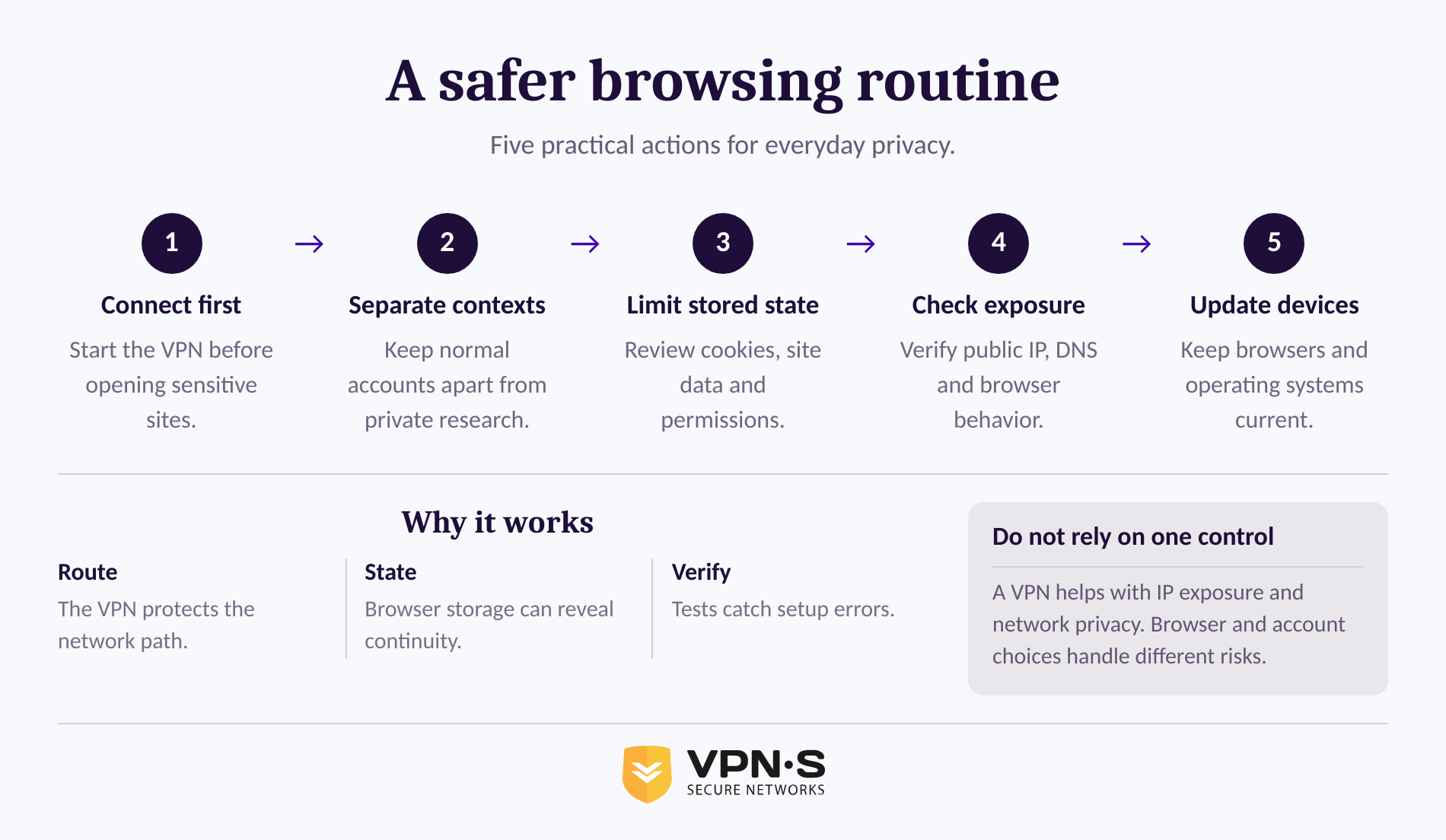
For everyday privacy, use a full-device VPN connection, reduce browser state, separate identified activity from private research and test the connection after major changes. The routine below is more realistic than chasing an impossible promise of complete invisibility.
Start by deciding what you are trying to protect. If the concern is an untrusted airport, hotel or café network, the priority is encrypting the device's connection before opening sensitive services. If the concern is cross-site tracking, browser state and account habits matter just as much as the VPN connection.
- Connect before opening sensitive sites. Use the VPN before signing in, searching or submitting data on an untrusted network. A full-device VPN is generally the clearest choice when the aim is to protect more than one browser tab.
- Choose the right browser context. Keep everyday signed-in browsing separate from research that does not need your normal accounts. A separate browser profile is often easier to manage than repeatedly clearing everything, because it keeps cookies, bookmarks and account sessions from crossing between contexts.
- Reduce stored recognition data. Review cookies and site permissions regularly. Clear site data when it no longer needs to persist, and do not automatically accept every request for location, notifications, camera or microphone access.
- Check the connection after changes. Confirm that the displayed public IP matches the selected VPN location and check for DNS or WebRTC-related exposure after changing networks, browsers or VPN settings. A single successful test is not a permanent guarantee, but it can catch configuration problems.
- Keep the device trustworthy. Install browser and operating-system updates promptly. A private route does not help if the browser or device has already been compromised, or if a convincing fake page collects information directly from you.
Private browsing mode can help with local cleanup, but it should not be treated as a network privacy tool. The Tor Project explains that private tabs erase local session information after closing, while still offering no protection against online tracking or a browser's digital fingerprint. (support.torproject.org)
If the VPN is not already installed on a device, use VPN Secure's official download options rather than downloading lookalike applications from unofficial sources.
The strongest everyday routine is simple: connect first, separate browsing contexts, limit saved state, check the connection and keep the device updated.
Should you use a VPN, private browsing, or Tor Browser?
These tools solve different parts of the privacy problem, so the right answer can be more than one tool. A VPN protects the network route, private browsing limits local session leftovers and Tor Browser is designed to reduce tracking and fingerprinting risks through a different browsing model.
| Tool | What it is best at | What it does not solve by itself |
|---|---|---|
| VPN | Encrypting the route from a device to the VPN server and masking the ordinary public IP from destination sites | Logged-in identity, cookies, form entries and browser fingerprinting |
| Private browsing window | Reducing local history and session data left after the window closes | Network privacy, website tracking and browser fingerprinting |
| Tor Browser | Routing through the Tor network and using browser protections intended to resist tracking and fingerprinting | Perfect anonymity, identity disclosure in forms or every application on a device |
Tor Browser can be appropriate for people whose privacy needs go beyond ordinary browsing, but it has limits. The Tor Project says that perfect anonymity is generally impossible, and that signing in or submitting personal details identifies the user to that site even when Tor Browser is in use. (support.torproject.org)
For ordinary banking, shopping, travel and public Wi-Fi use, a VPN plus sound browser hygiene is often the practical baseline. For higher-risk work, consider the consequences of an error before relying on any one tool, and seek specialist security advice when personal safety, legal exposure or sensitive sources are involved.
The right tool is the one that addresses the specific exposure you have, not the one that makes the broadest anonymity promise.
What else do people ask about anonymous browsing?
A VPN can improve privacy, but the answers below remain grounded in the same principle: an IP address is only one of several ways activity can be linked to a person. Account records, browser data, device information and information disclosed directly can matter just as much.
Do VPNs actually make you anonymous?
VPNs do not make users fully anonymous. A VPN can conceal a normal public IP address from destination websites and encrypt the connection to the VPN server, but sites can still recognize logged-in accounts, persistent cookies, browser fingerprints and information entered into forms. Anonymous browsing requires reducing those signals too. (vpnsecure.me)
Can the FBI track you with a VPN?
A VPN does not make a person impossible to investigate. In the United States, lawful investigations may use records from online accounts and other evidence; a Department of Justice filing described an investigation that connected activity through cookies, recovery email addresses, IP records and payment records despite VPN use. Laws and legal process vary by jurisdiction. (justice.gov)
Is TOR 100% untraceable?
Tor is not 100% untraceable. The Tor Project says perfect anonymity is generally impossible, and users can identify themselves by signing in, submitting personal information, changing the browser in distinctive ways or using applications that are not configured to use Tor. Tor Browser reduces risk; it does not remove it. (support.torproject.org)
Can you surf anonymously?
Complete anonymity on the ordinary web is not a realistic promise, but people can reduce linkability. Use a VPN to protect the network route, avoid signing into identity-bearing accounts when unnecessary, separate browser profiles, limit stored cookies and permissions, and avoid giving sites personal details that they do not need. (developer.mozilla.org)
The useful standard is not perfect anonymity. It is fewer unnecessary identifiers, fewer avoidable tracking signals and a private connection that is active before sensitive browsing begins.
For everyday private browsing, start with a VPN Secure subscription, then apply the browser and account steps that keep your VPN connection from being your only privacy control. (vpnsecure.me)