




A VPN hides your IP address from the websites you visit, but it doesn’t make you anonymous or untraceable. A VPN for anonymous online activity encrypts your connection, making it harder for your internet service provider and people sharing public Wi-Fi to decipher your traffic. They can still see that you’re connected to a VPN, and websites may recognize you when you sign in or share identifying details.
It makes sense to want more privacy when browsing from a café, traveling, or simply limiting what your network provider can see. A VPN can help, but it’s one layer of protection, not an invisibility cloak. What you do in your browser still matters.
This guide explains what a VPN hides from websites, your ISP, and public Wi-Fi operators, and what can still identify you, including accounts, device location, cookies, and browser fingerprinting. You’ll also see how VPNs compare with tools such as incognito mode and Tor, and how privacy laws fit into the picture. The goal is straightforward: help you choose protection that fits the risk you face.
Key Takeaways
- Think of a VPN as a privacy layer, not invisibility: sign-ins, cookies, device location, and browser fingerprints can still identify you.
- Compare privacy tools by what they protect. Incognito mode mainly limits what your device saves, while Tor and VPNs route traffic differently and have different trade-offs.
- On public Wi-Fi, encryption helps shield your traffic from people on the same network. Your ISP can still see that you’re connected to a VPN.
- Consider where a VPN’s servers are located and how local data-retention rules may affect information handling.
- Assess a no-logs policy alongside the provider’s privacy practices, and remember that a VPN shifts trust from your ISP to the VPN provider.
Does a VPN Make You Anonymous and Untraceable Online?
No. A VPN can hide your real IP address from websites and encrypt internet traffic, but it can’t erase every clue to your identity. Your accounts, device, browsing habits, and payment choices still matter.
Think of privacy as controlling who can see your activity, and anonymity as making it difficult to connect that activity to you.
Online Privacy and Anonymity
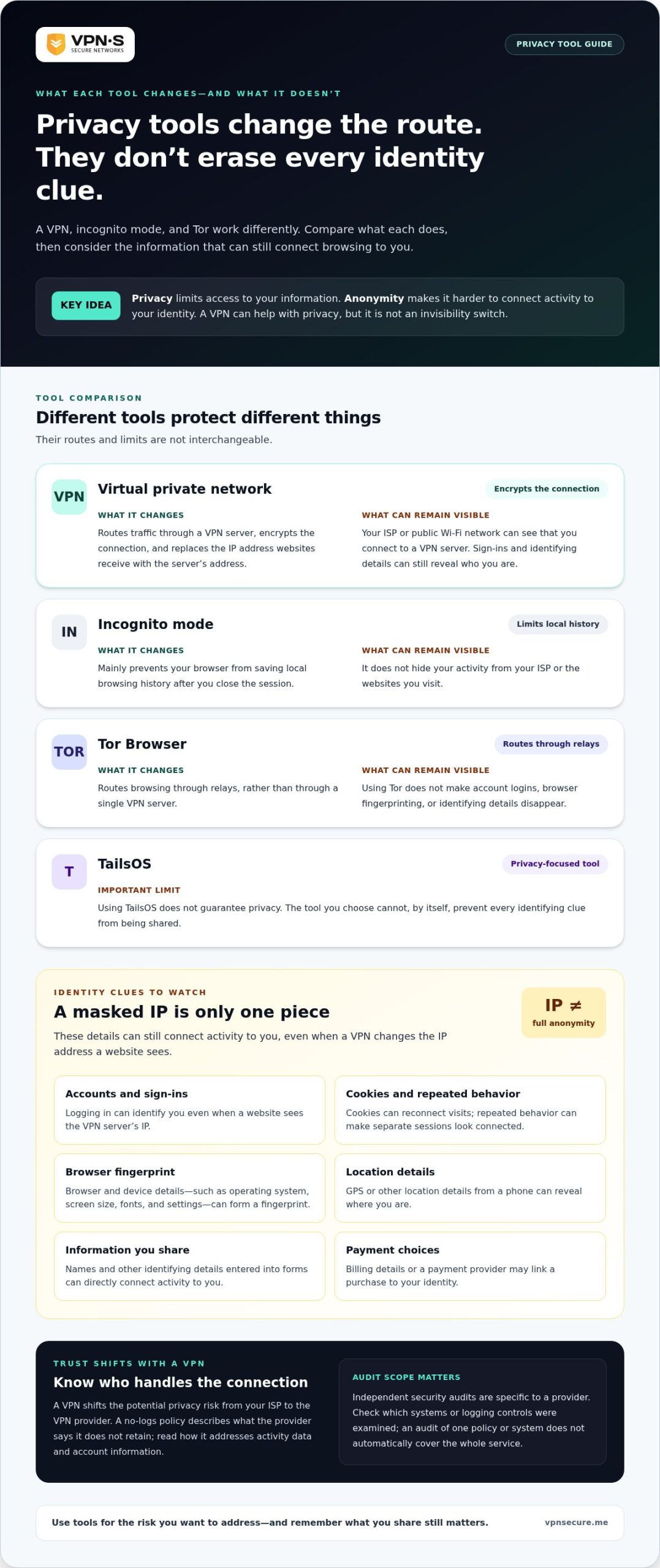
Online privacy limits access to your information; anonymity makes it harder to link your actions to your identity. That difference matters when you browse, post on social media, or use an online account. A VPN can replace the IP address a website sees with the VPN server’s address, but logging in can identify you anyway. Privacy is a sliding scale, not an invisibility switch.
Independent security audits are specific to each provider, not a universal badge. Look for a report that names the VPN provider and explains which systems or logging controls were examined. The scope matters: an audit of one policy or system doesn’t automatically cover every part of a service.
Anonymous browsing depends on more than an IP address. Your browser, operating system, screen size, fonts, and settings can form a browser fingerprint. Cookies can reconnect separate visits, while GPS or other location details from a phone can reveal where you are. Even without a name, repeated behavior can make separate browsing sessions look connected.
Payment choices can also link activity to your identity. A payment provider may process account or billing details, while a VPN changes the route your internet traffic takes. Don’t assume that using a different IP address makes a purchase anonymous. The account you use, details you enter, and payment method can each connect an online action to you.
Privacy Habits for Anonymous Browsing
Privacy habits are choices that reduce the personal clues you leave online. They matter because a VPN can’t control what you share with a website. Avoid logging in when an activity doesn’t require an account, limit identifying details in forms, and review your device’s location permissions before browsing. A search engine designed to limit tracking can also reduce the data shared through searches.
Incognito mode mainly prevents your browser from saving local history after you close it; it doesn’t hide your activity from your ISP or websites. Tor routes browsing through relays, while a VPN sends traffic through a VPN server. These tools work differently, and neither makes careless account use disappear. For a VPN for anonymous online activity, pair encrypted traffic with careful account, cookie, and location choices.
VPNs compared with other anonymity tools
A VPN changes the route your internet traffic takes, while other privacy tools work differently. Comparing them helps you match a tool to the information you want to protect.
In the United States, VPNs are used for lawful privacy and security purposes. A VPN doesn’t make otherwise unlawful online activity lawful or remove the rules that apply.
Free and Paid Anonymous VPNs
Free and paid VPNs differ in how access is funded and in the terms the provider sets. A free option’s price alone tells you little about its privacy protections. Some legitimate VPN businesses offer a seven-day free trial, but a trial isn’t evidence of a no-logs policy. Read the stated terms and privacy practices before trusting either type with personal information.
VPN IP Address Masking
IP address masking replaces the address websites receive with the VPN server’s address. Your connection can then appear to come from the server rather than your home network. For example, a website may record the VPN server’s IP address in its traffic logs. Masking doesn’t conceal details you submit directly, such as your name in an account form, or prevent sign-ins from linking activity to your identity.
Trustworthy No-Logs VPNs
A no-logs policy describes what a provider says it does not retain about your VPN activity. It matters because routing traffic through a VPN shifts the potential privacy risk from your ISP to the VPN provider. Read the policy for clear explanations of activity data and account information. Treat an independent security audit as useful only when its published scope identifies the systems or practices it examined.
VPN Legality in the United States
VPN use in the United States is a tool choice; a VPN doesn’t change the legal status of the activity it carries. This distinction matters if you’re using a VPN to protect browsing on public Wi-Fi or limit what your ISP can decipher. Encryption changes who can read traffic in transit, not what you’re permitted to do online.
Tor Browser offers a different route, sending browsing through relays rather than a single VPN server. TailsOS is another privacy-focused tool, but using Tor Browser and TailsOS doesn’t guarantee privacy. A VPN can also be combined with Tor, though adding another route doesn’t prevent account logins, browser fingerprinting, or identifying details from exposing you. Choose tools based on the risk you’re addressing, then limit the information you share with websites.
ISP and public Wi-Fi visibility
When you connect through a VPN, your ISP and a café’s Wi-Fi network see a connection to a VPN server. Encryption can prevent them from deciphering the traffic inside that connection.
What Your ISP Can See
Your internet service provider can see that your device connects to a VPN server. It can also see connection details, such as timing and network activity, without necessarily reading encrypted content. A VPN changes what your ISP can inspect; it doesn’t make the connection itself invisible.
With an encrypted VPN connection, your ISP can’t readily decipher which websites you visit from the traffic contents. Without encryption, a VPN connection doesn’t provide that protection. Your ISP may still observe patterns, including when traffic flows and how the connection behaves. Traffic analysis can use packet sizes, network lag, and timing to draw conclusions even when content is encrypted.
What Public Wi-Fi Can See
At a hotel, airport, or coffee shop, the Wi-Fi operator can see your device join its network and connect to a VPN server. Encryption helps shield traffic contents from the local network. That matters on shared Wi-Fi, where other parties may also connect through the same access point.
A VPN doesn’t remove every interaction with a local network. For example, a café’s Wi-Fi may display a sign-in page before you can connect. The operator can see that you joined its network, even if your later internet traffic travels through an encrypted VPN connection. Follow the network’s access policies, and avoid entering sensitive details on pages that don’t look legitimate.
What the VPN Changes, and What It Doesn’t
A VPN shifts visibility rather than erasing it. Your ISP sees the VPN connection, while the VPN provider handles traffic that would otherwise pass through your ISP. What the provider can see depends on encryption and the traffic involved, so the VPN service becomes a party you must trust.
Web tracking also works beyond your network connection. A Google sign-in, browser cookies, or information you enter on a website can connect activity to your account. A VPN can change the IP address visible to websites, but it doesn’t stop them from recognizing an account you use.
For a practical check, connect the VPN before opening an app or browser on public Wi-Fi. Confirm that the VPN connection is active, then remember what each party can see: the Wi-Fi network sees your connection to the VPN, your ISP sees the VPN connection, and the VPN provider handles your routed traffic. This division helps you understand surveillance risks without mistaking encryption for total anonymity.
Server location and data retention laws
A VPN server’s location affects the location websites associate with your connection. Its legal setting can also affect how information is handled, so both server location and provider jurisdiction matter.
When you route traffic through a VPN, websites receive the VPN server’s IP address instead of your home connection’s address. That IP can reveal the server’s location, such as a city or country. A website may therefore treat your connection as coming from the server’s region, not your physical location. The server location changes the visible network endpoint, not your identity or activity by itself.
Separate three details: where the provider is based, where its servers operate, and which laws apply to stored data. A provider based in one country may use servers in another. The server’s location and the company’s legal jurisdiction can therefore raise different privacy questions. Don’t treat a country label on a server list as a complete account of where data is managed.
Data-retention laws determine whether organizations must keep particular information and for how long. Rules vary between jurisdictions and can affect what records a provider may need to retain. Choosing a VPN with servers in privacy-friendly countries without data-retention laws can help protect user information. Still, assess the provider’s own logging policy alongside server location.
Encryption and retention address different parts of privacy. Encryption makes traffic harder for outside parties to read as it travels between your device and the VPN server. It doesn’t establish whether connection records or account information are stored. For example, encrypted browsing traffic and retained connection metadata are separate issues. Read the privacy policy for the information categories covered and the stated retention practices.
Virtual server locations add another distinction. A VPN may present an IP address associated with one country while routing traffic through hardware elsewhere. This can affect the apparent location websites see, but the IP address alone doesn’t tell you where the physical server is. Treat virtual locations as a routing and location choice, not proof of a particular data-handling regime.
For a targeted privacy decision, compare server location, provider jurisdiction, encryption, and logging terms together. If you connect from public Wi-Fi while traveling, encryption helps protect traffic on the local network; your chosen VPN server determines the IP location websites receive. No single location choice answers who may access stored information. The provider’s retention practices and the laws governing its operations remain key parts of the picture.
How to choose a trustworthy VPN with a no-logs policy?
A no-logs policy describes what a VPN provider says it does not record about your activity. It matters because your provider handles traffic that would otherwise pass through your internet service provider. Judge the policy by its details, not its label. “No logs” should explain which activity records are excluded and what account information remains.
Start with the privacy policy. Look for clear distinctions between browsing activity, connection data, diagnostic information, and account details. For example, a service may say it doesn’t record websites visited while still collecting information needed to manage an account. These categories have different privacy implications. A readable policy should explain them without hiding key details in broad, undefined terms.
Next, look for independent scrutiny. A security audit can provide evidence about the systems or practices examined, but its scope matters. Check what the report reviewed, when it was conducted, and whether it addresses logging claims or another part of the service. An audit of an app’s security doesn’t automatically establish how server records are handled.
Server ownership is another useful factor. VPN providers that own and operate their own servers generally offer stronger privacy guarantees. Look at what the policy says about server operations, access controls, and data retention. The provider’s location also matters because laws governing its operations may affect stored information. Compare those details rather than treating a country label or “no logs” slogan as a complete answer.
Use this practical checklist when assessing a provider:
- Logging: Does the policy clearly address browsing activity and connection records?
- Audit scope: Does a published report identify what systems or claims it examined?
- Server operations: Does the provider explain who operates its servers and how access is controlled?
- Data handling: Does the policy distinguish account details from traffic data?
- Legal setting: Does the provider explain how its operating jurisdiction relates to data retention?
These checks help you compare claims against concrete policies and technical practices. No single label answers every privacy question; the policy, server operations, and audit scope work together. For encrypted VPN access backed by a stated no-logs approach, explore VPN privacy options and compare how they fit your browsing needs.
VPN Secure: Monthly VPN Subscription
VPN Secure offers a Monthly VPN Subscription for people who want encrypted internet traffic while browsing or using public Wi-Fi. It adds a privacy layer between your device and the websites you visit, but it doesn’t make you anonymous or conceal details you share through accounts. Choose a VPN for connection protection, and keep using privacy habits that limit identifying information.
If you prefer a longer subscription period, VPN Secure also offers an Annual VPN Subscription. The right option depends on how you plan to use a VPN and your preferred subscription period. For more information about VPN Secure, visit VPN Secure online.
Make Privacy a Habit, Not a Guess
Your next step is to decide what you want your online privacy routine to protect. A VPN for anonymous online activity can support that routine, but your choices matter too. Set a clear baseline: use a VPN when you want an encrypted connection, limit the personal details you share, and choose carefully when signing in or making a payment.
Then match the subscription to how you plan to use the service. VPN Secure offers Monthly VPN Subscription and Annual VPN Subscription options, plus Dedicated IP. These offerings address different connection needs, so consider which fits your intended use rather than expecting a VPN to conceal every part of your digital identity.
Privacy works best when you understand the tool and its limits. Keep that distinction in mind as your browsing habits change, and make deliberate choices about where your information goes. If you’re ready to explore an option for your online privacy, contact VPN Secure about online privacy.
Frequently Asked Questions
Can your ISP track you with a VPN?
Your ISP can see that your device connects to a VPN, but encryption can prevent it from reading the contents of that traffic. It may still observe connection patterns, such as timing and changes in network activity. For example, a burst of data may be visible without revealing page content. Your browsing accounts and behavior also remain separate from what your ISP can see through the network connection.
What does a VPN do for your privacy?
A VPN encrypts internet traffic between your device and the VPN server, helping limit what your local network or ISP can decipher. It also presents the VPN server’s IP address to websites instead of your usual one. For example, this can keep a café Wi-Fi operator from readily reading traffic contents. It doesn’t control information you choose to share directly with an app or website.
What does a VPN not hide?
A VPN doesn’t hide details you enter into a website, such as your name, email address, or payment information. Signing in to a familiar account can connect a session to your identity, even when your IP address changes. Cookies and browser fingerprints can also distinguish your device. On mobile, GPS permissions may reveal your location independently of the route your internet traffic takes.
Are VPNs traceable?
VPN use can be observed, and activity may still be linked to you through other clues. Your ISP can detect a connection to a VPN server, while a website can identify an account you sign into. Traffic timing and packet patterns may also reveal activity patterns. The practical question is which party can observe each part: your ISP, the VPN provider, websites, or apps.
Aside from using a VPN, what else can you do to stay private online?
Reduce the identifying details you share. Use separate accounts for activities you don’t want connected, review app permissions for location access, and clear cookies when you don’t need saved sessions. Choose a search engine with privacy controls, and avoid entering personal information into unexpected forms. Incognito mode can limit locally saved browsing history, but it doesn’t make you anonymous to websites or your ISP.
Can you get a truly anonymous VPN?
No VPN can make every online action anonymous. A provider may reduce exposure of your real IP address, but accounts, cookies, device details, and payment records can still link activity to your identity. Check the provider’s logging policy and the information it requires for an account. An independent audit can offer insight into the practices examined, but read its scope rather than treating it as a blanket guarantee.
Can you stay anonymous on mobile?
You can improve mobile privacy with a VPN, but a phone can reveal information outside its internet connection. GPS access, app permissions, logged-in accounts, and identifying details in posts can point back to you. For example, a social media app may associate a post with your profile regardless of your VPN IP address. Review location permissions and avoid signing in when an account isn’t needed.
Can you use a free anonymous VPN?
Some legitimate VPN businesses offer a seven-day free trial, but trial access doesn’t make browsing anonymous. Before using a free option, read its privacy policy to understand what activity or account data it handles, and consider whether its terms fit your needs. Don’t judge privacy by price alone. A VPN can protect a connection, but careful account use and limited information sharing still matter.