




A VPN can protect a connection, but it can’t give you permission to ignore school rules. If a research source or learning tool is blocked, it’s understandable to wonder whether a VPN for bypassing school internet filters will solve the problem. The answer depends on the network, device, and school policy, and trying without checking the rules could create trouble.
School filters can block legitimate material, while a VPN may not bypass controls on a managed device or network. The school may also block VPN connections or prohibit their use under its acceptable use policy. A VPN is a privacy tool, not a guarantee of access or immunity from monitoring.
This guide explains what a VPN can and can’t do on a school network, which privacy protections to check before choosing one, and how to avoid exposing personal accounts or device data. It also covers safer ways to request access to a resource you need for schoolwork, so you can address the problem without taking unnecessary risks.
Key Takeaways
- A VPN encrypts internet traffic, but it doesn’t grant permission to access blocked school resources or make activity invisible.
- Network filters, managed devices, VPN encryption, and school permission each play a different role.
- If a class resource is blocked, note the URL and its learning purpose, then ask a teacher, librarian, or school IT administrator to review it or suggest an alternative.
- Before using a VPN for bypassing school internet filters, check your school’s acceptable use policy and understand the potential consequences.
- For permitted privacy use, compare a provider’s encryption, privacy terms, supported devices, and stated limitations.
VPN for bypassing school internet filters: what the search really means
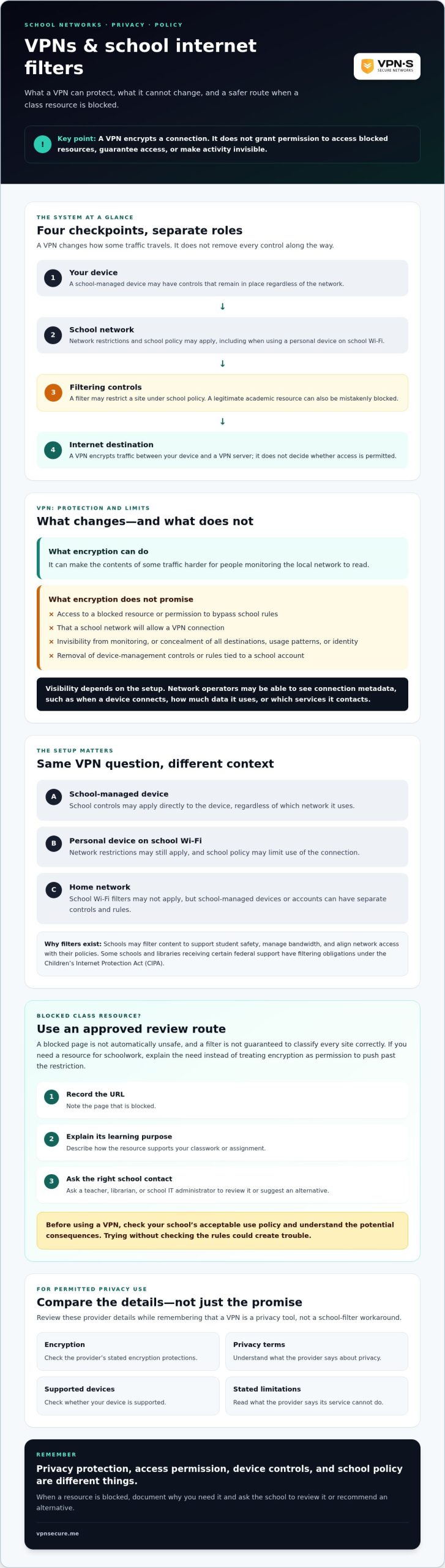
A VPN encrypts a connection, but it doesn’t grant permission to access a blocked resource. A school internet filter is a network or device control that restricts access under school policy. If a page you need for an assignment won’t load, it may be an over-blocking problem. That doesn’t mean evading the filter is allowed.
Intent matters, but so does the setup. Trying to reach a research source for class is different from trying to evade safeguards, monitoring, or acceptable use rules. The rules and technical controls can also depend on the device and network:
- School-managed device: The school may apply controls directly to the device, regardless of which network it uses.
- Personal device on school Wi-Fi: Network restrictions may still apply, and school policy may limit how you use the connection.
- Home network: School Wi-Fi filters may not apply, but school-managed devices or accounts can still have separate rules or controls.
What does a VPN change on a school network?
A VPN creates an encrypted connection between your device and a VPN server. This can make some traffic harder for people monitoring the local network to read. The Virtual Private Network (VPN) overview explains the basic idea of VPN tunneling and encryption. Encryption isn’t invisibility, though. It doesn’t erase device management, account activity, or school policy, and it doesn’t guarantee that a school network will allow the connection.
Think of these as separate layers. A VPN can affect how some network traffic is observed, but it doesn’t remove controls installed on a school device or change the terms attached to a school account. A VPN for bypassing school internet filters isn’t a reliable access promise, and using one against policy could lead to consequences under school rules.
Why might a school block websites or VPN connections?
Schools may filter content to support student safety, manage bandwidth, and keep network access aligned with their policies. Behind the scenes, administrators often deploy specialized gateway solutions (you can learn more about Lionic to see how modern web content filtering and application control operate at the network layer). They may also restrict VPN connections as part of network security. The approach can vary by school, device ownership, account, and network configuration, so there’s no single outcome to expect.
A blocked page isn’t automatically unsafe, and a filter isn’t guaranteed to classify every site correctly. A legitimate academic resource can be caught by a broad category or mistaken block. If that happens, ask for the resource to be reviewed through an approved route rather than treating encryption as permission to push past the restriction.
How school filters and VPN encryption work, without the technical fog
Picture a school assignment traveling through four checkpoints: your device → the school network → filtering controls → the internet destination. A filter may block a site along that route based on school policy. A VPN changes how some traffic travels, but it doesn’t remove every checkpoint or determine whether you’re allowed to reach the destination.
A VPN encrypts traffic between your device and a VPN server, making some network activity harder for local observers to read, but it doesn’t make you or your activity invisible. That distinction matters. Encryption can protect the contents of some traffic in transit, while device controls, school accounts, and other network settings operate separately.
Some schools and libraries receiving certain federal support have filtering obligations under the Children’s Internet Protection Act (CIPA). The FCC explains the law’s role in requiring internet safety policies and technology protection measures. This context helps explain why filtering exists, but it doesn’t mean every blocked page is unsafe or every filter makes the right call.
What can a school network administrator see?
Visibility depends on the setup. Network operators may be able to see connection metadata, such as when a device connects, how much data it uses, or which services it contacts. A VPN may limit access to the contents of encrypted traffic on the local network, but it doesn’t guarantee that destinations, usage patterns, or identity are hidden in every configuration.
Device management and account settings add other layers. A school-managed laptop could have controls that continue to apply even when the network connection changes. Activity linked to a school account may also be handled under that account’s settings, not protected simply because a VPN is in use.
Why can a VPN still fail to open a blocked site?
A network may restrict VPN connections, while a managed device may block or limit access independently. The destination itself could also require an approved school account, or browser controls may prevent a page from loading. Different obstacles can produce the same error on screen.
VPN encryption does not guarantee site access. If your goal is privacy on a personally controlled or otherwise authorized network, review a provider’s privacy terms and limitations before choosing a service. You can review VPN privacy information as part of that decision, but don’t treat a subscription as a promise to defeat school controls.
VPN versus school filters: privacy benefits, limits, and consequences
These tools serve different purposes. A VPN can encrypt traffic between your device and a VPN server. A school filter may restrict access under school policy. Device management can apply controls to a school-owned or school-managed device, while direct permission comes from an authorized person or process. None automatically replaces the others.
Keep the central distinction clear: a VPN is neither invisibility nor authorization. Searching for a VPN for bypassing school internet filters doesn’t change the rules that apply to a school network or device. Use this comparison to distinguish privacy protections from access controls:
| Measure | What it may protect or control | What it doesn’t guarantee |
|---|---|---|
| VPN encryption | Can make some traffic harder for local network observers to read. | Anonymity, access to a blocked site, or permission to use the connection. |
| School filtering | May restrict websites or services according to school settings and policy. | That every blocked page is unsafe or every decision is accurate. |
| Device management | May apply settings or restrictions directly on a managed device. | That network changes remove those controls. |
| Direct permission | Clarifies whether access is allowed under the school’s process. | That a VPN or other technical tool will make access work. |
Does a VPN make school browsing anonymous?
No. A VPN may change how some traffic travels and which provider handles it, but it can’t guarantee anonymity. A school account, managed device, signed-in browser session, or website login can still associate activity with you. What a school can see depends on its network configuration, device controls, and account settings. Don’t treat encryption as a way to disappear.
Provider privacy claims deserve scrutiny, too. Read the no-log VPN audit guide to understand why a “no logs” statement is a claim to evaluate, not proof by itself. Check what the provider says it collects and how it supports those statements.
What could happen if a student ignores school rules?
Need a blocked resource for class? Take these policy-aware steps
A blocked page can interrupt real research. If you need it for an assignment, choose a next step that addresses the access problem without risking a policy violation. Avoid proxy lists and technical workarounds. Ask the school to review the resource or point you to an approved alternative.
How to request access to a blocked educational website
Keep your request clear and specific. A teacher, librarian, or school IT administrator can help route it through the right process.
- Record the resource. Note the exact website or page address, its title, and what happens when you try to open it. Include the date or assignment if that helps staff identify the issue.
- Explain its class purpose. Say how the page supports your assignment or learning objective. For example, identify the topic, source, or research question you need it for.
- Request an approved review. Ask your teacher or IT team to check whether access can be approved through the school’s established process.
- Ask for another route if access isn’t approved. A teacher or librarian may suggest an accessible source, database, or other way to complete the research.
This gives staff useful context and keeps the focus on your schoolwork. It also makes clear that you’re asking for access rather than trying to get around the school’s controls.
What to check before using a VPN on a personal device
“Personal device” doesn’t automatically mean “personal network.” Before using a VPN, check your school’s acceptable use policy and ask a trusted staff member if the rules aren’t clear. Confirm who owns and manages the device, whether you’re using school Wi-Fi, and whether a school account or browser profile is active. A VPN for bypassing school internet filters isn’t a reliable or policy-safe route to a blocked resource.
For personal browsing, use a network you control only where your VPN provider’s terms and applicable local rules allow it. If you’re comparing privacy options for permitted use, read the provider’s terms carefully. This guide to secure VPN plans and commitments can help you assess what matters before choosing.
If a VPN fits your privacy needs on an authorized network, explore VPN Secure’s privacy service and review its terms. Keep that decision separate from any request to access school-blocked material. For class resources, speak with school staff about the approved process.
Choose privacy protection responsibly, without treating a VPN as a school-filter workaround
A VPN is a privacy tool for networks and uses where it’s permitted, not a pass to defeat school controls. To choose one responsibly, check what the provider promises, what it can’t promise, and whether the service fits your devices and needs. A VPN for bypassing school internet filters is not a reliable way to reach blocked material or avoid school rules.
How to evaluate a VPN provider’s privacy claims
Start with the details, not the slogans. Before subscribing, read the privacy policy and terms. Check what information the provider says it collects, how long it retains data, and what its encryption does and doesn’t cover. Confirm that your devices are supported, and look for clear explanations of service limits rather than promises of total anonymity.
- Encryption: Does the provider explain what traffic its VPN connection protects?
- Privacy terms: Is data collection and retention described in specific, understandable language?
- Supported devices: Will the service work on the devices you personally control?
- Limitations: Does the provider make clear that a VPN can’t guarantee anonymity or access to restricted sites?
“No logs” is a claim to examine, not proof on its own. Read this no-log VPN audit guide to understand what evidence may help you assess a provider’s privacy statements. Treat a company’s own description as a starting point for evaluation, not independent verification.
When VPN Secure may fit your privacy needs
VPN Secure is a subscription privacy service for permitted use, not a school-filter bypass product. The company describes its service as encrypting internet traffic across major devices and presents itself as a no-log provider. It is based in the Bahamas and says it operates outside the Five Eyes alliance. Assess those statements alongside the provider’s privacy terms. Neither a provider’s location nor a no-log claim guarantees anonymity or changes school policy.
VPN Secure also describes a server network spanning more than 40 countries. Check current server and device details directly before choosing a service, and consider whether its stated features suit your authorized use. Most importantly, confirm that VPN use is allowed on the network you plan to use.
If that’s the kind of privacy protection you need on a permitted network, explore VPN Secure’s privacy features. Use a VPN to protect privacy where allowed, and follow your school’s approved process when coursework requires access to a blocked resource.
Protect your privacy without risking school access
A VPN can add privacy on networks where its use is allowed, but it doesn’t grant permission to reach blocked sites or override school controls. Keep that distinction in mind when considering a VPN for bypassing school internet filters. If a resource is essential for class, ask a teacher, librarian, or school IT administrator to review it or recommend an approved alternative.
For personal privacy needs, check the provider’s encryption, supported devices, privacy terms, and limitations before choosing. VPN Secure says it encrypts traffic across major devices and describes its service as no-log. Treat that as a company claim, and review the current policy and any supporting evidence rather than assuming it guarantees anonymity.
If you need a VPN for permitted privacy use, explore VPN Secure’s privacy features and assess whether the service fits your needs. Follow the rules that apply to your network, and ask school staff for help when coursework gets blocked.
Frequently Asked Questions
Can a VPN bypass school internet filters?
A VPN may change how a connection is routed, but it’s not a reliable way to access a blocked site. Schools can restrict VPN connections, and controls on a managed device or account may still apply. A VPN for bypassing school internet filters doesn’t grant permission or guarantee access. If a class resource is blocked, ask a teacher, librarian, or school IT administrator to review it or suggest an approved alternative.
Is it allowed to use a VPN on school Wi-Fi?
It depends on your school’s acceptable use policy and the circumstances. Some schools prohibit VPN use or attempts to get around network controls. Check the policy before connecting, and ask a teacher or school IT administrator if the rules aren’t clear. Even if VPN use is legal where you live, that doesn’t automatically make it permitted on school Wi-Fi. A personal device doesn’t necessarily change the network rules.
Can my school see what I do online if I use a VPN?
It may still see some information, depending on its network setup, your device, and your account settings. A VPN encrypts traffic between your device and the VPN server, which can make some activity harder for local network observers to read. But it doesn’t necessarily hide connection timing, device activity, or account use. School-managed devices, signed-in browsers, and school accounts can provide separate sources of activity information.
Will a VPN work on a school-managed Chromebook or laptop?
There’s no guarantee. School-managed devices may have settings, software, or account restrictions that limit VPN use, regardless of the Wi-Fi network. The school may also restrict VPN connections at the network level. Don’t try to change management settings or work around device controls. If you need a website for an assignment, give the exact page and its academic purpose to your teacher or school IT administrator and ask for an approved route.
What should I do if a school filter blocks a website I need for class?
Record the exact page address and explain how it supports your assignment or learning objective. Then ask your teacher, librarian, or school IT administrator to review it through the school’s process. If access isn’t approved, request an accessible alternative or another research source. A brief, specific request helps staff understand what you need without turning a coursework problem into an attempt to evade school safeguards.
Does a VPN make students anonymous online?
No. A VPN can encrypt some traffic and change which provider handles the connection, but it doesn’t guarantee anonymity. A school login, managed device, browser session, or account on a website may still identify you. What network operators can observe varies by configuration. Treat a VPN as one privacy measure, not a way to disappear online or avoid school policies.
Is a free VPN a safe way to access blocked websites at school?
Not necessarily, and it isn’t a policy-safe shortcut. Some free VPN services may collect and sell browsing or location data, or expose users to malware and other security risks. Privacy practices vary, so read the terms carefully rather than assuming “free” means private. A VPN also doesn’t grant permission to access blocked school resources. For classwork, request an approved review or alternative.