




A VPN can shield the route your data travels, but it can’t lock every door on your device. If you’ve wondered who can see your activity on café Wi-Fi or what your internet provider can learn, a VPN for data security online can help protect your connection. But encryption isn’t the same as anonymity, and a VPN isn’t a complete security system.
You’re right to want more control over your data. The key is knowing what protection you’re getting and where it stops. A VPN encrypts traffic between your device and the VPN server, making it harder for others on the network to read that data in transit. It doesn’t erase your accounts, block every scam, or prevent harmful software from reaching your device.
This guide explains what a VPN can and can’t protect, how to use it as one layer of everyday security, and what to look for in a provider’s privacy claims. You’ll also learn why a no-logs promise is worth examining carefully rather than treating it as proof of anonymity. With clear expectations, you can make a stronger choice without buying into the hype.
Key Takeaways
- A VPN for data security online encrypts traffic between your device and a VPN server, helping reduce exposure on unfamiliar networks.
- Trace the path your data takes through the encrypted tunnel to understand what encryption hides and what connection details may still be visible.
- Separate connection privacy from device security: a VPN isn’t antivirus, phishing protection, or a guarantee of anonymity.
- Use a practical checklist to install your VPN, connect, and confirm it’s active before sensitive activity on an unfamiliar network.
- Assess a provider’s encryption and privacy claims carefully, including what its no-log policy means and what evidence supports it.
VPN for Data Security Online: What Risks Can It Reduce?
A VPN encrypts traffic between your device and a VPN server, creating a protected route for data as it moves across a network. That can make intercepted traffic harder to read and hide your home or mobile public IP address from the websites you visit. But the protection has boundaries. A VPN doesn’t make every website safe, secure a compromised device, or conceal information you type into an account form.
Think of it as a shield for one part of the journey, not armor for your entire digital life. The What is a Virtual Private Network? overview explains the basic technology. Its practical value depends on the threat, the VPN service, and how you use your device.
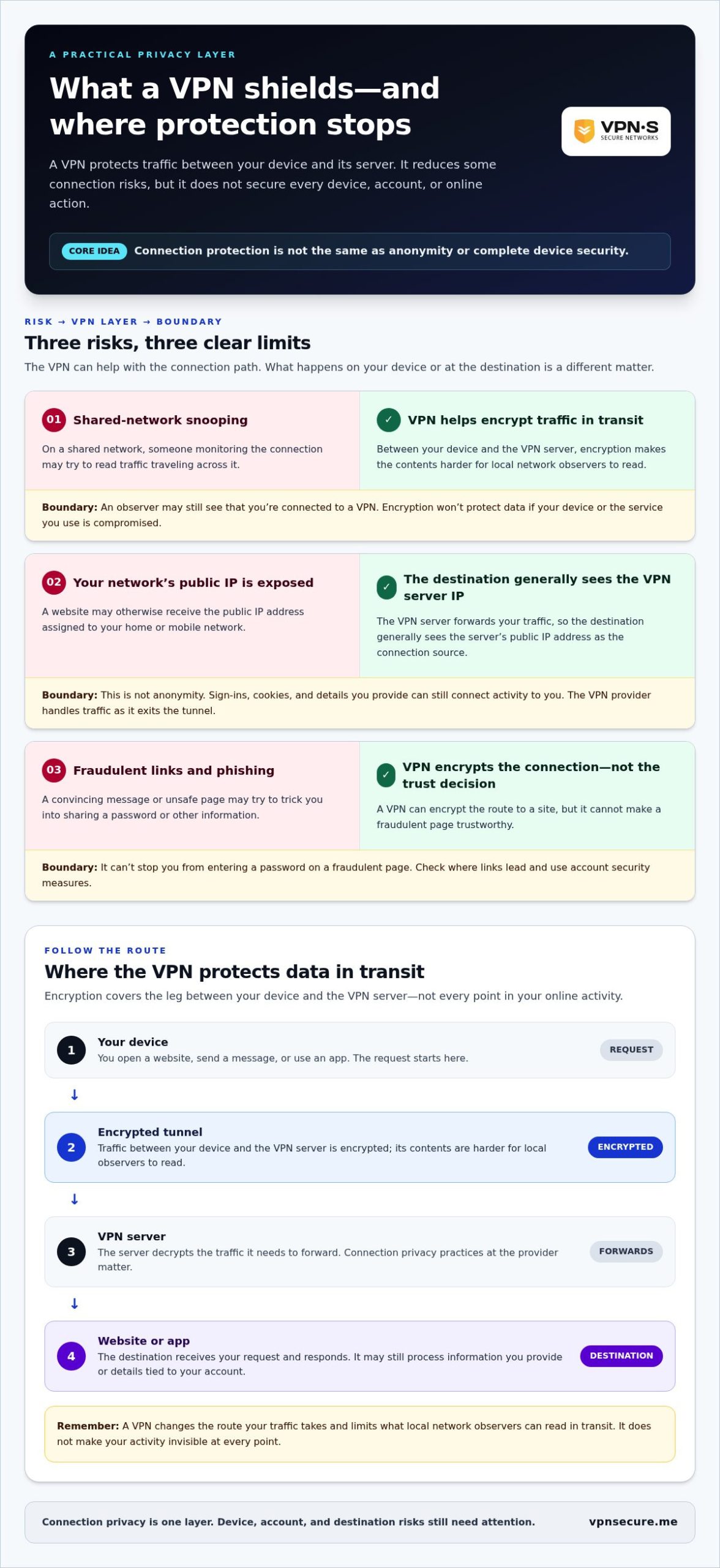
- Network snooping: On a shared network, encryption makes it harder for someone monitoring the connection to read traffic traveling through the VPN tunnel. It doesn’t protect data if your device or the service you’re using is compromised.
- Exposed connection details: Websites generally see the VPN server’s public IP address instead of your own. This can reduce exposure of your network’s IP, but websites may still identify you through account sign-ins, cookies, or information you provide.
- Unsafe links: A VPN can encrypt the connection to a site, but it can’t make a fraudulent page trustworthy or stop you from entering a password there. Check where links lead and use account security measures, too.
Quotable definition: A VPN encrypts data in transit between your device and a VPN server; it protects a connection, not every device, account, or online action.
What information can a VPN help protect?
Encryption scrambles traffic inside the tunnel so that anyone who intercepts it can’t readily understand its contents. The VPN server then forwards your traffic to its destination. Websites typically receive the server’s IP address as the connection source, rather than the public IP address assigned to your home or mobile network.
That shift isn’t anonymity. A site can still connect activity to an account you’re signed into, recognize stored cookies, or collect details you submit directly. The VPN provider handles your traffic as it exits the tunnel, so its privacy practices matter. Protection varies by service, connection setup, and what you do online.
When does online data security matter most?
Connection protection is relevant during ordinary activities, not just when you’re handling highly sensitive files. Browsing, messaging, and signing in to accounts all send data across networks. On shared networks, other users or whoever manages the network may have more opportunity to observe connection details. A VPN adds an encrypted route between your device and its server, reducing what local network observers can read in transit.
Still, the tunnel can’t fix every weak link. A convincing phishing message can trick you into sharing credentials, and malware can act directly on your device. Treat VPN protection as one layer: useful for reducing certain connection risks, but strongest when paired with careful link choices, secure accounts, and up-to-date device protection.
How VPN Encryption Protects Data in Transit
Encryption turns readable information into coded data that can’t be understood without the right key. An IP address helps identify a device’s connection and route internet traffic. A VPN for data security online changes how that traffic travels: your device sends it through an encrypted connection to a VPN server, which then forwards it to the destination, such as a website or app.
- Your device: You open a website, send a message, or use an app. Your request starts here.
- The encrypted tunnel: The VPN encrypts traffic traveling between your device and its server. Someone observing the local network may see that you’re connected to a VPN, but the contents of the encrypted traffic are harder to read.
- The VPN server: The server decrypts the traffic it needs to forward. The destination generally sees the server’s IP address as the source of the connection, rather than your network’s public IP address.
- The destination: The website or app receives your request and responds. The reply travels back through the server and encrypted tunnel to your device.
In short: A VPN changes the route your traffic takes and limits what local network observers can see, but it doesn’t make your online activity invisible at every point.
What happens to your data inside a VPN tunnel?
While data moves between your device and the VPN server, encryption scrambles it in transit. This helps protect the contents from someone trying to read traffic on the network you’re using. At the server, the traffic is decrypted for forwarding. From there, the destination may still receive information needed to provide its service, and the VPN provider may handle connection details.
A tunnel can’t erase what you choose to share. If you sign in, submit a form, or send a message, the website or app can process the information you provide. A VPN changes the connection path; it doesn’t remove account identifiers or make the destination forget your actions.
How is a VPN different from HTTPS?
HTTPS protects data exchanged between your browser and a specific website. It helps keep information such as a page request or form submission private while it travels between those endpoints. A VPN protects the connection between your device and the VPN server, covering that part of the route for traffic sent through the VPN.
They work together, not as substitutes. With both active, your traffic can be encrypted from your device to the VPN server, then protected by HTTPS as it travels from the server to a secure website. HTTPS doesn’t hide your network’s IP address from every observer, while a VPN doesn’t make an insecure website trustworthy. Each closes a different gap.
For an everyday connection-security layer, explore a subscription VPN for encrypted connections, while keeping HTTPS and careful data-sharing habits in place.
VPN Security Limits: What a VPN Cannot Protect You From
A VPN protects a connection, not every part of your digital life. It can encrypt traffic on its route to a VPN server and change the public IP address a website sees, but it isn’t antivirus, phishing protection, or a guarantee of anonymity. The value of a VPN for data security online comes from understanding that boundary and pairing it with safeguards for your device and accounts.
Use this threat map to separate what a VPN may reduce from what still needs your attention:
| Threat | What a VPN may help with | What remains exposed |
|---|---|---|
| Someone monitoring a shared network | Encryption can make traffic traveling through the VPN harder to read. | A compromised device, account, or destination can still expose information. |
| Websites identifying your network | A website generally sees the VPN server’s IP address instead of your network’s public IP. | Logins, cookies, browser settings, and details you submit can still identify you. |
| Phishing messages and deceptive sites | A VPN encrypts the connection to its server. | It doesn’t verify that a link or website is legitimate, or stop you from sharing credentials. |
| Malware and unsafe downloads | It can protect traffic in transit. | It doesn’t make a malicious file safe or remove malware already on your device. |
| Weak passwords or stolen accounts | It may protect some connection traffic from local observers. | It can’t prevent password reuse, account compromise, or unauthorized access using stolen credentials. |
Does a VPN make you anonymous online?
No. A VPN changes the IP address visible to websites, but that’s only one possible identifier. Sign in to an account and the service can associate activity with your profile. Cookies, browser settings, and details you enter can also help identify you. A VPN can improve connection privacy, but it can’t promise invisibility or guaranteed anonymity.
Can a VPN stop malware, phishing, or account theft?
Not by encryption alone. A harmful link remains harmful, and a secure connection can still carry a malicious download. If your device is compromised, a VPN can’t clean it or control what software does once it’s running. Nor can it rescue an account after someone obtains your password.
Build protection in layers. Keep your operating system, browser, and apps updated. Use strong, unique passwords for each account, and turn on multifactor authentication where available. Treat unexpected links and attachments with care, even when your VPN is connected. These steps address risks that connection encryption doesn’t.
That’s the practical role of a VPN: reduce certain connection risks without pretending to solve every security problem. Use it alongside sound account habits and device protections for a more balanced defense than relying on any single tool.
How to Use a VPN for Safer Online Data: A Practical Checklist
A VPN helps only when it’s set up and active on the device you’re using. Make checking it part of your routine, especially before signing in or handling sensitive information on a network you don’t know. This checklist keeps setup simple and adds the other protections a VPN can’t provide.
- Choose a service with clear privacy terms. Look for an understandable explanation of what connection or activity data the provider collects, how long it keeps it, and its company jurisdiction. Treat marketing language as a claim to examine, not proof by itself.
- Install the provider’s official app. Download it from the provider’s official website or your device’s trusted app store. Avoid lookalike apps and links from unsolicited messages.
- Select a suitable server location. Choose a location that makes sense for your connection and task. A nearby server may be a practical choice for everyday browsing, while a different location may suit a specific need. Don’t assume every provider offers the same server options or features.
- Connect before you browse. Open the app and start the VPN connection before signing in, messaging, or sending information over an unfamiliar network.
- Confirm it’s active. Check the app’s connection status rather than assuming the tunnel started. If it shows disconnected, pause sensitive activity until you’ve reconnected.
What should you check before connecting?
Use the official app and confirm its status each time you need protection. A familiar connection can drop, or you may open a browser before the VPN is active. Check the selected server location, too, so it fits your needs. Don’t rely on a protocol name or feature you haven’t verified in the app or service details.
Keep the rest of your security routine switched on. Install operating system and app updates, use unique passwords, enable multifactor authentication where available, and look for HTTPS before entering information on a website. A VPN doesn’t make a deceptive page legitimate, and it can’t repair a compromised device.
Checklist in one line: Connect, confirm, and keep your device and accounts protected; a VPN is one security layer, not a complete defense.
How can you evaluate a VPN provider’s privacy claims?
Read the privacy policy for specifics: what data is collected, what “no logs” means in practice, how long records are retained, and which company and jurisdiction are involved. Then separate the provider’s own statements from independent evidence. An audit can offer additional insight, but check what it examined and when; a broad claim without clear scope is hard to assess. Use this no-log VPN audit guide to understand what evidence can support a zero-logs claim.
For a practical connection-security layer, explore a VPN subscription for everyday use. Choose with clear expectations, then pair the connection with careful browsing and strong account security.
VPN Secure for Online Data Security: A Practical Privacy Layer
Once you know what a VPN can and can’t do, the next step is choosing a service that fits into your everyday routine. VPN Secure provides a subscription VPN that encrypts internet traffic across major devices, helping add connection protection when you browse, message, or sign in. It’s a practical layer, not a promise of total anonymity or protection from every device-level threat.
What VPN Secure brings to everyday browsing
VPN Secure provides access to servers in more than 40 countries, giving you location options for your connection. The company describes its service as no-log, and it is based in the Bahamas. These are relevant details to consider when reviewing a provider’s privacy approach, but a company’s own policy statements aren’t the same as independent proof. Jurisdiction alone also doesn’t guarantee privacy.
For a VPN for data security online, consider the whole picture: encryption, the provider’s stated data practices, and the limits of the protection. A VPN can make traffic harder to read while it travels through the encrypted connection. It can’t stop phishing, secure a device that’s already compromised, or prevent a website from associating activity with an account you use.
What to do next if you want an encrypted connection
Start by reviewing the service details and privacy terms. Consider whether a monthly or annual subscription suits your needs, then install the app on the device you plan to use. After connecting, confirm the app shows an active VPN connection before handling sensitive activity. Keep your device updated, use strong account security, and continue to check that websites use HTTPS.
VPN Secure subscriptions include a 30-day money-back guarantee. That gives you a defined period to consider the subscription, but it doesn’t guarantee a particular security outcome. For help weighing a month-to-month option, read the affordable monthly VPN plan guide and compare the choice with your own browsing needs.
Connection privacy works best when you understand both the protection and its limits. A VPN adds an encrypted route; your device updates, careful browsing, and secure account habits help cover other risks. Explore VPN Secure and its subscription options at Explore VPN Secure.
Make Your Privacy Choices Deliberate
Online privacy isn’t a switch you flip once. It’s a habit you shape around the devices you use, the accounts you rely on, and the information you choose to share. Treat a VPN for data security online as a decision about protecting a connection, not a promise that risk disappears. That distinction helps you choose tools with clear expectations.
As a next step, decide where added connection privacy would be useful in your everyday routine. Then review a provider’s privacy terms and consider whether its approach fits your expectations. A considered choice is more valuable than relying on bold claims or assuming one tool can do everything.
If you’re ready to add an encrypted connection to your privacy routine, explore VPN Secure. Keep building your defenses with thoughtful habits and the protections that fit your needs.
Frequently Asked Questions
Does a VPN protect your data online?
Yes, a VPN can protect some data as it travels between your device and the VPN server, especially from people observing the network you’re using. That’s useful when your apps send information over a connection you don’t control. It doesn’t control what happens after data reaches a website or service, though. For VPN for data security online, think of it as reducing exposure in transit, not securing every account or file on your device.
Can a VPN protect you from hackers on public Wi-Fi?
A VPN can make traffic harder for someone on the same network to read, but it can’t block every attack associated with public Wi-Fi. For example, it won’t fix an outdated device or stop someone from impersonating a legitimate website to steal your login. Keep your device software current, avoid suspicious login prompts, and use multifactor authentication for important accounts. A VPN helps with network exposure, while those habits address other ways attackers may target you.
Can a VPN stop viruses or phishing attacks?
No. A VPN doesn’t make an infected attachment safe or prove that a message came from the person it claims to represent. If an email asks you to reset a password, go to the service’s official website or app yourself instead of following the message link. Keep device security software and updates in place, and use unique passwords. Those steps target malicious files, deceptive messages, and account takeovers that connection encryption doesn’t prevent.
Is HTTPS enough, or do you also need a VPN?
HTTPS is essential for secure communication with websites that support it, but it doesn’t replace a VPN in every situation. For instance, HTTPS protects the browser-to-site exchange, while a VPN can add privacy on the connection between your device and its server. You may want both when using a network you don’t trust. Neither makes a fraudulent site safe, so check the domain carefully before entering payment details or credentials.
How do you know whether a VPN provider is trustworthy?
Look beyond slogans. Read the privacy policy for a specific explanation of what information the service collects, how it handles it, and whether it records browsing activity. Check who operates the company and where it is based. If the provider cites an independent audit, look for its scope, date, and conclusions rather than assuming the word “audited” proves every claim. A trustworthy choice should make its limits and data practices understandable.