




What if the privacy tool you trust shields your activity from your internet provider, but shifts some trust to the VPN company instead? A VPN for digital privacy protection encrypts internet traffic between your device and a VPN server. It can make your browsing less visible to your ISP or people sharing public Wi-Fi, but it doesn’t make you anonymous online.
If VPN claims have left you wondering what’s marketing and what’s real, your skepticism is healthy. A VPN can mask your IP address from websites and reduce some network-level exposure, but the VPN provider may be able to see information about traffic passing through its servers. It won’t stop phishing, malware, trackers, or someone getting into your accounts. No single tool covers every privacy and security risk.
This guide explains what a VPN can shield, what it can’t, and why privacy, anonymity, and security aren’t interchangeable. You’ll learn how to evaluate a provider’s logging practices and jurisdiction, then combine a VPN with practical habits such as using strong, unique passwords and multifactor authentication. The goal isn’t perfect invisibility. It’s a realistic privacy routine that gives you more control over your digital footprint.
Key Takeaways
- A VPN for digital privacy protection encrypts traffic between your device and the VPN server, while websites generally see the server’s IP address.
- Understand what your local network, internet provider, VPN provider, and websites may be able to observe at different points in the connection.
- Distinguish risks a VPN can reduce from threats that need other safeguards, such as phishing, malware, weak passwords, or account tracking.
- Use a five-step checklist to match your VPN setup to your risks, review provider privacy practices, and strengthen account security.
- VPN Secure, founded in 2012 and based in the Bahamas, describes its service as no-log. Provider claims and location are trust factors, not proof of anonymity.
VPN for digital privacy protection: what does it actually hide?
A virtual private network (VPN) encrypts traffic between your device and a VPN server. This encrypted tunnel helps limit what your internet provider or someone on the same local network can read while your data travels to the server. Websites generally see the VPN server’s IP address instead of your home or mobile public IP address. That changes what different observers can see, but it doesn’t make every part of your online activity invisible.
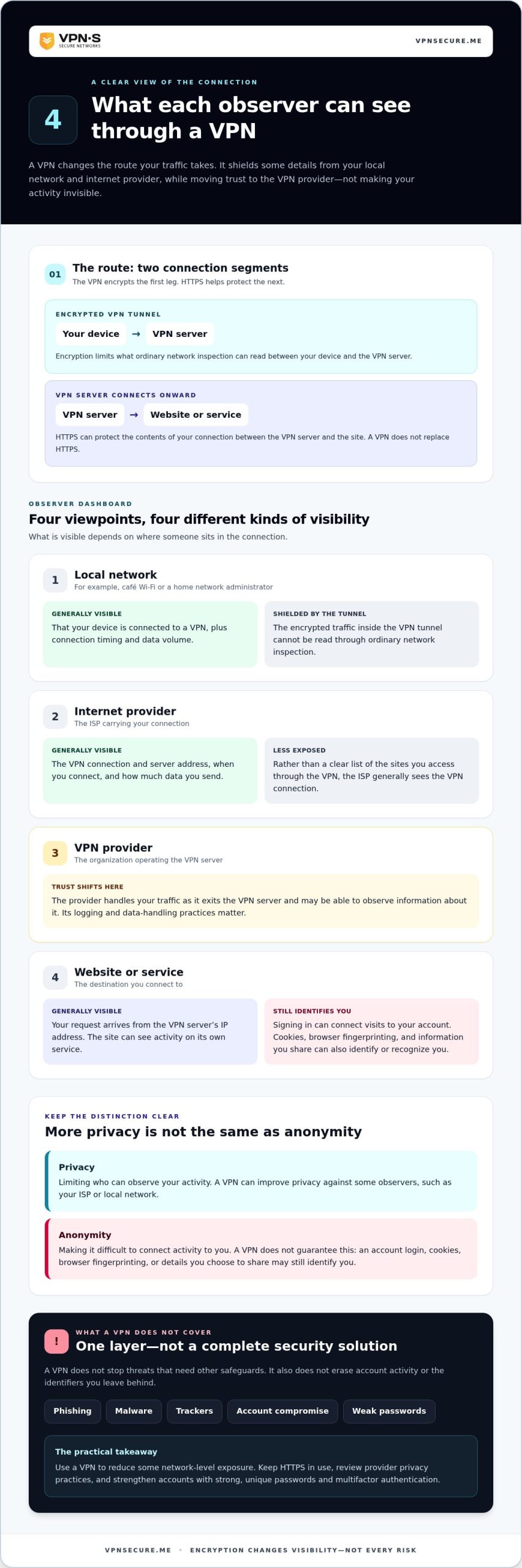
Think of the connection in stages: your device connects to the VPN server, which then connects to the website or service you requested. Your local network and internet provider can generally see that you’re communicating with a VPN, along with connection timing and data volume. The VPN provider handles your traffic as it leaves the server and may be able to observe information about it. The site you visit sees the VPN server’s IP address, while HTTPS can protect the contents of your connection between the VPN server and that site.
An IP address is a network identifier, not a complete identity card. It can offer clues, such as an approximate location, or help link activity, but it doesn’t automatically reveal your name or full browsing history. For a broader explanation of how VPNs work and the different types, see this Virtual Private Network (VPN) overview.
What information can a VPN help shield?
A VPN can reduce the visibility of your online activity to the internet provider carrying your connection and people monitoring the local network, such as a café’s Wi-Fi operator. Instead of seeing your traffic travel directly to a range of online services, they generally see an encrypted connection to a VPN server. They may still see the connection’s timing and volume. This shifts some trust from your network and ISP to your VPN provider.
Websites can still recognize you if you sign in. Your account may connect visits to your identity regardless of the IP address you use. Anything you post, submit, or share voluntarily can also identify you. A VPN changes the network path, not the information you choose to give a site.
Privacy is not the same as anonymity
Privacy means limiting who can observe your activity; anonymity means making it difficult to connect that activity to you. A VPN can improve privacy against some observers, but it doesn’t guarantee anonymity. The distinction matters when you decide what protection you need.
Cookies can remember a browser between visits, account logins can identify you directly, and browser fingerprinting can use details about your browser or device to distinguish it. Changing your IP address doesn’t erase those identifiers. You might appear to a site from a different network and still be recognized by your account or browser.
Treat a VPN for digital privacy protection as one layer, not a disguise that wipes your trail. It can conceal some connection details from your ISP and local network, while leaving account activity and other identifiers in place. First identify which observer you want to limit, then choose tools that address that specific exposure.
How VPN encryption changes who can see your internet traffic
With a VPN, your device sends traffic through an encrypted tunnel to a VPN server, which then connects to the website or service you requested. Encryption protects the device-to-server part of the route from ordinary network inspection. The destination still receives your request and sends a response.
Here’s how that route changes what each observer can see:
- Local network: A café Wi-Fi operator or home network administrator can generally see that your device is connected to a VPN, plus connection timing and data volume. They can’t read the encrypted traffic inside the tunnel.
- Internet provider: Your ISP can generally see the VPN connection and server address, rather than a clear list of the sites you access through it. It may still observe when you connect and how much data you send.
- VPN provider: The provider handles your traffic as it exits the VPN server. Its visibility and data-handling practices matter, so encryption doesn’t remove the need to consider whom you trust.
- Website or service: The site receives your request from the VPN server’s IP address. It can still see activity on its own service, including actions linked to an account you’re logged into.
A VPN limits what your local network and ISP can read; it doesn’t make your traffic invisible to the VPN provider or the website you use.
HTTPS remains important. It encrypts information between your browser and a website, helping protect details such as form submissions while they’re in transit. A VPN encrypts the connection from your device to the VPN server; it doesn’t replace HTTPS on the next leg. Look for HTTPS in the browser address bar, especially before entering passwords or payment details. A VPN for digital privacy protection works best alongside secure website connections.
What changes on public Wi-Fi and home networks?
A VPN encrypts the connection between your device and its server on both public Wi-Fi and home networks. Public Wi-Fi puts you on a network shared with others, but that doesn’t mean every hotspot is compromised. Modern Wi-Fi security also affects exposure. At home, a VPN may limit what your internet provider can observe, while your router still connects your devices to the VPN service.
Keep the basics in place: use HTTPS websites, avoid suspicious pop-ups asking you to install software or change settings, and don’t enter credentials into pages that look wrong. A VPN can’t make a deceptive login page trustworthy.
Where the VPN provider fits in the privacy picture
Using a VPN shifts some trust away from the local network and ISP toward the VPN provider. Review its privacy policy and logging claims, and consider its jurisdiction separately. The policy describes the provider’s stated data practices; jurisdiction provides context about the provider’s location. A no-log claim isn’t proof of total anonymity, and evidence such as an audit can help you assess how a claim has been examined.
If your goal is to encrypt traffic through a VPN service, explore VPN Secure subscription options with these visibility boundaries in mind.
What a VPN cannot protect: privacy limits and common misconceptions
A VPN protects one part of your connection. It doesn’t clean an infected device, spot a fake login page, or stop a website from tracking an account you’re signed into. Treat it as a tool for a specific exposure, not an all-purpose security shield. Its benefits are useful, but its boundaries matter.
Match each risk with a safeguard that addresses it:
What a VPN helps with
- Encrypting traffic between your device and the VPN server, limiting what a local network or internet provider can read in transit.
- Masking your public IP address from the websites you visit, which can reduce exposure of your network address.
- Changing the network route your traffic takes, which may help with a specific network privacy concern.
What requires another safeguard
- Malware and harmful downloads call for device security and caution with files and links.
- Phishing calls for checking the destination and sender before entering credentials.
- Weak or reused passwords call for strong, unique passwords and multifactor authentication.
- Account tracking, cookies, and information you share require account and browser privacy choices.
A VPN also can’t guarantee that a website, app, or other service will accept your connection or provide access to particular content. Services may restrict VPN traffic or apply their own access and regional rules. A changed IP address doesn’t guarantee access.
Does a VPN stop tracking, scams, or malware?
No. A VPN doesn’t remove cookies already stored in your browser or stop a service from associating activity with an account you’ve logged into. It also doesn’t make a phishing link safe or a malicious download harmless. Keep your device protections active, use unique passwords, and pause before opening unexpected links or files. Encryption protects a connection; it doesn’t judge what you click.
Why provider trust still matters
Your privacy depends partly on how the VPN provider handles connection data. Read its privacy policy to understand what it says it collects, how it uses that data, and how long it keeps it. A no-log statement is a provider’s policy claim, not a guarantee that no information exists or that you’re anonymous. Look for a clearly described scope and evidence supporting the claim.
Provider jurisdiction is a separate consideration from logging practices. Location can inform your understanding of the provider, while a policy describes its stated data handling. Neither alone proves total privacy. For a practical VPN for digital privacy protection setup, decide which risk you’re reducing, then pair the VPN with safeguards for the risks it can’t cover. That’s more effective than expecting one tool to do everything.
A practical checklist for stronger digital privacy with a VPN
A useful privacy routine starts with your actual exposure, not a promise of total protection. Use this five-step checklist to choose safeguards that fit your devices, accounts, and everyday connections.
- Define the risk. Decide what you want to limit. Is it what a public network can observe, what your internet provider can see, or the chance someone will access an important account? Each risk calls for a different response.
- Select a provider thoughtfully. Read the privacy policy to understand what connection data the provider says it collects and how it handles that data. Consider its jurisdiction separately, and look for credible evidence supporting logging claims. A policy statement is useful, but it isn’t proof of anonymity.
- Connect with purpose. Use the VPN when you want to reduce exposure on a network or to your internet provider. If local observers concern you, connect before browsing or signing in. Keep using HTTPS websites, especially for sensitive activity.
- Secure your accounts. Use a unique password for each important account and turn on multifactor authentication where available. These steps address account compromise risks a VPN connection can’t fix.
- Review your habits. Pause before opening unexpected links or downloading unfamiliar files. Review browser privacy settings, app permissions, and account security periodically. Keep your browser and device updated through their normal update settings.
How to match privacy steps to your real risks
Different exposures need different defenses. A shared network may make a VPN useful, as may concern about what your ISP can observe. Website tracking calls for reviewing cookies, browser settings, and account choices. If an account is compromised, prioritize changing its password and strengthening sign-in security. Start with the information and accounts that would matter most if exposed, then choose safeguards for those risks.
How to build a routine that sticks
Keep the routine simple enough to repeat. Connect before browsing on networks where local observers concern you. Periodically check which apps can access sensitive device information and whether your browser settings still reflect your preferences. Install device and browser updates through their normal settings, and use extra care with links that ask you to sign in. When you travel, take the same deliberate approach to network privacy.
VPN Secure offers a subscription VPN service that encrypts internet traffic. Explore VPN Secure’s approach to VPN privacy as you decide which layer fits your routine.
Choose VPN protection with clear expectations, and keep control of your privacy
Choose a VPN to reduce a defined exposure, not because an advertisement promises invisibility. If your goal is to limit what your internet provider can observe or protect traffic between your device and a VPN server, a VPN may fit. If your concern is a compromised account, website tracking, or malware, add other safeguards to your plan. Start with a clear question: whose view of your activity are you trying to limit?
What to expect from VPN Secure
VPN Secure is a Bahamas-based provider founded in 2012. Its subscription service encrypts internet traffic across major devices and has servers in over 40 countries. The company describes its VPN service as no-log. Treat that as the company’s stated approach, not independent proof or a promise of complete anonymity.
Provider location and logging practices are related but separate trust considerations. Jurisdiction gives context about where a provider is based; the privacy policy explains its stated approach to handling data. Read the policy for its scope and wording, and distinguish company claims from independently verified evidence. That helps you make an informed choice without treating any one detail as a guarantee.
Your next steps for more deliberate privacy
Start by naming the observer or exposure that matters to you. You might want to limit visibility to your internet provider, reduce exposure on a shared network, or protect sensitive traffic while traveling. Match the tool to the risk, and keep the protections for other gaps in place. A VPN works alongside account and device security, not in place of it.
- Use unique passwords and multifactor authentication to strengthen important accounts.
- Keep your browser and device updated through their normal update settings.
- Use HTTPS websites and be cautious with unexpected links, sign-in prompts, and downloads.
- Revisit your privacy policy and account settings as your needs change.
A VPN for digital privacy protection can be a practical layer when it matches a real exposure. Keep your expectations clear, review the provider’s stated practices, and be deliberate about the information you share. If that approach fits your needs, explore VPN Secure’s subscription options and take a considered next step toward more control over your online privacy.
Make your next privacy choice intentional
Digital privacy isn’t a switch you flip once. It’s a set of choices you make as your devices, accounts, and routines change. Pick one exposure you want to reduce, decide which safeguard fits it, and make that action part of your everyday habits. That’s more useful than chasing perfect invisibility.
A VPN for digital privacy protection can support that approach when you understand what you’re asking it to do. Keep your expectations grounded, and give equal attention to the choices a VPN can’t make for you, such as protecting account access and thinking before you share personal information. Small, consistent steps put more control in your hands.
If you’re ready to explore a VPN as one part of your privacy routine, explore VPN Secure and take a more deliberate approach to digital privacy. Choose protections that fit your needs, keep building good habits, and move forward with confidence.
Frequently Asked Questions
Does a VPN hide my browsing history from my internet provider?
A VPN for digital privacy protection can limit what your internet provider directly sees about your destinations and activity by encrypting traffic between your device and the VPN server. Your provider may still see that you connected to a VPN and observe connection details, such as timing and data volume. Your browser can still retain local history, and websites or accounts may record your visits separately. Clear your device history if you share it with others.
Can websites still identify me when I use a VPN?
Yes. A website may see the VPN server’s IP address instead of your usual public IP, but your account can identify you as soon as you sign in. Cookies and a recognizable browser profile may also help a site connect visits. If you use a shared device, sign out when finished and review browser cookie settings. These steps can reduce some account or browser connections, but they don’t guarantee that a website can’t recognize you.
Does a VPN protect my bank details when I use online banking?
A VPN encrypts the connection between your device and its server, adding privacy along that part of the network path. It doesn’t replace your bank’s safeguards or careful sign-in habits. Open your bank’s official app or type its web address yourself rather than following a link in an unexpected text or email. Check the address before entering details, use a strong, unique password, and enable multifactor authentication if your bank offers it.
Should I leave my VPN on all the time?
That depends on your needs, device, and network. Keeping it connected may reduce what your internet provider or local network can observe while you browse, but it won’t stop account-based tracking, phishing, or malware. Some websites or services may also handle VPN connections differently. Choose a routine you can maintain, and remember that an active VPN doesn’t make every link or download safe.
Does a VPN protect me from phishing and malicious links?
No. A VPN doesn’t tell you whether a message is genuine or a download is safe. A convincing fake sign-in page can still trick you into handing over a password, even through an encrypted connection. Check the sender and destination address before signing in, avoid unexpected downloads, use unique passwords and multifactor authentication, and keep your browser and operating system updated through their normal settings.
Can my employer see what I do online if I use a VPN?
Possibly. A personal VPN may change what a local network can observe, but it doesn’t override monitoring or workplace rules on an employer-managed device. For example, work-installed software may operate separately from your VPN connection. Review your organization’s device and network policies before using a work laptop for personal activity. Where appropriate, keep personal browsing on your own device and accounts rather than assuming a VPN makes work equipment private.
Does a VPN replace HTTPS?
No. HTTPS and a VPN protect different parts of the connection, so use both where available. HTTPS helps protect data exchanged between your browser and a website; a VPN encrypts traffic between your device and its server. Neither makes a fraudulent website trustworthy. Before entering a password or payment information, check that the address is the genuine site you intended to visit, not a lookalike reached through an unexpected link.