




What if the campus network can still tell you’re online, even when a VPN hides where you’re browsing? A VPN for university network privacy can encrypt traffic between your device and a VPN server, making it harder for campus Wi-Fi operators to see which sites and services you access. But it doesn’t make you invisible, and it won’t erase monitoring on a university-managed device.
It’s reasonable to want more privacy when you’re using shared Wi-Fi for research, personal accounts, or sensitive browsing. A VPN can help protect traffic on a network you don’t control, but campus IT may still see that your device is connected to a VPN. University systems may also apply access rules, and a VPN won’t override them or guarantee access to campus services.
This guide explains what a VPN can hide, what may remain visible, and how device monitoring changes the picture. You’ll learn how to assess a provider’s logging claims and device support, choose a tool that fits your campus use, and set it up without disrupting legitimate university access or violating policy.
Key Takeaways
- Understand which connection details campus IT may still see, even when your browsing traffic passes through an encrypted VPN tunnel.
- Compare personal VPNs, HTTPS, and university-managed VPNs by who operates them and what each is designed to protect.
- Use a VPN for university network privacy with clear expectations: it can add a layer of protection, but it doesn’t make you anonymous or bypass campus rules.
- Before installing a personal VPN, check university policies and device-management rules, then download the app from the provider’s verified official source.
- Evaluate encryption, device support, and transparent logging claims, remembering that a VPN shifts trust from the campus network to the provider.
VPN for university network privacy: what campus Wi-Fi can reveal
Campus Wi-Fi connects you to the internet, but it doesn’t make every part of your activity invisible to the network operator. A virtual private network creates an encrypted connection between your device and a VPN server, which then sends your traffic toward its destination. For a foundational overview of the technology, see Virtual Private Network (VPN).
Network privacy limits what the network can observe; it doesn’t hide who you are from every service or make you completely anonymous. The campus network may record connection details for operation or security, but that doesn’t mean administrators automatically inspect every student’s browsing activity.
What can university Wi-Fi administrators see?
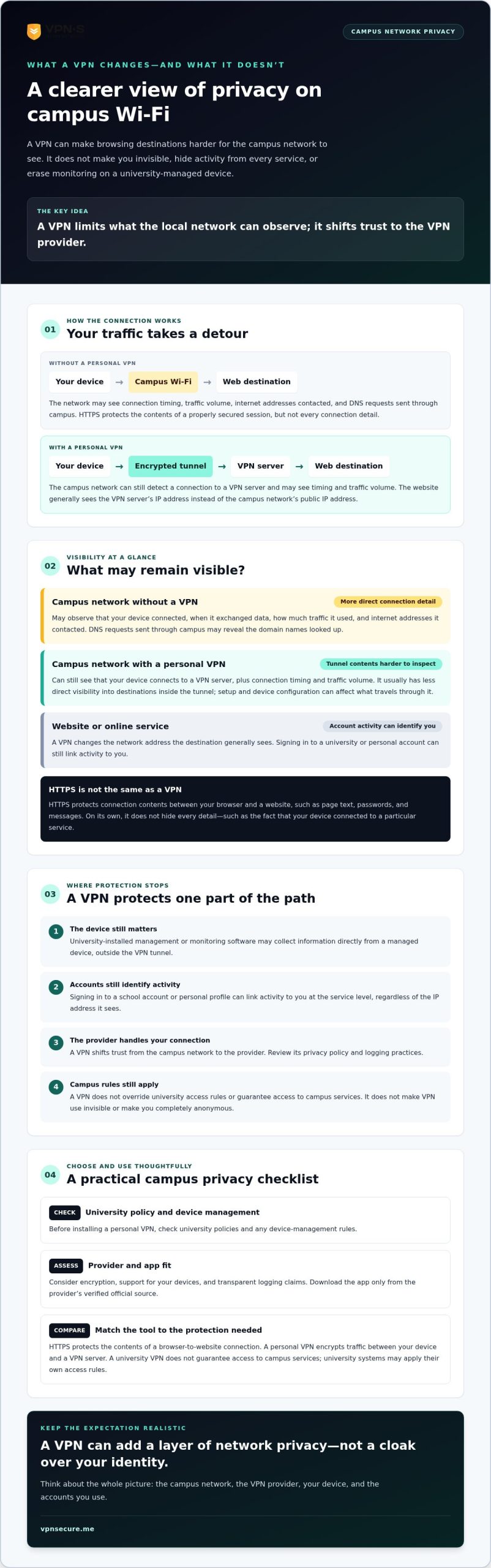
Visibility depends on how the campus network and your device are configured. Without a VPN, the network can generally see that your device connected, when it exchanged data, how much traffic it used, and the internet addresses it contacted. If your device sends DNS requests through the campus network, those requests may also reveal the domain names you look up. Encrypted DNS can limit what the local network sees in those requests, but it doesn’t conceal all connection metadata.
HTTPS protects the contents of a connection between your browser and a website. A network operator generally can’t read page text, passwords, or messages carried inside a properly secured HTTPS session. HTTPS alone doesn’t hide every detail, though, such as the fact that your device connected to a particular service. The exact information visible varies with encryption and network configuration.
What a personal VPN changes on campus
A personal VPN adds an encrypted tunnel from your device to the VPN server. Campus Wi-Fi can still see that your device is connected to a VPN server, along with connection timing and traffic volume. It usually has less direct visibility into the destinations inside the tunnel, though VPN setup and device configuration can affect what travels through it.
That protection shifts trust to the VPN provider, which handles your connection. Its privacy policy and logging practices deserve scrutiny. A VPN also can’t erase other ways you’re identified. A university-managed device may have monitoring software, while signing in to a school account or personal profile can link activity to you at the service level.
Think of a VPN for university network privacy as a way to limit what the campus network can observe, not as a cloak over your identity. It protects one part of the connection. Your device, accounts, and VPN provider still matter.
How a VPN protects university network privacy, and where protection stops
Picture your traffic taking a detour. Your device sends it through an encrypted tunnel to a VPN server, which then forwards it to the destination website. The campus network can often detect a connection to the VPN server, but encryption makes the traffic inside the tunnel harder for local observers to read. NIST describes a VPN as a secure communications mechanism that uses an unsecured network to connect privately across networks.
That detour also changes the address a website sees. Instead of seeing the campus network’s public IP address, the site will generally see the VPN server’s IP address. This can limit what the destination learns from the network address alone. It doesn’t make the VPN connection invisible: a university network may still identify VPN traffic, and network rules can still apply.
What a VPN can hide from the local network
Encryption helps prevent people monitoring the local connection from reading protected traffic contents, such as data sent within an encrypted session. It doesn’t conceal every signal. The network may still observe that your device is communicating with a VPN server, along with connection timing and traffic volume. A VPN offers a layer of network privacy, not a guarantee that campus IT can’t detect its use.
What a VPN cannot hide or fix
A VPN protects the path between your device and the VPN server. It doesn’t control what happens on your device or what you reveal to websites. Whether you log in to campus portals directly or organize coursework through student platforms like DormWay, signing in to a university account associates your activity with that account regardless of the IP address the network sees.
- Managed devices: University-installed management or monitoring software may collect information directly from the device, outside the VPN tunnel.
- Browser extensions: Extensions can access or handle browsing information according to their permissions and settings. A VPN doesn’t limit those permissions.
- Other security threats: A VPN doesn’t remove malware, stop phishing, or make weak passwords safe. Use appropriate device protections, check links before opening them, and choose strong, unique passwords.
On a university-managed device, a VPN can encrypt network traffic, but it can’t hide activity from monitoring software, accounts, or tools already on that device. That’s the practical boundary of VPN for university network privacy: it can reduce what the local network sees, while endpoint security and account privacy remain separate concerns.
If you’re considering a personal VPN subscription for a network you don’t control, review the provider’s privacy and logging claims before trusting it with your traffic. Explore personal VPN subscription options as one place to begin comparing your choices.
VPN, HTTPS, or university VPN: compare the right privacy option
These tools solve different problems. The right choice depends on what you’re trying to do, which device you’re using, and what your university permits. A personal VPN routes traffic through a provider’s server. HTTPS secures a connection to a particular website. A university-managed VPN may give authorized users a secure route to campus resources. None is a universal privacy switch.
| Option | Purpose and operator | What it doesn’t protect |
|---|---|---|
| Personal VPN | Encrypts traffic between your device and a VPN server. Operated by a commercial VPN provider. | Doesn’t make you anonymous, protect a compromised device, or guarantee access to campus services. The provider becomes part of your privacy relationship. |
| HTTPS | Encrypts data between your browser and a secure website. Provided by the website and supported by your browser. | Doesn’t conceal every connection detail from the local network or hide activity from the website you use. |
| University-managed VPN | Typically helps authorized users connect to internal resources. Operated by the university, with purpose and setup determined by that institution. | Doesn’t necessarily provide personal browsing privacy from the university that operates it, or protect your device and accounts from other risks. |
When HTTPS or a browser privacy setting may be enough
For ordinary browsing, HTTPS protects data exchanged between your browser and a secure website, even if you aren’t using a VPN. Private browsing mainly limits what your browser saves locally, such as history or cookies after a session. It doesn’t hide network activity from campus systems, secure a device, or prevent a signed-in website from associating activity with your account.
When to use a university VPN instead
Some universities use their VPN to provide access to resources such as library databases, intranets, or other services restricted to their network. Availability and requirements vary by campus, so check your university’s official instructions. Use its approved installation and sign-in steps, and ask campus IT if you’re unsure whether a personal VPN could interfere with a specific resource.
For VPN for university network privacy, choose based on the task. HTTPS may be enough for a secure website; a university VPN may be the right tool for authorized campus resources; a personal VPN may suit traffic protection on networks you don’t control. Check university rules and device-management requirements before changing your setup. Don’t use any VPN to route around institutional access controls.
How to use a personal VPN on campus responsibly
A personal VPN can add protection on a network you don’t control, but setup should start with campus rules, not the connect button. Check the acceptable-use policy and device-management requirements first. Universities may restrict VPN use on their networks or managed devices, and a VPN won’t override those rules.
- Check campus policies and device management. Confirm whether personal VPNs are allowed on campus Wi-Fi and on the device you plan to use. If it’s university-owned or managed, ask campus IT before installing anything.
- Use a personally controlled device when permitted. Install the current VPN app from the provider’s verified official website or official app store listing. Avoid links from unsolicited messages or third-party download sites. Review the app’s requested permissions before granting access.
- Connect in the right order. If campus Wi-Fi requires a sign-in page, complete that step first. Then open the VPN app and connect before sensitive browsing, provided university policy allows it.
- Check the connection. Look for an active or connected status in the VPN app, then try ordinary browsing. If pages load, that confirms basic connectivity, not perfect privacy or protection from every kind of monitoring.
- Keep expectations grounded. A VPN can encrypt traffic between your device and its server, but it doesn’t hide activity from every service you sign in to or from monitoring software already on your device.
Troubleshoot without bypassing campus controls
If the VPN won’t connect or a campus service stops working, check the university’s guidance and contact campus IT. Don’t change network settings to evade a block or institutional security requirement. For library databases, intranets, or other services that require campus access, use the university’s approved VPN and follow its installation and sign-in instructions.
Provider privacy claims deserve the same careful check as setup steps. Read the policy and look for clear evidence behind logging statements. This VPN no-log audit and verification guide explains why a label alone isn’t enough to judge a provider. A VPN for university network privacy is a tool, not a guarantee of anonymity.
If you’re comparing a paid VPN subscription for campus use, review the provider’s privacy claims and device support before choosing. Explore VPN subscription options and check that the service fits your device and university rules.
Choose a VPN for university network privacy with clear eyes
A VPN can reduce what the campus network sees, but it adds another party you must trust: the VPN provider. Base your choice on evidence and fit, not bold promises. Use this checklist to compare services before subscribing.
- Encryption: Check that the provider clearly explains how its VPN connection is encrypted. Avoid treating vague security language as a technical explanation.
- Device support: Confirm the provider has a current app for your device and that using it won’t conflict with university requirements. Support can vary by operating system and device type.
- Privacy policy: Look for clear details about what data is collected, how long it’s retained, and what account information is required. A VPN changes who can handle your traffic; it doesn’t remove the need to assess data practices.
- Logging evidence: Read what the provider means by “no logs” and look for credible evidence supporting the claim. Marketing language alone doesn’t prove what a company does or doesn’t record.
VPN Secure is one option to assess against these criteria. Before choosing, verify its encryption information, supported devices, privacy policy, and evidence for any logging claims. Don’t assume a provider’s statements are proof simply because they appear on its website.
Build a realistic privacy checklist
A VPN is only one part of a safer setup. Keep your device updated, use HTTPS when browsing, and protect accounts with strong, unique passwords and available strong authentication. Be cautious with links and unexpected login prompts. These steps address risks a VPN doesn’t fix, including phishing, weak account security, and threats already on your device.
Also consider who controls the device. If it’s managed by your university or another organization, check the monitoring and acceptable-use rules before using it for sensitive personal activity. Network encryption can’t shield activity from software installed on the device or from accounts you sign into.
If you’re comparing subscription formats, read this guide to affordable monthly VPN plan guidance, then review each provider’s terms and privacy disclosures. For VPN for university network privacy, the right fit depends on your device, campus rules, and how much evidence you find behind a provider’s claims.
Take a closer look at VPN Secure’s information and decide whether it meets your needs: Explore VPN Secure.
Make your next campus connection a considered one
A VPN can encrypt traffic between your device and its server, limiting what the campus network can see. It can’t make you anonymous, hide activity from every app or account, or override university rules. For routine browsing, HTTPS still matters; for campus-only resources, follow your university’s approved VPN instructions.
Choose a personal VPN by checking its encryption details, device support, privacy policy, and evidence behind logging claims. VPN Secure was founded in 2012, has servers in more than 40 countries, and describes its service as no-log. Check the current coverage and the wording and evidence for any privacy claim before relying on it. A no-log statement is a claim to evaluate, not automatic proof.
If a paid VPN subscription fits your campus use and university policy, assess the provider before subscribing. Explore VPN Secure and review its privacy features. You don’t need to choose between privacy and responsible campus access. Make an informed choice, keep your expectations grounded, and connect with greater confidence.
Frequently Asked Questions
Can my university see what websites I visit if I use a VPN?
A properly connected VPN generally limits the websites campus network operators can see directly, but it doesn’t make your activity invisible. The university may see that your device connected to a VPN server, along with connection timing and traffic volume. If the VPN disconnects or some traffic travels outside its tunnel, visibility may differ. Websites you visit can still identify you if you sign in or share personal information.
Does a VPN hide my browsing history from university Wi-Fi?
A VPN can limit what the Wi-Fi network sees about destinations inside the encrypted tunnel, but it doesn’t erase browsing history stored on your device or in your browser account. Campus systems may also retain connection metadata, such as when your device used the network. If you use a university-managed device, monitoring software may collect activity separately. Private browsing mainly limits locally saved history; it doesn’t hide network traffic.
Is it safe to use a VPN on university Wi-Fi?
A VPN can encrypt traffic between your device and the VPN server, which may reduce what others on the local network can read. Whether you can use one on campus depends on university policy and your device. Check acceptable-use rules first, especially on a managed laptop. Choose a provider carefully, too: the VPN handles your traffic, so review its privacy policy and logging evidence rather than assuming the connection makes you fully anonymous.
Can my university block or detect a VPN?
Yes. Campus network systems may identify traffic to a VPN server and may restrict or block some connections under university rules. Detection doesn’t necessarily mean administrators can read the encrypted traffic inside the tunnel. If a VPN connection fails, check campus guidance or ask IT for help. Don’t change network settings to evade a block or bypass institutional security controls.
Should I use my university VPN or a personal VPN?
Use the university VPN when official instructions require it to reach authorized resources, such as an intranet or library database. A personal VPN may suit privacy on a network you don’t control, if campus policy allows it. They serve different purposes, and neither guarantees anonymity. Check which device you’re using, what task you need to complete, and whether the connection follows university requirements before choosing.
Does a VPN protect me on a university-managed laptop?
A VPN can encrypt network traffic between the laptop and its VPN server, but it can’t shield activity from monitoring software installed on the device. The university may manage settings or collect information directly from a managed laptop, depending on its configuration and policies. Accounts you sign into can also connect activity to you. Review device rules and avoid sensitive personal activity unless you understand and are permitted to use the device that way.
Can a VPN make me anonymous on campus Wi-Fi?
No. A VPN changes the network path and can hide some traffic details from the local Wi-Fi operator, but it doesn’t erase your identity. Signed-in accounts, browser data, device monitoring, and information you share with websites can still identify you. The campus network may also detect VPN use and connection timing. Think of a VPN for university network privacy as a limited layer of protection, not a cloak of anonymity.