





















VPN et confidentialité
VPN options for Mac compared by privacy, protocols, and protection
A Mac’s polished interface isn’t a privacy shield. Yes, MacBook Air and MacBook Pro can use a VPN, and macOS includes a client that supports L2TP,...

A VPN won’t make your iPhone invisible, but it can add a useful layer of privacy. A VPN for iPhone and iOS privacy encrypts your internet traffic and can help protect your connection on public Wi-Fi. You may not need one all the time, but it can be useful when you want extra protection on hotel, airport or café networks while traveling.
It’s reasonable to expect more than an encrypted connection. A VPN’s leak protection, server locations, and connection stability also shape what it can do. The right fit depends on how you use your iPhone or iPad, not on the boldest promise in an app listing.
This guide explains when a VPN is useful, how the main options compare, and what to look for in iOS privacy and streaming features. You’ll have a clearer way to choose protection for everyday browsing and travel, without expecting a VPN to solve every privacy risk.
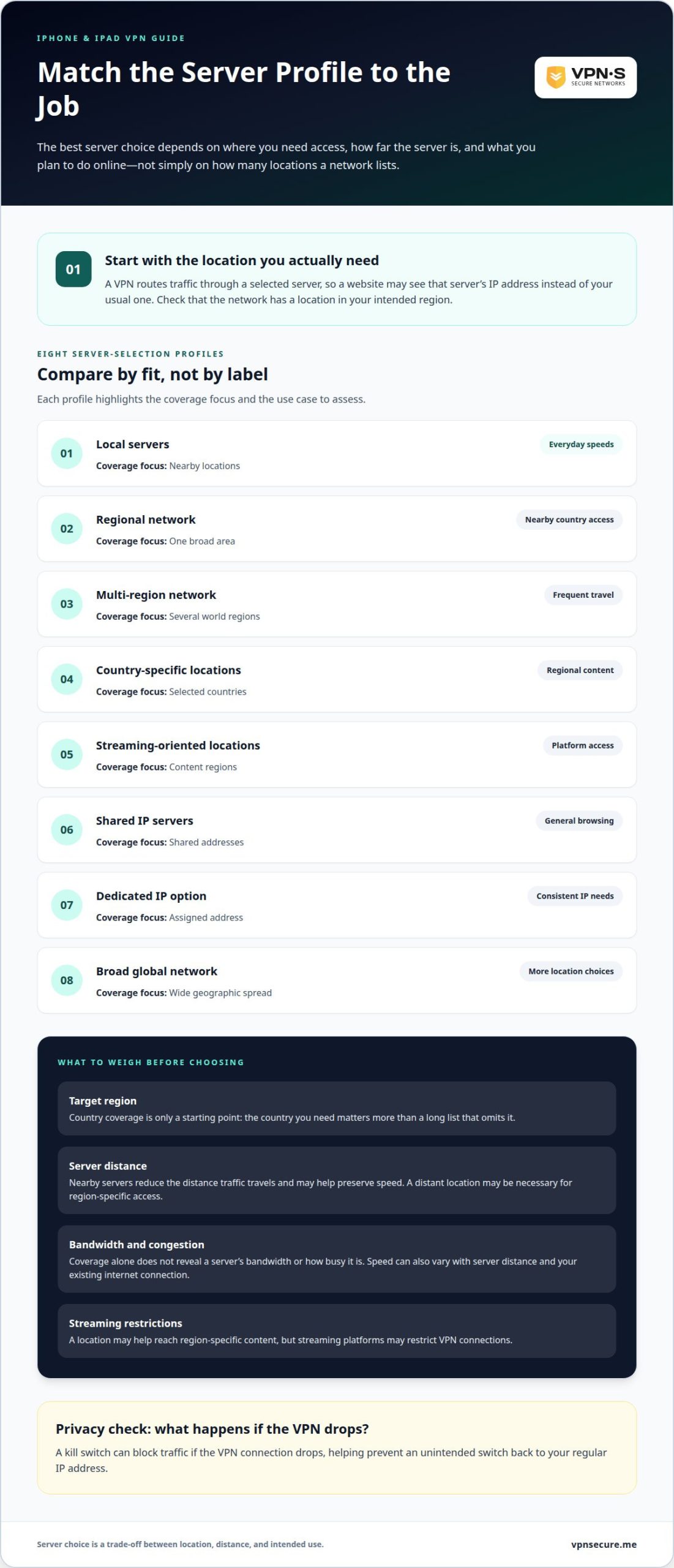
Server choice affects the IP address websites see and your connection speed. Compare available locations with the places where you actually use your iPhone.
A VPN network’s geographic coverage describes where its servers are located. Nearby servers reduce the distance traffic travels and may help preserve speed. Coverage alone doesn’t tell you a server’s bandwidth or how busy it is. Compare nearby options for everyday browsing with other locations close to where you travel.
Country coverage counts the countries where a network has server locations, but the total is only a starting point. A location close to where you live or travel matters more than a long list that omits it. Check that the network has a location near your destination. Geographic spread is different: a provider might cover many countries in one area but fewer in others.
A VPN routes your traffic through a selected server, so a website may see that server’s IP address instead of your usual one. This hides your real IP address from trackers and the sites you visit, although each platform sets its own rules on VPN connections. A kill switch can stop traffic if the VPN connection drops, preventing an unintended switch to your regular IP address. Windows users face the same speed and distance trade-off when choosing a server.
Compare these eight server-selection profiles by how well they fit your needs, not just by their labels:
| Option | Coverage focus | Best fit to assess |
|---|---|---|
| Local servers | Nearby locations | Everyday speeds |
| Regional network | One broad area | Short trips nearby |
| Multi-region network | Several world regions | Frequent travel |
| Country-specific locations | Selected countries | Regular destinations |
| Streaming-oriented locations | Video traffic | Smooth playback |
| Shared IP servers | Shared addresses | General browsing |
| Dedicated IP option | Assigned address | Consistent IP needs |
| Broad global network | Wide geographic spread | More location choices |
Choose a profile with a location near where you’ll be, then weigh server distance, bandwidth, and streaming needs.
A VPN is useful when you want device-wide encrypted traffic, especially on public Wi-Fi or while traveling. Without an always-on device-wide VPN, app communications are left to the app developer’s discretion, according to the National Institute of Standards and Technology (NIST). For VPN for iPhone iOS privacy, consider whether you need broader coverage than individual apps provide.
iCloud Private Relay isn’t a replacement for a VPN: it protects Safari browsing and certain network requests, rather than routing every app’s traffic through a VPN connection. Depending on its iOS setup and app configuration, a VPN can cover more of your device’s internet activity.
Think about every device you want to cover. Simultaneous connections determine how many devices can use one account at once, so count your iPhone, iPad, and Android phone. Setup guidance should explain how to install the iOS app, connect, and check its connection status. That makes it easier to confirm the VPN is active. A VPN for iPhone iOS privacy should fit your device needs as well as your security priorities.
Speed can vary. Encryption and routing traffic through a VPN server may reduce download speed; server distance, network congestion, and your existing internet connection also matter. Bandwidth describes how much data can move, while speed affects how quickly it arrives. A premium plan label alone doesn’t tell you how the connection will perform on your network.
Yes, a VPN can slow your iPhone’s internet, use more battery, and affect streaming. Background encryption and maintaining a connection can use battery, and some streaming services set their own terms on VPN use. The provider’s logging policy is a separate privacy consideration, not a measure of speed.
For a practical choice, match device connections to your household, then weigh iOS guidance, privacy terms, and performance needs. Explore encrypted VPN protection if you want a VPN connection for your devices.
Encryption protects internet traffic between your iPhone and the VPN server. Privacy also depends on the protocol, leak protection, and the provider’s practices.
A VPN encrypts traffic whether your iPhone connects through café Wi-Fi or mobile data. The network changes, but the VPN’s role is similar: it helps prevent others on that connection from reading traffic in transit. Encryption doesn’t make every app action private or secure, so consider what information each app collects and shares.
A VPN also doesn’t stop tracking by apps, advertisers, or Apple. It can mask your IP address from services, but account details, cookies, and device identifiers may still identify or track you.
A protocol sets how your device creates and maintains its encrypted VPN tunnel. WireGuard is recommended over IKEv2 when supported, for speed, security, and battery use. The fastest protocol in one situation may not perform best on every network, so prioritize a reliable connection and strong encryption over a speed label alone.
For privacy, look for a provider that publishes an independent no-logs audit, including its scope and findings. Read the logging policy alongside information about encryption and connection features; marketing claims alone don’t establish how data is handled.
An IPv6 leak occurs when some traffic travels outside the VPN tunnel and exposes your real network address. Leak protection should cover IPv6 traffic, not only IPv4, and a kill switch can help stop internet traffic if the VPN connection drops. These safeguards address different failure points, so one doesn’t replace the other.
Weak protocols or poor provider practices can expose traffic or connection details that users expect to stay private. Check the app’s protocol options, IPv6 leak protection, and what its logs policy says about activity. No VPN prevents every form of tracking, but these checks help you compare privacy protections beyond encryption alone.
Streaming is a common activity on a VPN while traveling, especially over hotel or airport Wi-Fi. Each streaming platform sets its own rules on VPN connections, and a VPN doesn’t change what your account offers. Some services may not support VPN use under their terms.
Test the service you want to use first. Connect to a nearby server, then reopen the streaming app. If playback is unstable, try another nearby server. If a service doesn’t support VPN connections, follow its terms; your browsing and other apps can stay protected.
Picture quality depends on more than the VPN. Streaming needs a steady connection, and a distant server or congested network can affect playback and download speed. An unlimited data allowance doesn’t guarantee a particular picture quality. Your Wi-Fi or mobile connection also affects the result.
On iPhone, install the VPN app from Apple’s App Store and use its settings to connect to a nearby server before opening the streaming service. If the app stalls, close and reopen it after the VPN connection changes. Your account settings and the service’s terms still determine what it displays.
For a VPN connection suited to streaming and travel, choose encrypted VPN protection for your devices.
VPNSecure gives iPhone and iPad users an encrypted connection for everyday browsing, public Wi-Fi, and travel. Its private, no-log VPN service is designed for people who want more control over where their internet traffic travels, including on hotel and airport networks.
Choose a Monthly VPN Subscription or Annual VPN Subscription to suit your preferences. VPN protection can help mask your IP address and encrypt traffic, but it doesn’t prevent app tracking or guarantee that every streaming platform supports VPN use. Match your choice to your privacy priorities and the devices you use.
If you want to discuss VPN protection for your devices, contact VPNSecure.
Your iPhone habits can change: a new travel routine, more streaming, or another device can shift what you need from a VPN. Revisit your protection choices when your priorities change rather than treating them as set-and-forget. A VPN for iPhone iOS privacy can support your needs, but it can’t stop every form of tracking.
Before choosing, decide what matters most in daily use: a private connection, security on public Wi-Fi, or coverage across devices. That priority gives you a practical standard for judging your options. If you’re weighing a VPN for iPhone iOS privacy, match its protections to how you browse. If you’d like help considering your options, talk with VPNSecure.
Take the next step at your own pace. Understanding what you need puts you in control of the decision.
Consider a paid VPN if you need regular coverage, a wider server network, or fewer usage limits. A subscription may suit someone who streams on hotel Wi-Fi while traveling or wants to protect an iPhone and iPad together. Compare the privacy policy, supported devices, connection limits, and leak safeguards rather than treating “premium” as proof of stronger security.
An iOS VPN app puts connection controls on your iPhone, so you can manage protection without configuring each app separately. For example, a traveler can connect before using airport Wi-Fi, then disconnect once back on a trusted network. App settings can make server selection and connection status easier to manage than manual setup.
An iOS VPN app is software for iPhone or iPad that connects the device to a VPN service. It routes internet traffic through a VPN server and encrypts traffic between the device and that server. Opening the app and selecting a location establishes a VPN connection; it doesn’t install a separate VPN inside every app.
Check the provider’s privacy policy, data limits, server access, and whether the app explains how it is funded. Free VPN data caps are typically around 500 MB to 2 GB per month. That may not be enough for video or large downloads. Also review app permissions and whether the provider describes its logging practices clearly.
A VPN encrypts traffic between your iPhone and its VPN server, helping shield that connection from others sharing the same network. It can also replace your visible IP address with the server’s address. It doesn’t erase cookies, prevent an app from collecting information you provide, or stop tracking tied to an account you use.
With an active VPN connection, your internet provider and Wi-Fi operator can see that your iPhone connects to a VPN server, but the VPN encrypts traffic traveling through the tunnel. Websites see the VPN server’s IP address instead of your usual one. Login details, cookies, and information you share can still identify you.
À lire aussi
A Mac’s polished interface isn’t a privacy shield. Yes, MacBook Air and MacBook Pro can use a VPN, and macOS includes a client that supports L2TP,...

Planning a trip to China? Learn which VPN features matter, why Stealth VPN helps, how to prepare before departure, and what legal and access limits to consider.

A VPN for accessing region-locked games can change the IP location a game sees, but it won’t automatically change your Steam store region. Steam...
Aucun log, jamais. Commencez avec Gratuit avec pubs en moins d’une minute.