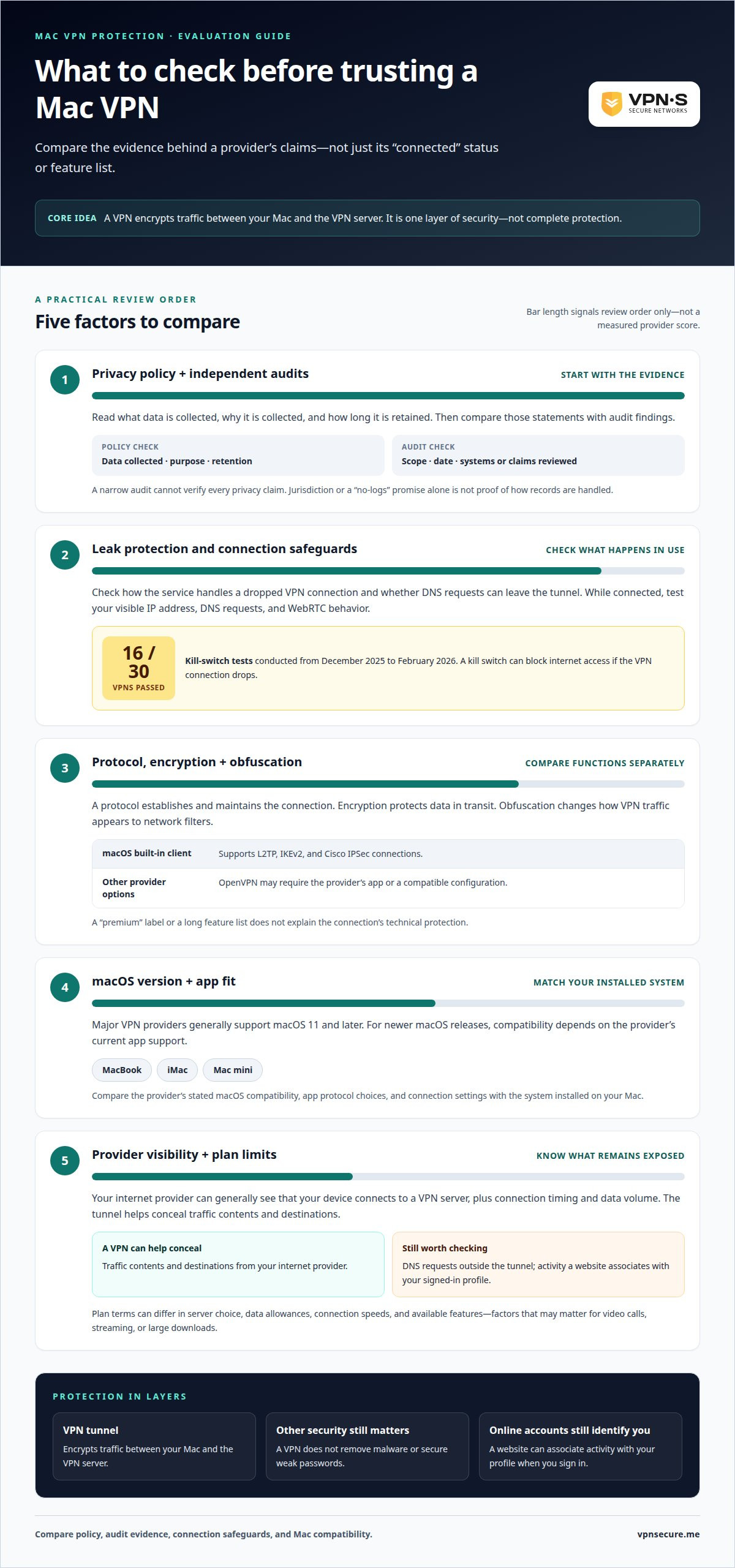
A Mac’s polished interface isn’t a privacy shield. Yes, MacBook Air and MacBook Pro can use a VPN, and macOS includes a client that supports L2TP, IKEv2, and Cisco IPSec connections. Choosing a VPN for Mac computer protection means looking beyond a simple “connected” status.
You’re right to expect privacy from a VPN, especially on public Wi-Fi. But a provider’s privacy policy, independent audits, connection protocol, and leak protection all affect what the service can and can’t protect. A VPN encrypts internet traffic in a tunnel, but it isn’t a complete cybersecurity strategy.
This comparison explains how to assess VPN protections and where their limits remain on MacBooks, iMacs, and Mac minis. You’ll learn how the main options differ, why VPN claims deserve scrutiny, and which features matter for your Mac, so you can choose with confidence without mistaking an encrypted connection for total protection.
Key Takeaways
- Read a VPN’s privacy policy for what it records, then weigh those claims against the scope and timing of independent audits.
- Compare protocols and protective features by how they affect your connection, not by technical labels alone.
- Understand what a VPN can conceal from network observers and what remains visible to your internet provider.
- Choose protection around the Mac you use and where you connect, while keeping in mind that a VPN is only one layer of security.
VPN privacy policies and independent audits
Compare each provider’s data collection policy with the scope of its independent audits. A privacy label alone doesn’t show how a Mac connection is handled.
VPN providers differ in logging practices, audit scope, and connection safeguards. Before choosing, compare their published policies, audit findings, and support for Mac workflows.
In the United States, using a VPN doesn’t make every online activity lawful. Streaming platforms and workplace networks may restrict VPN connections, so access can change when you connect.
Set up a Mac VPN through its app or a supported connection, then troubleshoot any connection problems. To check that it’s working, test your visible IP address, DNS requests, and WebRTC behavior while connected.
Leak checks matter: tests from December 2025 to February 2026 found that 16 of 30 VPNs passed kill-switch tests. On public Wi-Fi, encryption helps shield internet traffic from people monitoring the same network, but it doesn’t replace other security measures.
Swiss Privacy Laws and No-Logs Policies
A provider’s jurisdiction is one point of comparison, not proof that it keeps no records. Read its policy to see what data it collects, why, and for how long. Then compare those statements with independent audit findings. An audit’s scope and date matter: a narrow review can’t verify every privacy claim.
VPN Privacy and Security Practices
Look for data minimization, clear retention rules, and transparent audit reports. These are distinct from a no-logs promise: a policy describes a provider’s practices, while an audit assesses specific systems or claims. For public Wi-Fi, check what the service says about encryption and what happens if the VPN connection drops. These details make its protection easier to assess.
| Option |
Policy |
Audit evidence |
| Swiss jurisdiction |
Read data terms |
Review audit scope |
| No-logs claim |
Check retention language |
Look for direct testing |
| Audited practices |
Compare stated handling |
Check date and scope |
Choose a VPN whose written policy and independent evidence align with your Mac privacy needs.
Mac VPN protocols and features
A protocol sets the rules for connecting your Mac to a VPN server. Encryption protects data in transit, while obfuscation can help disguise VPN traffic from network filters. When choosing a VPN for Mac computer protection, compare these functions separately rather than treating a long feature list as proof of stronger privacy.
Major VPN providers generally support macOS 11 and later. For newer macOS releases, compatibility depends on the provider’s current app support. Compare the supported macOS versions and protocols with the version installed on your Mac before selecting a service.
VPN Protocols and Obfuscation
Protocols define how a VPN connection is established and maintained. The macOS built-in client supports L2TP, IKEv2, and Cisco IPSec, while a provider may offer other protocols through its own app. OpenVPN, for example, may require that app or a compatible configuration. Obfuscation serves a different purpose: it changes how VPN traffic appears to network filters, which can matter on restricted networks.
VPN Protocols and Encryption
A VPN encrypts internet traffic in a tunnel between your Mac and the VPN server. The protocol governs the connection, while encryption protects the data moving through it. Check the provider’s documented protocol and encryption options, then consider which supported combination suits your network. A “premium” label alone doesn’t explain the technical protection or show how the connection behaves.
Native macOS Apps and Version Support
A native macOS app brings a provider’s connection controls to your Mac. Support can vary by macOS release, so compare stated compatibility with your installed system, whether you use a MacBook, iMac, or Mac mini. Also review the app’s protocol choices and connection settings. For VPN for Mac computer protection, a compatible app and suitable protocol matter more than a generic Mac compatibility claim.
Choose a VPN that matches your macOS version, network conditions, and protocol needs. This gives you a clearer basis for comparing features than relying on a premium label or broad compatibility claim.
VPN limitations and carrier visibility
A VPN changes what your internet provider can observe, but it doesn’t erase every network signal. On a Mac, understand what remains visible and what the built-in client can connect to.
Your carrier or internet provider can generally see that your device connects to a VPN server, along with the connection timing and data volume. A VPN tunnel helps conceal your traffic’s contents and destinations, but DNS requests may reveal browsing activity if they travel outside the tunnel. A dropped connection can also expose traffic unless the service blocks internet access while disconnected.
The built-in macOS VPN client supports L2TP, IKEv2, and Cisco IPSec connections. That list limits which configurations it can use directly; it doesn’t cover every protocol a provider may offer. For example, a service using OpenVPN may require its own app or another supported configuration. A provider’s Mac app can add connection controls beyond the native client.
VPN plans can differ in server choice, data allowances, connection speeds, and available features. These limits matter if you use video calls, stream, or download large files. Compare plan terms and privacy policies, not just the word “free.” A limited server selection may also affect the network location your Mac appears to use.
Think of protection in layers. A VPN encrypts traffic between your Mac and its VPN server, but it doesn’t remove malware, secure weak passwords, or control what a website records after you sign in. For example, a website can still associate your activity with your profile when you’re logged in, even through a VPN.
- Provider visibility: The VPN provider handles your connection, so its logging policy matters.
- Network visibility: Your internet provider can see a VPN connection, not necessarily its tunneled content.
- Device security: macOS updates and account protections address risks a VPN doesn’t cover.
Choose based on the risks that matter most to you: provider logging, network restrictions, or free-plan limits.
Protecting MacBooks, iMacs, and Mac Minis
MacBook Air and MacBook Pro, as well as iMac and Mac mini computers, can use a VPN. The best fit depends less on the model than on where it connects, which macOS version it runs, and how the VPN app handles the connection.
For a MacBook used in an airport or coffee shop, a VPN can help protect your identity, change your apparent location, and shield online activity on public networks. An iMac or Mac mini used mostly at home can also benefit when you want to protect traffic on unfamiliar networks. A VPN is one layer of protection, not a replacement for other security practices.
Most major VPN providers support macOS 11 and later. Compare that compatibility with your Mac’s installed version before choosing an app. A native app may simplify connecting to a server and selecting available settings, while speeds can vary with the server location, your network, and the chosen protocol. Downloading an app alone doesn’t prove that the connection is active.
Match protection to your routine:
- Traveling MacBook: Prioritize a reliable connection on public Wi-Fi and protection if the VPN disconnects.
- Home iMac: Consider whether you want VPN protection across everyday browsing and streaming.
- Mac mini: Think about the device’s role, such as handling personal browsing or work traffic.
For any Mac, professional setup should account for the device, macOS compatibility, protocol options, and the networks it uses. After connecting, a professional can test whether the VPN is active and check for IP or DNS leaks. This helps distinguish a working tunnel from an app that merely appears connected.
Choose based on your Mac’s operating system and your usual networks, not the product label alone. If you want a VPN matched to your Mac use, explore Mac VPN protection options.
VPNSecure
VPNSecure’s private, no-log VPN encrypts internet traffic on major devices, including Macs. It can help protect your connection on public Wi-Fi and improve privacy from network observers. A VPN still isn’t a substitute for macOS updates, secure accounts, or other protections against malware.
Choose a Monthly VPN Subscription or Annual VPN Subscription based on how you want to manage access. If your Mac needs a consistent network identity, consider a Dedicated IP, an optional add-on. The right fit depends on your connection needs and how you use your Mac, not simply whether it’s a MacBook, iMac, or Mac mini.
For help choosing VPN protection for your Mac, contact VPNSecure.
Make Your Next Connection a Deliberate Choice
Your Mac is part of how you work, communicate, and use the internet. Treat its privacy settings as an ongoing decision, not a one-time purchase. Revisit your VPN choice when your routines change, such as shifting from home networks to frequent travel or using a Mac for both work and personal browsing.
The right VPN for Mac computer protection should fit how you use your device. Keep your priorities clear: privacy practices you can understand, Mac compatibility, and protection suited to the networks you use. A VPN can strengthen your privacy, while thoughtful account and device security complete the picture.
If you’re ready to choose a VPN that fits your Mac use, contact VPNSecure for help choosing. Take the next step with confidence, and make your connection work around your needs.
Frequently Asked Questions
Can I use a VPN on MacBook Air and MacBook Pro?
Yes. MacBook Air and MacBook Pro can use a VPN through a compatible macOS app or supported connection settings. The key is matching the app to the Mac’s installed macOS version. For example, if you use one Mac for work and another for travel, check compatibility on both before relying on the same setup. A VPN protects traffic on the device where its connection is active.
What Can’t a VPN Protect Your Mac From?
A VPN can’t stop malware from running, prevent phishing, or secure a weak account password. If you open a harmful attachment, the VPN doesn’t make the file safe. And when you sign in to a website, that service can still associate activity with your account. Keep macOS and apps updated, use strong account protections, and treat unexpected links with caution.
Do I really need a VPN if I have a Mac?
A VPN isn’t essential for every Mac user, but it can be useful when you want an encrypted connection on networks you don’t control. Consider your routine: a MacBook used in a hotel or shared workspace faces different network conditions from an iMac on a trusted home network. Decide based on where you connect and what you want to keep private from the network operator.
Do You Need a VPN on a Mac?
Whether you need a VPN depends on your privacy priorities and internet habits. A Mac user who regularly connects through airport Wi-Fi may value a VPN more than someone who rarely leaves a trusted network. Consider whether you want to change your apparent location or reduce what a local network can observe. A VPN adds a layer of privacy, not complete protection for every online activity.
Does Mac have a built-in VPN?
macOS includes a VPN client, but it isn’t the same as a provider’s full app. The built-in client supports L2TP, IKEv2, and Cisco IPSec connections; you still need compatible connection details. A provider app can offer its own interface and supported options. For a workplace Mac, an administrator may supply the configuration, while personal use depends on the VPN service you choose.
Does a VPN slow down my Mac or drain the battery?
A VPN can affect connection speed because traffic takes an encrypted route through a VPN server. The server’s distance, network conditions, and protocol all influence performance. On a MacBook, an active VPN also uses processing and network resources, which can affect battery use during a long session. If calls or downloads feel sluggish, try a closer server or compare performance with the VPN disconnected.