





















VPN & Privacy
VPN options for Mac compared by privacy, protocols, and protection
A Mac’s polished interface isn’t a privacy shield. Yes, MacBook Air and MacBook Pro can use a VPN, and macOS includes a client that supports L2TP,...

A VPN can shield your connection without putting you outside the rules. Using a VPN for streaming movies securely is legal in most countries, including while streaming, but you still need to follow each platform’s terms of service. The key question is how a VPN affects your privacy and playback.
It makes sense to want both a smooth movie night and more control over the data your connection reveals. A VPN for streaming movies securely encrypts internet traffic and gives streaming services a different IP address, helping conceal your real one. It can also affect connection speed, so the result depends on your internet connection and the route your traffic takes.
Choosing a VPN for streaming movies securely means weighing privacy, playback, and platform rules. This guide covers the legal basics, what a VPN changes while streaming, and how it protects your traffic. You’ll also learn what to consider when setting up a VPN on a streaming device, travelling, or choosing a server location.
Yes. A VPN provider can help configure a connection for your streaming device. The right setup depends on your device, the networks you use, and your streaming service.
While traveling, you’ll often stream over hotel, airport or café Wi-Fi. A VPN encrypts your internet traffic and routes it through a server you choose, ideally a nearby one for speed. The setup depends on your device, such as a smart TV or streaming stick.
For a suitable setup, identify your device type, the networks you’ll use and your streaming apps. These details help you choose a fast server and the right configuration. What you can watch still depends on each platform’s regional rules and terms, so using a VPN doesn’t itself grant viewing rights.
Netflix, Hulu, and Max may handle VPN connections differently, and results can vary by server and region. No single service can be identified here as reliably working with all three. A provider can help troubleshoot a connection, but each platform’s terms decide what it offers where.
For Ivacy, compare the full subscription term and renewal price when assessing affordability, then consider streaming access separately. For ExpressVPN, review its privacy practices alongside the device and services you want to use. US subscription and renewal prices vary by provider and plan; there’s no single price that applies to all leading streaming VPNs.
VPN use is legal in most countries, including for streaming, but platform terms still matter. A streaming service may limit VPN use or offer content only in certain regions. Read the terms for Netflix, Hulu, or Max before relying on a VPN to watch a particular title.
Live sports follow the same rules: a broadcaster’s access rules apply wherever you are, and a VPN doesn’t change them. Ask the provider to explain device setup and server selection for speed, then use the connection only in ways allowed by the streaming platform.
A VPN changes the route your internet traffic takes, which can affect playback speed. Server distance, connection quality, and the VPN settings you use all matter.
A VPN connects your device to a server in the region you select. A US server, for example, routes traffic through that location; a server in another country takes a different route. Server location and network conditions can affect connection performance.
More distance can mean a longer route between you and the server. That can affect response time and smooth playback, especially if the connection is already weak. For HD, the baseline internet speed is 5 to 10 Mbps; 4K streaming uses 25 Mbps as its baseline. A VPN can’t replace the bandwidth your video needs.
A feature called VPN Accelerator generally refers to technology designed to improve VPN connection speed by optimizing how traffic travels. It doesn’t create extra internet bandwidth or prevent every slowdown. Server location, network congestion, and your existing connection still affect playback. If video stutters, trying a closer server may help determine whether routing is a factor.
A VPN encrypts your traffic, making it harder for your internet provider to see that you’re streaming video. This may help if your provider slows traffic based on activity, but it can’t remove congestion elsewhere or override a data cap. Encrypted traffic can hide its contents, but it can’t make a crowded network faster.
A kill switch stops internet traffic if the VPN connection drops, helping prevent your device from reverting to its regular connection during a streaming session. That protects the privacy of the connection during an interruption, but playback pauses until the VPN reconnects or the protection is disabled. Check that the setting is available for your device and understand how it behaves before watching.
Explore encrypted VPN connections for streaming and everyday browsing.
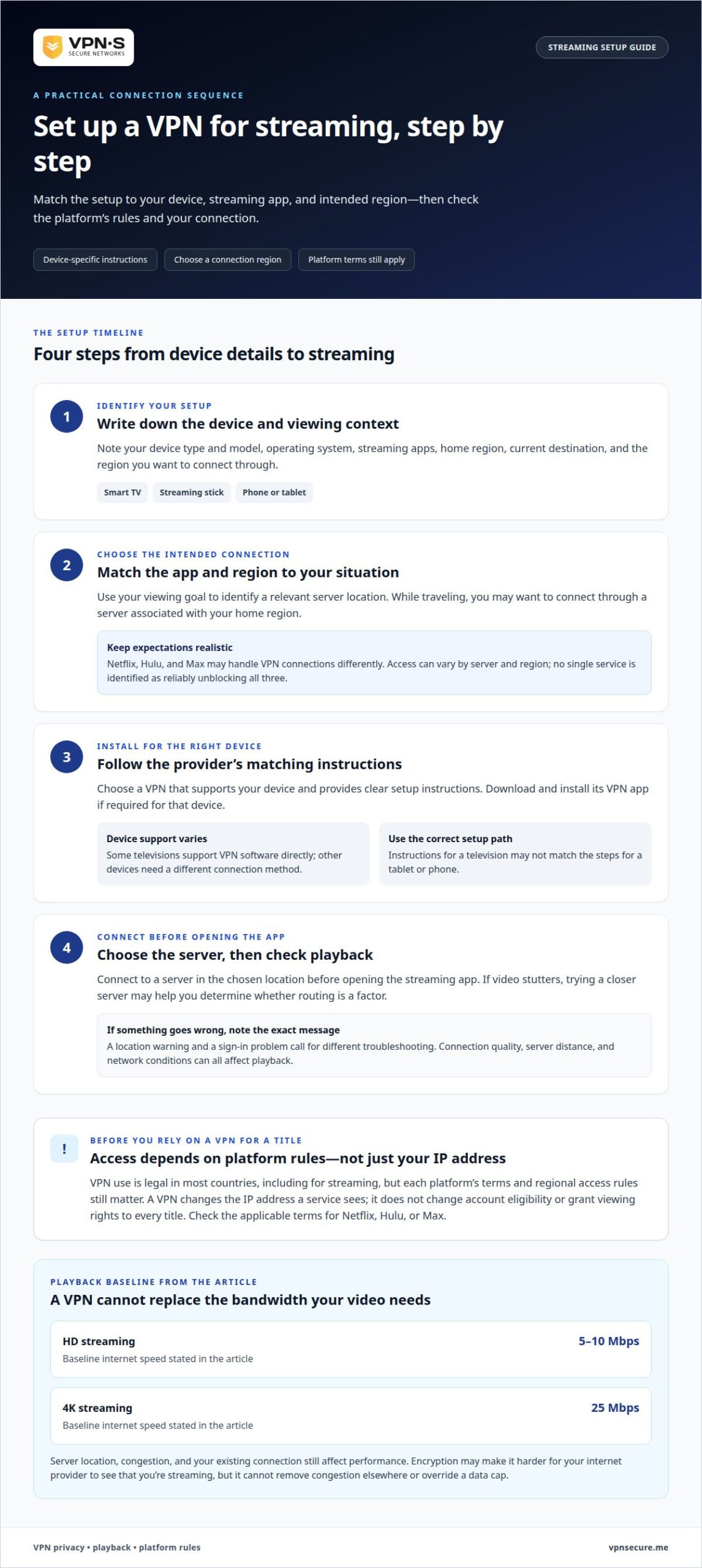
A streaming setup depends on your device, viewing location, and intended use. Choose a VPN that supports your device and provides clear setup instructions for your needs. Matching the instructions to your device avoids confusion, such as following television setup steps when you’re using a tablet.
Identify your device type and model, its operating system, and the streaming apps you use. Note where you’ll be watching and which networks you’ll rely on, such as hotel Wi-Fi. For example, setting up a smart TV abroad may differ from watching on a phone.
With those details, you can identify the relevant setup path and connection location. The usual sequence is:
Streaming devices don’t all handle apps the same way. Some televisions support VPN software directly, while other devices need a different connection method. Follow instructions that match your device and software instead of assuming every screen uses the same steps. Note any error message, too: a location warning and a sign-in problem call for different troubleshooting.
Keep your streaming account’s region and the platform’s terms in mind during setup. A VPN changes the IP address a streaming service sees, but it doesn’t change account eligibility or grant access to every title. Share only the information needed to configure the connection, then follow the platform’s rules. Clear details help tailor setup, but don’t guarantee access to specific content.
Streaming privacy involves more than changing your IP address. A VPN encrypts traffic between your device and the VPN server, making it harder for someone on the same public Wi-Fi network to read. The streaming platform can still see your account activity, so a VPN doesn’t make you anonymous to the service itself.
When connected, a VPN replaces your real IP address with the VPN server’s address. This can limit what a streaming platform or other online service learns from your network address. It doesn’t erase information linked to your account, browser, or activity in an app. Signing in to a personal streaming account, for example, still identifies that account to the platform.
When choosing a VPN for streaming movies securely, examine its logging policy, data retention practices, and jurisdiction. Look for clear explanations of what connection data is collected, how long it is kept, and whether activity logs are retained. The National Institute of Standards and Technology notes that long-term data retention can expose an organization to government searches, while privacy laws vary by country.
A VPN for streaming movies securely should offer more than encryption alone. A provider’s logging practices determine what information it keeps, while the laws in its jurisdiction can affect how that information is treated. Consider these points together instead of relying on a broad “private” label. A clear, specific policy is more useful than a sweeping claim without details.
For streaming on café Wi-Fi, encryption helps protect the connection from local network snooping. For account privacy, platform sign-in and the provider’s data practices still matter. Explore private VPN protection for a more protected streaming connection.
VPNSecure offers a private, no-log VPN that encrypts internet traffic across major devices. For movie streaming, that means you can use a VPN connection to help protect your traffic while you use your own streaming accounts on the road. It doesn’t override platform terms or guarantee access to every title, so keep each service’s regional rules in mind.
Choose a Monthly VPN Subscription or Annual VPN Subscription based on the term that suits you. Both provide an encrypted VPN connection for streaming and everyday browsing. If your use case calls for a static, non-shared IP address, VPNSecure also offers Dedicated IP as an optional add-on.
If you’re ready to explore VPN protection for streaming, contact VPNSecure.
Choosing a VPN for streaming movies securely starts with a clear priority: decide what matters most for your viewing. You might want more privacy on shared networks, a familiar setup while traveling, or support for your devices. That gives you a practical way to judge whether a VPN fits your routine instead of relying on broad claims.
Consider where you watch, which devices you use, and how much control you want over your connection. A setup that works well on a phone may need a different approach on a television. Keep your streaming platform’s terms in mind, and make privacy a deliberate part of your decision.
If you’re ready to discuss the right fit for your streaming needs, talk with VPNSecure about streaming. Take the next step with a clearer picture of what you want from your connection, and make your movie nights your own.
VPN use for streaming is legal in most countries, but laws differ by location. A VPN doesn’t change the rules attached to a streaming account or grant rights to content you otherwise can’t access. Before watching, consider local rules and the platform’s terms. A service may limit a title based on your region or account.
Yes, you can livestream through a VPN if your device and streaming service support the connection. Live video depends on a stable connection, and VPN routing can add delay or affect performance. A creator broadcasting a live event, for example, should consider upload capacity and latency, not just whether video playback works. Test the full broadcast setup before going live.
Some streaming services can identify connections associated with VPN servers, including through their IP addresses. A platform may limit playback, show an error, or offer a different catalog in response. Detection and outcomes vary by service and connection. If a title stops loading, the cause may be the VPN route, account settings, or the platform’s regional availability rules.
A VPN doesn’t inherently interfere with streaming. It routes traffic through a VPN server, but a streaming platform may decline a connection or limit a title under its own policies. Incorrect device settings can also interrupt playback. If playback fails, note the exact error and whether other apps connect to help narrow down the cause.
A kill switch stops internet traffic if the VPN connection unexpectedly drops, preventing the device from continuing on its regular connection. For example, if a VPN disconnects during a film, a kill switch can pause traffic until protection resumes. It helps limit exposure during a drop but can also interrupt playback. VPNSecure does not list this feature.
A VPN encrypts traffic between your device and its VPN server, making it harder for someone sharing café or hotel Wi-Fi to inspect that traffic. This can help protect streaming activity on the local network. It doesn’t hide your activity from the streaming platform after you sign in or protect information you choose to share in an account.
Keep reading
A Mac’s polished interface isn’t a privacy shield. Yes, MacBook Air and MacBook Pro can use a VPN, and macOS includes a client that supports L2TP,...

Planning a trip to China? Learn which VPN features matter, why Stealth VPN helps, how to prepare before departure, and what legal and access limits to consider.

A VPN for accessing region-locked games can change the IP location a game sees, but it won’t automatically change your Steam store region. Steam...
No logs, ever. Start with Free with ads in under a minute.