





















VPN & Privacy
VPN options for Mac compared by privacy, protocols, and protection
A Mac’s polished interface isn’t a privacy shield. Yes, MacBook Air and MacBook Pro can use a VPN, and macOS includes a client that supports L2TP,...

A VPN can protect your research connection, but it cannot grant access you do not have. A VPN for academic research access may help you reach university library resources when your institution permits remote VPN use and your account has the required credentials. Some libraries require their own institutional VPN or campus access, so a commercial VPN may not be enough.
That distinction matters. A VPN changes your apparent IP address and encrypts internet traffic, but it does not replace a university login or journal subscription. It also does not make your research activity invisible: your institution’s access rules and the VPN provider’s privacy practices still matter.
This guide explains how to set up a VPN on your devices, test whether library resources open correctly, and protect your connection without confusing privacy with unrestricted access. You’ll also learn when an institutional VPN is the better option, what to do if a database blocks your connection, and how to consider IP addresses and search privacy before you begin.
A VPN routes traffic through a private server, masking your device’s public IP address and encrypting the connection. Download academic articles only in accordance with your university’s acceptable-use policy and journal subscription terms. A VPN does not expand those permissions.
On café Wi-Fi, a library site sees the VPN server’s IP address instead of your device’s network address. This can add privacy and may help with IP-based institutional access, but it does not prove that your account is authorized. Sign in through your university portal when the database requests credentials.
Think of location masking as routing, not authorization. If a journal subscription allows access only through specified institutional IP ranges, a commercial VPN server may not match them. Use your university’s approved remote-access method for that resource. Changing your IP address alone will not unlock a subscription or override its geographic terms.
Encryption protects data traveling between your device and the VPN server. That matters on shared café or conference Wi-Fi, where you may sign in to an academic portal over a public network. Encryption can reduce exposure on that local connection, but it does not hide your activity from every service you sign in to.
WireGuard is a VPN protocol used to create encrypted tunnels. If it appears as an option in your VPN app, selecting it determines how the secure connection is established. It does not grant library access or replace university credentials. Those are separate controls.
Keep the boundaries clear: the VPN protects the connection to its server, while the library controls access to resources. A journal may apply IP-based or geographic subscription terms. Follow your institution’s rules for the database you’re using, especially when downloading or sharing full-text articles.
Before opening a research portal on public Wi-Fi, connect the VPN. If your VPN offers a kill switch, enable it. A dropped connection can expose your real IP address and institutional login. If access fails, use the university’s approved remote-access method rather than repeatedly changing locations. Connection protection and library authorization are separate.
VPN protection applies to the device carrying the connection, not every device nearby. VPNSecure encrypts internet traffic across major device types, so a laptop, phone, or tablet can each connect securely. Set up each device you use for library research instead of assuming one connection covers them all.
Start with the device you use to open academic databases. On a laptop, install the VPN app and sign in before opening the library portal. On a phone or tablet, install and configure the app separately. The interface may differ by platform, but the goal is the same: connect the device before accessing research resources.
For example, a researcher reading a journal on a laptop and checking citations on a phone needs a VPN connection on each device. Keep the university library login available on both. A VPN connection does not carry over from one screen to another, and a university VPN may have its own device instructions.
Map your research routine before setting up your devices. List the laptop, tablet, or phone you use for library work, then configure each one individually. This avoids a common gap: the laptop is protected, but a citation search on a phone uses a different connection. Follow your institution’s rules for devices accessing licensed databases.
Manual configuration can help when your university requires its own VPN settings rather than a commercial app. Follow the university’s instructions, enter the connection details it provides, and save the profile on the device you’ll use. Settings may differ by operating system, so do not copy a profile from another device without checking the instructions.
Set up your own devices with a VPN connection for major devices when you need encrypted traffic beyond campus.
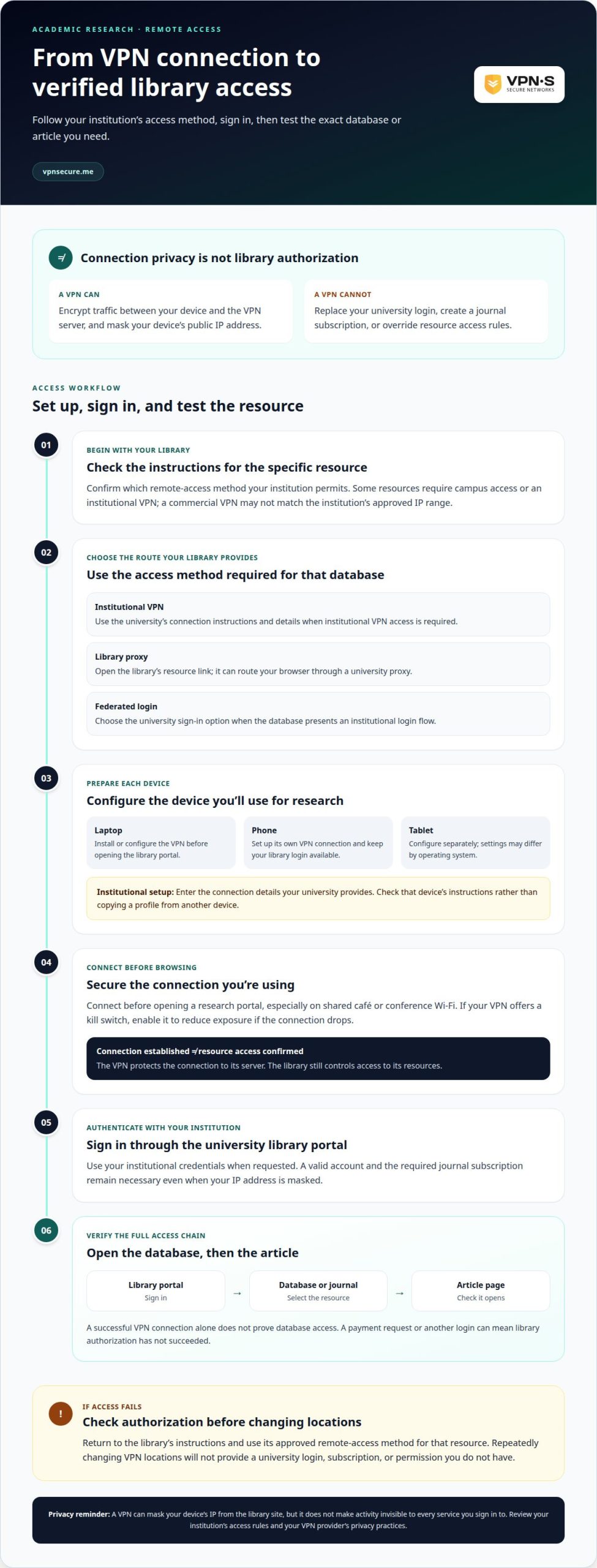
Remote access may use an institutional VPN, a library proxy, or a federated login through your university account. A VPN for academic research access works only when the institution’s method and your account meet the database’s requirements.
Start with your institution’s library access instructions. Some libraries allow VPN access only from certain regions, while others require campus access or an institutional VPN. Install or configure the method your university specifies, then sign in with your institutional credentials. A commercial VPN changes your apparent location, but it does not provide a university login or journal subscription.
Proxy access offers another route: a library link can send your browser through a university proxy, which identifies the institution to subscribed resources. Federated login instead uses an institutional sign-in flow, often presented as a university login option on a database page. Follow the route your library provides for the specific resource.
Test the entire access chain, not just the VPN connection. Open the university library portal, sign in, and select the database or journal you need. Then open an article page. If it asks for payment or another login, your VPN may be connected even though library authorization has failed. This is the practical test for a VPN for academic research access.
Use this sequence to isolate the problem:
If only one database fails, return to its library listing and follow the access instructions. If the institutional VPN will not connect, use the library proxy or federated login if offered. Avoid repeatedly switching VPN regions: a journal subscription may have geographic or IP-based terms, and changing locations will not resolve an authorization problem. For persistent login errors, note the resource name and displayed message, then follow your university’s support process.
A VPN changes the IP address a website sees, but it does not make research activity invisible. The VPN provider handles your connection, while your university may monitor traffic under its acceptable-use policy. The privacy trade-off depends on who operates each part of your route.
For example, when you search a journal database through a university VPN, the institution can associate the connection with its network. A commercial VPN changes the visible network address to its server, but the database still receives your search requests. Your account login can also identify you to the university or publisher. Keep connection privacy separate from account privacy.
Before using a VPN for academic research, review your institution’s remote-access and acceptable-use rules. Institutional database access often relies on IP addresses, and some universities monitor VPN traffic. A VPN connection will not override a journal’s subscription terms or authorize access to resources outside your account. Use approved library routes for licensed content.
Privacy protections also apply to student information. According to the U.S. Department of Education and the European Commission, educational institutions must safeguard student data and prevent unauthorized access or disclosure under regulations such as FERPA and GDPR. Those obligations do not mean every VPN hides your searches. Review the provider’s privacy terms and understand what data its service collects.
For a more private connection on public Wi-Fi, enable the VPN before signing in to research accounts. If the VPN offers a kill switch, turn it on so a dropped connection does not expose your real IP address. Keep university credentials private, and do not treat IP masking as anonymity. Your institution, VPN provider, and the sites you visit each handle different parts of your activity.
Choose a private VPN connection to add an encrypted layer when researching away from campus.
VPNSecure offers a private, no-log VPN service that encrypts internet traffic across major devices. It can add a layer of connection privacy when you research on public Wi-Fi or work away from campus. It does not replace your university credentials, library proxy, or institutional VPN when a database requires one.
If your library access route works and you want added privacy for your broader internet connection, VPNSecure’s Monthly VPN Subscription and Annual VPN Subscription are options to consider. The right setup depends on whether you need a commercial VPN alongside your institution’s access method, not in place of it.
Keep the distinction clear: a VPN protects your connection, while your university controls access to its library resources. Explore VPNSecure’s subscription options if you want added privacy for your broader internet connection.
Your next research session is an opportunity to make privacy part of your workflow. A VPN for academic research access should fit your research needs, account use, and institutional permissions. Plan your setup before a deadline or trip, when rushed decisions can make it harder to maintain a reliable routine. Keep those choices intentional as your project moves between work settings.
VPNSecure offers a Monthly VPN Subscription, an Annual VPN Subscription, and Dedicated IP as an optional add-on for readers considering a separate VPN connection. These options can support connection privacy for broader online activity, while university access still follows the institution’s requirements. Choose a setup that fits your routine and keep your research process moving.
Discuss your VPN needs with VPNSecure and take the next step toward a more considered research setup.
Stay curious, work confidently, and make privacy part of the plan.
Yes, if your university library permits access through that VPN and you authenticate with your account. For example, a library using institutional IP recognition might accept its campus VPN but not a commercial server. First, open the library’s remote-access instructions and follow the route listed for your database. A VPN connection alone does not establish eligibility for a journal or article.
A VPN, or virtual private network, sends your device’s internet traffic through an encrypted connection to a VPN server. Websites see the server’s IP address rather than your device’s network address. For example, using a VPN to check a university portal from a shared network changes the route your traffic takes. It does not replace your account credentials or grant access to restricted resources.
A VPN adds a server and an encrypted connection to the route between your device and a database, which can affect loading speed. The result depends on factors such as your internet connection, the server route, and the database itself. If an article page loads slowly, compare another library resource with a non-library site. This can help distinguish a VPN issue from a database delay.
Use the remote-access method specified by your university library. Install its VPN software or configure the connection using the institution’s instructions, connect, and sign in to the library portal with your university account. Then launch the database from the library’s resource page. For example, opening a journal through that page can carry the institutional access route to the publisher’s site.
No. A VPN does not create a journal subscription or provide university credentials. It can route your connection through an institution’s network when that institution provides the VPN and grants your account access. For example, a campus VPN can support access to a subscribed database, but your university account and subscription still determine which content you can open.
Researchers can use a commercial VPN for connection privacy, but it does not automatically provide access to university subscriptions. Libraries and publishers may rely on institutional IP ranges, login credentials, and subscription terms. Use your library’s approved access route for licensed databases. A commercial VPN is separate from that authorization, so do not treat a changed apparent location as permission to access restricted content.
Keep reading
A Mac’s polished interface isn’t a privacy shield. Yes, MacBook Air and MacBook Pro can use a VPN, and macOS includes a client that supports L2TP,...

Planning a trip to China? Learn which VPN features matter, why Stealth VPN helps, how to prepare before departure, and what legal and access limits to consider.

A VPN for accessing region-locked games can change the IP location a game sees, but it won’t automatically change your Steam store region. Steam...
No logs, ever. Start with Free with ads in under a minute.