




Your browser’s incognito window is lying to you. Closing that dark tab wipes your local cookies, but it leaves your real-time traffic wide open to your internet service provider, network snoops, and corporate data brokers. If you think private browsing keeps your searches discreet, think again. Deploying a genuine VPN to protect browsing history is the only reliable way to cut off external surveillance at the connection level.
You already know that commercial ISPs harvest your online habits to monetize your habits or hand over logs to prying eyes. It feels invasive because it is. Discover exactly how military-grade encryption shields your web traffic from ISPs, shared Wi-Fi sniffers, and third-party trackers before your data ever leaves your device. We will unpack who can see your unencrypted activity, break down how an offshore encrypted tunnel works, and show you how to spot a genuine zero-log provider that actually keeps you safe.
Key Takeaways
- Understand why commercial internet providers routinely track domain visits, timestamps, and bandwidth to build profitable consumer profiles.
- Discover why setting up an offshore VPN to protect browsing history creates an encrypted tunnel that defeats local network surveillance.
- Uncover the critical difference between local incognito modes and end-to-end network encryption across public or shared Wi-Fi.
- Learn how to evaluate genuine zero-log architectures to ensure your provider operates beyond invasive surveillance jurisdictions.
- Master the essential client settings, including automated kill switches, required to prevent accidental DNS leaks and data exposure.
Who Can See Your Browsing History Without a VPN?
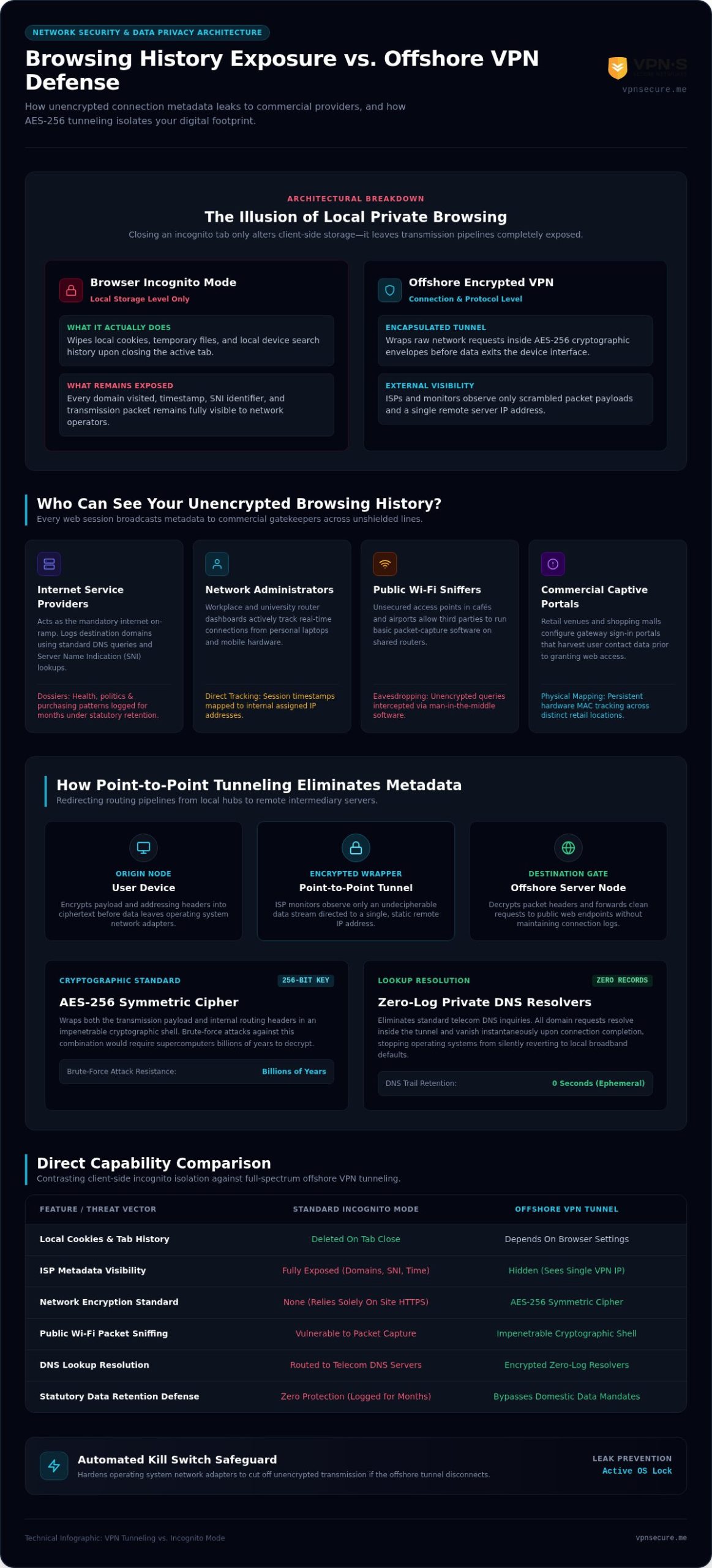
Every time you open a browser, your device sends unencrypted signals across a dozen corporate gatekeepers. HTTPS locks down passwords and credit card numbers, but it leaves your metadata completely bare. Anyone managing the network can see exactly which domains you visit, when you connect, and how much data you consume. Without an offshore Virtual Private Network (VPN), your real-time network requests broadcast personal digital footprints to multiple observers every single second.
The Role of Your Internet Service Provider (ISP)
Your ISP acts as your mandatory on-ramp to the internet. Because every request routes directly through their equipment, they log visited domain names using basic DNS lookups. Even when an encrypted handshake secures page content, Server Name Indication (SNI) leaks the specific web address you contact. Many telecom giants transform these connection logs into commercial goldmines, assembling behavioural advertising dossiers that reveal your health anxieties, political views, and purchasing patterns. In numerous Western countries, statutory data retention laws force providers to store these comprehensive connection records for months, ensuring state agencies can access your activity without requiring a judicial warrant.
Network Administrators and Public Wi-Fi Sniffers
Switching from home broadband to a public hotspot or an office network only multiplies your exposure. Multiple parties quietly intercept this data daily:
- Workplace and Campus Administrators: Central router dashboards record active sessions from personal laptops and smartphones, mapping timestamps directly to assigned internal IP addresses.
- Public Wi-Fi Packet Sniffers: Unencrypted café and airport networks permit basic man-in-the-middle packet eavesdropping. Anyone running basic packet-capture software on the same open router can inspect your unencrypted queries.
- Commercial Captive Portals: Retail venues and shopping malls leverage connection portals to harvest phone numbers while tracking persistent device MAC addresses between store locations.
Relying on open networks without defensive armor leaves your digital routine vulnerable to anyone holding administrative keys. Running a dedicated VPN to protect browsing history replaces this exposed data pipeline with an impenetrable cryptographic barrier, stopping commercial surveillance right at the perimeter.
How a VPN Shields Your Browsing History: Tunneling and Encryption
End-to-end VPN tunneling blinds network monitoring systems by encapsulating your raw web requests inside encrypted packets and routing them through a secure intermediary server before they reach the public internet. This architecture completely re-routes your digital pathway. Rather than broadcasting your target site to the nearest cell tower or broadband hub, your device establishes a point-to-point tunnel directly to an offshore server node. Your ISP no longer sees destination URLs or content requests. They observe only scrambled data streams and the single, unchanging IP address of the remote VPN server.
The Mechanics of AES-256 Packet Encryption
Every individual packet leaving your operating system gets wrapped in a cryptographic shell using AES-256 encryption. This symmetric cipher uses a 256-bit key to scramble plain text into undecipherable ciphertext. Modern supercomputers running brute-force attacks against this cipher would require billions of years to guess the correct combination. As Palo Alto Networks explains in their guide on VPN tunneling and encryption, the tunnel encapsulates both the payload data and the internal routing headers. Network sniffers cannot inspect the destination endpoint because the original addressing information remains locked inside the encrypted wrapper until the packet arrives at the remote VPN server.
Eliminating the ISP DNS Trail
Standard internet connections resolve domain names by querying telecom DNS servers, handing your ISP an exact log of every site you visit. A robust VPN eliminates this vulnerability by routing every address query through zero-log private resolvers located inside the encrypted tunnel:
- Zero-Log Resolvers: Queries are processed without storing records, meaning your DNS lookup history disappears the moment the connection completes.
- DNS Leak Safeguards: Hardened client software locks down operating system network adapters, stopping queries from silently reverting to local broadband defaults.
- Unified Network Defense: Deploying an encrypted tunnel using a dependable VPN for all devices guarantees your tablets, phones, and laptops share the same unbreachable standard.
Securing your data across modern networks requires closing every potential leak point. Activating a proven VPN to protect browsing history stops passive eavesdropping dead in its tracks and restores your digital autonomy.
Incognito Mode vs. VPN: The Illusion of Local Privacy
Most internet users mistake a clean browser history for actual anonymity. Launching a private tab changes how your browser handles files locally, but it does not change how data travels across the web. While you browse in incognito mode, your real-world IP address remains fully exposed to every router, switch, and web server along the path. A virtual private network conceals your transmission pathway across the wider internet, whereas incognito mode simply wipes your local tracks after the fact.
What Incognito Mode Actually Protects
Private browsing exists for one specific purpose: local hygiene. When you close that dark window, your browser automatically purges temporary cache files, typed search queries, and session cookies. It successfully prevents a family member or coworker sitting at the same computer from seeing what you searched five minutes ago. That is the hard limit of its capabilities. The second your traffic hits the physical network interface, private tabs broadcast every unencrypted packet across the wire without a single layer of defensive protection.
Why Only Encrypted Tunnels Stop External Interception
Local disk management cannot shield you from network-level surveillance. Sophisticated commercial trackers bypass missing cookies by pairing observable IP headers with device fingerprints, cross-referencing your screen resolution, system fonts, and hardware profiles to identify you anyway. If you want true network-level defense, you must mask your footprint entirely. Learning how network traffic masks work through genuine undetectable VPNs reveals why encrypting the transit pipe matters far more than clearing local browser caches.
| Threat Vector | Incognito Mode | Offshore Encrypted VPN |
|---|---|---|
| Local Shared Device Users | Hidden (Cache and tabs purged upon exit) | Visible (Local history remains unless cleared) |
| Broadband Provider Logging | Exposed (Every DNS request and domain logged) | Encrypted (Only scrambled VPN node traffic visible) |
| Public Wi-Fi Packet Eavesdropping | Vulnerable (Unencrypted data readable in transit) | Protected (AES-256 cryptographic envelope) |
| Real IP Address Exposure | Exposed (Public IP visible to all visited sites) | Masked (Replaced with offshore server IP) |
Relying on incognito mode to defend against network tracking is like whispering your secrets through a megaphone. Running an offshore VPN to protect browsing history guarantees that external observers see only indecipherable code, keeping your digital footprint strictly your own.
The No-Log Reality: Why Provider Policies and Jurisdiction Matter
Tunneling your data means nothing if the party holding the keys keeps a paper trail. When you connect through a reckless provider, you simply transfer your browsing history from your telecom provider to a private server farm. Marketing terms like “zero-logs” get thrown around casually, yet independent audits routinely reveal that roughly one-third of providers claiming zero-log protections still collect connection telemetry or user metadata. If a VPN stores your source IP, session duration, or DNS records on physical drives, your digital footprint remains completely vulnerable to court orders and hostile seizures.
The Danger of Five Eyes and 14 Eyes Intelligence Sharing
Legal jurisdiction dictates whether a privacy policy holds any real weight. Providers incorporated inside the Five Eyes, Nine Eyes, or 14 Eyes surveillance cartels operate under coercive legal frameworks. Agencies across member nations routinely bypass domestic wiretapping statutes by trading intercepted citizen logs with foreign counterparts. A VPN company registered in the United States, the United Kingdom, or Europe can be served with a National Security Letter or a sealed subpoena. These orders force engineers to install covert packet monitoring while gag orders prevent them from warning subscribers. True autonomy requires establishing legal roots in strict offshore sanctuaries like the Bahamas, where extraterritorial subpoenas have no domestic legal standing. If you are evaluating your options, understanding what separates a genuine ExpressVPN alternative outside Five Eyes from a provider that merely claims offshore status reveals how corporate ownership and verified no-log architecture matter as much as registered jurisdiction.
Verifying Authentic Zero-Log Operational Standards
Separating genuine privacy tools from predatory data operations comes down to infrastructure design. You need to inspect how the network handles your session data:
- Connection Metadata vs. Browsing Logs: Shady operators claim they do not log “activity” while quietly archiving source IP addresses, assigned server ports, and total bytes transferred. Genuine providers discard all identifying traces the second your session drops.
- Volatile RAM-Only Nodes: Hard drives retain deleted data fragments until overwritten. Operating servers entirely on volatile RAM guarantees that all operational data vanishes permanently upon power-down or system reboot.
- Free Proxy Traps: Running global server fleets costs millions. Services operating without subscription revenues routinely monetize customer traffic by bundling trackers or packaging browsing logs for commercial data brokers.
Never leave your digital rights to good faith promises. Choose an independently audited, offshore VPN to protect browsing history that engineers surveillance out of the equation entirely.
How to Configure Your VPN for Complete Browsing History Protection
Clicking “connect” inside a generic application does not instantly shield your connection. Default client configurations often favor smooth streaming over bulletproof defense, leaving critical side channels wide open. If a temporary network drop occurs, your operating system defaults to unencrypted routing without alerting you. Achieving ironclad security means locking down client settings to ensure no single data packet escapes unencrypted into your ISP’s waiting hands.
Essential In-App Security Settings
Locking down your software requires establishing aggressive fallback boundaries before loading a single webpage. Toggle these settings immediately:
- System-Level Kill Switch: Ensure your client terminates all network traffic instantly if the encrypted tunnel drops. Without this feature, background programs immediately fail over to local telecom channels, exposing active visits in cleartext.
- Automated Network Activation: Configure the application to launch on boot and connect automatically whenever you join public Wi-Fi or switch to cellular data. Passive protection eliminates human error.
- Browser Protocol Hardening: Disable WebRTC requests within browser flags and turn off local IPv6 routing. Browser-level WebRTC vulnerabilities can broadcast your true internal IP address even when your primary tunnel displays an offshore location.
Testing Your Tunnel Integrity
Never assume your tunnel works just because the interface shows a green checkmark. Load an independent DNS and IP leak testing tool while the connection runs. Scrutinize the results carefully: the visible IP address must match your chosen offshore server location, and the detected DNS resolver must point exclusively to the private infrastructure of your provider. If your regional broadband provider appears anywhere on that diagnostic screen, you are dealing with a critical packet leak. The same clean IP reputation and leakproof routing that protects your browsing history is equally critical when you need a reliable VPN for BBC iPlayer abroad, where broadcasters actively blacklist shared server addresses. Locking in permanent digital autonomy across every workstation and phone means securing the best annual VPN deal, cutting out sporadic coverage gaps completely.
Consistency separates truly private users from tracked consumers. Deploying a rigorously configured VPN to protect browsing history turns daily web access into a locked vault, keeping ISPs, data brokers, and network snoops permanently locked out.
Take Back Control of Your Digital Footprint
Surveillance capitalism thrives because most internet users assume private browsing windows protect them. You now know better. Telecom providers systematically harvest unencrypted DNS queries, while public hotspots expose your everyday habits to anyone holding packet-sniffing tools. Relying on local tab wipes won’t stop wide-area network surveillance. True privacy requires an active, impenetrable barrier at the connection layer.
Deploying a verified VPN to protect browsing history removes you from corporate databases and rogue network trackers entirely. By encapsulating outgoing traffic inside military-grade AES-256 encryption, you blind outside observers to visited domains, timestamps, and physical coordinates. What matters most is trusting where that traffic terminates. Operating from Bahamian jurisdiction since 2012, VPN Secure maintains proven zero-logging standards completely outside Five Eyes surveillance pacts, backed by native leak prevention across your entire hardware fleet.
Your web habits belong to you alone. Reclaim your digital sovereignty with VPN Secure and experience the web without compromise or corporate oversight.
Frequently Asked Questions
Does a VPN completely hide my browsing history from my internet provider?
Yes, an active encrypted tunnel stops your ISP from logging the domains you visit. Your provider sees that you connected to an external IP address, the connection timestamp, and the volume of bandwidth used. The actual website destinations, requested URLs, search queries, and transmitted data remain scrambled inside an AES-256 envelope, preventing your provider from assembling monetization profiles from your traffic.
Can my employer see what websites I visit if I use a VPN on work Wi-Fi?
Network administrators cannot inspect encrypted traffic passing through your personal device while your tunnel remains active. The workplace router sees only encrypted data packets heading to an external server. If you browse on a company-owned machine, workplace monitoring software, keyloggers, or enterprise certificates installed locally can still record your activity regardless of whether you run an encrypted tunnel.
Does clearing my browser history do the same thing as using a VPN?
No, clearing local history only wipes cached files, cookies, and visited URLs from your local hard drive. It provides zero network protection. Your broadband provider, network administrators, and Wi-Fi sniffers have already logged those requests in real time across the physical wire. Using a dedicated VPN to protect browsing history secures transmission across the open network before records can be captured externally.
Can police or government agencies track browsing history through a VPN?
Authorities cannot intercept encrypted transit streams in real time. To obtain records, agencies must serve court orders directly to the VPN company. If that provider operates inside the Five Eyes alliance, secret subpoenas can force them to log user sessions. Providers incorporated in offshore privacy sanctuaries like the Bahamas operate outside foreign surveillance pacts, leaving no logs for investigators to seize.
Do free VPN services protect my browsing history as effectively as paid ones?
No, free services often undermine the very privacy they advertise. Maintaining server fleets requires significant capital, and free operators routinely monetize users by injecting trackers, selling bandwidth, or auctioning aggregated browsing logs to marketing brokers. Genuine protection requires independent infrastructure funded through sustainable subscriptions, such as a monthly or annual plan built entirely on zero-logging architectures.
What happens to my browsing history if my VPN connection suddenly drops?
If your encrypted connection drops without an automated kill switch enabled, your device immediately reverts to your default broadband line. Your operating system silently routes subsequent DNS lookups and web visits through your unencrypted ISP connection. Enabling a built-in kill switch prevents this exposure by instantly cutting all device internet traffic until your secure tunnel re-establishes.