




Bloated server networks won’t save your stream when BBC iPlayer decides to pull the plug. Most travelers discover too late that massive server counts mean nothing if the broadcaster has already blacklisted every shared IP address in the cluster. Securing a reliable VPN for BBC iPlayer abroad isn’t about chasing vanity metrics; it comes down to clean IP reputation, leakproof routing, and outsmarting aggressive detection filters.
Nothing ruins downtime abroad faster than settling into a hotel room only to stare at error 02001 or an endless loading loop. You shouldn’t have to waste time battling broken connections or proxy walls just to watch the UK television you already pay for. You’ll discover the exact steps to dismantle these geoblocks, eliminate buffering on hostile public networks, and unlock pristine HD or 4K live streams anywhere in the world.
We’ll walk through seamless setup steps across your devices, explore how dedicated IP addresses permanently defeat proxy blacklists, and provide a field-tested troubleshooting checklist for when streaming platforms strike back.
Key Takeaways
- Understand how BBC iPlayer identifies data center traffic and why massive server networks still trigger instant blocks.
- Master the exact configuration steps to run your VPN for BBC iPlayer abroad without leaking browser or GPS location signals.
- Discover how a clean Dedicated IP bypasses the recurring shared-IP blacklists that cause mid-stream crashes.
- Apply a rapid troubleshooting routine to dismantle proxy error 02001 and restore smooth HD streaming on any connection.
Why BBC iPlayer Blocks VPNs Abroad (and How Detection Works)
The BBC guards its border fiercely. Territorial licensing agreements restrict its catalogue strictly to viewers within the United Kingdom. To enforce this, the platform deploys sophisticated perimeter defenses designed to identify and reject international viewers. Understanding how geo-blocking works on a technical level exposes why basic circumvention tools fail. The platform doesn’t just read your apparent country code; it actively analyzes the pedigree of your connection.
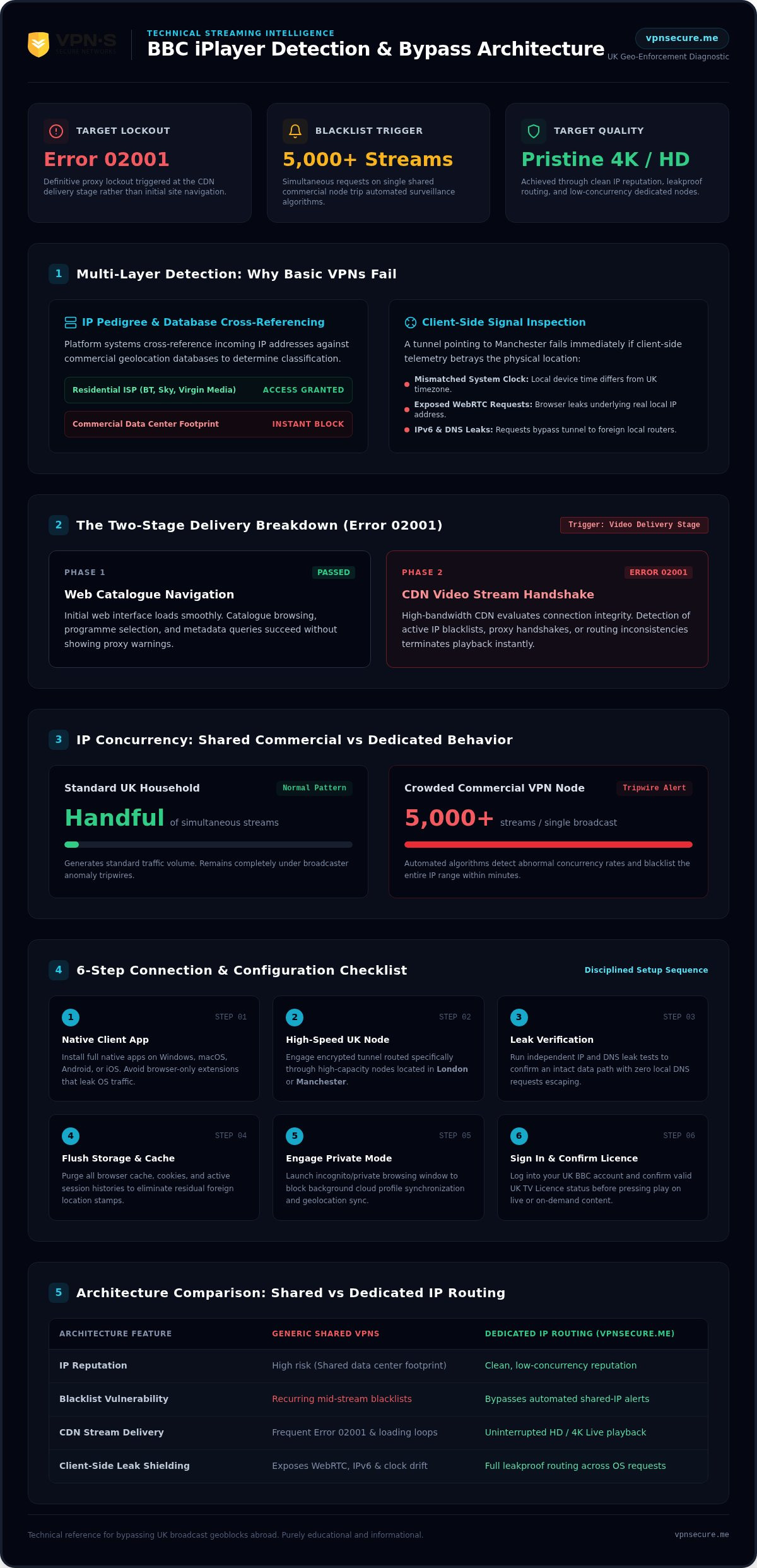
When you connect to the platform, inspection systems cross-reference your incoming IP address against commercial geolocation databases. If your traffic traces back to a commercial data center instead of a residential UK internet service provider like BT, Sky, or Virgin Media, your access drops instantly. Worse, streaming platforms routinely inspect client-side signals. A mismatched system clock, exposed WebRTC requests, or an IPv6 leak will betray your physical location even if your tunnel claims to be sitting in Manchester.
Relying on a generic VPN for BBC iPlayer abroad leaves you vulnerable to these deep inspection routines unless your provider specifically conceals data center footprints and seals client-side leaks.
The Anatomy of BBC iPlayer Error Code 02001
Error 02001 is the platform’s definitive proxy lockout. You might browse the catalogue without issue, but the moment you press play, media delivery stalls. The platform separates initial web navigation from its high-bandwidth content delivery networks (CDNs). When the video player requests streaming segments, the CDN evaluates the connection integrity. If it detects a proxy handshake, an active IP blacklist, or packet routing inconsistencies, it terminates playback and throws error 02001. Defeating it requires an uninterrupted, clean data path from authentication all the way to video delivery.
How Automated IP Blacklisting Targets Commercial VPNs
Commercial VPNs often become victims of their own scale. Broadcasters deploy automated surveillance algorithms that track IP concurrency rates. In a typical British home, an IP address generates a handful of simultaneous streams. When a popular commercial VPN node pushes five thousand simultaneous connections into a single live broadcast, the anomaly triggers an automated alert. The broadcaster’s defense systems flag the node and blacklist the entire IP range within minutes.
Crowded servers guarantee detection. To maintain continuous access, you need low-concurrency routing and clean addressing that lets you bypass geo restrictions VPN filters without setting off automated tripwires.
How to Watch BBC iPlayer Abroad with a VPN: Step-by-Step Setup
Most connection failures happen before video data even begins to transfer. Rushing to open your browser right after clicking “connect” triggers red flags. Broadcasters justify these strict technological measures based on copyright enforcement, as detailed in the UK’s official position on geo-blocking. If you want a flawless stream, you need a disciplined sequence that locks down your local digital footprint first.
A properly configured VPN for BBC iPlayer abroad shields your identity completely, ensuring high bandwidth and reliable playback whether you stream on a laptop or a hotel television.
Step 1 to 3: Securing Your Encrypted UK Tunnel
Start by selecting a provider with specialized, high-capacity UK streaming nodes. Download and install the native client application on your primary device, whether that is Windows, macOS, Android, or iOS. Avoid lightweight, browser-only extensions; they leave background operating system requests vulnerable to discovery.
Open your VPN software and select a high-speed UK node in London or Manchester. Once the encrypted tunnel engages, confirm your digital location before navigating any further. Run an independent IP and DNS leak test online. If the lookup confirms a clean UK location with zero local DNS leaks, your data path is secure.
Step 4 to 6: Clearing Fingerprints and Launching iPlayer
Never log in with cached browsing data active. Residual cookies quietly advertise your previous foreign connections to the platform. Follow this quick launch checklist:
- Flush local storage: Purge all browser cache, cookies, and active session histories.
- Engage private mode: Open an incognito or private browsing window to prevent background profile sync.
- Access the platform: Head to the BBC iPlayer website and sign in to your UK BBC account.
- Confirm compliance: Select your live program or box set, and confirm your valid UK TV Licence status when prompted.
Configuring Smart TVs, Firestick, and Media Consoles
Streaming on a television requires handling hardware constraints. For an Amazon Fire TV Stick, download your provider’s native application straight from the Amazon Appstore, log in, and bind your connection to a UK node before launching the streaming app. For game consoles, smart TVs, or Apple TVs that lack direct VPN app support, set up encrypted routing across your local network. You can explore hardware-wide configurations using our comprehensive VPN for all devices setup tutorial.
Securing your personal hardware while moving between networks shouldn’t be complicated. If you are ready to eliminate configuration headaches, you can get started with VPN Secure to protect all your devices under a single account.
Essential VPN Features Needed to Bypass BBC iPlayer Geoblocks
Most commercial VPN providers sell you an illusion built on bloated server numbers. They parade fleets of thousands of endpoints, yet neglect the underlying network hygiene required to slip past modern content firewalls. Choosing an effective VPN for BBC iPlayer abroad means ignoring vanity counts and focusing squarely on IP health, private DNS infrastructure, and unthrottled bandwidth.
Top-tier streaming platforms don’t evaluate how many servers your provider owns. They analyze the technical fingerprint of the specific node touching their gateway. To stream live sports and box sets without arbitrary lockouts, your provider must possess three critical architectural defenses.
DNS, IPv6, and WebRTC Leak Elimination
A single misdirected packet renders the strongest encryption useless. When you request a stream, your browser queries a DNS server to resolve media hostnames. If your VPN routes that request through your hotel ISP or a local telecom instead of its own encrypted resolvers, the broadcaster spots the discrepancy immediately. Your connection gets blocked, even if your apparent IPv4 address sits in London.
Your client software must enforce strict DNS leak protection and automatically disable IPv6 routing. Unchecked WebRTC requests inside modern web browsers operate as another silent traitor, leaking your underlying hardware IP behind the tunnel. Check out our deep-dive analysis on undetectable VPN architecture to see how robust network cloaking eliminates these hardware-level vulnerabilities.
Dedicated IP vs. Shared IP Server Pools
Shared IP pools are a prime liability for international streaming. When thousands of users pile onto the same public VPN server to watch a live football match, automated platform algorithms flag that single IP as abnormal datacenter traffic. The result? Instant blacklists and continuous CAPTCHA loops.
A Dedicated IP solves this structural flaw completely. By assigning you a private, clean static UK address that nobody else touches, your streaming activity mirrors a standard British household. You bypass the aggressive crowd-detection filters that permanently hunt down high-concurrency commercial nodes.
Optimized Server Architecture Over Pure Server Numbers
Raw server count is a marketing gimmick. An operator with five hundred overloaded, low-bandwidth servers will fail where an operator with lean, high-throughput infrastructure succeeds effortlessly. Streaming live 4K content requires consistent throughput, demanding at least 25 Mbps of stable bandwidth without mid-stream throttling.
Premium routing relies on high-capacity 10Gbps backbone connections engineered to handle continuous media loads without dropping frames. Strategic node deployment ensures seamless coverage across the globe. See how strategic routing beats raw volume across VPN servers 40 countries wide to maintain high-speed reliability wherever you travel.
Troubleshooting BBC iPlayer VPN Streaming Issues in 2026
Hitting an unexpected playback block doesn’t mean your setup is broken. Broadcasters constantly refine their telemetry, probing your hardware for subtle geographic inconsistencies. When your VPN for BBC iPlayer abroad encounters sudden resistance, standard reconnect tricks rarely solve the problem. You need a methodical approach that hunts down and eliminates silent data leaks across your operating system and browser environment.
Isolate the issue systematically. You can neutralize platform blocks without compromising encryption by addressing three hidden vectors: cached tracking identifiers, network adapter collisions, and hardware-level telemetry.
Eliminating Persistent Browser and Cookie Tracking
Web browsers store an aggressive amount of location data. Even after connecting to an active UK server, legacy tracking scripts will expose your true origin. Take control of your local browser environment with these immediate actions:
- Clear persistent storage: Delete all cookies, local cache, and offline site data linked to bbc.co.uk.
- Flush DNS resolver cache: Open your system terminal and execute a local DNS flush (
ipconfig /flushdnson Windows orsudo dscacheutil -flushcacheon macOS) to eliminate poisoned lookup records. - Block geolocation APIs: Open browser privacy settings and explicitly revoke location permissions for the platform, ensuring your browser never responds to silent GPS coordinate requests.
Synchronizing System Clock and Disabling WebRTC Leaks
Deep telemetry checks often compare your system clock to your reported IP address. If your virtual tunnel routes through London but your device clock runs on Central European Time or Eastern Standard Time, the mismatch immediately triggers a proxy flag. Set your device time zone manually to Greenwich Mean Time (GMT) or British Summer Time (BST) before initiating your session.
WebRTC leaks present another persistent hazard. Modern browsers utilize WebRTC for peer-to-peer audio and video feeds, which can bypass encrypted tunnels to expose your real public IP. Turn off WebRTC in your browser configuration, or utilize native extensions designed to block STUN protocol requests entirely. Review our comprehensive tutorial on using a VPN to protect browsing history to close every potential logging gap on your machine.
Stop wrestling with unreliable connections and broken playback screens. Eliminate streaming errors permanently when you get your Dedicated IP subscription from VPN Secure today.
Why VPN Secure Delivers Uninterrupted UK Streaming Abroad
Most commercial VPN services operate as corporate conglomerates beholden to domestic data-sharing pacts. They sell massive promises, yet funnel your private streaming traffic through jurisdictions that mandate surveillance, retention, and inspection. Bypassing geoblocks shouldn’t require trading away your fundamental right to digital autonomy. When you deploy a specialized VPN for BBC iPlayer abroad, you need a provider engineered from the metal up to resist both aggressive streaming blacklists and state-sponsored data logging.
VPN Secure operates as an unyielding privacy shield. By combining high-capacity streaming infrastructure with ironclad legal autonomy, it provides the uninterrupted streaming performance you expect alongside the uncompromising privacy you deserve.
Offshore Jurisdiction and True Zero-Log Privacy
Jurisdiction matters as much as encryption algorithms. Founded in 2012, VPN Secure operates under the sovereign legal protection of the Bahamas, completely outside the reach of the Five Eyes, Nine Eyes, and Fourteen Eyes intelligence-sharing alliances. The UK maintains some of the most aggressive surveillance frameworks in the western world, including invasive bulk data collection mandates. If you are evaluating providers and want to understand why offshore incorporation matters, our detailed breakdown of the best ExpressVPN alternative outside Five Eyes explains how jurisdiction, ownership, and verified no-log policies combine to form a complete privacy assessment.
Our Bahamian incorporation means no mandatory data retention laws govern your activity. What you stream, download, or browse remains entirely your business. We maintain a verified, strict no-log policy that has protected users for well over a decade, keeping your viewing history invisible to local ISPs, foreign network snoopers, and overreaching agencies.
Dedicated Streaming IPs and Multi-Device Performance
Shared server pools remain the primary reason streaming sessions collapse. When hundreds of users crowd onto the same shared IP node, automated detection filters drop the banhammer. VPN Secure offers an optional clean Dedicated IP add-on, giving you an exclusive, private British static address that keeps your traffic looking like standard home broadband. This permanently eliminates sudden proxy disconnects, server hopping, and frustrating security prompts.
Every plan includes unlimited streaming bandwidth and full multi-device support. Whether you configure your connection across a laptop, smartphone, or living room media setup, your stream delivers consistent HD and 4K bitrates without data caps. Secure top-tier savings through our flexible best annual VPN deal, or choose our straightforward Monthly VPN Subscription to stay protected on your own terms.
Take Control of Your Streaming Freedom Today
Geographic borders shouldn’t dictate your access to news, live sporting events, or the British television culture you value. VPN Secure provides the clean routing, leak-free DNS architecture, and raw throughput required to reclaim complete online freedom. Reclaim your access to BBC iPlayer with VPN Secure today and experience the web without arbitrary barriers.
Stream British Television on Your Own Terms
Streaming error screens and blocked servers shouldn’t dictate how you watch your favourite British shows while traveling. Beating aggressive broadcaster firewalls doesn’t require complex workarounds or bloated server lists. It requires clean IP reputation, leakproof DNS shielding, and the right network architecture. When you configure a secure VPN for BBC iPlayer abroad, you strip away digital borders and regain instant, buffer-free playback.
VPN Secure has defended online autonomy since 2012 from independent Bahamian jurisdiction, well clear of intrusive Five Eyes data retention laws. With high-throughput servers spanning 40+ countries, leak-free routing, and optional clean Dedicated IPs, you get seamless HD and 4K playback without the threat of shared-IP blacklists. Every subscription backs your streaming freedom with a verified no-log policy and a 30-day money-back guarantee.
Take charge of your connection, leave proxy errors behind, and Unblock BBC iPlayer Anywhere with VPN Secure right now.
Frequently Asked Questions
Can I legally watch BBC iPlayer abroad using a VPN?
Using a VPN is entirely legal in most countries, though bypassing geoblocks breaches the BBC’s terms of service. There are no recorded cases of individuals facing criminal charges simply for viewing streams abroad. However, UK law requires viewers to hold a valid TV Licence to access live broadcasts or on-demand content. You remain personally responsible for complying with domestic licensing requirements while keeping your browsing private.
Why does BBC iPlayer still block me even when connected to a UK VPN?
Blocks occur when the platform identifies data center IP ranges or detects client-side data leaks. If hundreds of users share the same server address, automated inspection systems flag it as a proxy. Your device might also leak genuine coordinates through WebRTC, browser cookies, or system clock mismatches. Deploying an optimized VPN for BBC iPlayer abroad with clean addressing and leak protection solves these lockouts.
Can I use a free VPN to watch BBC iPlayer while traveling outside the UK?
No. Free services rely on overused, public data center nodes that streaming platforms blacklisted years ago. They also impose strict bandwidth throttles, making sustained video playback impossible. Worse, free providers monetize by harvesting and selling your browsing logs. Accessing high-definition media reliably requires high-capacity commercial infrastructure engineered to evade proxy detection, which is why premium paid subscriptions remain the only working solution.
Do I still need a UK TV Licence to stream BBC iPlayer with a VPN?
Yes. The BBC platform explicitly asks you to confirm you hold a valid UK TV Licence before initiating video playback. A VPN creates a secure, encrypted UK tunnel, but it doesn’t replace the legal licensing requirement. When registering or accessing your BBC account, you must confirm your licence status. The encrypted tunnel simply ensures your connection routes cleanly without artificial geographic interference.
How do I watch BBC iPlayer on my Smart TV or Amazon Firestick abroad?
Install your VPN client directly onto your Amazon Firestick via the Amazon Appstore, select an active UK server, and launch the iPlayer app. For smart TVs or consoles that lack native app support, configure the encrypted connection at your network router level or share an encrypted hotspot from your laptop. This routes all television data through the UK tunnel before reaching the streaming platform.
What internet connection speed do I need to stream BBC iPlayer in 4K?
Streaming BBC iPlayer in 4K Ultra HD requires a stable download speed of at least 25 Mbps. Standard high-definition broadcasts stream comfortably at around 5 Mbps. To avoid mid-show buffering loops while traveling, ensure your underlying hotel or mobile Wi-Fi connection meets these thresholds before launching your encrypted tunnel. VPN Secure provides unlimited bandwidth to keep your bitrates running at full throttle.
How does a Dedicated IP prevent BBC iPlayer proxy detection errors?
A Dedicated IP assigns you a private, static UK address that is never shared with other users. Standard VPN server pools group thousands of simultaneous streams onto single addresses, which triggers automated proxy blacklists instantly. Because your Dedicated IP handles only your personal traffic, its connection profile looks identical to a standard residential British connection, bypassing detection systems and eliminating proxy error 02001 permanently.