




A VPN can hide your route, but it can’t erase every clue that points back to you. If you’re looking for a vpn to browse anonymously, it helps to know the limits: a VPN encrypts your connection to its server and masks your usual public IP from websites, but it can’t stop a signed-in account, cookies, or browser fingerprint from identifying you.
It’s understandable to want one switch that keeps your browsing private. But a VPN and incognito mode do different jobs, and neither makes you invisible to everyone. Your internet provider may see less about your activity when you connect through a VPN, while the VPN provider handles the traffic routed through its service.
This guide explains what a VPN can hide, what websites and other observers may still learn, and why incognito mode isn’t a substitute. You’ll also find practical ways to layer privacy habits, from managing cookies and accounts to choosing a VPN. The goal isn’t a false promise of total anonymity. It’s more control over who can see what.
Key Takeaways
- A vpn to browse anonymously can mask your usual public IP address and encrypt the connection to the VPN server, but it can’t make you untraceable.
- Understand how your traffic travels through a VPN and how HTTPS separately protects data between your browser and a website.
- Incognito mode mainly limits what your browser saves on your device. It doesn’t hide your activity from every observer.
- For a more private session, connect to a trusted VPN, check your visible IP, review browser settings, and avoid signing into identifying accounts.
- Compare privacy policies, logging transparency, jurisdiction, and device support. A VPN provider handles traffic that was previously visible to your internet provider.
VPN to browse anonymously: what a VPN changes, and what it does not
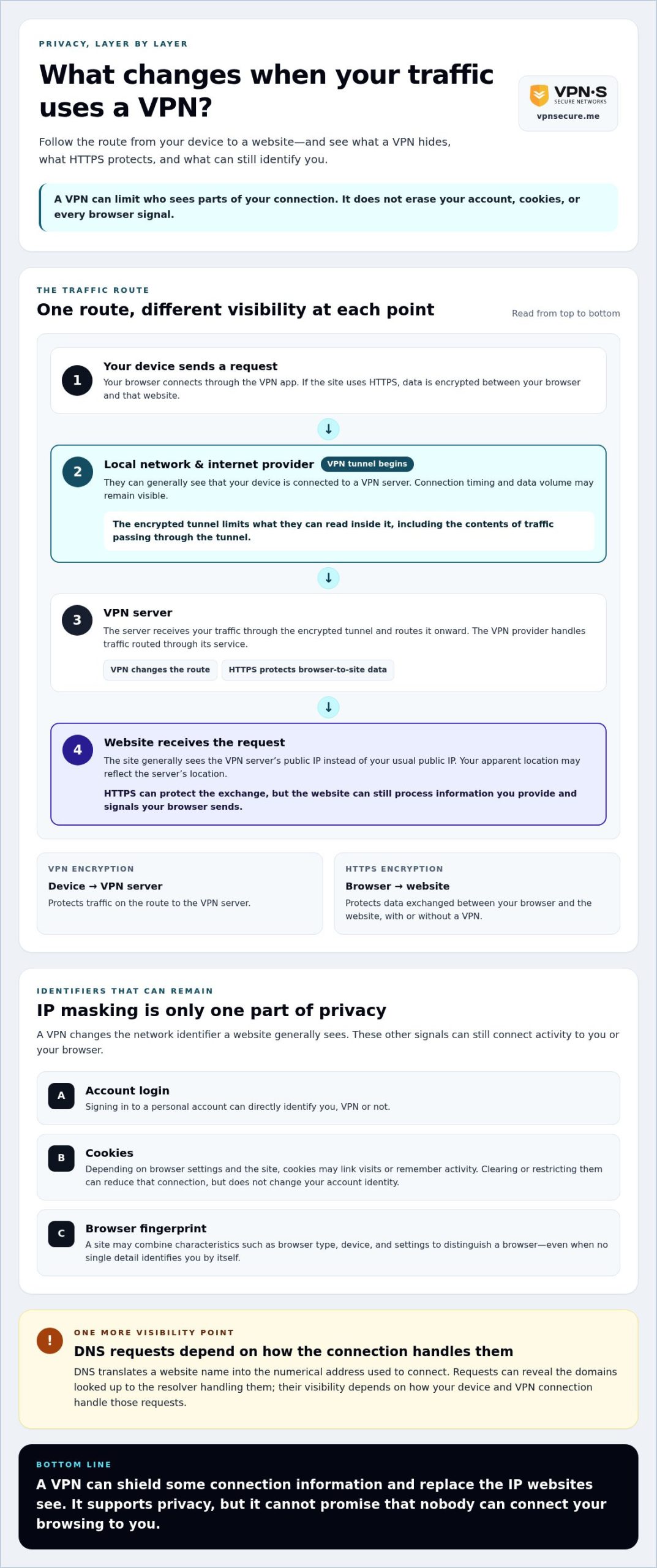
A VPN changes who can see parts of your connection. It creates an encrypted tunnel between your device and a VPN server, then routes your internet traffic through that server. The Virtual Private Network (VPN) overview explains the basic technologies behind this approach, including tunneling and encryption.
For someone using a vpn to browse anonymously, the key distinction is that reducing identifiable signals is not the same as becoming untraceable. A VPN can shield some information and replace the public IP address websites see with the VPN server’s IP. It doesn’t erase account details, cookies, or every other clue that can identify you.
Online privacy means limiting who can see your activity; guaranteed anonymity means nobody can connect it to you. A VPN can support the first, but it can’t promise the second.
What does a VPN hide from an internet provider?
While the VPN is connected, your internet provider generally can’t read the contents of traffic passing through the encrypted tunnel, such as the pages or messages you access. But encryption doesn’t make the connection itself disappear. Your provider may still see that you’re connected to a VPN server, along with connection details such as timing and data volume. A VPN doesn’t automatically delete records kept by websites, apps, or your device.
What does a website see when you use a VPN?
A website generally sees the VPN server’s public IP address instead of the public IP address assigned to your home connection. This masks one network identifier and may make your apparent location reflect the server’s location. It doesn’t remove other identifiers stored in your browser or attached to your account.
Sign in to a personal account and the site can recognize you through that login, VPN or not. Cookies can link visits, while browser fingerprint signals, such as combinations of browser and device settings, may help distinguish one visitor from another. IP masking is useful, but it’s only one part of the privacy picture.
- VPN server IP: The site generally sees this instead of your usual public IP.
- Account login: Signing in can directly identify you.
- Cookies and browser signals: These may help recognize or track your browser independently of its IP address.
Think of a VPN as changing the route and shielding traffic on the way to the VPN server, not wiping your digital identity clean. The VPN provider also handles your traffic, so privacy depends partly on the provider’s practices. Use a VPN as one layer, then consider the accounts, cookies, and browser signals you leave behind.
How VPN encryption, IP masking, and browser tracking work together
With a VPN, your device sends traffic through an encrypted tunnel to a VPN server, which then forwards requests to websites. The website replies through that route. The VPN server’s IP address is generally visible to the site, while your usual public IP is masked. Washington University in St. Louis explains the protective role of VPNs in privacy protection, but no single layer covers every way you may be recognized.
HTTPS adds another layer. It encrypts data between your browser and the website, whether or not you use a VPN. A VPN protects traffic on the device-to-server leg; HTTPS protects the browser-to-website exchange. With both, your local network and internet provider have less access to the contents of your connection. The website can still process information you provide and signals your browser sends.
How a VPN changes your IP address and network visibility
An IP address helps route data and can reveal information about a connection, including an approximate location. A VPN substitutes the server’s IP for your usual public IP as seen by websites. It doesn’t change your account identity or device characteristics.
DNS translates a domain name, such as a website address, into the numerical address computers use to connect. DNS requests can reveal which domains you look up to the resolver handling them. Their visibility depends on how your device and VPN connection handle those requests. On a café network, staff may still see that your device is connected and communicating with a VPN server, but encryption limits what they can read inside the tunnel. Websites and online services see requests arriving through the VPN, along with any information your browser or account shares.
Why cookies and browser fingerprints can still recognize you
Cookies are small pieces of data a site can store in your browser. Depending on your browser settings and the site, they may help link visits or remember activity. Clearing or restricting cookies can reduce that connection, but it won’t change your account identity.
Browser fingerprinting works differently. A site may combine characteristics such as your browser type, device, and settings to distinguish a browser. No single detail has to identify you on its own for the combination to be useful. If you sign in to a personal account, the site can associate your activity with that account regardless of your VPN’s IP address.
VPN encryption protects the connection, not the identifiers your browser, cookies, and account can reveal. If you want an encrypted route across your devices, explore VPN subscription options as one layer in a broader privacy routine.
VPN vs. incognito mode: which protects anonymous browsing better?
They solve different problems. A VPN changes how your internet traffic travels and can mask your usual public IP from websites. Incognito or private browsing mode mainly limits what your browser saves on your device after the session. Neither makes you invisible, but together they can address separate privacy concerns. Washington University in St. Louis explains how VPNs protect privacy by encrypting network traffic and masking an IP address.
| What you’re checking | VPN | Private browsing | Both together |
|---|---|---|---|
| Visible IP | Websites generally see the VPN server’s IP. | Websites generally see your usual public IP. | Websites generally see the VPN server’s IP. |
| Local browsing history | Doesn’t prevent the browser from saving history. | Usually doesn’t save session history after you close the private window. | Combines the VPN’s network protection with private-session controls. |
| Cookies | Doesn’t remove or block cookies by itself. | Cookies may work during the session and are generally cleared when it ends. | Session cookies may still identify or remember activity while the window is open. |
| Account sign-ins | A login can identify you. | A login can identify you. | A login can identify you. |
What incognito or private browsing mode actually does
Private mode is useful on a shared computer because it generally limits saved browsing history and session data in that browser. It doesn’t replace your public IP with another one, and it doesn’t stop websites, network operators, or services you sign into from seeing relevant activity. Browsers handle private sessions differently, so check your browser’s current documentation to see exactly what it saves or clears.
When to use a VPN, private browsing, or both
Choose a VPN when you want to reduce network-level visibility or keep websites from seeing your usual public IP. Choose private mode when you want to reduce traces left in a shared browser session. Use both if both concerns apply, such as browsing on a shared device over a network where you want to limit visibility into your activity. For a vpn to browse anonymously, remember that neither tool hides your identity if you sign in to a personal account.
Quick rule: a VPN changes the network route; private browsing changes what the browser keeps locally. Combine them for layered privacy, not a promise of total anonymity.
How to browse more privately with a VPN: a practical checklist
Privacy works best as a routine, not a single button. Before browsing, set up your VPN, confirm it’s connected, and close gaps a VPN can’t cover, such as a personal account login or a site’s location permission. Use this checklist to make a vpn to browse anonymously more private without treating it as a guarantee of anonymity.
Set up a VPN connection before browsing
- Choose a provider you can assess. Read its privacy policy and look for clear information about what connection data it handles and retains. A “no-log” label alone isn’t proof. Use this no-log VPN audit guide to understand what evidence can support such claims.
- Install and connect. Download the VPN app for your device, sign in, and follow the provider’s connection instructions. Connect before opening sites where you want to limit network-level visibility.
- Check the visible IP. Before connecting, note the public IP shown by an IP-checking site. Connect to the VPN and check again. The displayed address should change to the VPN server’s IP. This confirms that the apparent IP changed, not that you’re anonymous.
- Know what to do if the connection drops. Pause sensitive browsing, reconnect through the app, and check the visible IP again before continuing. Your traffic may take a different route while the VPN is disconnected.
Reduce the browser signals a VPN cannot hide
Next, review your browser’s privacy settings. Restrict cookies or clear them when appropriate, and deny location access to sites that don’t need it. A VPN can mask your usual public IP, but it doesn’t stop a site from receiving location permission, storing browser data, or identifying a download linked to your activity. Be cautious with files that contain personal details or reveal information when opened.
For stronger anonymity, don’t sign in to personal email, social media, or shopping accounts during that session. A login can connect browsing activity directly to your identity, regardless of the VPN connection. Private browser windows can help limit locally saved session data, but settings differ by browser.
Using a VPN on café or hotel Wi-Fi can add a layer of protection on a public network. See this secure VPN travel guide for more context. Build your routine around a provider whose privacy practices you understand, then explore VPN subscription options for an encrypted connection across your devices.
Choose a VPN for anonymous browsing without trusting impossible promises
A VPN shifts trust; it doesn’t eliminate it. Your internet provider may see less of the contents of traffic routed through an encrypted VPN connection, but the VPN provider handles that traffic instead. So choosing a vpn to browse anonymously means weighing what the service protects against what you need to trust it with.
Look beyond bold claims. A useful privacy policy should clearly explain what information the provider collects, what connection or activity data it retains, and how long it keeps that data. Check whether the policy is supported by independent evidence, such as an audit, rather than treating a “no logs” statement alone as proof. Also consider whether the service supports your devices and makes it practical to use consistently.
What to look for in a VPN privacy policy
- Logging transparency: Look for clear descriptions of retained connection details and browsing activity. Vague wording makes it harder to understand what the service can associate with your account.
- Independent verification: A provider’s policy describes its own practices. Independent evidence can offer another way to assess those claims. Don’t assume an audit exists unless the provider makes verifiable details available.
- Jurisdiction: Where a provider is based can shape the legal context around its operations, but location alone doesn’t guarantee privacy. Consider it alongside the policy, transparency, and available verification.
- Device support: Check that the VPN works on the devices you actually browse with, so privacy doesn’t depend on remembering to protect only one of them.
Where VPN Secure fits into a layered privacy routine
VPN Secure is a Bahamas-based provider whose encrypted VPN subscription service supports major devices. The company follows a no-log approach and operates outside the Five Eyes alliance. These are relevant details to weigh, not proof that a VPN makes browsing completely anonymous or a substitute for understanding a provider’s privacy practices.
Even with a VPN, websites may recognize your account, cookies, or browser signals. Choose a provider whose stated practices and available evidence you understand, then combine the connection with careful browser settings and account habits. If that balance fits your privacy needs, explore VPN Secure’s subscription service as one layer in your browsing routine.
Build a more private browsing routine
A VPN can mask your usual public IP and encrypt traffic to the VPN server, but it can’t erase cookies, browser fingerprints, or the identity attached to an account you sign into. Incognito mode handles a different task by limiting what your browser saves locally. Use each tool for the privacy gap it can actually address, and choose a provider whose policy and logging practices you understand.
If you’re considering a vpn to browse anonymously, remember that a VPN helps reduce exposure, not guarantee invisibility. VPN Secure, founded in 2012 and based in the Bahamas, provides an encrypted VPN service for major devices and follows a no-log approach. The service includes a 30-day money-back guarantee.
Make privacy a habit, not a promise you expect one tool to keep. Explore VPN Secure’s privacy protection and take a practical step toward more control over your browsing.
Frequently Asked Questions
Does a VPN make me completely anonymous online?
No. A VPN encrypts traffic between your device and its server and can mask your usual public IP from websites, but it doesn’t erase account logins, cookies, browser fingerprints, or information you share. Your browsing habits and browser settings also affect how activity may be connected to you. Treat a VPN as one layer of privacy, not invisibility, and consider the provider’s data practices before routing traffic through its service.
Can websites track me when I use a VPN?
Yes. A VPN changes the IP address a website generally sees, but it doesn’t automatically block other forms of tracking. A site may recognize you through a signed-in account, cookies, browser fingerprint signals, or details you submit in a form. Review browser privacy settings and think about which accounts you use during a session. A VPN can reduce exposure of your usual IP, but it can’t prevent every way a site may link visits.
Is a VPN better than incognito mode for anonymous browsing?
They do different jobs, so neither is a complete anonymity tool. A VPN encrypts the connection to its server and can mask your usual public IP from websites. Incognito or private browsing mainly limits some history and session data saved on your device. Use a VPN to address network-level exposure and private mode to reduce local browser traces. If you sign in to a personal account, the service can still identify you.
What does my internet provider see when I use a VPN?
With a VPN connected, your internet provider can generally see that your device is communicating with a VPN server, plus connection details such as timing and data volume. Encryption is intended to prevent the provider from reading the contents of traffic protected by the VPN. Don’t assume this means zero visibility: the exact details available can depend on your setup. The VPN provider, in turn, handles traffic routed through its service.
Can I browse anonymously if I sign in to my account?
Usually not from the service you sign into. A VPN may hide your usual public IP from that service, but your account identifies you directly, and activity may be associated with it under the service’s own policies. If anonymity is your goal, avoid signing in to personally identifying accounts during that session. Other browser or device signals may still help link activity, so logging out alone can’t guarantee that visits won’t be connected.
Does a VPN hide my browsing history from everyone?
No. A VPN can limit what your internet provider can read about protected traffic and change the IP address websites see, but it doesn’t automatically remove history saved in your browser. It also can’t prevent account-based tracking or guarantee that a VPN provider retains no data. Review your browser’s privacy settings and read the provider’s policy to understand what records may exist. Different observers can see different parts of your activity.
How can I check whether my VPN is hiding my IP address?
Connect to the VPN, then use a reputable IP-checking page and compare the displayed address with the one shown before you connected. After connection, the page should generally show the VPN server’s IP and may display its location. This check only tells you what IP is visible at that moment. It doesn’t prove that cookies, account activity, DNS requests, or other identifiers are hidden, so treat it as one useful check, not an anonymity test.