


A streaming library can change when your apparent location changes. Geo-blocking restricts access to online content based on geographical location, often because licensing agreements vary by region. A geo-unblocking VPN for entertainment routes your connection through a server in another region, so your public IP address appears to come from there.
Finding a show or service unavailable in your region can be frustrating. A VPN may help you access regional content, but the server you choose matters, and streaming platforms may restrict VPN connections. This guide explains how geo-blocking works, how a VPN changes your apparent region, how to choose a server, and what to consider when setting up a VPN on different devices. It also covers limits that may still apply, so you can make an informed choice.
Key Takeaways
- A mobile app may deny access if your device’s reported location conflicts with the location suggested by its network IP.
- Choose a server region that matches the content you want, and consider how the route may affect connection speed.
- If access fails, a different server in the same region may work; platforms can block VPN connections.
- Before setup, check operating-system compatibility and look for settings such as a kill switch and IP leak protection.
How VPNs enable access to Geo-Restricted content worldwide?
Geo-blocking uses your public IP address to limit what you can watch or access from your location. A VPN routes traffic through a server in another region, changing the apparent location associated with your IP address.
Region-Specific Entertainment Access
A VPN can make your connection appear to come from another region, which may open access to region-specific entertainment. For example, a traveler could select a server in their home region to try to reach a streaming library available there. This can matter when shows, sports broadcasts, apps, or games vary by country. A geo-unblocking VPN for entertainment changes your apparent network location, not the service’s licensing rules.
Location-Based Access Limits
Geo-blocking restricts entertainment, sports, apps, games, and websites based on a visitor’s apparent location. Netflix may offer different titles in different regions, while a sports stream may be limited to a particular market. Some websites also restrict access to news or journalism, and governments may block sites their citizens can view. These limits can affect what you can access while traveling, not just what appears in your home streaming catalogue.
Streaming Service VPN Policies
Streaming services may block VPN connections to enforce regional licensing obligations. Netflix, Hulu, and Disney+ can restrict access when they detect a VPN. Using a VPN to access region-locked content could breach a service’s terms and lead to account suspension or termination. VPN use itself is not illegal unless prohibited where you are, but accessing content that is illegal in your region could create legal trouble. Read the service’s terms before connecting.
Streaming Speed and Unblocking Choices
No single VPN can be named as the best or fastest for every streaming service in 2026. Choose one with servers in the region you need, then consider the route between your location and that server; longer routes can affect speed. HD and 4K playback depend on connection speed, so test playback after connecting. If a platform blocks the VPN, switch to another server in the same region. If access still fails, clear browser cookies and cache, which may retain location data.
Definition of geo-blocking
Geo-blocking restricts online access based on a user’s geographical location. A website or app can estimate where your connection comes from using your public IP address. That address is associated with your internet connection, not your phone or computer. Your network may also assign different IP addresses at home and work, so the same Android device can appear to connect from different places.
Services use location checks to apply regional access rules. A streaming catalogue, news site, game, or app may show different content or deny access depending on your apparent region. A VPN routes traffic through a server elsewhere, changing the location associated with your IP address. This may bypass some location-based blocks, but it does not change the service’s rules or make restricted content lawful to access.
In the European Union, the 2018 Geo-Blocking Regulation prohibits unjustified discrimination based on nationality or residence when customers buy general goods and services online. Copyright-protected content, including streaming video and e-books, is largely exempt from that regulation. The distinction matters: a rule about purchasing general goods doesn’t automatically remove regional limits on films or shows. Licensing agreements can still shape which titles a streaming service makes available in each region.
Geo-blocking also affects services beyond entertainment. Some countries block VoIP and other internet communication methods, preventing calling apps from connecting normally. Governments may block websites to stop citizens from viewing disapproved content, including news and journalism. The reason for a block affects what a VPN can do: a location-based restriction may respond to a different IP address, while a website or communication service may apply additional access controls. First identify whether the restriction affects one service or an entire network.
Choosing a VPN server in another region
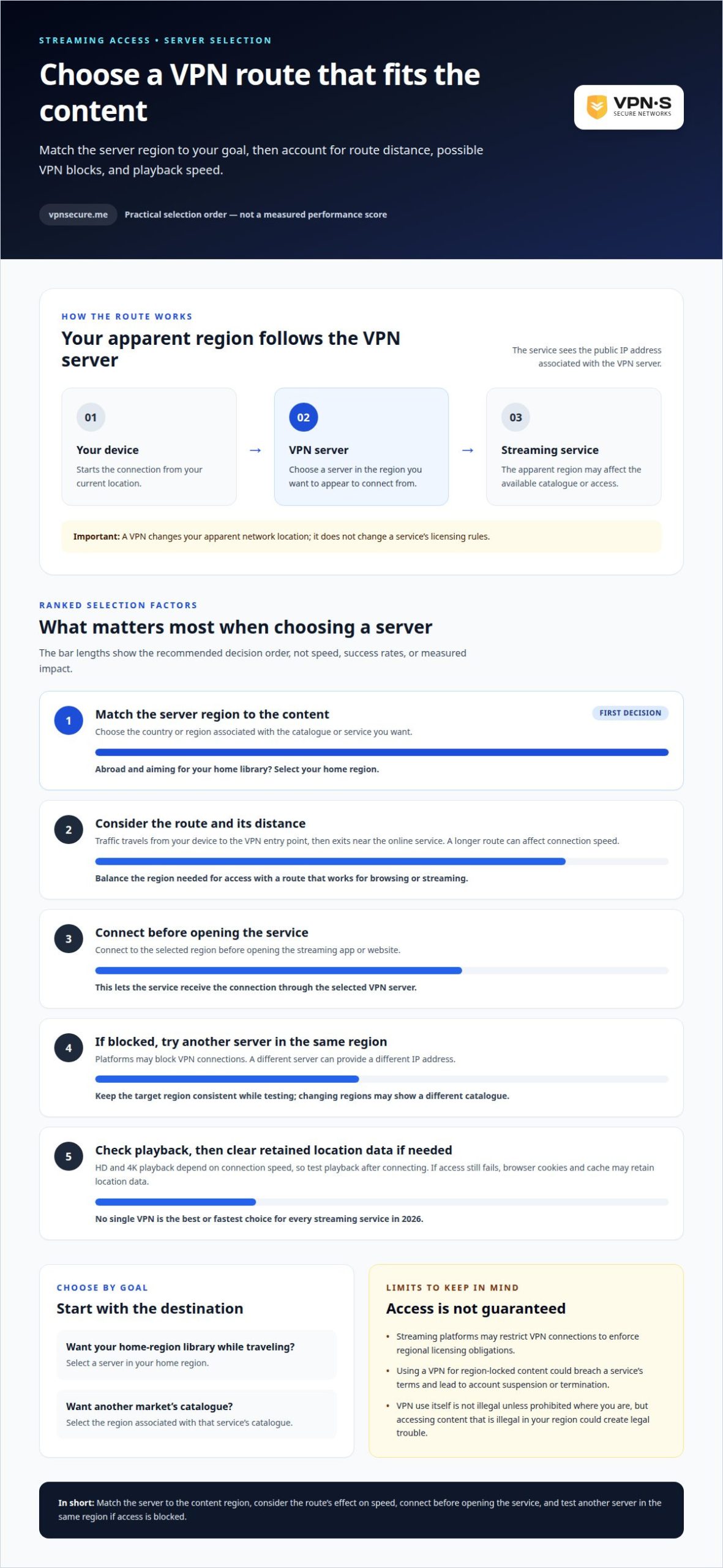
Choose a server in the region whose online content you want to access. Your connection will then appear to come from that server’s geographic location.
Start with the service or catalogue you want to use, then select a matching region in the VPN dashboard. If a streaming catalogue is available only in a particular country, for example, choose a server there. The VPN routes your traffic through that server, so your public IP address reflects its location. A server in another region may show a different catalogue, but it does not change the platform’s licensing terms.
Distance matters. Your traffic travels from your device to the VPN’s entry point, then exits near the online service. A nearby entry point can shorten the first leg, while an exit point near the service can shorten the second. Routing traffic through a VPN can affect connection speed, so the most suitable geographic route may not be the fastest for browsing or streaming.
Let your goal guide your choice. If you are abroad and want to access a home-region library, select your home region. To view another market’s content, choose the region associated with that service’s catalogue. Avoid choosing a location at random: the exit IP needs to match the access requirement.
- Select the region associated with the content or service.
- Connect before opening the streaming app or website.
- If access is blocked, try another server in the same region.
A different server can provide a different IP address, which may help if the first one is blocked. Keep the target region consistent while testing, because switching regions changes your apparent location and may lead to a different catalogue. Choose a route that balances access and connection speed for what you want to watch.
Setting up a VPN on different devices
Setup depends on your device and operating system. Check support for Windows, macOS, iOS, Android, or Linux before connecting. VPNs can also run on computers, smartphones, TVs, and IoT devices, but setup varies by platform.
On a computer or phone, install the VPN software, sign in, and select a server region. Connect before opening Netflix or another streaming app to route the device’s internet traffic through the VPN from the start. If you switch networks, such as moving from home Wi-Fi to mobile data, reconnect and confirm the VPN is active.
For a TV, use a VPN option supported by that device. If its operating system does not support the VPN directly, using another supported device may be a better option for viewing. Do not assume every TV or IoT device has the same setup screens: menus vary by model and operating system.
- Choose the device you’ll use for streaming.
- Install the VPN software that supports its operating system.
- Connect to the region you need before launching the app.
- Enable auto-connect on startup, a kill switch, and IP leak protection if available.
A kill switch can stop internet traffic if the VPN connection drops. IP leak protection helps limit exposure of your actual address. These settings may matter if an interruption could reveal your regular network location while an app is open. Test your connection before settling in to watch.
Choose a VPN subscription for your devices when you want encrypted traffic across supported devices and a server region you can select.
VPNSecure
VPNSecure routes encrypted internet traffic through servers in other regions, supporting private browsing and access to region-specific entertainment. For streaming across your devices, choose the Monthly VPN Subscription or Annual VPN Subscription that suits your needs. Both provide access to VPNSecure’s private, no-log VPN service. Zero logging: IP address, connection timestamps, bandwidth usage and DNS requests are NOT logged.
If you need a consistent IP address, a Dedicated IP is another option. Streaming platforms may still restrict VPN access, and a VPN does not change their terms or regional licensing rules. Choose a server location that matches the content you want to access, then connect before opening the app. To choose a VPNSecure subscription or Dedicated IP, visit VPNSecure.
Make your next connection intentional
Regional access depends on how and where you connect, not on changing a streaming service’s rules. Before watching, decide which region you need and which device you will use. Then connect with privacy and platform terms in mind. This keeps your entertainment plans deliberate, whether you are at home or traveling.
A geo-unblocking VPN for entertainment can support more flexible access, while an encrypted connection helps protect internet traffic. For a VPN setup that fits your devices and viewing needs, contact VPNSecure for help. Choose your next step with confidence and take control of how you connect.
Frequently Asked Questions
What is geo-blocking?
Geo-blocking is a location-based restriction that controls which online content or services you can access. A news website, game, or streaming app may show different pages depending on your apparent region. For example, a publisher might make an article available in one country but restrict it elsewhere. The restriction can apply to an entire site, a specific feature, or selected content.
How to Unblock Geo-restricted Sites with VPN?
Connect to a VPN server in a region where the site is available, then reopen the site or app. If a mobile app still denies access, its location permission may contribute to a mismatch between your device location and network IP location. Review the app’s location settings and reconnect. For browser access, clearing stored cookies may remove old location signals that conflict with the new connection.
What is Geoblocking and Why is It Necessary?
Geo-blocking limits online access according to location. Content providers may use it to follow licensing agreements, copyright restrictions, or regional marketing plans. For example, a distributor may have rights to show a film in one market but not another. Websites may also apply geographic limits to services affected by local rules. These restrictions help providers enforce regional boundaries online.
Will I get in trouble for accessing geo-blocked content?
Using a VPN to access geo-blocked content is not illegal unless VPN use is illegal in your country, but consequences can still apply. A streaming service’s terms may prohibit VPN access and allow account suspension or termination. Accessing content that is illegal in your region could also lead to legal trouble. Read the service’s terms and understand local restrictions before connecting.
What is a geo-unblocking VPN and how does it work for streaming?
A geo-unblocking VPN routes your internet connection through a server in another region, so websites see the server’s IP location. This may help you access a streaming catalogue associated with that region. The VPN encrypts traffic between your device and the internet, but it does not change licensing rights or override a platform’s access rules. A streaming service may still identify and block VPN connections.
Which streaming services can VPNs access in the United States and abroad?
VPN connections may work with services such as Netflix, Hulu, and Disney+, but access depends on the platform, server, and region. A service may offer different titles in the United States and abroad, or block VPN connections to enforce licensing terms. Availability can also change when platforms update their detection systems. Check the relevant service’s terms before using a VPN for regional content.