



The best way to access blocked content globally depends on why it’s blocked. A VPN can help with geographic restrictions, while Tor or a proxy may suit other access barriers; archived pages can help when a page is no longer available. If you see HTTP 451, the status means “Unavailable For Legal Reasons,” and it was standardized in 2016.
A block may come from a government, internet provider, school or workplace network, or a website restricting access by location. The right approach depends on the cause, and bypassing a restriction can have legal or policy consequences. This guide explains how to identify the type of block and when a VPN, Tor, proxy, or archived page may help. It offers a practical way forward without treating every blocked page as the same problem.
Key Takeaways
- Trace whether a block comes from a government, ISP, network administrator, or the website itself before choosing a workaround.
- Match the tool to the obstacle: VPNs, Tor, proxies, and archived pages solve different access problems and offer different trade-offs.
- Consider local laws and network rules before trying to bypass a restriction, especially on school or workplace connections.
- Tell geographic limits from broader censorship by looking at how access changes across locations and services.
Government and ISP website blocking in different countries
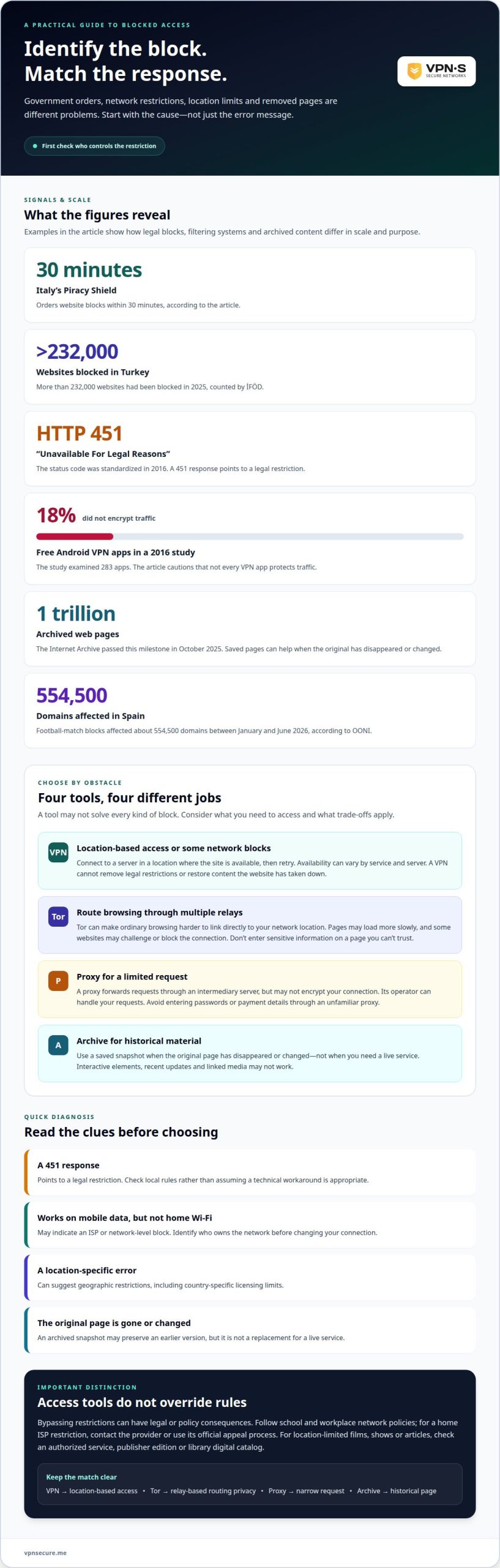
Start by identifying who controls the block; government orders, ISP restrictions, and geographic limits call for different responses. Italy’s Piracy Shield orders website blocks within 30 minutes, while Turkey had more than 232,000 websites blocked in 2025, counted by İFÖD.
- Inspect the message and compare access across networks. HTTP status 451 means “Unavailable For Legal Reasons,” and it was standardized in 2016. A 451 response points to a legal restriction; a site that loads on mobile data but not your home Wi-Fi may indicate an ISP or network-level block. A location-specific error can suggest geographic restrictions.
-
Set Up a VPN for Website Access
Install a VPN app from its official source, sign in, and connect to a server in a location where the site is available. Reopen the site in a fresh browser tab. If it still fails, disconnect and reconnect, try another suitable server, and make sure the VPN connection is active before browsing.
-
Unblock Websites with a VPN
Connect to a VPN server in the location the website expects, then try the page again. For streaming, check whether the service loads and plays content while connected. Availability can vary by service and server. If you see a location error, try another server in the same country rather than assuming every VPN connection will work.
- Match your response to the cause of the block. Governments may order restrictions, internet providers may implement them, and websites may limit access by country. A VPN can help with some network or location-based blocks, but it cannot remove legal restrictions or restore content the website has taken down.
What’s the best way to unblock websites?
Choose a lawful option that fits the restriction, because bypassing every block isn’t safe or appropriate. First identify whether the limit comes from a law, network administrator, provider, or content license.
- Use an authorized source for location-limited films, shows, or articles. Check the publisher’s edition, a licensed service available where you are, or a library’s digital catalog. These options provide legitimate access without disguising your location or violating a network rule.
-
Review the Legality of Unblocking Websites
Check the rules where you are before bypassing a government restriction. The legality of bypassing website blocks can vary by location, so check local rules before doing so. Rules for bypassing restrictions on school computers can vary, so check the applicable policies before trying to get around them. A programmer in China was ordered to pay 1 million yuan for using a virtual private network, so don’t treat access tools as a way around local law.
-
Access Network- or Provider-Blocked Websites Safely
Identify the network owner before changing your connection. On a school or workplace network, follow its access policy instead of evading an administrator’s block. For a home ISP restriction, contact the provider or use its official appeal process. If access is allowed and the restriction is technical, an encrypted VPN connection can protect traffic on public Wi-Fi, but it doesn’t override laws or network rules.
- Distinguish licensing limits from censorship and technical failures. A streaming catalog may vary by country because distribution rights differ, while a network administrator may block categories under an institutional policy. Use an authorized catalog or publisher edition for licensed content, and don’t assume a VPN makes a prohibited stream or site lawful.
Using VPNs, Tor, proxies, and archived pages
Choose a tool based on the obstacle and the content you need. A VPN changes your apparent network location, Tor routes browsing through multiple relays, proxies forward requests, and archives display saved copies.
- Use a VPN when a website limits access by location or a network blocks its connection. Connect through a server in a location where the site is available, then retry the page. Don’t assume every VPN app protects traffic: a 2016 study of 283 free Android VPN apps found 18% did not encrypt traffic.
- Use Tor when you want to make ordinary browsing harder to link directly to your network location. Tor routes traffic through relays, which can slow page loading and lead some websites to challenge or block the connection. Don’t enter sensitive information on a page you can’t trust.
- Try a proxy for a limited task, such as loading a public page through an intermediary server. A proxy may not encrypt your connection, and its operator can handle your requests. Avoid entering passwords or payment details through an unfamiliar proxy, especially on a login page.
- Use an archived page when the original has disappeared or changed, rather than when you need a live service. The Internet Archive passed one trillion archived web pages in October 2025. Search for a saved snapshot, then remember that interactive elements, recent updates, and linked media may not work.
- Match the method to the content: use a VPN for location-based access, Tor for routing privacy, a proxy for a narrow request, or an archive for historical material. If a method fails, check whether the page requires a live login, a current location, or a working network connection before switching tools.
Geographic restrictions and country-specific access
Location can affect access even when a website still works elsewhere. Compare what changes across countries, then distinguish licensing limits from broader network disruptions before choosing a method.
- Compare the same service from different locations to spot a geographic restriction. Spain’s football-match blocks affected about 554,500 domains between January and June 2026, according to OONI. That scale shows why a single failed page may reflect a wider blocking system, not a problem with your device.
- Look for timing and scope when access suddenly changes. Social media in Turkey was throttled for 42 hours after Istanbul’s mayor was detained in March 2025. A temporary slowdown across platforms differs from one streaming service denying a catalog, so note which sites fail and whether the change is brief or persistent.
- Check whether the restriction targets a service, a domain, or an entire category. In September 2025, Nepal blocked 26 social media platforms, then lifted the ban days later. A countrywide change across named platforms points to a different cause than a single publisher limiting access to one article.
- Account for overblocking, where a restriction reaches services beyond its apparent target. Cloudflare says an Italian blocking order blocked Google Drive for more than 12 hours. Spain’s football-match blocking was based on a Barcelona court ruling in December 2024, illustrating how a legal order can affect access beyond one intended site.
- Choose a response that fits the restriction. For a location-based content limit, a VPN can route your connection through another country; for a temporary outage or broad block, changing location may not restore access. Russia blocked WhatsApp in February 2026, a reminder that country-specific access can shift quickly. Explore VPN access for geographic restrictions when a location change is the obstacle.
VPNSecure
VPNSecure encrypts internet traffic across major devices and can help with geographic restrictions, streaming platforms, and VOIP apps. It may suit you when the obstacle is location-based and VPN use is permitted where you are. It won’t override local laws or a service’s access rules.
Choose a Monthly VPN Subscription or Annual VPN Subscription to suit how you plan to use the connection. On public Wi-Fi, encryption adds a layer of privacy; for location-based access, connect through an available server in the relevant country. To discuss your access needs, contact VPNSecure.
Make your next connection a deliberate one
Choose your next step according to why access is blocked. Before changing your connection, decide whether you need a licensed source, a saved copy, or a different network route. This distinction can save time and prevent you from treating a legal or institutional restriction as a simple location error.
VPNSecure offers a Dedicated IP alongside its subscription plans. No tool makes every page available, and a VPN doesn’t replace permission to access content. Use a VPN where it fits, while following local rules and service terms.
Ready to discuss your needs? Contact VPNSecure for advice about the right way to access blocked content globally. Take the next step with a clear goal and make your connection work for you.
Frequently Asked Questions
How about unblocking sites at work?
Don’t evade your employer’s network controls. Ask the administrator or manager to approve access for a work task, and provide the exact site and what you need from it, such as a research report or customer portal. For personal browsing, use your own device and connection outside work, while following workplace policies on device use and confidential information.
How do I unblock a site?
Try opening the site on another trusted network, such as your mobile connection, to see whether the restriction is local. If it still fails, note the error message and check whether the site has moved, gone offline, or requires sign-in. Choose a lawful method suited to the cause, and avoid unfamiliar tools that ask for passwords or payment details.
Why Are Websites Banned?
Authorities may order websites blocked to enforce laws or restrict material they consider prohibited. A court order may also target sites linked to copyright infringement, as with Italy’s Piracy Shield system. Separately, a school or library may filter material under its applicable rules. The reason matters: an authority-imposed ban is different from a broken page or subscription limit.
Why do websites get blocked?
Websites can become inaccessible for reasons other than a government ban. An internet provider may apply a blocking order, a school may filter categories, or a website may restrict access by location or account status. Technical faults can look similar. If a page works on mobile data but not home Wi-Fi, for example, the problem may be with the network rather than the website.
What does “access blocked content globally” mean?
It means finding a suitable way to view online material that isn’t available through your current connection or location. The phrase covers different situations, from a page blocked by a network to a streaming catalog limited by country. It doesn’t mean every restriction can or should be bypassed. First identify who controls access, then choose an allowed route to the content.
Why is online content blocked in different countries?
Access differs between countries because governments, courts, providers, and content owners can impose different restrictions. A streaming service may offer distinct catalogs because distribution rights vary by territory; authorities may order blocks for other reasons. The same website can therefore load in one country and fail in another. Check whether the issue affects one service or a wider set of websites.