




A blocked website isn’t automatically a legal green light. Using a VPN to access blocked websites is legal in most countries, while some governments restrict or ban VPN use. Local rules still matter, and a VPN won’t make unlawful activity lawful. It encrypts traffic between your device and the VPN server and gives you a different IP address, changing what a website sees about your connection.
It’s frustrating when a site you need is blocked by a school, workplace, internet provider, or government. The reason for the restriction matters, as does how you respond to it. A VPN can help in some cases, but the VPN connection itself can also be blocked.
This guide explains why websites are restricted, what to consider before bypassing a block, and how VPN encryption and privacy features work. You’ll find practical steps for connecting more safely, ways to troubleshoot when a VPN won’t reach a site, and legal considerations, including those involving copyrighted content and access controls.
Key Takeaways
- Identify whether a block comes from a website, network, internet provider, or government before choosing how to respond.
- Review local laws and network rules before bypassing a restriction, especially when copyrighted content or access controls are involved.
- Choose VPN settings with your priorities in mind, including server location, connection speed, and privacy protections.
- Use safeguards such as DNS leak protection and a kill switch, then test that your real IP address is hidden.
- If you need an encrypted connection for regular browsing, compare VPN Secure’s Monthly VPN Subscription and Annual VPN Subscription to find an option that fits your needs.
Is unblocking websites legal?
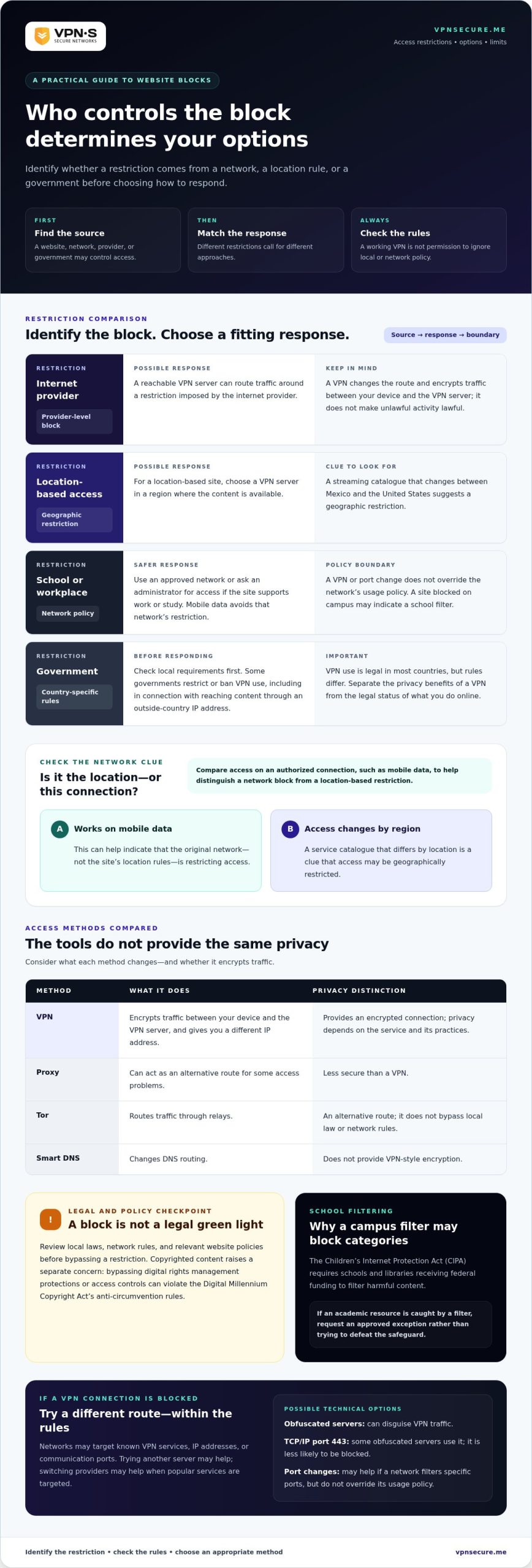
VPN use is legal in most countries, but some governments restrict or ban it. A VPN, proxy, Tor, and Smart DNS work differently: a VPN encrypts your traffic, a proxy is less secure, Tor routes traffic through relays, and Smart DNS changes DNS routing without VPN-style encryption.
- Check the rules that apply where you are. Before trying to access a blocked site, distinguish VPN use from the activity you plan to do online. Some governments restrict VPNs, and a workplace or school may prohibit bypassing its network filters. Copyrighted content raises a separate concern: bypassing digital rights management protections or access controls can violate the Digital Millennium Copyright Act’s anti-circumvention rules. Read the relevant policy and local requirements before connecting.
- Choose a VPN for your purpose and device. For privacy on café Wi-Fi, look for encrypted traffic and clear privacy practices. For a location-based site, choose a server in a location where the content is available. Confirm that the VPN app supports your device’s operating system before subscribing. Streaming, browsing, and protecting a work connection may call for different server locations and settings.
- Pick a nearby server, then test speed. Encryption can add overhead and slow a connection, while a VPN may also bypass ISP throttling. Start with a server closer to your physical location to reduce distance-related delays. If a site needs another location, connect to a suitable server there and compare loading time. A distant server may add latency, especially for video calls or live streams.
- Switch servers when a VPN connection is blocked. Networks can block VPN tunnels by targeting known VPN services, IP addresses, or communication ports. Try another server first; switching providers may help when a network targets popular VPN services. Obfuscated servers can disguise VPN traffic. Some route traffic through TCP/IP port 443, which is less likely to be blocked. This can help evade detection, but it doesn’t change local law or network rules.
- Compare privacy and subscription terms before choosing. Look for a clear no-logging policy and an explanation of how traffic and account data are handled. Check whether the service supports your device and offers server locations suited to your needs. Compare subscription periods and renewal terms, not just the price. If a dedicated IP is relevant, it may be less likely to be blocked because it isn’t shared with other customers.
Government, workplace, and school website restrictions
Start by identifying who controls the block: a government, employer, school, internet provider, or content platform. Alternatives to a VPN include proxy services, Tor, and Smart DNS, but they differ in privacy. A proxy is less secure than a VPN, and Smart DNS doesn’t provide VPN-style encryption.
-
Identify the Type of Website Restriction
Check whether the restriction follows your location or applies only on a particular network. A streaming catalogue that changes between Mexico and the United States suggests a geographic restriction, while a site blocked on campus suggests a school filter. Try the site on an authorized connection, such as mobile data, to help distinguish a network block from a location-based restriction.
-
Review Rules for Bypassing Restrictions
Read the network policy and local rules before attempting to bypass a restriction. Governments may block websites to control access to information, and some also restrict VPNs used to reach content through an outside-country IP address. Schools and workplaces can set their own access rules. Don’t treat a working VPN connection as permission to disregard them.
- Match your response to the block. If an internet provider blocks a site, a reachable VPN server can route traffic around that provider-level restriction. If the website restricts access by geography, choose a server in a region where the content is available. If a workplace or school network blocks VPN traffic, changing the VPN port may help when the network filters specific ports, but it doesn’t override the network’s usage policy.
- Use safer alternatives where they fit. For a school or workplace site block, use an approved network or ask an administrator for access when the site supports your work or study. On a network that blocks VPN traffic, switching to mobile data avoids that network’s restriction. A proxy or Smart DNS can help with some access problems, but neither provides the same encrypted connection as a VPN. Tor is another route, not a way to bypass local law or network rules.
- Account for school filtering. The Children’s Internet Protection Act (CIPA) requires schools and libraries receiving federal funding to filter harmful content. That helps explain why a campus network may block categories of sites rather than one specific address. If an academic resource is caught by a filter, request an approved exception instead of trying to defeat the safeguard. For personal browsing outside restricted networks, an encrypted VPN connection can protect traffic on networks that permit VPN use.
Legal considerations for unblocking websites
Separate the privacy benefits of a VPN from the legal status of the activity. The rules depend on the country, network, and content you access.
- Identify which rule applies before connecting. Separate government restrictions from workplace or school policies and website terms. A VPN can encrypt traffic and give you a different IP address, but that doesn’t determine whether accessing a particular site is lawful. Check the rules where you are and the restrictions tied to the network. A government block, an employer’s filter, and a streaming platform’s regional limit raise different questions.
- Consider the activity, not just the connection. A VPN is a privacy tool, not permission to break the law. Using an IP address from another country doesn’t make every online action legal in your own country. Before proceeding, consider what you intend to view, download, share, or bypass. If the restriction concerns copyrighted material or a technical access control, treat that as a separate legal concern.
- Avoid bypassing copyright protections or access controls. Bypassing digital rights management protections or access controls on copyrighted material can violate the Digital Millennium Copyright Act’s anti-circumvention rules. For example, using a VPN to change your apparent location differs from defeating a technical measure that controls access to copyrighted content. Encryption doesn’t change the legal nature of that action. Keep the distinction clear before attempting access.
- Account for restrictive government environments. The legality of VPN use varies by country. VPN use is legal in most countries, while some governments restrict or ban it. In extremely restrictive regimes, reaching certain websites may cause serious trouble with authorities. A VPN’s obfuscation can hide that you’re using a VPN, but it doesn’t remove legal exposure or make a prohibited activity lawful. Consider local rules before connecting.
- Protect your identity without mistaking privacy for immunity. A VPN replaces the IP address a website sees with the VPN server’s address and encrypts traffic between your device and that server. It doesn’t erase information you choose to provide, such as signing in to an account under your name. Avoid entering personal details on unfamiliar sites, and don’t use a secure connection to evade a workplace or school policy. Check the applicable rules before acting.
VPN encryption and privacy features
Some free VPNs log user data and sell it to third parties. Review a service’s privacy policy and logging practices before trusting it with your internet traffic.
- Understand what encryption protects. A VPN encrypts data traveling between your device and the VPN server, then gives websites a different IP address. This can help shield traffic on public Wi-Fi, such as a café network, from people monitoring that connection. It doesn’t make every online action anonymous: websites can still identify you through account logins, cookies, or details you submit.
- Choose a protocol with security in mind. Protocols control how your device creates and maintains a VPN connection. L2TP lacks adequate security on its own and is sometimes paired with IPsec, which encrypts internet data packets. IKEv2 is designed to work with IPsec and creates encryption keys for VPN connections. Look at the protocol options in your VPN app and select one that supports your device.
- Enable a kill switch before browsing. A VPN kill switch can cut internet access if the VPN connection drops, helping prevent traffic from leaving through your regular connection. Turn it on in the app settings before opening sensitive pages or downloading files. For example, if Wi-Fi briefly disconnects on a train, the kill switch can prevent your device from going online outside the VPN tunnel.
- Check for DNS leaks and verify your IP. DNS requests can reveal which domains your device is trying to reach. Enable DNS leak protection in the VPN settings, then use an IP checker while connected. Compare the displayed address with your usual IP address. If the checker still shows your regular address, disconnect and reconnect before entering passwords or downloading private documents.
- Evaluate privacy promises, not just encryption claims. Encryption protects traffic in transit, but it doesn’t determine what a VPN provider records. Read the privacy policy for clear information about logging, data retention, and sharing. A no-log claim should explain what activity data the service doesn’t retain. If the policy leaves you unsure about how browsing data is handled, choose a provider with transparent privacy practices.
Using a VPN to access blocked websites
A VPN works when the block targets your original connection and its server remains reachable. Follow these steps to identify the restriction, choose a route, and troubleshoot the connection.
- Identify what’s blocking the site. Try the website on another permitted network, such as mobile data. If it opens there but not on your usual Wi-Fi, the network may be filtering access. If the site changes by location, it may be applying a geographic restriction. A VPN can bypass some provider-level or location-based blocks when its server isn’t blocked.
- Choose a server that matches your goal. For location-based content, select a server in a region where the site is available. For general browsing, start with a server closer to your physical location. A shorter route can limit connection delays, though encryption may still affect speed. Connect, reload the site, and note whether the page or error message changes.
- Change servers if access still fails. Some websites block IP addresses linked to VPN services. Disconnect and select another server, then try the site again. If the network targets VPN traffic itself, switching to another VPN service may help. A dedicated VPN IP may be less likely to be blocked because it isn’t shared among multiple users.
- Troubleshoot the connection before changing settings. Check that your internet works without the VPN, update the VPN software, and test another server. If the VPN connects but the site remains blocked, review firewall settings and the VPN port. A firewall may block ports used by VPNs, and changing the port may help traffic pass through. Avoid typing a site’s IP address instead of its URL, as this may fail and create security risks.
- Use alternatives only for the right kind of block. A URL shortener may help when a network blocks a domain, but it doesn’t encrypt your traffic. Mobile data avoids the network blocking the VPN, though it won’t change a website’s location rules. If your goal is encrypted browsing on networks that permit VPN traffic, explore a private VPN connection suited to your needs.
VPN Secure: Monthly VPN Subscription
VPN Secure’s Monthly VPN Subscription provides an encrypted connection for browsing on major devices. It can help protect your internet traffic on public Wi-Fi and access geographically restricted sites when a VPN server is available to you. A VPN changes the IP address websites see, but it doesn’t override local laws or network policies.
Choose a monthly subscription for a shorter commitment, or consider the Annual VPN Subscription for longer-term use. A Dedicated IP may suit you if shared VPN addresses are being blocked. Match the option to your browsing needs, then connect before opening the site.
Visit vpnsecure.me to explore VPN Secure’s subscription options.
Make your next connection a deliberate one
Before connecting, decide what matters most: reaching a particular site, protecting everyday browsing, or keeping a consistent IP address. That choice helps you select the right setup instead of changing servers blindly. A VPN can help you access blocked websites while encrypting traffic, but use it in line with the rules that apply to your location and network.
VPN Secure offers Monthly and Annual VPN Subscriptions for different subscription periods. If a shared VPN address is causing access problems, a Dedicated IP may better fit your needs. Choose based on how you browse and the kind of connection you need, not on the assumption that a VPN removes every restriction.
For help choosing a suitable option, contact VPN Secure. Take the next step with a clear goal, protect your connection, and browse with greater confidence.
Frequently Asked Questions
How can I unblock sites on Google Chrome?
First, determine whether Chrome, an extension, or the network is blocking the site. Try opening it in another browser on the same device; if it also fails, the restriction likely sits outside Chrome. If your network permits VPN use, connect through a VPN app, then reload the page. Turn off conflicting proxy extensions, and use your organization’s approved access process for school or work filters.
What is a VPN?
A VPN, or virtual private network, creates an encrypted connection between your device and a VPN server. Picture a protected passage through a public network: traffic travels through it before reaching the wider internet. Websites see the server’s IP address instead of your usual one. A VPN protects data in transit, but it doesn’t make you anonymous if you sign in to an account or share identifying details.
How does a VPN help access websites blocked by a network or region?
A VPN routes your traffic through a server, so a website sees the server’s IP address and apparent location. That can help when a network blocks your usual connection or a site limits content by region. The route only helps if the VPN server can communicate with the site. Account settings, browser cookies, or location permissions may still affect what content appears.
How to use a VPN to access a blocked website on Windows, Mac, iPhone, or Android?
Install a VPN app that supports your operating system, sign in, and connect to a suitable server. On Windows or Mac, connect before opening Chrome or another browser. On iPhone or Android, approve the system’s VPN connection prompt, then revisit the site. If the page still fails, try another server and check that the VPN remains connected while it loads.
Which VPNs reliably unblock websites and streaming services in 2026?
No VPN can promise access to every website or streaming service. Sites can block VPN server addresses, and availability can change by location or platform. Compare providers by their privacy policies, device support, server choices, and obfuscation features if a network detects VPN traffic. A dedicated IP may help when a shared address is blocked, but it doesn’t guarantee access to a particular service.
Is using a VPN to access blocked websites legal in the United States?
VPN use and the activity performed through it are separate legal questions. The key issue is whether you’re protecting a connection or bypassing a restriction with legal consequences. For example, bypassing digital rights management or access controls on copyrighted material can violate the DMCA’s anti-circumvention rules. Network policies also matter, so distinguish a personal connection from a school or workplace network.
Can a school, employer, ISP, or government detect VPN use?
Yes, a network can sometimes identify VPN traffic, including through deep packet inspection or by recognizing VPN server IP addresses. Detection doesn’t necessarily reveal the contents of encrypted traffic, but the network may still block the connection. Obfuscated VPN servers can disguise VPN use, though results depend on the network’s filtering methods. A school or employer may also enforce its own access policies.
Why might a website still block access when using a VPN?
A website may block the VPN server’s IP address, reject traffic from its apparent region, or apply restrictions to your account. Try a different server in an appropriate location, then reload the site without changing several settings at once. If access is still denied, check whether your account region or browser cookies affect the result. A VPN changes the network route, not the website’s access rules.