




A VPN is only as trustworthy as its privacy practices and security settings. A private VPN service provider should explain what data it keeps and protect traffic with strong encryption: minimum criteria specify RSA-2048 or better for the handshake and AES-256-GCM or AES-256-CBC for data encryption. A VPN can add privacy, but it isn’t a reason to ignore what happens to your data.
Look beyond bold claims. A no-logs promise matters because a VPN provider handles your internet traffic, so pay attention to exactly what the promise means.
This guide compares VPN providers on privacy, server locations, device connections, free plans, and refund terms. Learn what each factor tells you, how to weigh the trade-offs, and which questions can help you choose a service for browsing, streaming, and connecting on public Wi-Fi.
Key Takeaways
- Compare server coverage by the locations you need, and learn why a virtual server’s location can differ from its physical hardware.
- Match a provider’s simultaneous connection limit to the devices and people sharing your account.
- Weigh the trade-offs of free plans against paid subscriptions, including the terms and coverage of any refund policy.
- Look beyond privacy promises: assess logging practices, encryption standards, and how clearly a provider explains its security choices.
Server locations and virtual servers
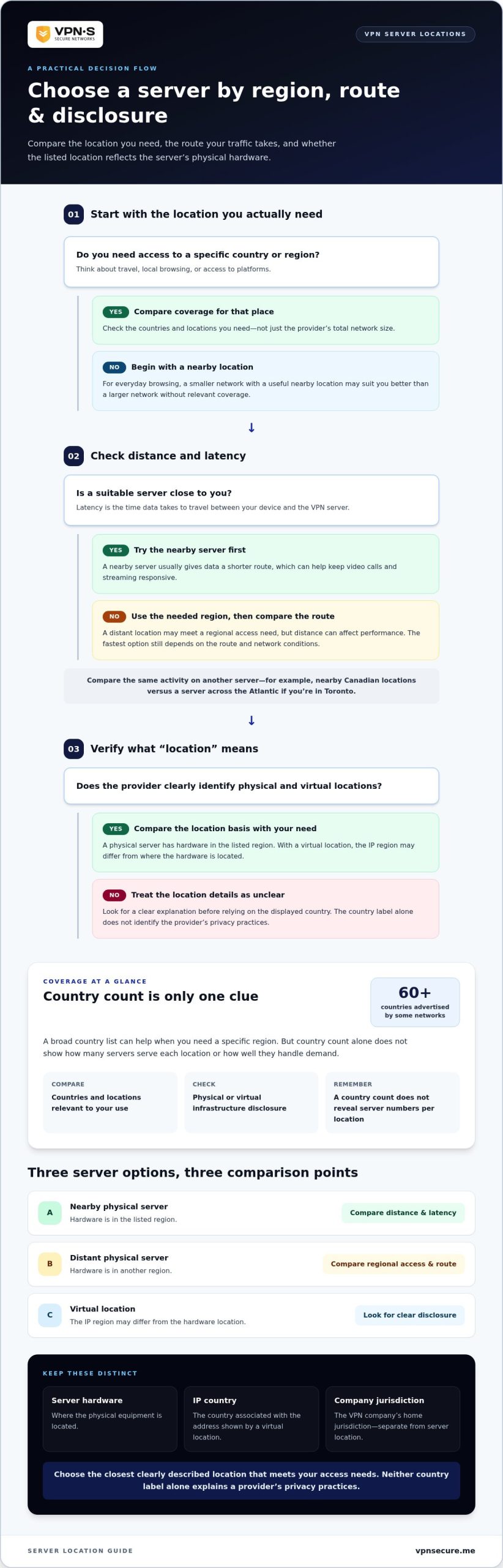
Server locations affect connection speed, regional access, and the country associated with your online traffic. Compare proximity to you, the countries covered, and whether listed locations use physical or virtual infrastructure.
Nearby Servers and Latency
Latency is the time data takes to travel between your device and a VPN server. A nearby server usually gives data a shorter route than a distant one, which can help keep video calls and streaming responsive. If you’re in Toronto, for example, compare nearby Canadian locations with a server across the Atlantic. The fastest option still depends on the route and network conditions.
Start with a nearby location, then compare the same activity on another server. A router connection can send traffic from several devices through one VPN setup, but distance can still affect performance.
Network Size and Coverage
Network size counts the locations a provider lists, not just its total hardware. Some VPN networks advertise coverage across 60+ countries. That breadth can help when you need a specific region, but country count alone doesn’t show how many servers serve each location or how well they handle demand.
Compare the countries you need for travel, local browsing, or access to platforms. A smaller network with a useful nearby location may suit everyday browsing better than a larger network without relevant coverage. Check whether the location list identifies physical and virtual servers.
Server Network Jurisdictions
A server’s physical location and the VPN company’s home jurisdiction are separate details. A virtual location may provide an IP address associated with one country while its hardware is elsewhere, so the displayed country doesn’t necessarily identify the server’s physical jurisdiction.
Compare these details separately. Look for clear explanations of virtual locations and the company’s operating jurisdiction; neither country label alone explains a provider’s privacy practices. A location table can make the differences easier to scan:
| Server option | Location basis | Best comparison point |
|---|---|---|
| Nearby physical server | Hardware in the listed region | Distance and latency |
| Distant physical server | Hardware in another region | Regional access and route |
| Virtual location | IP region may differ from hardware location | Clear location disclosure |
Choose the closest clearly described location that meets your access needs.
Simultaneous device connections
There’s no universal device or server count across leading VPN providers. Each provider sets its own simultaneous-connection limit, while its server network is measured separately; a country count doesn’t tell you how many servers operate there.
Count the devices you use: a Windows laptop, iPhone, tablet, and smart TV may all need protection at once. Include household members’ and work devices when comparing plans. If you reach the connection limit, a device may need to disconnect before another can join the VPN.
A router can change how you plan coverage. When a router runs a VPN connection, devices using it can send their internet traffic through the tunnel without each device running a separate VPN app. Setup depends on compatible hardware and the provider’s instructions. Compare this option with installing apps individually, especially for devices that don’t support VPN apps directly.
Connection limits and performance are different criteria. A higher device allowance doesn’t automatically mean faster speeds. Connected devices share bandwidth, so HD streaming, large downloads, and video calls may compete for it. Protocols also affect how a VPN connection handles speed and security. For example, a video call and cloud backup running together may feel slower than either activity alone.
Use this practical comparison:
- Count: List the devices and people who need access at the same time.
- Choose: Compare that total with each plan’s simultaneous-connection limit.
- Route: Consider a VPN-compatible router for devices that lack VPN apps.
- Test: Run your usual activities together and compare speeds with different protocols.
Don’t treat a large server network as proof of unlimited device access. If you want to explore VPN connection options, match the plan to the devices you use and how you connect.
The number of simultaneous devices and servers varies by provider. Device limits and server networks are measured separately, and a country count doesn’t reveal how many servers operate there.
Free VPN plans and money-back guarantees
Free plans and paid subscriptions differ in usage limits, billing terms, and refund policies. Compare what each plan includes before choosing based on convenience alone.
In the United States, VPN services are legal when they aren’t used for illegal activity. A VPN doesn’t make illegal conduct lawful or prevent websites from applying their own access restrictions.
Free Plans and Data Limits
A free VPN plan may suit occasional browsing, but restrictions can make it less useful for daily use. Providers may limit data, server locations, speeds, or features. Match the plan details to your routine: a short browsing session uses less data than regular video streaming or large downloads.
Encryption protects traffic passing through the VPN tunnel, but it doesn’t make every online activity private. Your accounts and the information you share can still identify you. Compare a free plan’s data allowance and available locations with the tasks you need it for.
Money-Back Guarantees
A refund period gives you a defined window to assess a paid plan. A 30-day money-back period is one example of a VPN refund policy. Read the terms for the start date, eligible subscriptions, and refund request steps. A stated period is useful only if you understand its conditions.
Paid plans may bill monthly or annually. Compare the full subscription commitment, renewal terms, and included features, not just the billing label. Note when the next payment is due and how cancellation works. This helps you weigh ongoing protection against a free plan’s restrictions.
Before subscribing, use this quick checklist:
- Free use: Match data and location limits to your browsing and streaming habits.
- Refund: Read the eligibility terms and request process.
- Subscription: Review the billing period, renewal, and cancellation terms.
VPN privacy and security criteria
Strong encryption matters, but privacy also depends on what a provider collects and retains. Vague logging language, unclear ownership, and apps that don’t explain their permissions are reasons to look more closely.
Use encryption as a measurable starting point. Minimum criteria specify RSA-2048 or better for the handshake and AES-256-GCM or AES-256-CBC for data encryption. A stronger handshake can be one factor to consider when comparing VPN encryption. These standards help protect traffic between your device and the VPN server, but they don’t erase account activity or identify you less when you sign in.
Read the privacy policy for specific data categories. A clear policy distinguishes service operation details from browsing activity, such as the sites you visit. Look for direct statements about collection, retention, and sharing. If it’s unclear whether browsing records are kept, compare the provider’s policy with others before deciding.
Check the app before connecting. On Android, review its permissions and confirm that the listed publisher matches the provider. After connecting, use a leak test to see whether your public IP address changes. Switch servers and repeat the test: traffic should pass through the selected server, not expose your regular address.
- Encryption: Compare handshake and data-encryption standards against the criteria above.
- Logging: Find precise language about browsing records, connection data, and retention.
- App behavior: Review Android permissions and publisher details before downloading.
- Connection check: Test your IP address after connecting and switching servers.
A virtual private network is a tool, not a cure-all: it protects the connection to its server, while account logins and information you share remain relevant to privacy. Explore private VPN protection and compare its privacy approach with these criteria.
VPN Secure: Monthly VPN Subscription
VPN Secure’s Monthly VPN Subscription provides encrypted internet traffic across major devices. It may suit you if you want VPN protection without an annual subscription, or need a service for public Wi-Fi, streaming, or VOIP access. VPN Secure follows a zero-logging policy and offers features designed to help bypass geo-restrictions. Read our full no-logging policy.
Choose a Monthly VPN Subscription if month-to-month access suits your plans. The Annual VPN Subscription is another option if you prefer an annual term. VPN Secure also offers a Dedicated IP and White Label VPN, which serve different needs from personal VPN use.
Compare the privacy criteria and device needs above with your browsing habits. If VPN Secure fits, visit VPN Secure to explore the subscription options.
Make privacy part of your routine
Turn your privacy priorities into a repeatable setup. Decide which devices should use the VPN by default, when to connect while traveling, and which online activities need extra attention. A private VPN service provider can protect your connection, but your choices still matter: keep apps updated, use strong account passwords, and avoid sharing sensitive details unnecessarily.
VPN Secure offers Monthly VPN Subscription and Annual VPN Subscription options, plus a Dedicated IP for users whose needs call for one. Choose the option that fits how you plan to use a VPN, rather than paying for features that don’t serve your routine. If you want help considering those options, contact VPN Secure for VPN advice.
Take a practical step today: choose which devices you want protected and plan to connect consistently. A considered setup helps you stay in control of how you move online.
Frequently Asked Questions
Can I Trust My VPN to Protect My Privacy?
A VPN is easier to evaluate when its privacy promises are specific, consistent, and clear. A private VPN service provider should explain how it handles information and who operates the service. Before relying on it for sensitive browsing, review its policy and test your connection for IP leaks. A VPN can’t prevent tracking through accounts where you’re signed in.
Is a VPN Worth Getting?
A VPN can be useful if you often connect to unfamiliar Wi-Fi, travel, or want to reduce the exposure of your internet traffic to the local network. For example, connecting through a hotel network adds a layer of protection between your device and that network. A VPN won’t stop phishing, malicious downloads, or weak passwords, so maintain other security habits too.
What is a VPN?
A VPN, or virtual private network, sends your internet traffic through an encrypted connection to a VPN server. Websites then see the server’s IP address rather than your device’s usual public IP address. For example, connecting from a café routes your traffic through the VPN before it reaches a website. Your device still communicates with the VPN provider.
What is the best VPN in 2026?
There isn’t one best VPN for every person in 2026. The right choice depends on your priorities, such as privacy, access to locations you need, support for your devices, and clear subscription terms. A traveler may value convenient server choices, while someone protecting several household devices may prioritize app compatibility. Compare those needs first, then choose a provider that fits.
Why Do I Need a VPN?
You may want a VPN to add privacy on shared networks, protect traffic while traveling, or use an IP address associated with another location. For instance, a remote worker at a coworking space may prefer an encrypted route for routine browsing. A VPN doesn’t make you anonymous or replace antivirus software and careful online habits, but it gives you another layer of control.