


A VPN can help unblock streaming services by routing your connection through a server in another country, so your device uses an IP address associated with that location. But it can’t remove licensing limits: platforms may detect VPN traffic, and sports broadcasts may still be subject to regional blackouts. The right setup depends on the service, the location it checks, and the stream you want to watch.
It’s frustrating when a familiar show disappears or a live game is blocked because your location changed. The right server can help with regional access, while connection speed matters for smooth playback. A dedicated IP or traffic obfuscation may also affect how a VPN connection is identified. None of these features overrides a platform’s content rights or access rules.
This guide explains why streaming platforms restrict VPN connections, how IP-based location checks and sports blackouts work, and which VPN features may help. You’ll learn what to consider when choosing a setup, including server locations, speed, dedicated IPs, and obfuscation, so you can make an informed choice before streaming.
Key Takeaways
- Use content licensing as the starting point: a VPN changes how your connection appears, not the rights attached to a show or event.
- Match the VPN server location to the region the streaming service uses to assess access.
- For live sports, separate a location-based blackout from account or home-address eligibility rules.
- Compare server selection, connection speed, obfuscation, and a dedicated IP to understand which setup best fits your streaming needs.
Why licensing agreements lead streaming services to restrict VPN access
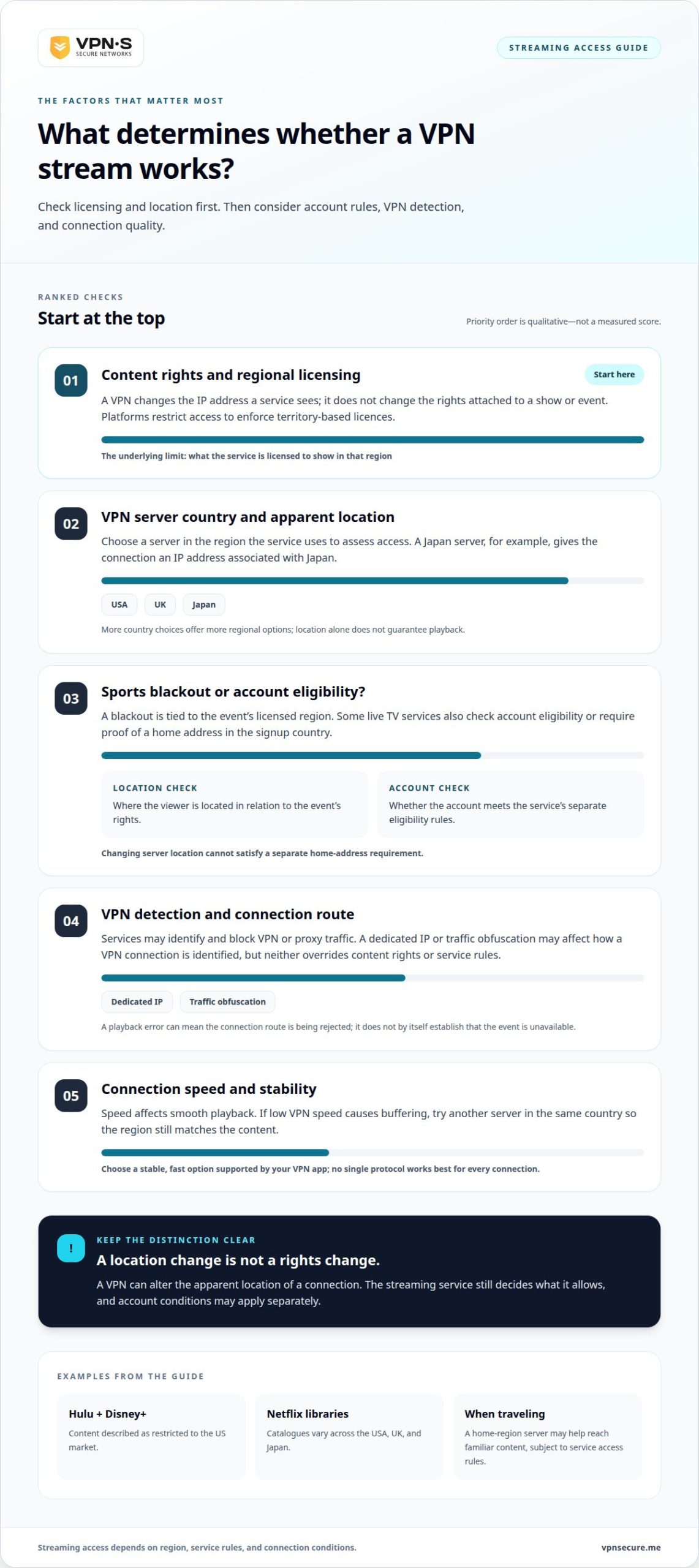
Streaming platforms license shows and events for specific regions, so catalogues can vary by country. Hulu and Disney+ content is restricted to the US market.
Regional Licensing and VPN Restrictions
Regional licensing means a platform limits content according to the territories where it holds distribution rights. A VPN routes internet traffic through a server elsewhere, giving your device a temporary IP address associated with that country. That can make a regional library appear accessible, but it doesn’t change the licence. Services restrict VPN connections to enforce those boundaries.
Netflix libraries in the USA, UK, and Japan show how catalogues vary by region. VPN access to geo-restricted libraries can change as platforms identify and block VPN traffic. If you’re traveling, connecting through a server in your home region may help you reach familiar content. If playback fails, try another server or retry later. Over time, access to regional content through VPNs can shift as platforms change their detection.
Terms, Legality, and Account Consequences
Service terms set the conditions for using a platform, while licensing explains why some titles are region-limited. Whether accessing another region breaches a service’s terms depends on its rules. In the United States, using a VPN to stream is generally legal, but that doesn’t grant permission to view content outside its licensed area. The VPN connection and the platform’s access conditions are separate issues.
A streaming service can block a VPN connection, and its terms may allow account restrictions or suspension. But not every VPN connection leads to account action: a playback error and an account decision are different outcomes. Free VPNs can also involve privacy and security trade-offs, since data handling and connection protections vary. When streaming, weigh privacy alongside access, speed, and the platform’s regional rules.
How streaming services use IP addresses to determine location
A streaming service can use your internet IP address to estimate your location and apply regional access rules. A VPN server changes the IP address the service sees, so choosing the right country matters.
IP Addresses and Apparent Location
An IP address is an internet identifier that streaming services use to estimate where a device connects from. A VPN routes traffic through a server in another country, giving the connection an IP address associated with that location. For example, a server in Japan can make your connection appear to come from Japan. This may affect which regional catalogue a service presents, but the service still decides what access it allows.
VPN Server Locations and Network Size
A VPN server network includes servers in different locations, letting you choose the country your connection appears to use. For streaming, choose a location that matches the service’s intended region, such as the USA, UK, or Japan. More country choices can offer more regional options, but location alone doesn’t determine whether playback works. Server speed and platform detection matter, too.
Which VPN server locations and protocols are best for streaming? Choose a server in the country whose library you want to access. For example, select a UK location for UK content. No single protocol works best for every connection, so prioritize a stable, fast option supported by your VPN app.
To change your apparent location, connect to a server in the target country before opening Netflix or another streaming app. Then reopen the app to start a fresh session over the VPN connection. If the catalogue still reflects your previous location, close and relaunch the app, then confirm the VPN remains connected.
Server choice also affects video quality. If low VPN speed causes buffering, try another server in the same country. A nearby server may respond faster, but it still needs to match the region required for the content. Country coverage gives you options, while connection performance helps determine whether a stream plays smoothly.
Sports streaming blackouts and regional restrictions
A sports blackout is a regional restriction that prevents access to a game where its rights are assigned elsewhere. A stream can be geo-blocked when the viewer’s location falls outside the event’s licensed area. That’s why a match available in one place can disappear in another. A VPN can help bypass that boundary by routing your connection through a server in the relevant country.
Live TV can involve another access check. A service streaming from another country may require a VPN connection to a server there, then check whether your account qualifies. Some live TV services also require proof of a home address in the country where you signed up. Changing your apparent location won’t meet that separate eligibility condition. Treat location checks and account requirements as distinct restrictions.
Proxy restrictions can create a similar playback barrier. A VPN or proxy routes a connection through an intermediary—such as connectivity networks provided by Proxied—but streaming services can block connections they identify as VPN traffic. An error after connecting doesn’t necessarily mean the game itself is unavailable. It may mean the service is rejecting the connection route. The key distinction is whether the restriction concerns the event’s licensed region or the connection method.
Start troubleshooting by matching the VPN server country to the stream’s licensed area. If you’re watching a live broadcast while traveling, choose a server in the country associated with your account or intended stream. If playback remains blocked, try another server in that country, then reopen the streaming app. If the service requires a home address, changing servers won’t satisfy that account check. A server change may address a connection block, but it can’t expand a broadcaster’s rights or replace an eligibility requirement.
Dedicated streaming servers and obfuscation
A streaming-focused setup addresses two different issues: finding a suitable server and reducing the chance that a platform identifies VPN traffic. Neither feature changes a show’s licensing rights, but each may affect whether the connection works.
A dedicated streaming server is selected or optimized for streaming access. It aims to provide a connection suited to video playback, with the right country location and enough speed for the stream. The label alone doesn’t mean a platform will accept it. If a service blocks the connection, try another server in the same region to see whether the route is the problem.
Obfuscation changes how VPN traffic appears to network filters. It may help when a service or network recognizes and blocks ordinary VPN connections, such as when a streaming app rejects playback on an otherwise working connection. It doesn’t make a connection invisible or override a platform’s access rules. Think of obfuscation as a way to address detection, not a key to every regional library.
A dedicated IP solves a different problem. It gives one subscriber an IP address that isn’t shared with other users, which can make the connection address more consistent. That may matter if repeated changes in shared IP addresses trigger extra checks. It still doesn’t guarantee access: the streaming platform can apply its own location and account rules to that address.
For a global audience, server choice remains central. A network spanning 40+ countries can offer a range of country locations, but the useful server is the one matching the content region and delivering stable playback. If a stream fails, try another server in that region. If the VPN connects but the service still blocks it, obfuscation may be the more relevant feature to consider.
Want a consistent connection address to try with your streaming setup? Explore a Dedicated IP option and compare it with your access needs.
VPNSecure: Monthly VPN Subscription
VPNSecure offers a Monthly VPN Subscription for viewers who want encrypted internet traffic and access to VPN servers while streaming. Its private, no-log VPN service works across major devices and can help bypass geo-restrictions. A VPN changes your apparent connection location, but it can’t change a platform’s licensing terms or guarantee access to a particular title.
Choose a monthly subscription if you want VPN access on a monthly basis. For a consistent IP address, VPNSecure also offers a Dedicated IP that isn’t shared with other users. The right option depends on whether your priority is changing your apparent region or using an IP address reserved for your connection.
Explore the VPNSecure streaming setup or contact VPNSecure to learn more.
Make your next stream a considered choice
Start with how you watch. If you stream while traveling, prioritize a VPN connection that lets you select the region relevant to your account. If you watch from one location and want a consistent connection address, consider whether a Dedicated IP suits your needs. Keep the platform’s access conditions in mind, too. A VPN can change your connection route, but it can’t rewrite a service’s rules.
Before choosing a setup, decide what matters most: reliable playback, access while away from home, or a consistent IP address. These priorities can help you decide whether a monthly or annual subscription fits your usage. If you’re considering a VPN to unblock streaming services, focus on your specific streaming needs rather than promises of universal access.
VPNSecure offers Monthly VPN Subscription, Annual VPN Subscription, and Dedicated IP options. Contact VPNSecure for streaming advice and take your next step with a clearer setup in mind.
Frequently Asked Questions
What is the best VPN for streaming right now?
There isn’t one best VPN for every viewer or streaming library. To unblock streaming services, choose a VPN based on the country you need, supported devices, connection performance, and features such as obfuscation or a dedicated IP. Assess it for the specific platform and region you use. A setup that works for watching at home may not suit travel or a different account.
Can I use a VPN to watch live TV?
Which VPNs currently work best with Netflix, Hulu, Disney+, Max, and other streaming services?
No single VPN works consistently across Netflix, Hulu, Disney+, Max, and every regional catalogue. When choosing a VPN to unblock streaming services, compare its server options and relevant features with the exact platform and region you want. Platform detection and available libraries can change, and access with one service doesn’t guarantee access with another. Assess compatibility for that specific combination, not as a universal ranking.
How do I set up a VPN to access a streaming service while traveling?
Install and sign in to your VPN app before opening the streaming service. Connect to a server in the region associated with the catalogue you want to watch, then launch the platform and sign in with your own account. Keep the VPN connected during playback. If the app shows a location error, close it and start a fresh session after connecting.
How can I fix a streaming service that detects or blocks my VPN?
First, identify whether the error refers to a VPN connection, a location mismatch, or an account requirement. If it points to the connection, try another server in the same country or use obfuscation if your VPN supports it. If the message concerns account eligibility or a home address, changing servers won’t resolve that requirement. Reopen the app after changing connections.
How do VPN streaming speeds compare, and what internet speed is needed for HD or 4K?
A VPN can reduce available speed because traffic takes an encrypted route through a server. The effect depends on the connection, server distance, and network load. HD or 4K playback needs enough throughput for the stream, plus capacity for other devices using your internet. Compare playback with and without the VPN, and try a closer or less congested server if video buffers.