




Hotel Wi-Fi gets you online, but it doesn’t make your connection private. A VPN for hotel Wi-Fi protection encrypts your internet traffic and masks your real IP address, helping shield your activity from the local network. It won’t stop phishing or malware, and you’ll usually need to sign in through the hotel’s captive portal before connecting to the VPN.
It’s reasonable to ask whether hotel Wi-Fi is safe, especially when you’re handling work or personal accounts on a shared network. A VPN adds a layer of protection, but it can affect connection speed, and restricted networks may interfere with access. This guide explains what a VPN can and can’t protect, how to get through hotel sign-in screens, and why speed can change. You’ll also learn what to do if the connection feels slow or a website won’t load, so you can make an informed decision before settling in to work, stream, or browse.
Key Takeaways
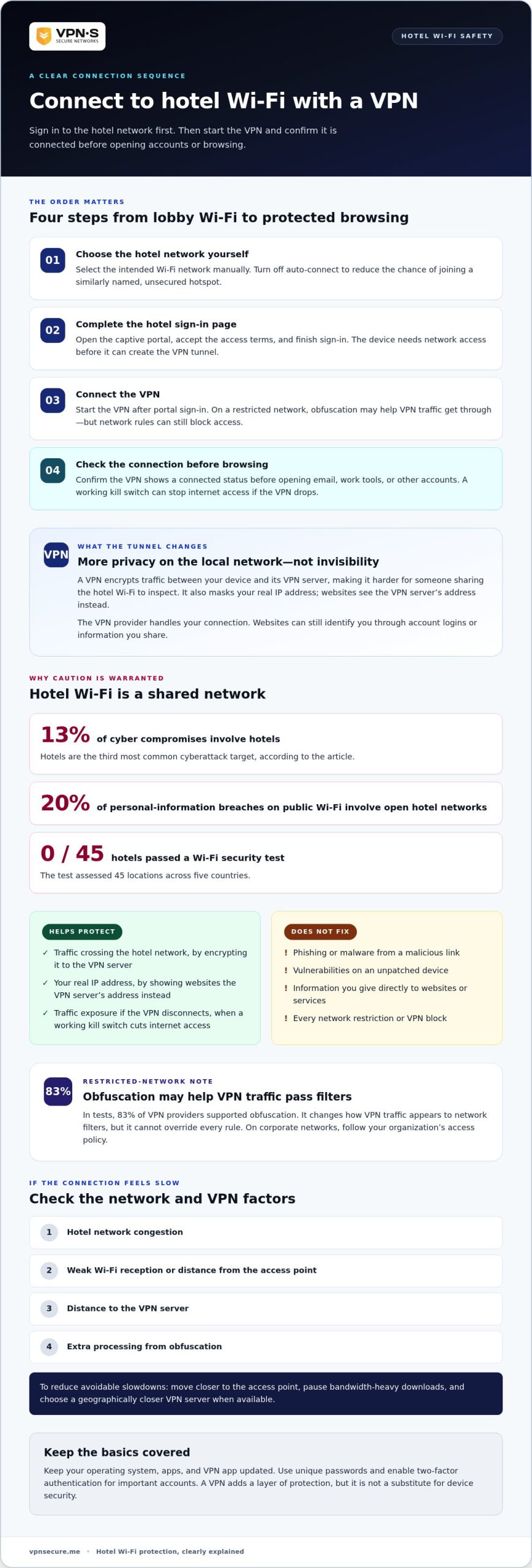
- Sign in through the hotel’s captive portal first, then connect your VPN before browsing.
- On restricted networks, obfuscation may help VPN traffic get through, but network rules can still affect access.
- Choose the hotel’s Wi-Fi network manually and avoid auto-connect to reduce the chance of joining a fake hotspot.
- Keep your device updated and use two-factor authentication for important accounts; a VPN can’t fix an unpatched device.
- If your connection slows, consider the hotel network’s congestion and the VPN server’s distance before changing your settings.
1. Does a VPN Protect You on Public WiFi?
Yes. A VPN for hotel Wi-Fi protection encrypts your internet traffic on your device before it travels across the hotel network. The network carries that traffic through an encrypted tunnel, making it harder for someone sharing the Wi-Fi to inspect. A VPN also masks your real IP address, so websites see the VPN server’s address instead of your device’s.
Encryption changes how your data appears in transit. For example, when you check work email from a hotel lobby, your connection to the VPN server is encrypted before it crosses the shared Wi-Fi. This helps protect the contents of your traffic, including credentials sent through the tunnel. It doesn’t make you invisible: the VPN provider handles your connection, and websites can still identify you through account logins or other information you share.
Which VPNs are best for hotel Wi-Fi protection in the US? Choose a VPN that encrypts traffic, masks your IP address, and has a working kill switch that cuts internet access if the VPN drops. Check its privacy practices too: in research covering 30 providers, 10 passed independent no-logs audits in 2025.
How does a VPN protect you on hotel Wi-Fi? It creates an encrypted connection between your device and a VPN server, shielding traffic as it crosses the hotel’s local network. Connect the VPN before browsing or entering credentials. If it can’t connect, first complete the hotel’s captive-portal sign-in.
What risks remain when using a VPN on hotel Wi-Fi? A VPN doesn’t block phishing or malware if you open a malicious link, and it can’t fix vulnerabilities in an unpatched device. Keep your operating system and apps updated, and use two-factor authentication on important accounts.
Is a free VPN safe to use on hotel Wi-Fi? “Free” alone doesn’t show whether a VPN protects your traffic or handles your data responsibly. Apply the same checks: look for encryption, IP masking, clear privacy practices, and a working kill switch.
Use this simple sequence while traveling: join the hotel network, complete its sign-in page, then turn on the VPN. Confirm that the VPN shows a connected status before opening email, work tools, or other accounts. If the connection drops, a kill switch can stop internet access until the protected tunnel returns. This prevents your device from quietly continuing over hotel Wi-Fi without the VPN.
2. Obfuscation on restricted hotel and corporate networks
A hotel or corporate network may block VPN connections, even when ordinary websites load. Obfuscation changes how VPN traffic appears to network filters, helping it resemble regular internet traffic. In tests, 83% of VPN providers supported obfuscation. That feature can help when a network recognizes and restricts standard VPN traffic, but it can’t override every network rule.
Hotel Wi-Fi often requires a captive portal before granting internet access. If the VPN won’t connect, open the hotel’s sign-in page first, accept its access terms, and then start the VPN. This gives your device network access before it tries to create an encrypted tunnel. On a corporate network, follow your organization’s access policy rather than using obfuscation to evade its controls.
Obfuscation addresses one kind of network filtering. It doesn’t make unsecured Wi-Fi trustworthy, remove malware, or prevent a malicious website from stealing information you enter. A VPN encrypts traffic between your device and its VPN server, limiting what someone monitoring the local network can read. Websites can still collect information you provide directly, such as account details or form entries.
For example, imagine joining a hotel network that blocks a standard VPN connection. Turn off auto-connect to avoid accidentally joining a similarly named, unsecured hotspot. Connect to the hotel’s intended network, complete the captive portal, then enable obfuscation in your VPN settings and connect. If access still fails, the network may block VPN traffic more broadly. Use another permitted connection instead of repeatedly changing settings.
Speed can also change on a restricted network. Hotel congestion, weak Wi-Fi reception, distance to the VPN server, and the extra processing involved in obfuscation can all affect responsiveness. To reduce avoidable slowdowns, move closer to the access point, pause bandwidth-heavy downloads, and choose a VPN server geographically closer to you when available. Test a regular webpage after connecting, then compare it with a video or work call.
Obfuscation is a useful access tool, not a privacy guarantee. Keep your device and VPN app updated, use unique passwords, and enable two-factor authentication for important accounts. If hotel Wi-Fi blocks a connection you need, a VPN for restricted networks can help protect traffic when the network permits VPN access.
3. Is Hotel Wi-Fi Safe?
Hotel Wi-Fi isn’t automatically safe for banking, work, or private browsing. Hotels account for 13% of cyber compromises, making them the third most common cyberattack target. Open hotel networks account for 20% of personal information breaches on public Wi-Fi. Treat an unsecured connection as a shared space, not a trusted extension of your home network.
Risk isn’t limited to one country or device. In a 2019 test, WatchGuard Technologies assessed Wi-Fi security at 45 locations in five countries, and no hotel passed. On an iPhone, keep iOS updated, turn off automatic connection to remembered networks, and select the hotel’s network yourself. A familiar network name alone doesn’t prove it belongs to the hotel.
Hotel network eavesdropping can expose more than a browser window. Even when you visit HTTPS websites, the local network may see domain names through DNS requests. A VPN encrypts traffic between your device and its VPN server, limiting what the local network can inspect. It doesn’t erase activity you share with a website or protect information entered into a fake login page.
Banking calls for extra care. When possible, avoid accessing bank accounts or entering card details on hotel Wi-Fi. If you must use the network, connect through a VPN first, check that the bank’s address is correct, and use its official app or website. A VPN cannot stop phishing, malicious downloads, or malware already on your device.
Streaming presents a different mix of risks. Hotel Wi-Fi can expose your connection to local network monitoring, while weak reception or congestion can interrupt playback. Protect your traffic with a VPN, use the streaming service’s genuine sign-in page, and avoid saving account credentials on a shared hotel device. On your own iPhone, review which apps can access sensitive data and location.
International travel adds another layer: hotel networks and sign-in portals vary between destinations. In a 2026 Microsoft security advisory, attackers on compromised hotel Wi-Fi used a device sign-in code entered on Microsoft’s real login page to hijack Microsoft 365 accounts without a password. Don’t approve sign-in requests you didn’t start, and protect important accounts with two-factor authentication. The Federal Trade Commission also advises caution on public networks. Security comes from combining an encrypted connection with careful browsing, current software, and attention to what you approve.
4. Man-in-the-middle attacks and rogue hotspots
A man-in-the-middle attack places an attacker between your device and an online service. On hotel Wi-Fi, the attacker may observe or interfere with data moving across the network. A rogue hotspot, often called an Evil Twin, copies a legitimate network’s name to lure guests. If you connect to the wrong “Hotel Guest” network, your traffic may pass through an attacker’s equipment.
Encryption helps limit exposure. A VPN encrypts traffic between your device and its VPN server, reducing the risk of data exposure from man-in-the-middle attacks on hotel Wi-Fi. It doesn’t remove malware already installed on your device or stop you from entering credentials on a fake website. Treat a VPN as one layer of security, not a shield against every threat.
Before connecting, confirm the exact Wi-Fi name with hotel staff or the information provided in your room. Don’t choose a network just because its name includes the hotel brand. On an iPhone or Android device, turn off automatic network joining and select the intended network manually. If a sign-in page asks for unusual personal or payment details, stop and check with hotel staff before submitting them.
After joining the legitimate network, complete its captive portal, then start your VPN. Open a familiar HTTPS website and check that the connection is secure before signing in. HTTPS protects the connection to that website, while the VPN adds encryption between your device and its server. Neither makes a convincing fake login page safe, so check the address carefully.
Watch for warning signs while browsing. A sudden sign-in prompt when you’re already online, an unexpected certificate warning, or a page asking you to re-enter credentials can signal interference. Don’t bypass browser security warnings to reach email or banking. Disconnect from Wi-Fi, forget the suspicious network, and reconnect only after confirming the correct network name with the hotel.
For example, if your laptop joins a second network with a slightly altered hotel name, disconnect before opening work email. Disable auto-join for that network so the device doesn’t reconnect later. If the VPN connection drops, pause sensitive activity until the protected connection returns. A kill switch can cut off internet access during a VPN interruption, reducing the chance that traffic continues unprotected.
These steps address network-based attacks, not every device threat. Keep your operating system and browser updated, use unique passwords, and enable two-factor authentication for important accounts. If you clicked a malicious link or installed a suspicious file, disconnecting from hotel Wi-Fi alone won’t remove malware. Run your device’s security checks and change affected credentials from a trusted connection.
5. VPN effects on hotel internet speed
A VPN adds an encrypted route between your device and a VPN server. That extra route can increase latency, the delay before a webpage or video responds. Hotel Wi-Fi congestion, weak room reception, and distance to the server also affect speed. A slow video call doesn’t automatically mean the VPN caused it. First test the hotel connection without the VPN, then repeat the same task with it enabled.
Use a consistent comparison. In the same room, open the same website on the same device, first without the VPN and then with it. Notice page loading, call quality, or streaming interruptions, rather than relying on a single speed-test result. If both connections struggle, the hotel network or your Wi-Fi signal is likely the bottleneck. If the VPN connection feels slower, server distance and network congestion are useful factors to adjust.
Choose a VPN server closer to your current location when available. A shorter route often means less delay than sending traffic across another region. Then pause large downloads and close unused video streams, which compete for the hotel network’s bandwidth. If your room has weak reception, move nearer to the access point or try another location. Change one factor at a time, then repeat your test.
Encryption requires processing, but the hotel’s available bandwidth, signal quality, and server route usually shape the experience. For example, an overloaded lobby network can slow browsing before a VPN connects. A VPN won’t create extra bandwidth or make a crowded Wi-Fi network faster. It changes the route and protects traffic along it, so judge speed and privacy as separate needs.
Don’t switch off protection just because a work page takes longer to load. First try a closer server, reconnect to the hotel Wi-Fi, or move to a stronger signal. If a VPN connection drops, a kill switch can stop internet access until the tunnel returns. That pause is safer than letting passwords or work traffic travel exposed, where someone monitoring an unsecured network could intercept them.
Speed isn’t the only measure of a useful connection. A VPN helps limit what hackers on the local network can see, but it doesn’t block malware or make every website safe. Keep your device updated and avoid suspicious downloads, even if browsing feels smooth. For a hotel video call, test the connection before joining, close bandwidth-heavy apps, and keep the VPN on while handling private work.
VPN Secure: Monthly VPN Subscription
VPN Secure’s Monthly VPN Subscription encrypts internet traffic across major devices, helping protect your connection on hotel Wi-Fi. Connect after completing the hotel’s sign-in portal, then use the VPN while browsing, working, or streaming. Encryption helps limit what others on the local network can inspect, while masking your real IP address. It doesn’t block phishing or malware, so keep your device updated and check websites before entering credentials. If you want an encrypted connection for a trip or regular travel, the monthly subscription is a direct way to add VPN protection to your routine. Choose it for network privacy, not as a replacement for careful browsing or device security. Contact VPN Secure to learn more about the Monthly VPN Subscription.
Make privacy part of your travel routine
Your next trip is a good time to prepare your digital habits before reaching the hotel. Decide which accounts and devices you’ll use, update them before departure, and choose a VPN plan that fits how often you travel. VPN Secure offers a Monthly VPN Subscription, an Annual VPN Subscription, and a Dedicated IP. A VPN for hotel Wi-Fi protection can support safer browsing on shared networks, but your choices still matter: use distinct passwords, keep software current, and pause before approving unexpected sign-in requests.
Make the decision before you’re tired, rushing through check-in, or joining the first network you see. That gives you time to install and connect your VPN, understand its settings, and make it part of your routine. If you want to explore the available options, contact VPN Secure. Take control of your connection before your next stay, and travel with a clearer plan.
Frequently Asked Questions
Is Hotel Wi-Fi Safe?
Hotel Wi-Fi isn’t automatically safe, even if it requires a room number or password. Those details control access, but don’t prove that every device or connection on the network is trustworthy. Use your own device, avoid saving payment details in shared browsers, and sign out of accounts after use. For sensitive tasks, choose a trusted connection where possible, and keep your device’s security settings enabled.
Can Hotel Wi-Fi be Hacked?
Yes. Attackers can target hotel networks or create fake hotspots that imitate legitimate names. A compromised network may expose traffic that isn’t adequately protected, while a fake sign-in page can trick guests into giving away credentials. Select the Wi-Fi name provided by the hotel, avoid unexpected login prompts, and don’t approve account sign-ins you didn’t initiate. A VPN reduces network-level exposure but doesn’t remove malware from a device.
What if You Can’t Connect to a VPN from Hotel WiFi?
First, check whether the hotel’s sign-in page still needs your acceptance or room details. Open a browser, complete the portal, then retry the VPN. If it still fails, reconnect to the correct network and restart the VPN app. A restricted network may block VPN connections; use another permitted connection for sensitive tasks rather than entering credentials unprotected. Don’t bypass your workplace’s network rules while traveling for business.
Can Hotels See What Websites You Visit on Their Wi-Fi?
The local network may see website domain names through DNS requests, even when the site uses HTTPS. HTTPS protects the content exchanged with a website, not necessarily every detail about the connection. A VPN routes traffic through an encrypted tunnel, helping conceal destinations from the local network. Your account activity remains visible to the website you use, so a VPN doesn’t make browsing anonymous to that service.
Can a VPN Bypass Hotel Captive Portals?
Usually, no. A hotel captive portal often requires you to accept terms or enter access details before normal internet access begins, and a VPN generally can’t connect until you complete that step. Join the hotel network, complete its official sign-in page, then start the VPN. If the portal keeps reappearing, disconnect and reconnect to Wi-Fi, then check that the login session completed before trying again.
Can hotel Wi-Fi see your screen?
No, joining Wi-Fi doesn’t let hotel staff view your screen directly. Screen visibility requires something beyond ordinary network access, such as screen sharing you enabled, a compromised device, or someone physically looking at your display. Before a video call, check that screen sharing is off unless you intend to present. Lock your laptop when leaving your room, and avoid casting to unfamiliar hotel-room devices.
Do Hotels Monitor your Wi-Fi Activity?
Hotel network systems can record or process connection details to manage access and troubleshoot service. Depending on the connection, this may include activity timing or domain information exposed through DNS requests. A VPN limits what the local network can inspect inside its encrypted tunnel, but it doesn’t prevent websites from recording activity on their own services. Don’t treat a hotel connection as a private home network.
Does a VPN Protect You on Public WiFi?
Yes, a VPN helps protect traffic crossing public Wi-Fi by encrypting its route to a VPN server. This can reduce the risk of someone on the same network reading your connection contents. It won’t stop you from entering a password on a fake page, opening a malicious attachment, or using an outdated device. Keep software current, check sign-in pages carefully, and use unique passwords for important accounts.