


A VPN can help you access social media when a network or location-based block gets in the way, but it can’t override platform rules or local restrictions. A VPN for social media unblocking routes your connection through a VPN server, which may change the location that apps and websites see.
It makes sense to want access without giving up privacy. The right choice depends on more than whether a service connects: encryption, logging practices, supported devices, and simultaneous connections all matter. This guide explains how to weigh those factors, use a VPN on phones and computers, and account for legal and ethical limits. You’ll be better equipped to choose a VPN that fits your needs without mistaking a privacy tool for permission to ignore the rules.
Key Takeaways
- Consider local laws and platform rules before using a VPN to get around an access restriction.
- Assess what a no-logs policy means in practice, and how RAM-only servers affect data storage.
- Count the phones, computers, and other devices you want to protect, then match that need to the connection limit.
- Choose a VPN by weighing access, privacy protections, and device support together rather than focusing on unblocking alone.
Legal and ethical considerations of bypassing restrictions
A school, employer, hotel, or national network may restrict social media for different reasons. Before using a VPN, identify who controls the restriction and which rules apply.
Reasons for Network Restrictions
Networks may restrict social media to manage bandwidth, enforce workplace or school policies, or comply with local controls. For example, a company might block Instagram on its office Wi-Fi while leaving other sites available. The reason matters: a network policy differs from a country-level restriction, and the appropriate response depends on the rules governing your connection.
Check the network’s terms and your organization’s acceptable-use policy before trying to bypass a block. Encrypting traffic with a VPN doesn’t make an action permitted. Consider whether access is needed for work, communication, or personal use, and respect the restrictions that apply to your situation.
VPN Access on Restricted Networks
A VPN creates an encrypted connection between your device and a VPN server. This can prevent a local network from reading the contents of your traffic, but it doesn’t guarantee that social media will load. Some networks block VPN connections, while others restrict particular apps or services.
For example, if a café’s Wi-Fi blocks an app, a VPN can route your connection differently. The network’s controls, the app’s availability, and applicable laws all affect the result. Use a VPN to bypass social media restrictions only where doing so is lawful and consistent with network rules.
VPN Detection and Blocking
Yes. Social media platforms can detect or block VPN connections. A platform may identify traffic associated with VPN servers and restrict access or require additional account checks. This doesn’t mean every VPN connection is blocked, but it does mean a VPN for social media access isn’t invisible to every service.
If an app rejects a connection, repeated attempts won’t override its rules. The platform may also enforce its own account policies, regardless of the network you’re using. Treat a VPN as a privacy and routing tool, not a way to guarantee access or avoid platform enforcement.
Access While Traveling Abroad
Yes. A VPN can help you access social media while traveling abroad by routing traffic through a server in another location. This may help when a service’s availability or the local network differs from what you’re used to at home. A VPN changes the route and apparent connection location, not local law.
Before connecting, consider the rules where you’re traveling and the terms of the hotel, airport, or mobile network. For example, a hotel’s Wi-Fi policy may still restrict VPN traffic. A VPN doesn’t override those rules, so use it carefully and choose access methods that comply with local requirements.
No-logs policies and RAM-only servers
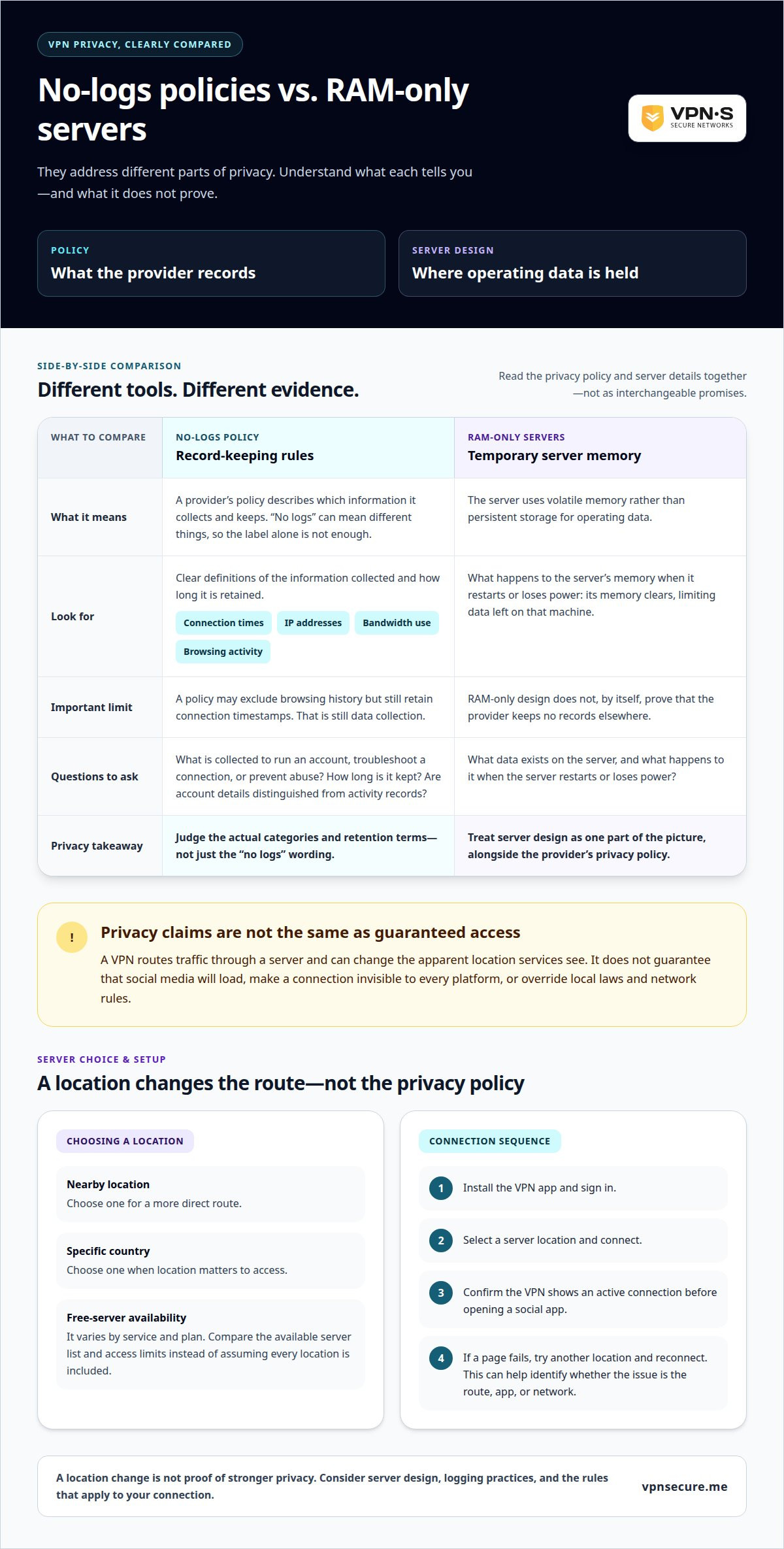
A VPN’s privacy claims depend on what its systems record, not just its marketing label. A no-logs policy should explain whether connection times, IP addresses, bandwidth use, or browsing activity are logged. For example, a policy that excludes browsing history but retains connection timestamps still describes data collection. Read the policy’s definitions and retention terms before choosing a service.
What a no-logs policy covers
“No logs” can refer to different records, so look for clear categories and plain explanations. Check what information is collected to operate an account, troubleshoot a connection, or prevent abuse, and how long it is kept. A policy should distinguish account details from activity records. This helps you assess whether your social media use could be linked to a VPN session.
How RAM-only servers work
RAM-only servers use volatile memory rather than persistent storage for operating data. When a server restarts or loses power, its memory clears, which can limit the data left on that machine. This doesn’t, by itself, prove that a provider keeps no records elsewhere. Consider server design alongside the privacy policy, including what happens during a Windows or Android connection.
Server locations and free access
Server locations affect the route your traffic takes and the apparent location services may see. Choose a nearby location for a direct route, or a specific country when location matters to access. Free-server availability varies between VPN services and plans. Rather than assuming a free option includes every location, compare the available server list and any access limits before relying on it.
Setup and server selection
Install the VPN app on your device, sign in, and select a server location. Connect before opening Instagram or another social app, then confirm the VPN shows an active connection. If a page fails, try another location and reconnect. This sequence can help identify whether the issue is the server route, app, or network, without mistaking a location change for stronger privacy protection.
Simultaneous device connections
A connection limit determines how many devices can use one VPN account at the same time. Count the devices you actually use, such as an Android phone, an iPad, and a Windows laptop. Each may need its own active connection, even when all three access Instagram or TikTok over the same home Wi-Fi.
Compatibility is separate from the connection limit. The VPN app must support each device’s operating system, and the social platform must still work in that app or browser. List your phones, tablets, and computers, then compare their operating systems with the VPN’s supported apps. Don’t assume support for one device means support for every device in your household.
Consider how you use social media across platforms. You might scroll through Instagram on a phone while checking Facebook messages on a laptop. If both devices connect at once, they use separate VPN connections. A limit that suits one person’s phone may not suit a household with several active users. Simultaneous use matters more than the total number of devices you own.
Setup also affects daily use. On each device, install the VPN app, sign in, and connect before opening an app such as X. Some apps offer a quick-connect control, though its behavior depends on the service and device. If you switch from a laptop to a phone, check which device remains connected and whether your account supports both sessions.
Use this quick assessment:
- List every phone, tablet, and computer that may connect together.
- Match each device’s operating system to supported VPN apps.
- Decide whether you need simultaneous protection or can disconnect one device before connecting another.
This makes the limit practical: choose a plan based on how you use your devices, not just how many you own. It also helps you spot compatibility gaps before relying on a VPN for social media access on a particular device.
Choosing a VPN for social media access
Choose a VPN by balancing privacy, access, device support, and connection quality. No service is fastest for every social app: distance, network conditions, and your device all affect speed.
VPN Selection Criteria
Start with your main goal: protecting traffic, accessing a platform, or both. Check the privacy policy, supported operating systems, and available server locations. Then consider how the VPN handles your IP address and whether its app supports your phone or computer. For example, an Android user should confirm the VPN app supports Android before relying on it for daily access.
Choose a server location that suits your situation. A nearby server can reduce routing distance, while a server in another country may matter when access depends on location. Neither choice overrides platform rules or local restrictions. Match the server to your purpose, then see whether the connection stays stable while loading posts, photos, and video.
Connection Speeds for Social Media Apps
Which VPNs offer the fastest speeds for social media apps? There’s no universal fastest VPN: performance changes with your location, chosen server, internet connection, and device. A service that feels quick on one network may slow down on another, so compare performance in conditions similar to your usual use.
Test the same task, such as loading a video or refreshing a feed, with and without the VPN. If traffic feels sluggish, switch to a closer server and repeat the task. This helps you identify whether the route or your underlying connection is affecting performance. Don’t judge speed by one app alone: video and text feeds place different demands on a connection.
Use a simple decision order: prioritize privacy, confirm app compatibility, select a suitable location, then assess everyday performance. If you want a VPN for social media access, explore VPN options with those criteria in mind.
VPNSecure
VPNSecure provides an encrypted VPN service to protect internet traffic and access social media across major devices. It can be a practical option for a private connection while browsing, traveling, or using public Wi-Fi. A VPN changes how your traffic reaches a platform, but it doesn’t override local laws, network policies, or social media rules.
Choose a Monthly VPN Subscription or Annual VPN Subscription based on how you prefer to access the service. If a consistent IP address suits your needs, a Dedicated IP is also available. Match your choice to your devices and privacy priorities, then use social platforms responsibly wherever you connect.
For questions about VPNSecure and its options, contact VPNSecure.
Make Your Next Connection a Deliberate Choice
A VPN for social media unblocking can support a considered approach to online access, but it shouldn’t make the decision for you. Be clear about what access you need, which boundaries apply, and what privacy trade-offs suit your situation. That clarity helps you use a VPN intentionally instead of treating every restriction as something to defeat.
Your expectations matter, too. A VPN can change how your connection is routed, but it can’t control a platform’s decisions or replace your judgment about local rules. Choose an approach you’re comfortable using consistently, and reassess it if your needs or circumstances change.
If you’re ready to explore an option that fits your priorities, contact VPNSecure about your options. Move forward thoughtfully and stay in control of your choices.
Frequently Asked Questions
Why Do You Need a VPN?
A VPN can add privacy to your connection and help you access services when a network or location blocks them. For example, it can protect traffic on café Wi-Fi and route your connection through a different server. It won’t make you anonymous or override platform policies. Before choosing how to use one, consider whether your priority is connection privacy, access, or both.
Which VPNs reliably unblock social media platforms?
No VPN can promise reliable access to every social platform on every network. A VPN for social media unblocking may help when a restriction depends on your network or apparent location, but platforms can detect and block VPN traffic. Look for clear privacy information, suitable device apps, and server locations that fit your needs. Follow applicable rules, and don’t treat access as guaranteed.
Does a VPN unblock Facebook, Instagram, TikTok, X, and Snapchat?
A VPN may help you reach Facebook, Instagram, TikTok, X, or Snapchat when access is limited by a network or location. Results depend on the platform, connection, and restrictions in effect. If one app opens but another doesn’t, the issue may be specific to that service. A VPN changes your connection route; it can’t change account settings or platform decisions.
How should you choose a VPN for social media in 2026?
Choose based on your devices, privacy needs, and intended use, rather than a ranking. Check whether the apps support your phone and computer, what the privacy policy says about data handling, and whether server locations suit your needs. For example, a frequent traveler may prioritize device compatibility and location options. Consider network and platform rules before connecting, too.
How much do VPNs for social media access cost in the United States?
VPN prices in the United States vary by provider, subscription period, and included options. Monthly and annual billing may have different terms, and add-ons can affect the total. Compare the amount due, renewal conditions, and cancellation terms before choosing. Don’t judge a plan by its advertised monthly equivalent alone: the billing period determines what you pay upfront.
How do you use a VPN to access blocked social media on iPhone, Android, and computers?
Install a VPN app that supports your iPhone, Android device, or computer, then sign in and connect to a suitable server. Open the social app or its browser version once the VPN shows an active connection. If you switch from Wi-Fi to mobile data, reconnect if needed. Apps and browsers can behave differently, so try the platform’s other access method.