



A free VPN can unblock some websites and apps, but it won’t open every streaming service. A VPN for unblocking apps routes your traffic through a VPN server, so a service may see the server’s IP address instead of yours. Access still depends on the service and its restrictions.
It’s reasonable to want a simple way around blocks without adding a tool you don’t need. This guide explains what free VPNs can and can’t do, when a VPN app, browser extension or proxy makes sense, and how a VPN masks your IP address while you use public Wi-Fi.
You’ll also learn why access varies between platforms and networks, and what to consider before choosing a VPN for streaming or everyday browsing. The goal is to help you choose the right tool without confusing access with privacy or security.
Key Takeaways
- Choose a VPN app for device-wide traffic protection, a browser extension for browser activity, or a proxy for a simpler web-only route.
- A free VPN may open some sites or apps, but streaming access can vary by service and network.
- Understand what IP masking does on public Wi-Fi, and why it doesn’t replace careful browsing.
- Match your VPN choice to the apps you use, the access you need, and the protection you want.
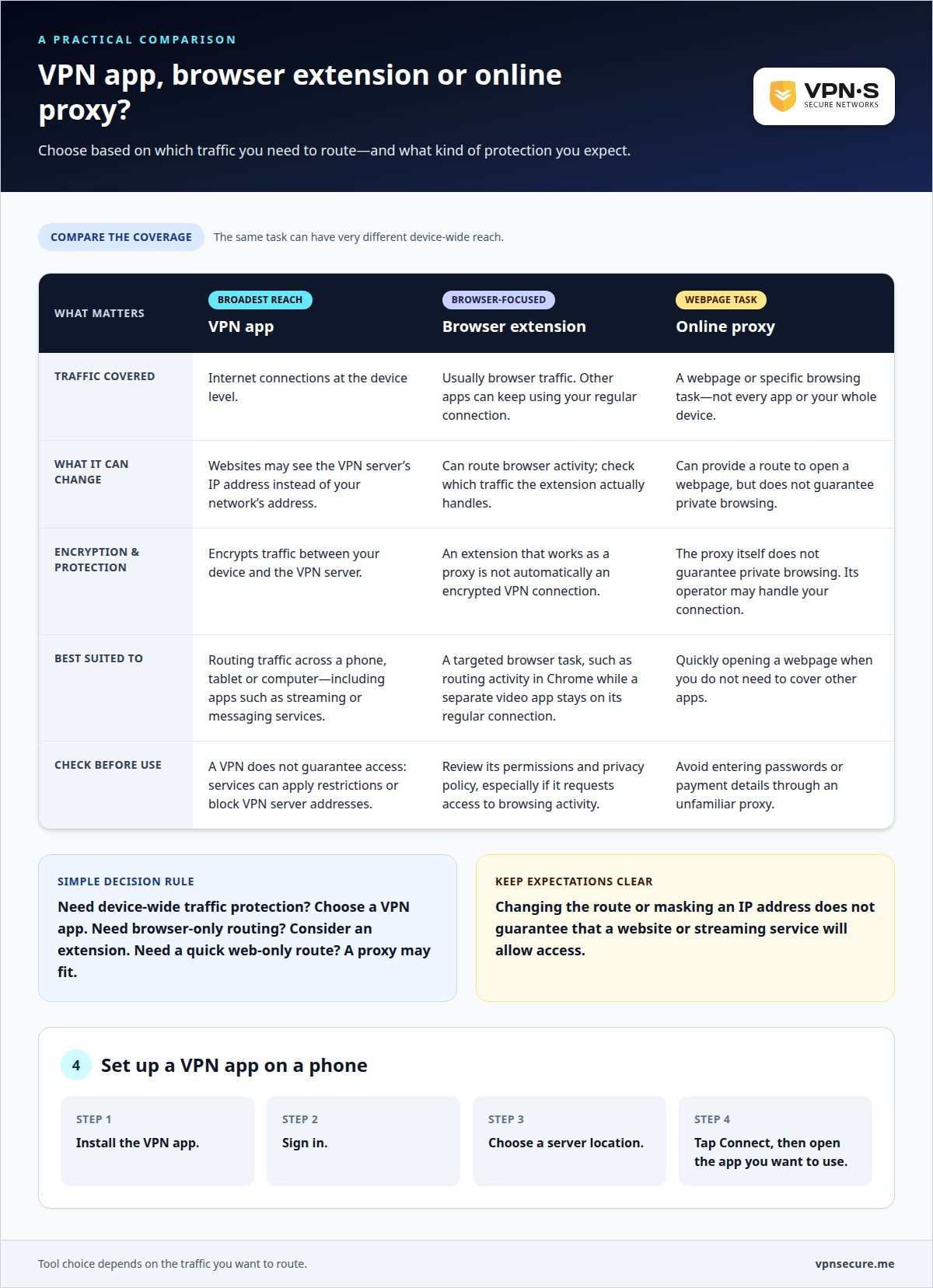
VPN app, browser extension or online proxy?
Choose a tool based on the traffic you need to route. A VPN app handles internet connections at the device level, while a browser extension usually applies only to browser traffic. An online proxy works through a webpage, making it better suited to a specific browsing task than to covering every app.
A VPN app is the broadest option for an iPhone, Android phone, tablet or computer. Connect through the app before opening a streaming or messaging service. Covered traffic then travels through the VPN connection, which can change the IP address websites see and encrypt traffic between your device and the VPN server.
A browser extension is more targeted. For example, a Chrome extension can route browser activity while a separate video app continues using your regular connection. This can be convenient for browsing websites, but it won’t automatically protect other apps on your device. Check which traffic the extension routes before relying on it.
An ad-supported browser extension may fund access by displaying ads. Before installing one, review its permissions and privacy policy, particularly if it requests access to your browsing activity. An extension that works as a proxy isn’t automatically an encrypted VPN connection.
An online proxy can quickly open a webpage, but it usually won’t cover other apps or your whole device. Avoid entering passwords or payment details through an unfamiliar proxy. Its operator may handle your connection, and the proxy itself doesn’t guarantee private browsing.
On an iPhone or Android device, install a VPN app, sign in, choose a server location, and tap Connect. Keep the connection active while opening the app you want to use. If access is still blocked, switching tools won’t guarantee access; the service’s restrictions matter too.
Encrypted browsing and private-browsing mode do different things. A VPN encrypts traffic between your device and its VPN server; private-browsing mode mainly limits what your browser saves locally. For example, Safari Private Browsing doesn’t replace a VPN, and a VPN doesn’t erase browser history saved on your device.
Free VPNs for unblocking streaming apps and services
A free VPN may open a streaming app or website, but access varies by service. Platforms can block VPN server addresses, so connecting successfully doesn’t guarantee a video will play. Free plans may also limit server locations, connection speed or data, which can interrupt streaming or restrict the regions you can try.
For US users, distinguish the VPN connection from the streaming service’s access rules. A VPN changes your connection, but it doesn’t override an app’s terms. A service may restrict VPN-based access in its terms. That platform issue is separate from whether using a VPN itself is lawful.
Free VPN risks depend on the provider and its business model. An ad-supported service may display ads, while a crowded or limited server network can make streaming slow or unreliable. Review the provider’s privacy policy and app permissions before connecting, especially if the app requests access beyond what its VPN function needs.
Try this sequence: connect to a server, open the streaming app, and test playback. If the app reports a proxy or VPN error, the server may be blocked. Disconnecting and trying another available location can sometimes help, but free plans may offer few locations or impose usage limits.
Don’t assume “free” means private or guarantees access. Check whether the service explains how it handles browsing data, what limits apply, and whether it supports the apps you use. A plan that works for browsing a website may still struggle with high-quality video or an app that blocks its server addresses. Use a free VPN for a specific, low-stakes test; choose a paid option if you need consistent access and broader protection.
IP address masking and public Wi-Fi protection
Your public IP address helps websites identify the network connection reaching them. With a VPN active, websites generally see the VPN server’s IP address instead of your network’s address. For example, traffic routed through the VPN shows the server’s address rather than the café’s Wi-Fi address. This masks your network IP, but it doesn’t make you anonymous: signed-in accounts and browser activity can still identify you.
On public Wi-Fi, a VPN encrypts traffic between your device and the VPN server, helping protect information as it travels across the local network. It doesn’t make every connection private end to end. A VPN can’t stop a phishing page from stealing information you enter or protect data after it reaches a website. Use HTTPS websites and avoid entering sensitive details on unfamiliar pages.
At an airport, hotel or café, follow this order: connect to Wi-Fi, turn on the VPN, then open your browser or app. Keep the VPN active while you browse or stream. If the connection drops, pause sensitive activity until the VPN reconnects. This puts the protected connection in place before you use other apps.
An unlimited data allowance refers to how much data a plan lets you use; it doesn’t mean unlimited privacy or unrestricted access. A VPN depends on its server connection, and websites can apply their own access rules. For example, a streaming service may block a VPN server even while the VPN masks your IP address. Encryption and location changes solve different problems.
For a practical check, compare the public IP shown before connecting with the one shown afterward. The second should belong to the VPN connection, not the café network. Then open a familiar website and confirm the connection still works. This checks IP masking; it doesn’t prove that every app or network activity is protected.
Which VPNs are best for unblocking apps in the US?
The right choice depends on the apps you use, the devices you connect, and your privacy needs. No VPN can promise access to every streaming service: platforms may block VPN server addresses, and access rules vary. Judge a provider by how well it suits your actual needs, not by a blanket promise to unblock everything.
Start with compatibility. If you want to use a streaming app on an iPhone, Android phone, computer and tablet, look for apps for those devices. Then consider simultaneous connections: watching on a television while browsing on a phone uses more than one device.
Next, assess server choice and performance for your routine. If a US streaming app blocks one server, another location may work, but switching can’t guarantee access. For video, a stable connection matters as much as location. Read the provider’s plan details for usage limits and device support before choosing.
Give privacy equal weight. Review the provider’s explanation of traffic encryption, logging and account data. These details help you understand what the VPN protects and what information remains tied to your account. A VPN can mask your IP address, but it doesn’t make signed-in activity anonymous.
Use a simple decision process: list the apps and devices you need, match them to the provider’s supported platforms, then compare its privacy terms and connection options. If you mainly need one browser, a full-device VPN may exceed what the task requires. If you want protection across apps on public Wi-Fi, device-wide coverage is more relevant.
Choose based on your real needs, not a “works everywhere” claim. Find a VPN option for your apps and devices when you’re ready to compare your requirements with a suitable plan.
VPNSecure
VPNSecure helps you use streaming and calling apps while encrypting internet traffic across major devices. If you want app access alongside protection on public Wi-Fi, its VPN service brings both needs together. Choose a Monthly VPN Subscription or Annual VPN Subscription for private VPN access. A Dedicated IP is also available.
A VPN changes the IP address apps see and routes your traffic through an encrypted connection. This can help with location-based restrictions, but each app sets its own access rules. Choose the option that fits how you browse, stream and connect across your devices.
Ready to explore a VPN for your apps and everyday connections? Contact VPNSecure to discuss your needs.
Choose your next connection with purpose
Before choosing a VPN, decide what matters most in your routine: access to a particular app, privacy on public networks, or both. That priority helps you focus on relevant features instead of broad claims that may not fit your situation.
Consider where you’ll use it, which devices you rely on, and how much control you want over your connection. A VPN for unblocking apps can be part of the decision, but the right fit also depends on the service you’re trying to access and your privacy preferences.
Take the next step by matching your needs with a VPN plan that suits your everyday use. Explore VPN options with VPNSecure and make a choice that supports how you want to connect.
Frequently Asked Questions
Can a free VPN unblock websites?
Yes, a free VPN can sometimes open a website, but the result depends on whether the site blocks the VPN’s server. A news page may load, for example, while a streaming platform rejects the same connection. Free plans can also restrict server locations or usage, so they may not suit regular video viewing. Avoid entering sensitive information through a service whose privacy practices you don’t understand.
What if the VPN download or installation is blocked?
If a network blocks VPN downloads, don’t bypass its controls without permission. Install the app using a trusted connection, such as your home network or mobile data, before traveling. Avoid unofficial download sites or files sent by strangers, which can expose your device to harmful software. On a managed work or school device, ask the administrator about approved options.
Which VPN settings help on blocked networks?
On a network that interferes with VPN connections, try a different protocol or a provider’s obfuscation setting, if available. OpenVPN and WireGuard are examples of VPN protocols, and options vary by app. A different server may also help establish a connection. Change one setting at a time, and follow the network owner’s rules, especially on workplace or school equipment.
Which VPNs reliably unblock streaming and social media apps?
No VPN can promise reliable access to every streaming or social media app. Services can identify and block VPN server addresses, and access can vary by platform, location and server. Look for a VPN that supports your devices and explains its privacy practices. Test the particular app you use, and remember that a successful connection doesn’t guarantee the platform will allow playback.
How do VPNs unblock apps restricted by a school or workplace network?
A VPN routes covered traffic through its server, which can make it harder for a local network filter to identify destinations in the usual way. But schools and employers set their own network policies and may block VPN connections. Don’t use a VPN to evade rules on a managed network. Ask the administrator about approved access, or use a personal connection where permitted.
How much do VPNs that unblock apps cost in the US?
VPN costs in the US vary with subscription term, included features, and optional services such as a dedicated IP. VPNSecure’s price depends on the option selected and is provided after a quote request. Compare the billing period and features against your needs, such as app access on multiple devices or protection on public Wi-Fi, rather than choosing on cost alone.