




















VPN & Privacy
How to Set Up a VPN on Your Smart TV for Secure Streaming
Yes, you can use a VPN with a smart TV, but the setup depends on the model. A VPN for smart TV streaming security may work through a supported TV app...

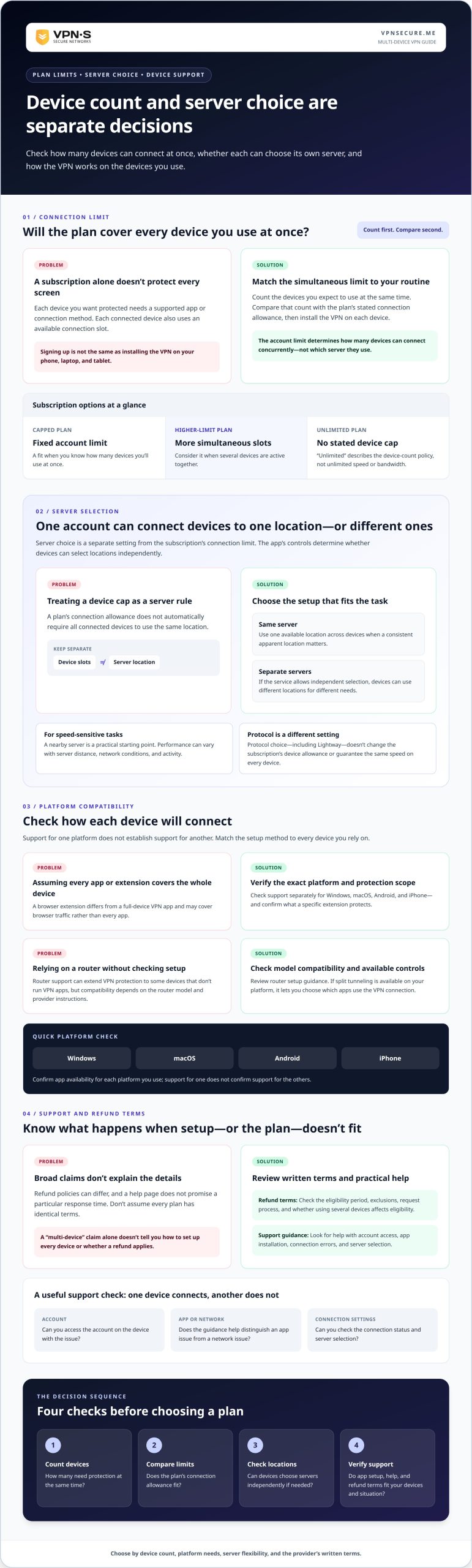
Your phone isn’t the only device carrying your digital life. A VPN for multiple devices subscription can encrypt internet traffic on the phones, laptops, and tablets you use at home, at work, and on public Wi-Fi. Check the simultaneous-device limit and setup requirements: each device needs a supported app or connection method, and the subscription determines how many devices can connect at once.
Signing up alone doesn’t protect every screen. Install the VPN on each device you want to protect, then check how the account and server selection work across those devices. It’s also worth reviewing the provider’s support guidance and refund terms before choosing a plan.
Compare subscription periods and device support against the devices you use and how you connect. The practical choice is the plan that fits your routine, platform needs, and connection limit.
Yes. Devices on one subscription can connect to the same VPN server, but they usually don’t have to. Each connected device uses an available connection slot, while its server choice is a separate setting. If the app allows independent selection, a laptop can use one location while a phone uses another.
Which VPN providers allow the most simultaneous device connections? Providers offering unlimited simultaneous connections allow the most by their stated device limit. Among capped plans, the highest published connection allowance wins.
Which VPNs offer unlimited simultaneous connections? Some VPN plans advertise unlimited simultaneous connections. Read “unlimited” as a device-count policy, not a guarantee of unlimited internet speed or bandwidth. A connection limit still matters if your account has a cap, even when you switch servers.
Protocol choice is a separate consideration and doesn’t change the subscription’s device allowance. Performance can vary with network conditions and server load, so a protocol alone can’t guarantee the same speed on every device.
| Subscription option | Device connections | Server choice | Best fit |
|---|---|---|---|
| Capped plan | Fixed account limit | May vary by device | Known device count |
| Higher-limit plan | More simultaneous slots | May vary by device | Several active devices |
| Unlimited plan | No stated device cap | May vary by device | Many connected devices |
| Single-server setup | Still subject to plan limit | Devices use one location | Consistent location needs |
| Mixed-server setup | Still subject to plan limit | Devices choose separately | Different location needs |
Choose by counting the devices you’ll use simultaneously first, then compare the plan’s limit and server-selection flexibility.
A refund policy is only useful if its terms fit your situation. Before subscribing, read the published guarantee for its eligibility period, exclusions, and refund process. Check whether using the service on several devices affects eligibility, and note what information a refund request requires. The details vary by provider, so don’t assume every plan offers identical terms.
Support matters when a device you rely on won’t connect. Look for clear instructions on account access, app installation, connection errors, and server selection. For example, if a Windows laptop connects but an Android phone doesn’t, useful guidance should help distinguish an app, network, or account issue. A help page doesn’t guarantee a particular response time.
Compare platform compatibility with the devices you actually use. Windows and macOS computers, Android phones, and iPhones are distinct platforms; support for one doesn’t establish support for another. A browser extension also differs from a full-device VPN app. It may cover browser traffic rather than every app, so check what protection the specific extension provides.
A VPN router can extend protection to devices that don’t run VPN apps, including some streaming devices. Router compatibility and setup depend on the router model and provider instructions. Also consider whether the provider supports split tunneling, which lets you choose which apps use the VPN connection. This can help separate a streaming app from other traffic, but it’s useful only when available on your platform.
Choose a provider with written terms and setup guidance for the devices you use, rather than relying on a broad “multi-device” claim.
Your laptop isn’t the only device that connects to the internet. A Windows computer might handle work and downloads, while a phone checks messages and a smart TV streams video. Each device uses its own network connection, so protecting only the laptop leaves the others outside that VPN connection. Multiple-device coverage helps match protection to how you actually use your devices.
Server locations matter when devices need different connections. A VPN app usually lets you choose from the locations in its network. You might select a nearby server on a laptop for everyday browsing and a different location on a phone when you need another regional connection. The right choice depends on your task and the locations available.
Devices on one subscription don’t necessarily need to share a server or IP address. A laptop and smart TV can connect separately if the service allows independent server selection. Using the same server can provide a consistent apparent location across devices; separate locations may suit different activities.
A larger server network can offer more location choices, but the number of locations doesn’t determine how fast a connection feels. Performance can vary with server distance, network conditions, and activity. Choosing a nearby server is a practical starting point when speed matters.
Check how the provider displays server locations in its apps, then choose based on each device’s purpose. This makes server selection practical instead of assuming one location suits every screen.
Installing an app on one device doesn’t protect the others. A phone, tablet, and computer each need a compatible VPN app or another supported connection method. A VPN for multiple devices subscription should explain which platforms it supports and how to use one account across them, subject to the connection limit.
Good installation guidance accounts for platform differences. Android and desktop operating systems have different menus, permissions, and connection prompts. Instructions should identify the correct app, explain how to sign in, and show how to connect. They should also distinguish a full-device app from a browser extension, which may cover browser traffic but not other apps.
For each device, the setup process should cover key steps:
Households with mixed devices benefit from clear, platform-specific instructions. A computer may run Windows while another uses a different operating system, and an Android phone may show separate permission prompts. If setup stalls, guidance that separates account access, app settings, and network issues makes troubleshooting more focused. Specific instructions are more useful than a generic compatibility claim.
Before choosing a VPN for multiple devices subscription, make sure the setup guidance matches your actual devices and explains how to connect each one. For protection across your own devices, explore VPN coverage for multiple devices and choose the subscription period that fits your needs.
VPNSecure offers a private, no-log VPN service that encrypts internet traffic across major devices. If you want one account for the devices you use every day, consider which of its 1-week, 1-month, 1-year or 3-year plans fits your needs. The key is matching your choice to your devices, connection needs, and preferred subscription period.
A VPN can protect traffic on supported phones and computers, whether you’re browsing at home or using public Wi-Fi. Choose the option that suits your routine, then review the app and connection details relevant to your devices. A Dedicated IP is also available for users who need that specific connection type.
Ready to discuss which option fits your needs? Contact VPNSecure.
Choose a VPN subscription for multiple devices based on how you actually use them. Start by listing the devices you rely on and where you connect. Then consider whether you need one server location across devices or different locations for different tasks. This turns a general privacy goal into a practical decision.
A strong next step is to match your priorities before selecting a plan: everyday browsing, streaming, or protecting connections while travelling. The right VPN for multiple devices subscription should fit that routine without adding complexity. Keep your device mix and preferred way to connect in mind as you decide.
If you’re ready to explore an option that fits your needs, contact VPNSecure. Take the next step with confidence and make protection part of your connected routine.
Yes, a VPN subscription can be shared within the account’s permitted use, but provider rules set the boundary. VPNSecure allows one account per person or household and says not to share beyond its 10-device limit. For example, household members can connect their own supported devices under one household account, provided simultaneous use stays within that cap.
To set up a VPN, install the app for each supported operating system, sign in, and connect from that device. If a Windows computer connects but an Android phone doesn’t, use the platform-specific guidance to identify whether the issue involves app setup, account access, or the device’s network.
No. Compatibility depends on the provider’s apps and supported connection methods. VPNSecure lists apps for Windows, macOS, Linux, iOS, Android, Apple TV and Android TV, plus browser extensions for Chrome and Firefox. Don’t assume that support for Apple TV means every smart TV has a compatible app. For router setups, its configuration files work with DD-WRT, Tomato, ASUS (models with WRT installed), OpenWrt, Synology NAS, and Raspberry Pi.
VPNSecure supports up to 10 simultaneous devices per subscription. Each connected device uses a place within that limit, so a household with several phones and computers should count the devices likely to connect together. Connecting a different device later doesn’t make the simultaneous limit higher. The subscription’s stated cap, not the number of apps installed, determines concurrent use.
They can cover several device categories, but support depends on each platform. VPNSecure lists Windows, macOS, and Linux apps for computers, plus iOS and Android support for mobile devices. Apple TV and Android TV are also listed. A tablet may use a supported mobile app, but don’t treat that as proof every tablet model or smart TV is supported.
Yes, VPNSecure permits one account per person or household, so household members can use the same account within its device limit. For example, family members could connect supported personal devices under the household account. Keep the total simultaneous connections within the subscription’s cap, and don’t extend account sharing beyond the permitted household use.
Keep reading
Yes, you can use a VPN with a smart TV, but the setup depends on the model. A VPN for smart TV streaming security may work through a supported TV app...
Before installing free VPN software on Windows, check the download source, privacy policy, data limits, ads, protocols, and whether free means a plan, trial, or refund period.
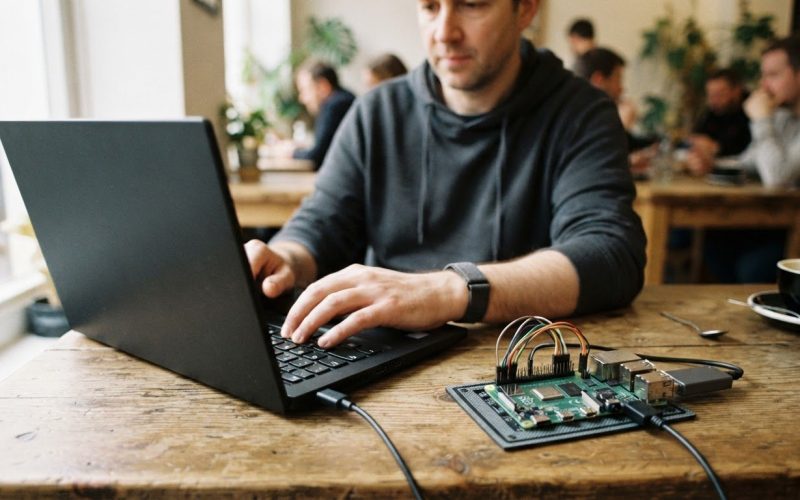
A VPN can encrypt Linux traffic, but the wrong fit may leave you struggling with setup or lacking support for your system. Choosing a VPN for Linux...
No logs, ever. Start with Free with ads in under a minute.