


The VPN with the largest server list isn’t automatically the right choice for watching foreign TV. A VPN to access foreign TV needs servers in the countries whose libraries you want, dependable streaming performance, and privacy features that fit your needs. Focus on how well those factors work together, not just on access.
It’s frustrating when a show or live broadcast is available abroad but the stream won’t play where you are. A VPN routes your connection through a server in another country, but streaming services set their own policies on VPN use, and VPN rules vary by jurisdiction.
This guide compares around seven options by streaming access, privacy, and security, so you can focus on what matters instead of getting distracted by server-count claims. You’ll also see why a VPN’s protections deserve a place in the decision, how to choose based on the TV library you want, and where VPNSecure fits if you’re looking for a private VPN subscription.
Key Takeaways
- Match VPN support to the devices you actually stream on, and consider how many connections your household needs at once.
- Choose server locations based on the TV libraries you want to reach, while keeping connection speed in view.
- Understand that VPN rules vary by jurisdiction and streaming services may set their own policies on VPN use.
- Compare privacy and security features as well as streaming access, since a VPN’s shared IP address can affect how your connection appears.
Which streaming services work with VPNs?
In the United States, VPN subscription prices depend on the provider, billing period, and included features. Compare the total price and plan terms rather than assuming monthly and annual plans cost the same. Streaming compatibility also depends on device support, server locations, and the number of simultaneous connections.
Streaming VPN provider comparisons
Compare providers by server coverage, supported devices, and simultaneous connections. An Apple TV app may make living-room streaming simpler than router setup. A provider that allows connections on many devices may suit a household with several screens. Streaming services can still apply their own VPN policies.
| Option | Device support | Server coverage | Connections |
|---|---|---|---|
| Broad app support | Phones, computers, TVs | Multiple regions | Plan-dependent |
| Smart-TV apps | Selected TV platforms | Multiple regions | Plan-dependent |
| Router setup | TVs using home network | Multiple regions | Network-wide |
| Mobile-focused | Phones and tablets | Provider-dependent | Plan-dependent |
| Computer-focused | Windows and Mac | Provider-dependent | Plan-dependent |
| Limited connections | Supported devices | Provider-dependent | Restricted |
| Unlimited connections | Supported devices | Provider-dependent | Unlimited |
Use the table as a comparison checklist, not a guarantee that every streaming service will work. Check that the provider’s app supports your device and that its server coverage includes the country you need.
Device and smart-TV compatibility
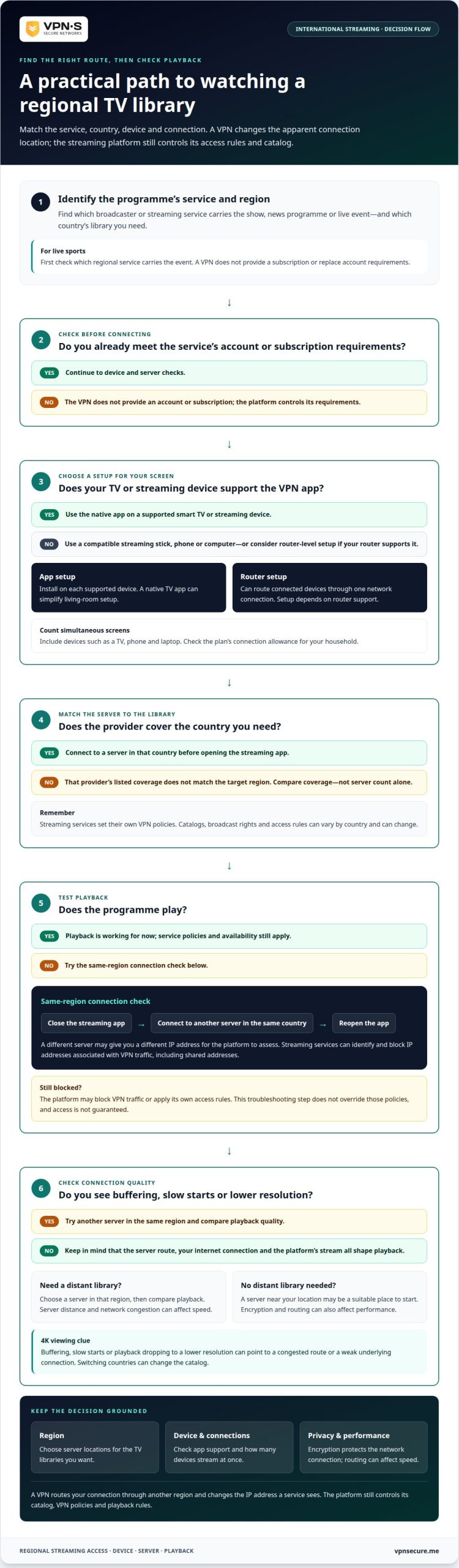
Start with the screen you’ll use. A native app can simplify setup on a supported smart TV, while a streaming stick, phone, or computer may need its own VPN app. If your TV lacks a compatible app, router-level VPN setup can route connected devices through one network connection. Setup depends on router support and differs from installing an app on each device.
Count the devices that need access at the same time, such as a TV, phone, and laptop. Then look for a provider with an option that works for your TV or router, servers in your target region, and enough simultaneous connections for your household.
VPNs for accessing international streaming libraries
A VPN routes your connection through a server in another region, changing the IP address a streaming service sees. Whether you can watch depends on the platform’s VPN policies and the library available in that region.
VPN setup and streaming troubleshooting
Choose a VPN provider with servers in the country whose library you want, then connect before opening Netflix or Prime Video. If a title remains blocked, close the streaming app, connect to another server in the same region, and reopen it. This gives the platform a new connection to assess. Catalogs and VPN policies can change, so access to one service doesn’t mean another will work.
For live sports, first check which regional service carries the event. A VPN changes your apparent location, but it doesn’t provide a subscription or override account requirements. Encryption protects the network connection, while the streaming platform controls its catalog and playback rules.
Speed and 4K streaming performance
Server distance and network congestion can affect streaming speeds. If you don’t need a distant library, connect to a VPN server near your location. If you do need another region, choose a server there and compare playback quality. A VPN may improve speeds when an internet service provider throttles streaming traffic, but encryption and routing can also affect performance.
For 4K, watch for buffering, slow starts, or playback that drops to a lower resolution. These signs can point to a congested route or a weak underlying connection. Try another server in the same region before changing regions, since switching countries can change the catalog. The VPN’s server location, your internet connection, and the platform’s stream all shape playback.
Compare providers by the regions they cover and the consistency of connections to those servers, not by server count alone. Netflix, Prime Video, and sports platforms may respond differently to VPN traffic. For a closer look at encrypted connections and streaming, explore VPN privacy and streaming.
Accessing international TV and streaming services with a VPN
A VPN can help you access a home-country stream while abroad, but the streaming service controls access. First identify the country and service carrying the programme you want to watch.
VPN IP detection and blocking
Streaming services can identify and block IP addresses associated with VPN traffic. An address shared by many VPN users may be recognizable as VPN traffic. If a stream stops working, disconnecting and reconnecting to another server in the same country may give you a different IP address. This is a troubleshooting step, not a way to override platform policies.
Home-country streaming access
For nationals abroad, home-country news and entertainment can preserve a familiar connection. Millions of nationals living abroad may want to watch news from home. First identify the broadcaster or streaming service carrying the programme, then choose a VPN server in that country. Check whether your existing subscription works abroad; a VPN changes the apparent connection location, but doesn’t replace an account or subscription.
For international TV, compare services by country and content. One broadcaster may offer local news, while another platform carries a particular sports event. Your selected country matters because streaming libraries and broadcast rights vary. Smooth viewing also depends on the server connection and the streaming service’s access rules.
Legality and streaming-service terms
VPN legality varies by jurisdiction, and streaming services may have their own policies on VPN use. These are separate considerations: a VPN’s legal status where you are doesn’t establish that a platform permits VPN connections. Before streaming, consider the rules that apply in your location and the terms of your subscription. This matters whether you’re watching a home-country service abroad or accessing another country’s library.
Choose a country based on the programme and broadcaster, not a provider’s marketing claims. A VPN can route your connection through a selected region, but the platform decides which titles are available there. Check the service’s catalog and terms before planning to watch a specific show or live event.
VPN privacy and security features
Streaming access is only one part of the decision. A VPN also changes how your internet traffic travels between your device and the wider internet. Encryption helps protect traffic on the route to the VPN server, including when you watch a stream on café Wi-Fi. It doesn’t make you invisible to Netflix or hide activity within an account you’re logged into.
Look beyond claims of fast speeds. A VPN can affect performance because traffic takes a different route, and server distance and network congestion matter too. Privacy depends on what the provider collects and retains, not just on encryption. Read the privacy policy for details about connection records, account information, and data retention.
- Encryption: Protects data in transit between your device and the VPN server.
- Logging policy: Explains what information the provider records about your connection.
- Shared IP address: Makes your online activity appear under an address used by other VPN users, rather than your regular address.
- Device coverage: Shows whether the VPN app supports each device you use for streaming.
These features serve different purposes. Encryption protects the connection path, a logging policy explains how a provider handles data, and an IP address affects how websites see your connection. None replaces strong account passwords or careful account security. For example, a VPN can’t prevent someone from accessing your streaming account with stolen login details.
Don’t treat a privacy promise or a claim of fast speeds as proof on its own. Compare the provider’s stated policies with your needs, and switch servers if a connection performs poorly. Keep the VPN app updated on each streaming device and connect securely before opening a streaming service. This supports safer viewing without confusing privacy with complete anonymity.
Choose a VPN with clear privacy practices and encrypted connections for your streaming devices. Explore encrypted VPN options to support more private viewing.
VPNSecure
VPNSecure encrypts internet traffic across major devices and can route your connection through another country. Its private, no-log VPN service can help you reach a foreign streaming library or watch home-country TV abroad. Zero logging: IP address, connection timestamps, bandwidth usage and DNS requests are NOT logged. Streaming platforms set their own access policies, so a VPN doesn’t guarantee every title will play.
Choose a Monthly VPN Subscription or Annual VPN Subscription based on how you prefer to pay. A Dedicated IP provides a distinct VPN address. The right option depends on your streaming needs and how else you use a VPN.
If you’d like to discuss using VPNSecure for international streaming, contact VPNSecure.
Make your next stream a considered choice
Choose a VPN to access foreign TV based on the libraries you want and the privacy you expect from your connection. Consider your viewing habits: occasional trips, regular overseas viewing, and everyday protection may call for different subscription terms. Streaming services set their own policies, so weigh access alongside privacy rather than treating either as the whole decision.
VPNSecure offers Monthly and Annual VPN Subscriptions, as well as Dedicated IP. Consider which option suits how you’ll use a VPN, including whether streaming is part of broader internet protection. You don’t need to chase every available library. Choose a setup that fits your devices, viewing routine, and privacy priorities.
Ready to talk through your streaming needs? Contact VPNSecure for VPN advice. Take the next step with a clearer sense of what you want from your connection, and choose with confidence.
Frequently Asked Questions
What is the best VPN for streaming right now?
No single VPN suits every streaming setup. Match the provider’s supported apps to your TV, phone, or streaming device, then check whether its server coverage includes the country you need. For example, someone watching on a smart TV may value direct app support, while a traveller may prioritize an easy-to-use phone app. Streaming platforms can still restrict VPN connections.
Can I use a VPN to save money on streaming subscriptions?
A VPN isn’t a reliable way to lower subscription costs. Streaming prices, payment options, and account rules are set by each service and may depend on your location and account details. Changing your apparent region doesn’t guarantee a different price or an accepted payment method. Compare the plans available to your account and follow the platform’s terms before subscribing.
Can I use a free VPN instead of paying for one?
You can use a free VPN if its terms and features meet your needs, but don’t assume it will support your streaming setup. Check whether it offers an app for your device, servers in your target country, and enough connection capacity for viewing. A free option may have limitations that affect usability. Review its privacy terms before routing your traffic through it.
Is using a VPN legal?
VPN legality varies by jurisdiction, so the answer depends on where you use one. That’s separate from a streaming service’s rules: a platform may restrict VPN connections even where VPN use is legal. If you’re travelling, consider the rules in your current location and the terms of the streaming account you plan to use.
Is using a VPN safe?
A VPN can encrypt traffic between your device and the VPN server, helping protect a connection on public Wi-Fi. It doesn’t make every online activity risk-free or replace antivirus software, secure passwords, and careful browsing. For example, a VPN can’t stop you entering your streaming password on a phishing page. Use it as one layer of protection, not your entire security plan.
So what works best?
A VPN to access foreign TV works best when its device support, server locations, and privacy practices fit your viewing routine. Decide which country’s content matters, choose the screen you’ll use, and review the streaming service’s terms. Then weigh access alongside connection privacy instead of chasing a single feature. This gives you a practical basis for choosing and adjusting your setup.