





















VPN y privacidad
VPN options for Mac compared by privacy, protocols, and protection
A Mac’s polished interface isn’t a privacy shield. Yes, MacBook Air and MacBook Pro can use a VPN, and macOS includes a client that supports L2TP,...

Shared Wi-Fi can expose more than your study playlist. A VPN for online learning platforms encrypts your internet traffic and masks your IP address, adding privacy when you study in a café, library, or campus common area. Can you share one subscription with classmates? Only when the subscription terms permit multiple users or devices, so don’t assume one account automatically covers the whole group.
It makes sense to want a simple way to protect your coursework and keep study sessions running smoothly. This guide explains what a VPN can and can’t do on shared Wi-Fi, how to fit one into your learning routine, and what to consider before sharing access. You’ll also learn how a VPN may affect sign-in checks on course platforms, and why a VPN is a privacy layer, not a substitute for account security or your school’s access rules.
A VPN can add privacy to course traffic, from a portal login to a live lecture. It also changes the IP address learning platforms see, which may affect access and account checks.
A VPN encrypts traffic between your device and its VPN server. On shared networks, this makes data harder for someone on the same connection to read in transit. For example, when you open a course portal or join a video class, your traffic travels through that encrypted connection. Encryption protects the route, but it doesn’t make you anonymous after you log in to the platform.
A VPN masks your usual IP address and shows the address of its server instead. This can make it harder for someone on a local network to link your browsing to your device’s network location. Your learning account can still identify you through your login. Platforms and school networks set their own VPN rules, so VPN use may or may not be permitted. A changed IP address or location can prompt account verification; any suspension depends on the platform’s rules and review.
Course platforms and schools set their own rules for VPN connections. A VPN doesn’t change course licensing, school policies, or platform terms, so use the access methods permitted for your account. If a platform asks you to verify a sign-in while the VPN is on, follow its normal verification steps or switch to a nearby server.
Encryption and routing through a VPN server can slow video lectures, live classes, or file downloads. Performance depends on factors such as server distance, network congestion, and the quality of your original connection. For a livestream, choose a nearby server and prioritize reliable performance over a distant location. Test the connection before class, then switch servers if the video stutters or course files take longer to download.
A café hotspot, library network, or campus connection uses infrastructure shared with other users. A VPN for online learning platforms can add privacy on these networks, but it doesn’t replace basic device and account safeguards.
Shared access creates risks beyond someone seeing your screen. A fake hotspot could imitate a café network, while unsafe browsing may expose account details or reveal your activity. For example, if you’re joining class from an airport, confirm the network name with venue staff before connecting. Open the official learning platform app or enter its address yourself instead of following an unexpected sign-in link.
Coursework can also remain exposed through saved sessions and shared devices. On an Android tablet borrowed from a classmate, sign out after class and avoid saving passwords. A VPN protects traffic as it travels through the network, but not files already stored on the device. Keep downloaded assignments in personal storage rather than a shared folder, and lock the screen before stepping away.
A VPN adds a privacy layer on public internet connections by routing traffic through an encrypted connection. When choosing a VPN for online learning platforms, look for a clear no-logs policy that explains how the provider handles activity information. DNS leak protection and a kill switch can help prevent requests or traffic from leaving the VPN connection unexpectedly.
Before opening a course portal at a library, connect to the VPN and confirm it stays active during class. If the connection drops, a kill switch can stop internet traffic until the VPN reconnects. This can reduce exposure during a login or video session, but it doesn’t replace a strong, unique password or secure device settings. Combine these protections, then sign out after using a shared computer.
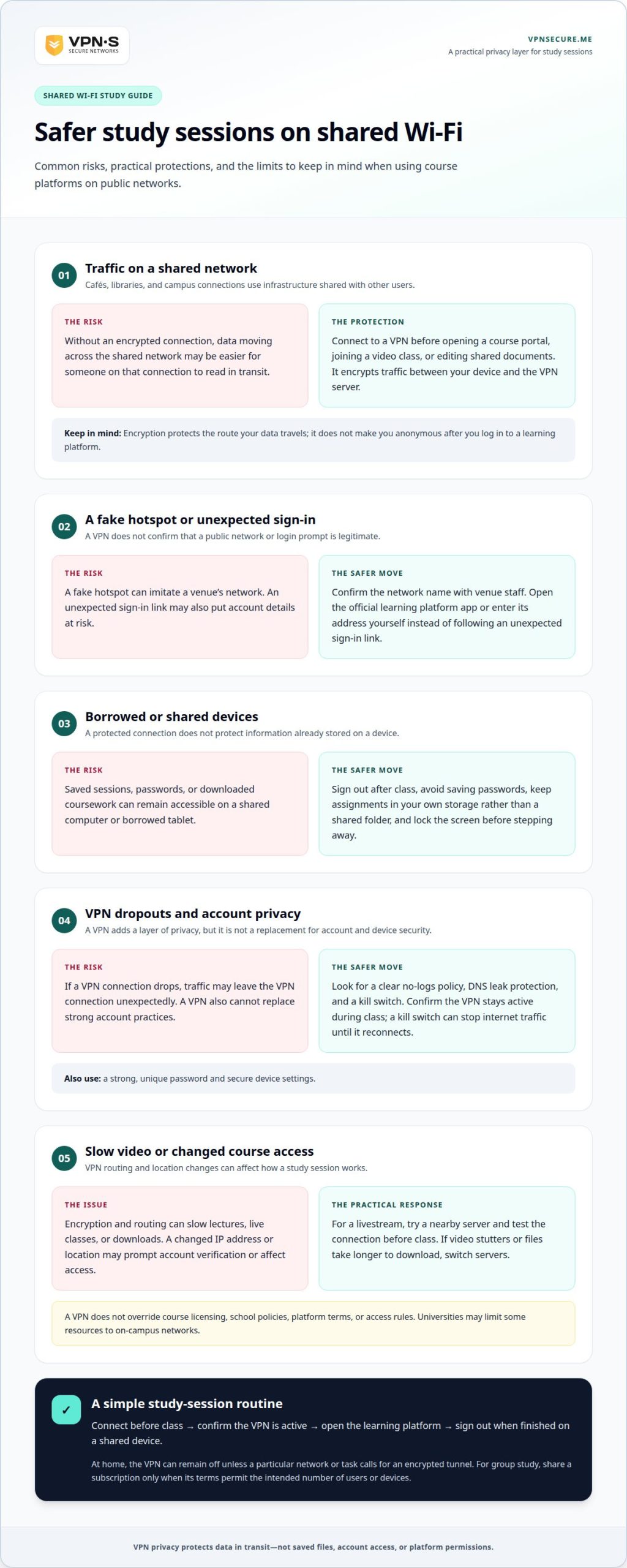
A VPN fits best when it protects study sessions without interrupting them. Students and educators can use one on public Wi-Fi before opening course portals, joining video conferences, or editing shared documents. At home, it can remain off unless a particular network or task calls for an encrypted tunnel.
Make the routine simple: connect before class, confirm the VPN is active, then open the learning platform. On a Windows laptop, start the VPN before accessing course files or joining a group call. Repeat the same step on a phone or tablet when studying away from home. Universities may limit some resources to on-campus networks because of licensing terms, access controls, or security policies, so a VPN connection may affect access.
Subscriptions differ in term and cost. A monthly subscription suits students who want a shorter commitment, while an annual plan can balance savings with a longer commitment. The amount depends on the provider and plan details, so compare the billing period and terms rather than assuming every VPN has the same price. Student discounts aren’t automatic; any available offer depends on the provider.
Free VPN options may appeal when budgets are tight, but review their limits and privacy terms before routing coursework through one. Consider whether the service supports the devices you study on, including Windows, and whether its server choices and performance suit live classes. Don’t treat “free” as proof that a service fits your privacy needs.
For shared study, each classmate should use an individual account unless the subscription terms allow sharing. That keeps access clear during group work and avoids passing login details around. A VPN can protect data moving between devices and a server, but it won’t secure files already saved in cloud storage or replace careful account practices. Sign out of shared computers after class and keep course files in your own account.
A public network puts your device on shared infrastructure, not inside a private classroom. At an airport, hotel, or campus lounge, other users connect through the same access point. Network encryption helps protect traffic in transit, but it doesn’t stop someone nearby from viewing an unlocked screen or using your unattended laptop. Lock your device whenever you leave a study space.
Remote education also means learning across countries and networks with different controls. A compromised device can expose saved course files, browser sessions, or account credentials, even when the network connection is encrypted. Before opening a course portal, install operating-system updates and close browser tabs containing personal information. Avoid downloading course materials from unexpected messages, and use the platform’s official app or site.
A VPN addresses one part of the risk: it encrypts traffic between your device and a VPN server. It doesn’t stop phishing pages, secure a weak password, or remove malware already on your device. For example, if a message pretending to come from a university asks you to reset your password, verify it through the school’s usual portal instead of following its link.
Use a practical routine at a café or library: connect to the VPN before signing into class, keep your device’s security settings and software current, and disconnect from networks you no longer need. If a video lesson stops loading, pause before turning off protections; first reconnect to the VPN or try another network. For a protected connection during study sessions, choose encrypted VPN protection.
VPNSecure offers a private, no-log VPN service that encrypts internet traffic across major devices. For students using shared Wi-Fi, it adds a privacy layer to everyday course access. A VPN still cannot override a school’s network rules or course licensing terms.
Choose a Monthly VPN Subscription for a shorter commitment or an Annual VPN Subscription for longer-term use. Either can suit a routine that includes lectures at home and study sessions on public Wi-Fi. Classmates should share access only if the subscription terms permit it; individual accounts avoid passing login details around.
If an encrypted connection fits your study routine, contact VPNSecure to discuss your needs.
Build privacy into your study routine before your next session on a shared network. Choose a VPN for online learning platforms that fits how and where you study, and keep your school’s access rules in mind. A VPN adds an encrypted layer, but thoughtful account and device habits still matter.
VPNSecure offers Monthly VPN Subscription and Annual VPN Subscription options, as well as Dedicated IP. Consider which option suits your needs and study pattern, without assuming a shared subscription covers classmates. Decide how you want to use a VPN across your own study sessions, then choose a plan.
Contact VPNSecure about student VPNs to discuss your needs. Take control of your connection and get back to learning with greater confidence.
Only share a subscription if its terms permit multiple users or devices. A personal account isn’t automatically a group plan, and sharing login details can expose your account to classmates. Before a group study session, confirm what the subscription allows and whether each person can use a separate profile. If sharing isn’t permitted, use individual subscriptions instead of passing one password around.
A VPN encrypts internet traffic between your device and its VPN server, helping shield data in transit. It doesn’t protect information you enter on a phishing page or secure files already saved to a device. For example, use a unique password for your learning account and enable two-factor authentication when the platform supports it. These steps protect account access beyond the network connection.
First, check whether your regular internet connection works without the VPN. If it does, reconnect to the VPN and try another server. Close and reopen the learning platform, then test a course page and video. If your school network doesn’t allow VPN connections, follow its access rules rather than repeatedly changing settings. For a login problem, use the platform’s normal account recovery process.
Prioritize clear privacy terms, strong encryption, compatible apps, and reliable performance on the networks you use. A nearby server can help keep delays manageable during live lessons. Also consider whether the provider explains its logging practices and supports your laptop and phone. Before relying on a VPN for a deadline, test your learning portal, video class, and file uploads on your usual device.
There isn’t one VPN that guarantees identical access across Coursera, Udemy, and Canvas. Platform settings, school sign-in systems, and course licensing can affect how connections work. Test the VPN with your account by trying a login, a video lesson, and a file upload. If your school requires its own access method, follow those instructions for campus resources.
VPN costs vary by provider, billing term, and included features, so compare the full subscription terms rather than just a monthly equivalent. Free access depends on the provider; VPNSecure offers paid subscriptions, not a free-to-use tier. Before choosing, weigh the privacy policy, device support, and performance you need for classes. Avoid treating a free plan as suitable without reviewing its limits and data practices.
Sigue leyendo
A Mac’s polished interface isn’t a privacy shield. Yes, MacBook Air and MacBook Pro can use a VPN, and macOS includes a client that supports L2TP,...

Planning a trip to China? Learn which VPN features matter, why Stealth VPN helps, how to prepare before departure, and what legal and access limits to consider.

A VPN for accessing region-locked games can change the IP location a game sees, but it won’t automatically change your Steam store region. Steam...
Sin registros, nunca. Empieza con Gratis con anuncios en menos de un minuto.