




















VPN y privacidad
How to Set Up a VPN on Your Smart TV for Secure Streaming
Yes, you can use a VPN with a smart TV, but the setup depends on the model. A VPN for smart TV streaming security may work through a supported TV app...
In short
Free VPN software for Windows can be useful for short, low-risk browsing, but install only from a verifiable publisher and read how the service pays for itself. Before connecting, check the privacy policy, Windows download source, data limits, protocol support, ads, and whether free really means a plan, trial, or refund period.
Key takeaways
Free VPN software for Windows is not automatically unsafe, but free pricing alone tells you almost nothing about the app’s security or privacy practices. The safer decision is to verify who publishes the app, what it collects, how it is funded, and whether Windows recognizes the download source.
A VPN creates an encrypted connection between your device and a VPN service, which can reduce some risks from network eavesdropping. It does not remove the need to assess the VPN company itself, and it cannot repair a compromised computer or neutralize a malicious app. NIST’s VPN guidance notes that VPNs can reduce networking risks but cannot eliminate them. (tsapps.nist.gov)
The first risk comes before you connect. An unfamiliar installer can request broad permissions, add unwanted software, or simply be a poor-quality app with unclear data practices. That is why the download source and publisher matter as much as encryption terminology.
A trustworthy-looking app can still have tradeoffs. Read the privacy policy and terms for plain answers about connection logs, account data, advertising, analytics, sharing with third parties, and how long information is retained. The Federal Trade Commission advises consumers to use privacy policies, user agreements, and terms of service to understand what an app collects and how the developer says it secures that information. (consumer.ftc.gov)
A free Windows VPN is safest when you can verify both the software and the service behind it.
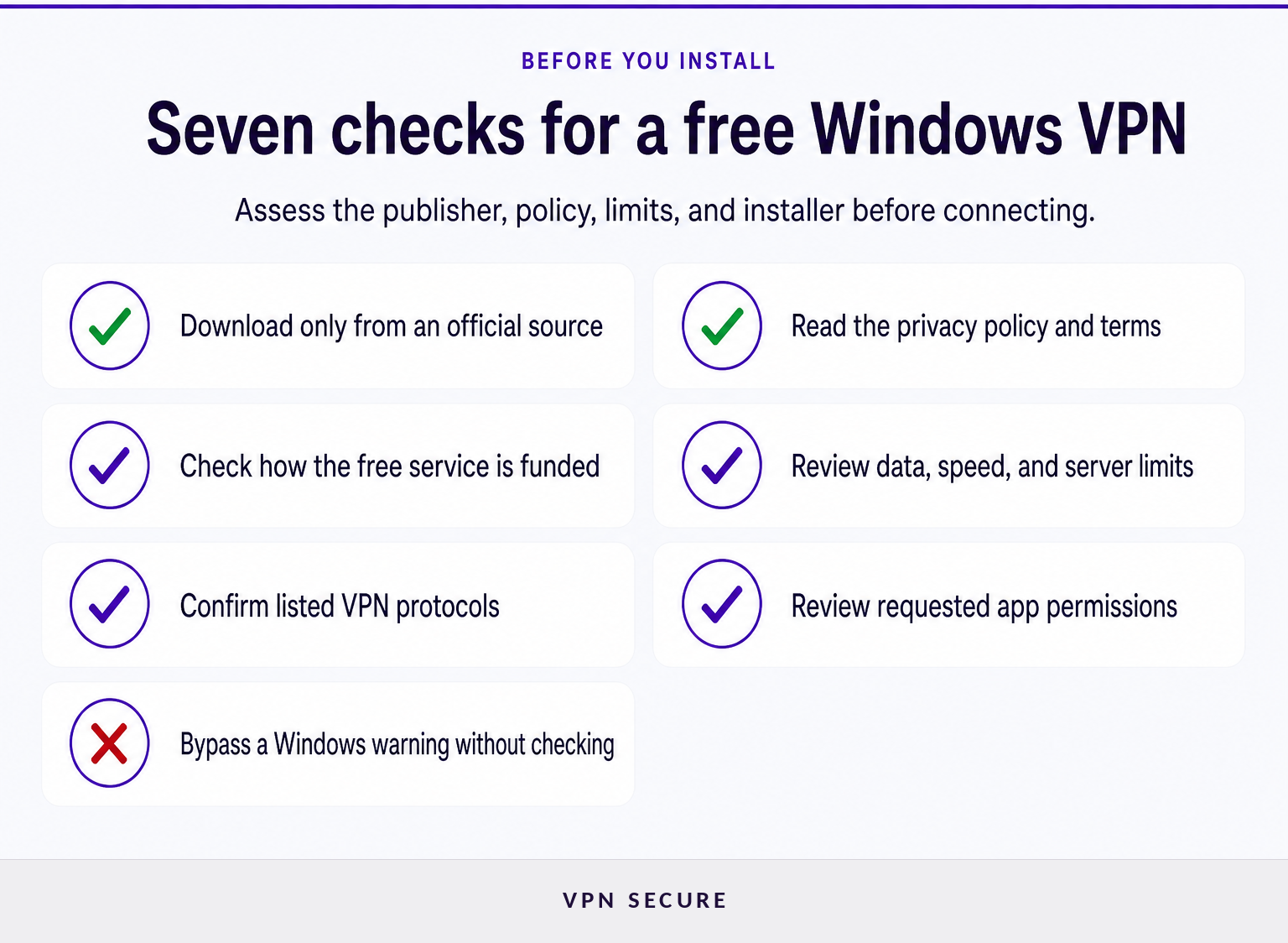
Check the publisher and download location first, then check the privacy policy, limits, billing terms, and technical details. If any of those are missing, vague, or contradictory, treat that as a reason to pause rather than a reason to install.
Use this checklist before clicking Install:
The best free VPN download is one you can verify before it ever connects to the internet.
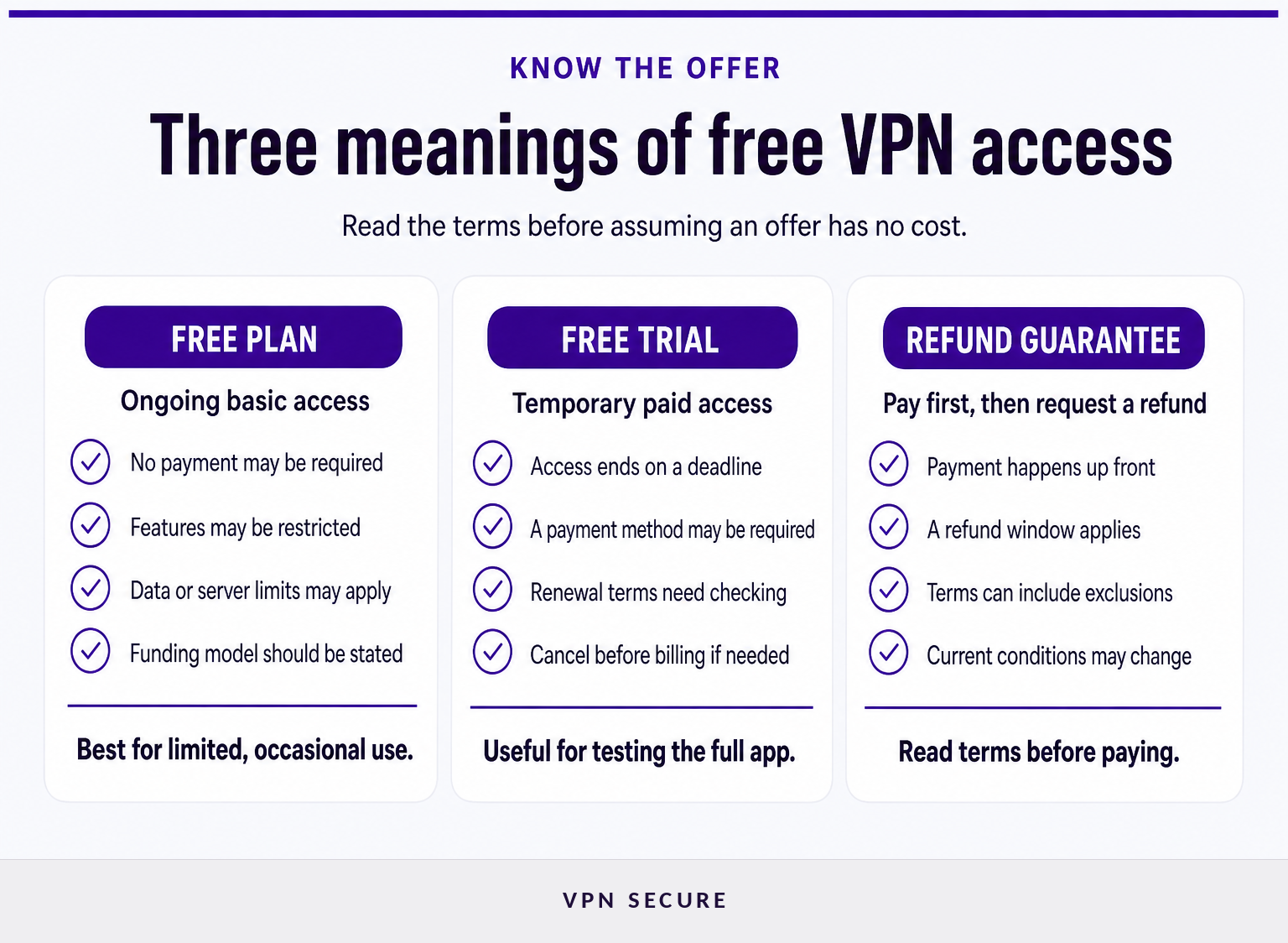
These labels are often grouped together, but they are not interchangeable. A permanently free plan can be used without payment, while a free trial and a money-back guarantee commonly involve a deadline, account requirements, or payment details.
A permanently free plan is usually designed for ongoing basic use. It may limit data, locations, speed, devices, or advanced features. It can be a sensible option if you only need occasional browsing and accept the restrictions.
A free trial gives temporary access to a paid tier. Check whether a card is required, when paid billing begins, whether auto-renewal is enabled, and what cancellation route applies. A trial can be useful for testing a Windows app before committing, but it is not the same as a lasting free service.
A money-back guarantee means you pay first and may request a refund within stated conditions. Read the applicable current terms before paying. Refund periods, eligible payment methods, renewal treatment, and exclusions can change.
For long-term use, compare the restrictions of free access with the capabilities and current terms of paid VPN plans. The important comparison is not “free versus paid” in the abstract. It is whether the plan fits your privacy needs, expected usage, and tolerance for limits.
A free offer is only useful when you understand exactly when it ends, what it restricts, and what it costs afterward.
Most free VPN plans trade full access for a narrower service. The limits may involve data, speed, available locations, simultaneous devices, streaming access, support, or security features.
Data caps are the easiest limit to spot because they appear as a number, but other restrictions can matter more. A plan with unlimited data may still offer only a few locations, crowded servers, a slower protocol choice, or no protection if the connection drops.
For everyday browsing on public Wi-Fi, the most relevant checks are whether the app covers all device traffic, supports a kill switch, and handles both IPv4 and IPv6 traffic where applicable. If you only need browser traffic routed through another location, a proxy extension may be enough, but it does not protect other Windows apps in the same way as a device-wide VPN tunnel. See how a VPN works before treating a browser extension and a VPN app as equivalent.
Logging language also deserves close reading. “No logs” can mean different things unless the provider explains which records are not retained. Look for direct statements about IP addresses, connection times, bandwidth usage, DNS requests, and browsing activity. For an example of the level of detail worth seeking, read VPNSecure’s no-logging policy.
Free VPN limitations matter most when they interfere with the specific protection or access you expected to receive.
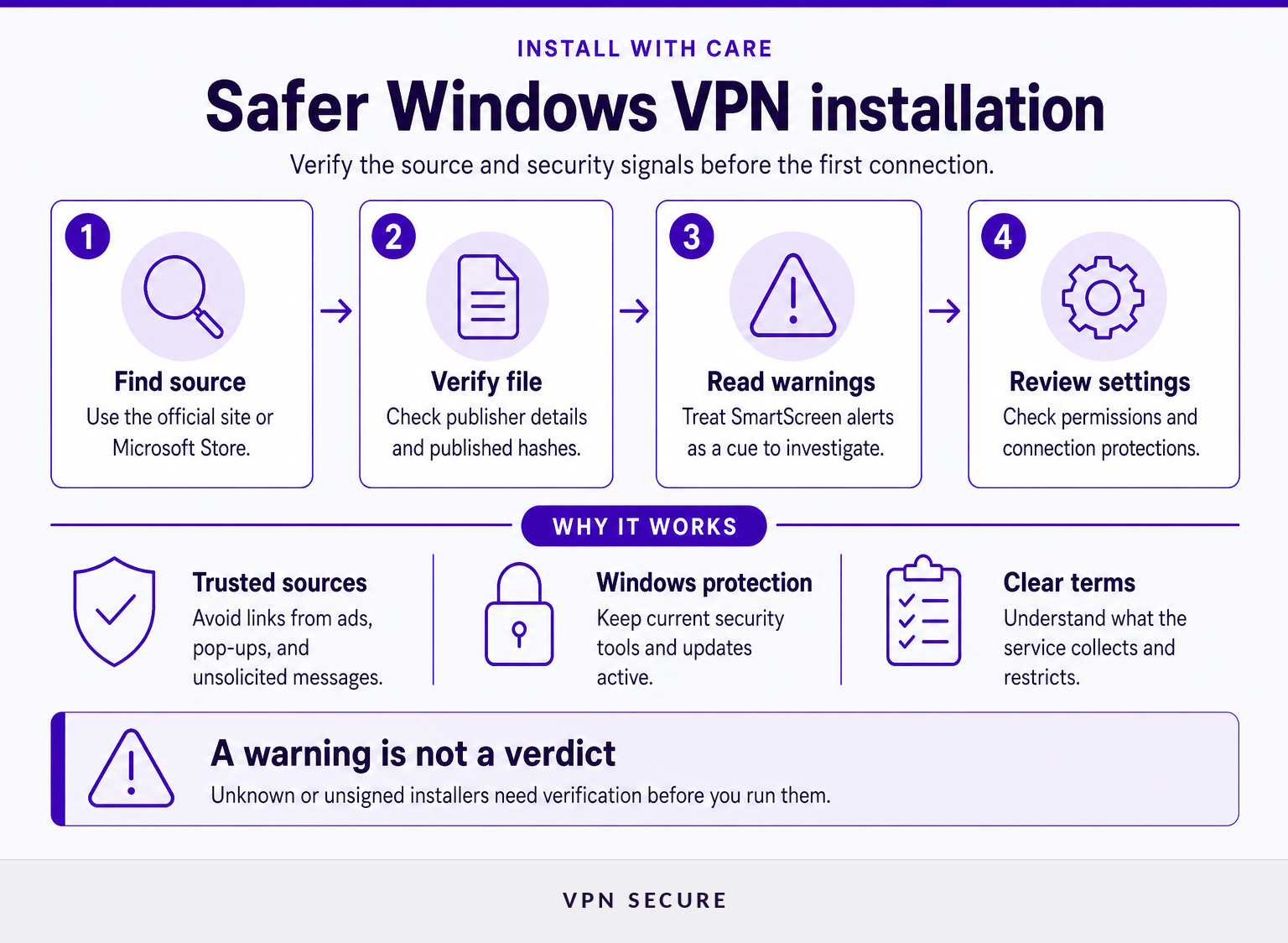
Use the provider’s verified download page or the Microsoft Store, keep Windows security protections enabled, and stop if the installer behaves differently from what the official source describes. Do not disable security warnings merely to complete an installation.
Microsoft recommends downloading applications from trusted sources, maintaining updated protection, and taking Windows warnings seriously. Microsoft Defender SmartScreen evaluates file and publisher reputation, download history, URL reputation, and other signals. A warning does not by itself prove that software is malicious, but Microsoft says it should prompt caution, particularly for an unsigned or unexpected download. (learn.microsoft.com)
As of November 2026, VPNSecure’s Windows page states that its current direct installer is not code-signed and may show a SmartScreen or unknown-publisher warning. The page also publishes a SHA-256 value for the installer and offers a Microsoft Store route. Verify that you are on the official page before using either route, and do not proceed with a direct installer unless you are satisfied that the source and file details match what the publisher provides. (vpnsecure.me)
Before connecting for the first time, update Windows, confirm that antivirus protection remains active, and read the app’s settings. Enable a kill switch only after understanding that it can block internet access when the VPN disconnects. Test the connection on a routine website before relying on it for a sensitive task.
Safer installation is about verifying the source, respecting Windows warnings, and understanding the app before it handles your traffic.
The questions below focus on the decision points that matter before a free VPN is installed on a Windows PC. The answers apply broadly because each provider’s rules, app behavior, and privacy terms can change.
A free VPN can be safe for Windows if the publisher is verifiable, the download comes from an official source, and the privacy policy clearly explains data handling. Check SmartScreen warnings, permissions, protocol information, usage limits, and support documentation before installing. Free pricing does not prove either safety or danger. (learn.microsoft.com)
Some VPNs offer a permanently free tier, while others use a limited trial, promotional credit, advertising, or a refund period after payment. Read the billing screen and terms before entering payment information. Confirm what happens when the introductory period ends, whether renewal is automatic, and which features are unavailable without a subscription.
A VPN encrypts traffic between your device and the VPN service, but it does not replace malware protection or make an unsafe installer harmless. Keep Windows updated, use trusted download sources, and retain active security protections. Microsoft specifically advises caution with unfamiliar programs downloaded from the internet. (tsapps.nist.gov)
The safest answer is usually the one that separates connection privacy from software safety.
Start with the smallest decision: decide whether you need occasional basic VPN access or regular device-wide protection. Then compare the limits, privacy terms, Windows installation route, and current billing conditions before you hand an unfamiliar app control over your network traffic.
If a subscription-based Windows VPN better matches your needs, review VPNSecure for Windows and verify the current download, account, and plan details before installing.
Sigue leyendo
Yes, you can use a VPN with a smart TV, but the setup depends on the model. A VPN for smart TV streaming security may work through a supported TV app...

Una VPN para varios dispositivos puede cifrar el tráfico de internet de los móviles, portátiles y tablets que usas en casa, en el trabajo y en wifi públicas.
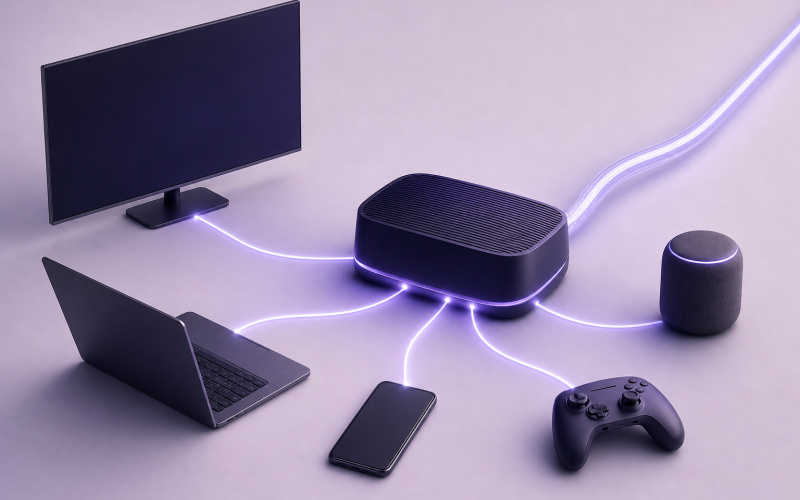
Descubre qué protege una VPN en un router, dónde siguen importando las apps de VPN, qué routers sirven y cuándo tiene sentido un router VPN preconfigurado.
Sin registros, nunca. Empieza con Gratis con anuncios en menos de un minuto.