





















VPN et confidentialité
VPN options for Mac compared by privacy, protocols, and protection
A Mac’s polished interface isn’t a privacy shield. Yes, MacBook Air and MacBook Pro can use a VPN, and macOS includes a client that supports L2TP,...

A low price doesn’t tell you whether an Android VPN protects your privacy. A VPN for Android phone security can encrypt traffic between your phone and a VPN server, but protection also depends on the provider’s privacy practices, security features, performance, and plan limits.
It’s reasonable to want protection that works without slowing your phone or trading convenience for restrictions. Free plans may limit usage, while paid plans can differ in price, device limits, and included features.
Before choosing, compare the free tier’s usage limits, privacy and security features, subscription costs, and how many devices a plan covers. Consider how those trade-offs affect your Android phone, then weigh the protection you want against the limits you’re willing to accept.
A VPN for Android phone security can help protect browsing, but a free plan’s data cap may interrupt everyday use. Compare the monthly allowance, speed restrictions, privacy practices, and streaming access before choosing.
Free VPN plans commonly allow about 500 MB to 2 GB of high-speed traffic before slowing or cutting off the connection. That may cover occasional browsing, but video streaming can use the allowance quickly. A capped plan prioritizes a clear data limit; an advertised unlimited plan removes that cap but may still have speed or feature restrictions.
Performance also depends on the server and connection conditions. A slow connection can make pages load gradually and videos buffer, even before the data allowance runs out. Treat “unlimited” as a data description, not a promise of unlimited speed.
A free tier can provide limited VPN access, while a paid plan may offer different features and fewer usage restrictions. The exact mix varies by provider. A Google Play Store rating of at least four stars can help you assess user feedback, but it doesn’t establish how an app handles personal data.
Privacy deserves special attention: a 2016 analysis found that 75 percent of Android VPN apps used third-party tracking libraries. Check the app’s privacy information and permissions before relying on it. VPNSecure is one provider name you may encounter, but judge each plan by its own terms rather than its brand alone.
Streaming is another consideration. Access to Netflix or other platforms can vary, and video can use data quickly. Compare the plan’s stated streaming access with your intended use instead of assuming every VPN connection will work with every service.
| Plan option | Data | Speed | Streaming fit |
|---|---|---|---|
| Capped free plan | Limited | May slow or stop at cap | Short, occasional viewing |
| Advertised unlimited free plan | No stated data cap | May still have restrictions | Depends on plan access |
| Free plan with restricted features | Check plan terms | Check plan terms | May not suit regular viewing |
| Paid VPN plan | Compare its allowance | Compare its limits | Check supported services |
| Free plan for browsing | Allowance determines use | Restrictions affect loading | Better suited to lighter use |
Choose by matching your usual data use and streaming needs to the plan’s stated limits, not by the words “free” or “unlimited.”
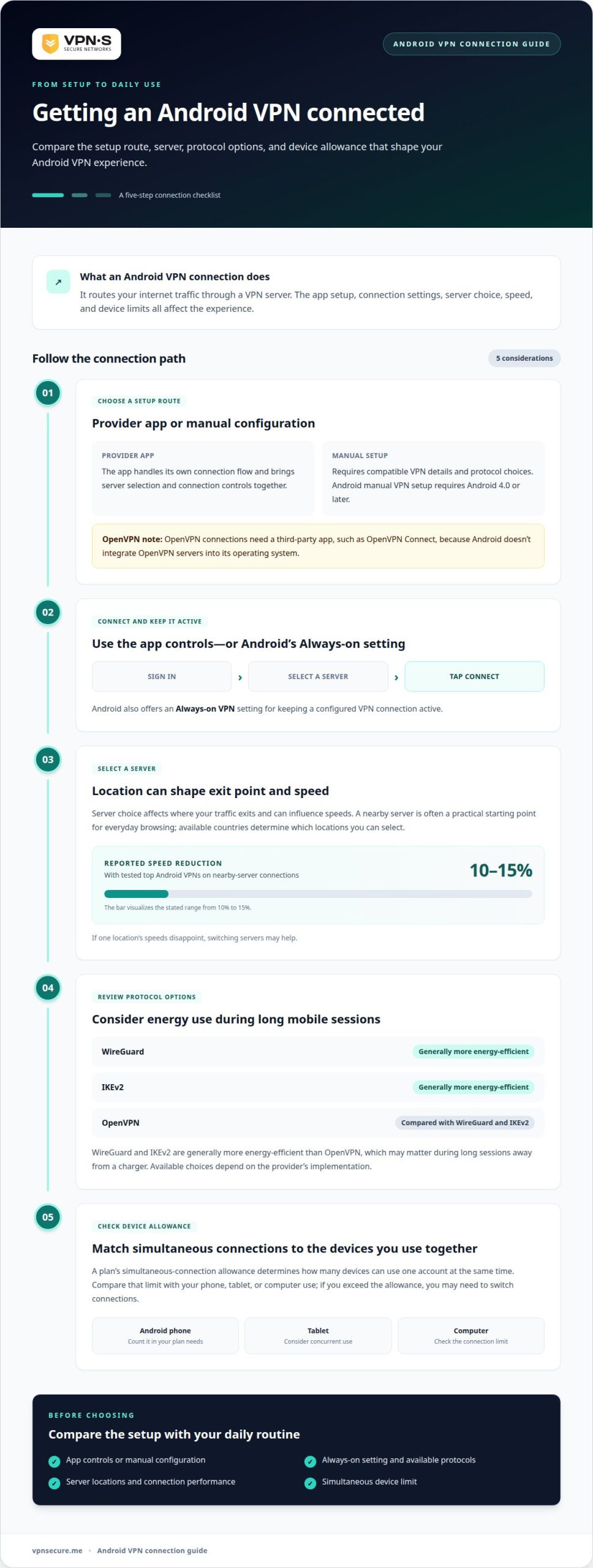
An Android VPN connection routes your internet traffic through a VPN server. App setup, connection settings, server choice, speed, and device limits shape the experience.
A VPN app typically connects after sign-in, server selection, and a tap to connect. Android also offers an Always-on VPN setting for keeping a configured VPN connection active. The app route is designed around its provider’s available servers and controls; Android also offers a built-in option for manually configuring a VPN connection.
Manual VPN setup requires Android 4.0 or later. OpenVPN connections need a third-party app such as OpenVPN Connect because Android doesn’t integrate OpenVPN servers into its operating system. These options differ in setup: a provider’s app handles its own connection flow, while manual configuration requires compatible VPN details and protocol choices.
Server choice affects where your traffic exits and can influence speeds. A nearby server is often a practical starting point for everyday browsing. With tested top Android VPNs, nearby-server connections typically reduce speed by 10-15%. Server availability across countries can also affect which locations you can select.
Device limits matter if you want to protect your Android phone alongside a tablet or computer. A simultaneous-connection allowance determines how many devices can use one account at the same time. Compare that limit with the devices you use together; you may need to switch connections if you exceed the allowance.
Protocol choice can affect performance too. WireGuard and IKEv2 are generally more energy-efficient than OpenVPN, which may matter during long sessions away from a charger. A provider’s Android app may offer connection options, while the specific choices depend on its implementation. The Google Play Store app route brings server selection and connection controls together; switching servers can help when one location’s speeds disappoint.
Compare server locations, supported protocols, Android’s Always-on VPN setting, and simultaneous device limits with your daily routine before choosing.
Android VPN protection depends on encryption, the app’s permissions, and the provider’s privacy practices. A paid plan may add features or remove limits, but price alone doesn’t establish stronger security.
Look for AES-256 encryption and clear privacy terms before installing an app on an Android device. A 2016 analysis found that 82 percent of Android VPN apps requested access to user accounts or texts. Review the permissions shown by Google Play before you download; a VPN connection doesn’t justify unrelated access to mobile data.
Compare monthly and annual billing terms and included features rather than treating price as proof of protection.
No single protocol is automatically the most secure in every Android setup. WireGuard, OpenVPN, and IKEv2 are distinct options, and the provider’s implementation and encryption matter. AES-256 is a recommended encryption standard. WireGuard and IKEv2 are generally more energy-efficient than OpenVPN, which may matter during long sessions on a mobile device.
Android may offer built-in VPN options, though available protocols can vary. A 2016 analysis found that 18 percent of Android VPN apps used unencrypted tunneling protocols. Focus on encrypted connections and the app’s stated protocol options, not just an advanced-sounding name.
Yes. A VPN encrypts traffic between your Android phone and the VPN server, adding protection when you use public Wi-Fi at a café or airport. It helps protect internet traffic on that connection, but it doesn’t make every app, website, or account secure.
A VPN can’t stop phishing, malware, unsafe downloads, or someone using a stolen password. It also doesn’t replace secure account practices or make a fake login page trustworthy. On public Wi-Fi, use a VPN for traffic protection, and treat unexpected links and requests for account details with caution.
A VPN subscription’s value depends on more than its monthly charge. Compare the billing term, simultaneous device limit, connection features, and restrictions that affect your Android phone and other devices.
Price depends on the case and is given after a quote request; cost factors include the subscription term, device allowance, and included features. Monthly and annual billing suit different budgets: a monthly term offers flexibility, while an annual term commits you for longer. Compare the total commitment and renewal terms, not just the advertised billing interval.
Device limits set how many connections can share one account at once. Count the Android phone, tablet, and computer you use together, then compare that total with the plan’s allowance. A strict connection limit can mean disconnecting one device before connecting another. That trade-off matters if several people share the same network or account.
Features also shape value. A kill switch is designed to stop internet traffic if the VPN connection drops; split tunneling lets selected apps use a different connection route. Don’t assume every plan includes these features. Compare the plan details and decide whether either fits your routine.
Streaming adds another practical consideration. If you watch on an Android phone and a television, check how the device allowance works across both screens. Then compare the service’s connection options and stated limits. A plan with more simultaneous connections may suit a multi-device household better, even if phone protection is your main reason for subscribing.
Match the plan term and device limit to your actual use. For one phone, a larger household allowance may add little value; for a phone, tablet, and laptop used together, it can prevent constant switching. Weigh that against features you’ll use rather than assuming a longer term or longer feature list means better value.
To compare VPN subscription options against your device needs, focus on the limits and billing term that fit your routine.
VPNSecure offers a private, no-log VPN service that encrypts internet traffic across major devices. If you want a paid option for your Android phone rather than a free plan with data limits, its Monthly VPN Subscription and Annual VPN Subscription provide two subscription terms to consider.
Choose based on how long you want access and which devices you plan to protect. VPNSecure can help encrypt traffic on public Wi-Fi and support private browsing, but a VPN cannot prevent threats such as phishing or malware. Match the subscription to your needs, not to features you won’t use.
For help deciding which VPNSecure subscription fits your Android use, contact VPNSecure.
Choose protection based on how you actually use your Android phone, not the loudest claim on a plan page. A VPN for Android phone security is one part of a broader privacy routine: it can encrypt network traffic, but it won’t block every online threat. Keep that distinction in mind as you decide which safeguards matter most.
VPNSecure offers Monthly VPN Subscription and Annual VPN Subscription plans, as well as Dedicated IP as an optional add-on. The right fit depends on your intended use and preferred subscription term. Focus on the protection and flexibility you need, and avoid paying for features that don’t serve your routine.
Take the next step with a clear idea of your priorities. Contact VPNSecure for help choosing an option for your needs, then move forward with greater confidence in how you protect your connection.
Install the provider’s Android app, sign in, and approve its request to create a VPN connection. The app can then show connection status and available locations. You’ll need your account details before connecting. After setup, confirm the VPN indicator appears when connected so you know the phone is routing traffic through the service.
Some phones support VPN connections through their operating systems, but that isn’t the same as an active VPN subscription. The phone’s settings can connect to a compatible VPN configuration, while a provider’s app gives access to its service and account. Buying a phone doesn’t automatically provide a provider account or server network.
Yes. Android includes a VPN client for supported configurations, but it doesn’t provide a commercial VPN account or server network by itself. You can use a provider’s app or configure a compatible connection manually. Android supplies connection support; the provider supplies the account and VPN endpoints.
Choose a service with an Android app that suits your Samsung phone, clear privacy terms, and stated encryption details. Review the app’s requested permissions before installation, and consider whether its device allowance covers your other devices. If you use a Samsung phone and tablet, for example, the simultaneous-connection limit determines whether both can stay connected under one account.
An Android VPN service can work with Android’s Always-on VPN setting to keep a configured connection active. Available controls depend on the app and Android version. If you use your phone for calls or navigation while moving between Wi-Fi and mobile data, a persistent connection setting can reduce the need to reconnect manually after changing networks.
A VPN encrypts traffic routed through its connection, adding protection when your Android phone uses public Wi-Fi. It doesn’t hide activity inside accounts where you’re signed in, and it can’t prevent every online threat. For instance, a VPN won’t make a fraudulent sign-in page safe or stop you from sharing a password with a phishing site.
À lire aussi
A Mac’s polished interface isn’t a privacy shield. Yes, MacBook Air and MacBook Pro can use a VPN, and macOS includes a client that supports L2TP,...

Planning a trip to China? Learn which VPN features matter, why Stealth VPN helps, how to prepare before departure, and what legal and access limits to consider.

A VPN for accessing region-locked games can change the IP location a game sees, but it won’t automatically change your Steam store region. Steam...
Aucun log, jamais. Commencez avec Gratuit avec pubs en moins d’une minute.