





















VPN и конфиденциальность
VPN options for Mac compared by privacy, protocols, and protection
A Mac’s polished interface isn’t a privacy shield. Yes, MacBook Air and MacBook Pro can use a VPN, and macOS includes a client that supports L2TP,...

Streaming on the road usually means hotel, airport or café Wi-Fi you don’t control. A VPN for streaming while travelling encrypts your connection on those networks and hides your IP address from trackers. It doesn’t change what a streaming service offers you: each service’s terms and account rules still apply.
Want to keep up with your shows while travelling? The key question is whether a VPN keeps your accounts private on the networks you’ll use, not simply how many server locations it lists.
This guide compares six VPN options on privacy, device support, pricing and server routing. You’ll see why streaming services treat VPN connections differently and what to consider for your viewing setup. Use these practical details to compare your options without relying on broad promises.
A free VPN isn’t automatically unsafe, but “free” doesn’t explain how it handles your traffic. Before streaming over public Wi-Fi, review its privacy policy, encryption, data limits and server network. A VPN connection alone doesn’t guarantee that a streaming player will load.
Streaming services handle VPN connections differently, and some may not accept them under their terms. A VPN for streaming while travelling therefore needs strong encryption and a stable route, not just a familiar app. Free plans may also limit your choice of servers or streaming data, so check the actual plan details.
A VPN doesn’t provide a TV licence or change your licence status. Whether you need a licence to watch BBC iPlayer depends on the applicable BBC rules and your circumstances.
Streaming services may require an account, and postcode or payment requirements can differ. A VPN encrypts your connection; it doesn’t create an account or meet separate sign-up requirements.
Using a VPN is legal in the UK, but a streaming service may set its own rules on VPN use in its terms. Legality and account terms are separate questions, and the rules differ by platform.
| Option | Safety checks | Streaming setup | Best fit |
|---|---|---|---|
| Free VPN | Review privacy and encryption details | Server choice may be limited | Light, occasional use |
| Paid VPN | Review the same safeguards | Compare server network and device support | Regular streaming |
| No VPN | No VPN provider involved | No encryption on public Wi-Fi | Trusted home networks |
Choose based on the VPN’s privacy practices, server network and the devices you stream on.
If playback is slow or unstable, try another server close to you. Reconnect, then reopen the app or player. If a service doesn’t support VPN connections under its terms, follow those terms. On a smart TV, use a VPN only if the TV or your network setup supports it; otherwise, stream from a compatible device.
Check device support before travelling. Windows and macOS apps can protect a laptop, while iOS and Android apps cover phones and tablets. Smart TV support varies, so check whether your television supports a VPN app or can use a compatible network setup. Choose based on the devices you’ll actually use to stream.
Which VPNs offer a solid server network, streaming performance and simultaneous connections? Look for server locations near where you’ll be, apps for your devices and a connection limit that suits your household. Playback also depends on your internet connection, distance to the server, server load and selected video quality.
A speed comparison using a 100 Mbps connection gives a clear baseline, but it doesn’t predict your results abroad. For example, a server close to where you are staying is usually a practical first choice; if playback stutters, try another nearby location and compare speeds. Keep other bandwidth-heavy apps closed while testing to see whether they affect playback.
Connection limits vary by subscription. One subscription in this comparison allows up to five devices to connect at once. Count the devices likely to be online together, such as a laptop, phone, tablet and smart TV. Also distinguish simultaneous connections from the number of devices on which you can install the app: those limits may differ.
Install the VPN app on a compatible device, sign in, select a nearby server and connect before opening your streaming service. If your television lacks a suitable app, use a compatible device and cast or connect it as your setup allows. A stable connection can help avoid interruptions, but no server location guarantees a particular speed.
For a private connection across your devices, explore VPN options for streaming and compare them with your setup.
That plan allows up to five devices to connect at once. Actual streaming speeds vary with your connection, distance to the server, server load and video quality.
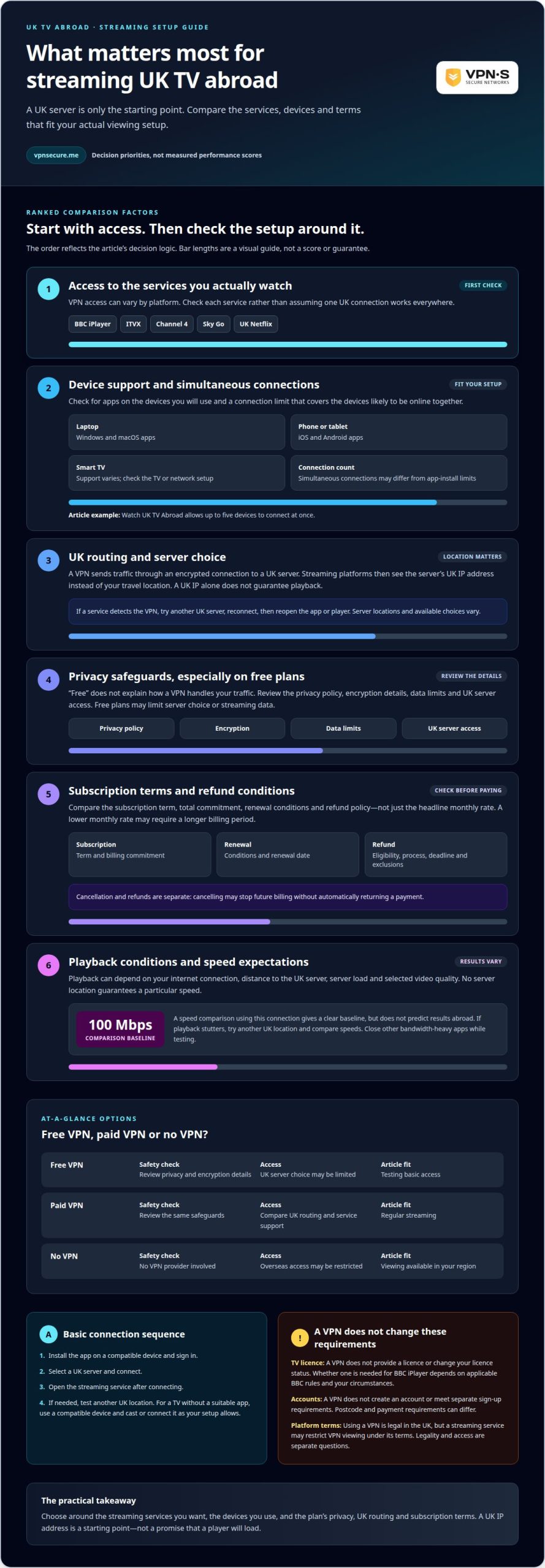
Compare the subscription term, renewal conditions and refund policy, not just the headline price. For streaming on the road, also check whether the plan supports the devices and server locations you need.
VPN prices vary by subscription length, features and billing terms. A shorter plan may suit a brief trip, while an annual subscription may suit regular viewing. Compare the total commitment and renewal terms before choosing: a lower monthly rate may require a longer billing period.
For these subscriptions, pricing depends on the case and is provided after a quote request; the cost factors include the chosen term and features. Check that the plan supports your intended setup, such as streaming on an Android phone over hotel Wi-Fi. A VPN adds privacy and security, but that alone doesn’t determine whether a plan is good value.
A money-back guarantee explains when a subscriber can request a refund and what conditions apply. Terms vary, so read the policy for the request process, eligible purchases and exclusions. Don’t assume every VPN offers the same guarantee or that a “money back” headline explains the full terms.
Before paying, save the policy details and note any deadline or required steps. If you plan to stream while travelling, try the services and devices that matter during the stated period. For example, test your usual streaming app on your Android phone and check that your chosen server connects as expected.
Keep refund terms separate from subscription cancellation. Cancelling may stop future billing without automatically returning a payment. Review both policies, the renewal date and your payment method. This gives you a clearer basis for comparison, especially if you only need a VPN during a short trip.
A VPN sends your internet traffic through an encrypted connection to a VPN server. Websites and apps then see the server’s IP address instead of your own, and the local network can’t read what you send.
Server networks vary in location, capacity and server choice. A network with several locations gives you alternatives if one route is slow. One location may work, but gives you fewer options if you need to change routes.
Download the VPN app, select a server location and connect before opening your streaming app. The VPN routes traffic from that device through the selected server. If you use a router, its VPN configuration can protect connected devices instead of relying on separate apps.
Some VPNs label servers for streaming; others provide general locations. A streaming label can help you find a server intended for video traffic, but doesn’t guarantee the fastest route. Server load, distance and your internet connection all affect playback.
If a stream buffers, disconnect, choose another server and reopen the platform. Compare playback at the same video quality to make the test useful. The fastest route isn’t always the nearest or a server labelled for streaming: congestion and the route between your device and the server can matter too.
When travelling, check that the VPN supports the device or router you plan to use. A phone app won’t automatically cover a smart TV, and a router setup determines which devices use the VPN route. Match the connection method to your viewing setup before streaming.
Choose a VPN with a server network that fits your devices and streaming setup.
VPNSecure encrypts your internet traffic and routes it through a VPN while you travel, so your streaming and other accounts stay private on hotel and public Wi-Fi. Its private, no-log service supports major devices, making it an option when you want a secure connection for services you already use, subject to each service’s terms.
Choose a Monthly VPN Subscription for shorter-term use or an Annual VPN Subscription for ongoing protection. The right option depends on how long you need the connection and which devices you’ll use. A VPN changes your apparent IP address, but each streaming platform sets its own account requirements and terms.
For a private VPN connection on your travels, explore VPNSecure’s monthly or annual subscription options.
Start with the shows and services you want to watch, then choose a VPN setup that suits your devices and travel plans. A VPN for streaming while travelling encrypts your connection on unfamiliar networks, but the streaming platform still controls account access and its own terms. Keep those requirements in mind as you decide.
VPNSecure offers Monthly VPN Subscription and Annual VPN Subscription options, plus Dedicated IP as a separate add-on. Choose a subscription period that suits your plans and consider Dedicated IP separately for your VPN setup. Select the option that matches your viewing needs, devices and time away.
If you want to talk through your VPN needs, contact VPNSecure. Make a considered choice, set up your connection, and enjoy your time away with a clearer plan for streaming.
A VPN can protect your connection while you use services such as BBC iPlayer, ITVX, Channel 4, Sky Go or Netflix, but each service decides under its terms whether it accepts VPN connections, and your account and the programme’s availability still apply. A VPN doesn’t change what a service offers you. Check your service’s terms and your device before travelling.
Look for a VPN with a solid server network, apps for your devices and clear privacy practices. No provider can promise that every streaming platform will accept every connection: each service sets its own rules on VPN use. For a fair comparison, test the same service on your intended device and connection. Prioritise security and stable speeds over claims of universal access.
They can work through a VPN, but support varies by service and connection. BBC iPlayer, ITVX, Channel 4 and Sky Go set their own rules on VPN use, and their account requirements remain separate. If a service doesn’t support VPN connections, follow its terms. For playback problems, reconnect to a nearby server, then reopen that service’s app.
Subscription costs, trial availability and refund terms vary by provider and plan. Compare the billing period, renewal terms, cancellation process and refund conditions before paying. A trial may be limited to certain payment methods, while a money-back guarantee may require a request within its stated terms. “Trial” and “refund” mean different things, so read the applicable policy before subscribing.
Install the VPN app on a compatible phone or computer, sign in, choose a nearby server and connect before opening your streaming app. For a smart TV, use a supported VPN app or another compatible setup; support varies by model and platform. If the stream won’t load, reconnect, reopen the app and try another server. The right setup for streaming on the road depends on your device.
Free VPNs vary in how they protect traffic, handle data and fund their service. Before installing one, read its privacy policy and check what information it collects, how long it retains it and whether its security practices are clearly explained. Review app permissions too. If those details are unclear, avoid sending sensitive information through the connection, especially on public Wi-Fi.
Читайте также
A Mac’s polished interface isn’t a privacy shield. Yes, MacBook Air and MacBook Pro can use a VPN, and macOS includes a client that supports L2TP,...

Planning a trip to China? Learn which VPN features matter, why Stealth VPN helps, how to prepare before departure, and what legal and access limits to consider.

A VPN for accessing region-locked games can change the IP location a game sees, but it won’t automatically change your Steam store region. Steam...
Никаких логов, никогда. Начните с режима «Бесплатно с рекламой» меньше чем за минуту.