





















VPN ve Gizlilik
VPN options for Mac compared by privacy, protocols, and protection
A Mac’s polished interface isn’t a privacy shield. Yes, MacBook Air and MacBook Pro can use a VPN, and macOS includes a client that supports L2TP,...

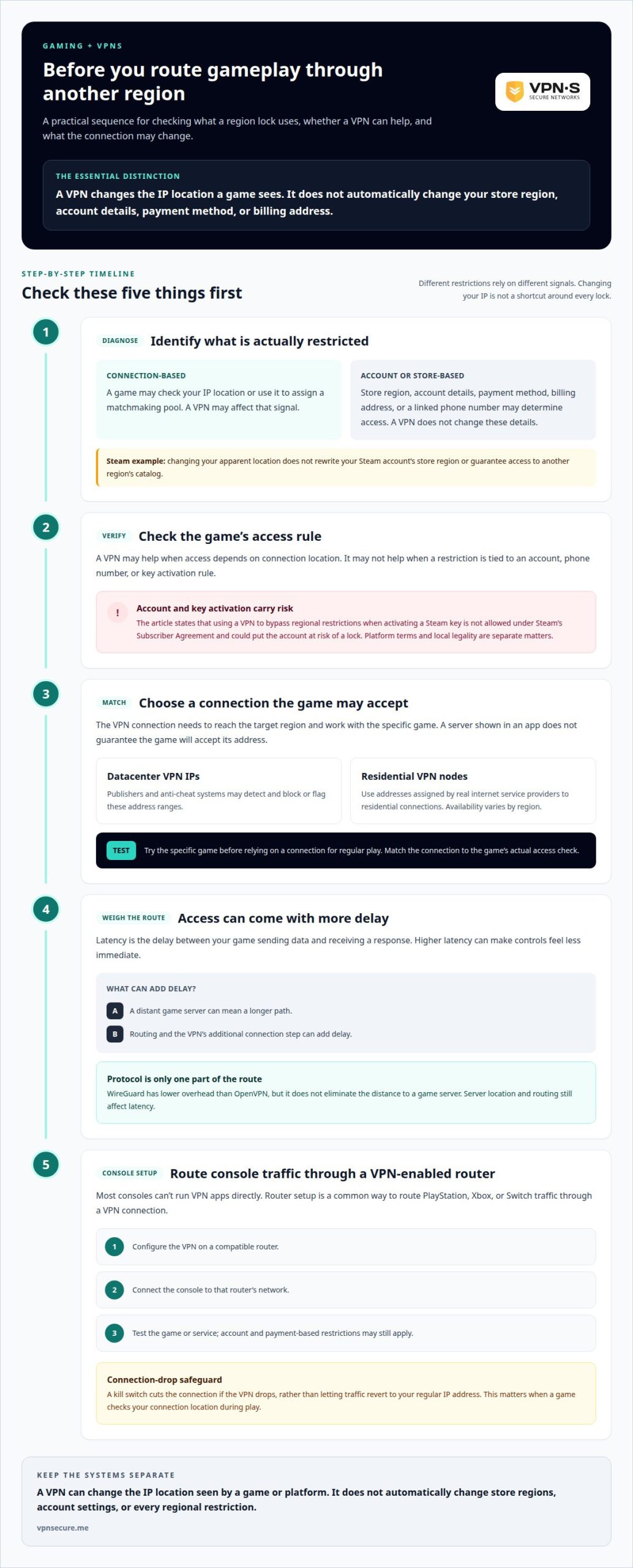
A VPN for accessing region-locked games can change the IP location a game sees, but it won’t automatically change your Steam store region. Steam access may also depend on your account, payment method, and billing address, and trying to bypass regional rules can put your account at risk. Changing your IP is not a shortcut around every lock.
It can be frustrating when a game is unavailable where you live or a console title is tied to another region. Publishers may restrict access for legal reasons, and a VPN won’t override every limit. The distinction matters: some games check your connection’s location, while storefronts and consoles may also rely on account or payment details.
This guide explains what a VPN can and can’t change on Steam, when it may help you connect to a game, and why console access takes extra setup. You’ll also learn how region locks affect ping and account risk, so you can weigh the trade-offs before changing how you connect.
No. A VPN changes the IP address Steam or a game server sees, but it doesn’t change your Steam account’s store region. Store access may also depend on your account details, payment method, and billing address. Changing your apparent location alone won’t rewrite those account details or guarantee access to another region’s catalog.
That distinction matters when a game uses IP-based matchmaking. Connecting through a server in another location may affect which matchmaking pool you enter if the game uses your IP location to assign players. Account-region and phone-number restrictions work differently. A VPN won’t change the region attached to your account or the phone number linked to it, so changing your IP may not unlock the game.
Access to some PC storefronts may require a separate account created for the relevant region. That doesn’t make a VPN a safe shortcut for changing Steam regions. Storefronts can reject access or restrict accounts when users try to bypass regional limits. Before changing regions, distinguish between connecting to a game server and changing a store or account region. They are separate systems with separate restrictions.
Take care with game keys, too. Using a VPN to bypass regional restrictions when activating a key is not allowed under Steam’s Subscriber Agreement, and doing so could put your account at risk of a lock. VPN use may be legal in most countries, while a platform’s terms can still prohibit specific uses. These rules are separate: local legality doesn’t override Steam’s account conditions.
For example, if a key won’t activate because it’s restricted to another region, routing through that region doesn’t change the key’s activation rules. If you simply want to join a location-based matchmaking pool, changing your IP may help, but account and phone-number checks can still determine access. Identify the restriction before changing your connection.
Sometimes. A VPN for accessing region-locked games can change the IP location a game sees, which may help when access depends on that location. It won’t override every account-based restriction, and your route can affect gameplay. First identify whether the game checks your connection location or another account detail.
For gaming, choose a VPN connection that reaches the target region and works with the game you want to play. Publishers and anti-cheat systems may detect and block or flag datacenter VPN IP ranges. Coverage varies by provider and region, so a server appearing on a map doesn’t guarantee the game will accept its address.
Some region locks require an IP address registered to the target region, not simply traffic routed through a server there. Residential VPN nodes use addresses assigned by real internet service providers to residential connections, and availability varies by region. Test the specific game before relying on a connection for regular play. A VPN for accessing region-locked games should match the game’s actual access check, not just the country shown in an app.
Latency is the delay between your game sending data and receiving a response. Higher latency can make controls feel less immediate. Connecting to a distant game server usually increases ping because distance, routing, and the VPN’s additional connection step all add delay.
For example, routing through another region to reach a restricted server may get past an IP-location barrier but create a longer path for gameplay. A VPN isn’t automatically a gaming-speed upgrade. The useful route meets the game’s location requirement without adding unnecessary distance. If a match feels less responsive, the longer route may outweigh the access benefit.
WireGuard has lower overhead than OpenVPN, so it’s worth considering when connection efficiency matters. Lower overhead doesn’t eliminate the distance between you and a game server, however. Server location and routing still affect latency, making protocol choice only one part of the connection.
Release timing is another possible use. A VPN may let you start a game earlier through another time zone only if the publisher doesn’t tie release access to your account region. On PC or Mac, connecting from another region may also allow a download that’s unavailable locally. Account rules can still determine access.
VPNs can change the IP location seen by Steam, PlayStation, Xbox, and Nintendo eShop, which may help with IP-based restrictions. They don’t automatically change store regions or account settings, and a VPN alone won’t bypass every console lock.
Compatibility means routing a platform’s internet traffic through a VPN connection, not changing every restriction attached to an account. This distinction matters because a console store may use account or payment details, while a game server may use your connection’s IP location. A VPN connection can affect the latter without changing the former.
Most consoles can’t run VPN apps directly, so PlayStation, Xbox, and Switch commonly connect through a VPN-enabled router. Steam runs on PC, where a VPN can change the apparent IP location, but it won’t change account-region rules. Nintendo eShop and console storefront access can also depend on region-specific accounts or payment details. A VPN may help with an IP-based release restriction, but it doesn’t guarantee store access.
Router setup places the VPN connection between your console and the internet. Configure the VPN on a compatible router, connect your PlayStation, Xbox, or Switch to that router’s network, then test the game or service. This routes console traffic through the VPN without installing an app on the console itself.
A kill switch cuts the connection if the VPN drops, rather than letting traffic revert to your regular IP address. That matters if a game checks your connection location during play: a drop could expose your usual IP. Enable the kill switch on your VPN setup if available, then confirm that the console loses internet access when the VPN connection stops. A kill switch prevents this connection fallback; it doesn’t change account-region or store restrictions.
Regional locks don’t all come from the same decision. A publisher may restrict a game for legal reasons, affecting where it’s sold, activated, or played. The check may use your IP address, account region, or phone number. These signals answer different questions, so changing your connection location won’t necessarily change the result.
Storefronts and game servers can apply separate rules. A regional store may consider account details, payment method, and billing address, while a multiplayer game may use your IP location to determine access or matchmaking. For example, a player might reach a server through a different location but still have an account tied to another region. The restriction depends on the system being checked, not just the player’s current connection.
Release timing can create another regional difference. A VPN may help you connect from another time zone, but it only affects access if the publisher hasn’t tied the launch time to your account region. This matters when a title appears available elsewhere but remains unavailable to your account. An IP change can alter the location a server sees; it can’t rewrite an account-based release rule.
Regional restrictions may apply to a game key rather than the game’s servers. A key intended for one region may not activate through a connection from another. Steam’s Subscriber Agreement prohibits using a VPN to bypass regional restrictions when activating a key, and attempts could risk an account lock. Understand the activation rule before trying a different connection.
The practical takeaway: identify the restriction first. An IP-based block, an account-region limit, and a key activation restriction need different answers. A VPN addresses the connection’s apparent location, not every publisher or storefront decision. For encrypted traffic while gaming, explore VPN protection.
VPNSecure encrypts your internet traffic and can route it through another location, which may help when a game restriction depends on your IP address. It can also protect your connection while gaming on public Wi-Fi. It won’t change a Steam account’s region, override a publisher’s rules, or guarantee access to a restricted game. Those limits matter, especially for account-based storefront and activation restrictions.
If you want encrypted traffic for gaming or everyday browsing, choose a Monthly VPN Subscription or Annual VPN Subscription based on how you prefer to subscribe. The service is suited to privacy and IP-based access, not to bypassing platform terms or account rules.
Contact VPNSecure to discuss your VPN needs.
Before changing your connection, decide what you need it to do. A VPN for accessing region-locked games may help with an IP-based restriction, but it can’t rewrite storefront or account rules. Treating access and privacy as separate goals makes it easier to choose a setup that fits your gaming habits.
For encrypted internet traffic, VPNSecure offers Monthly VPN Subscription and Annual VPN Subscription options, as well as Dedicated IP. Choose based on your intended use, not on the assumption that a VPN can unlock every game or store. Platform rules and the type of region lock still matter.
If you want to discuss which VPN option fits your needs, contact VPNSecure. Make your next connection choice with a clear goal and a better understanding of what it can, and can’t, change.
Only if the game restricts server access based on your IP location. If a server appears in the game’s usual region list and accepts your connection, a VPN may add an unnecessary routing step. For example, a player traveling abroad may use a VPN to show an IP location associated with home, but account rules or the game’s own access checks can still apply.
A VPN can route console traffic through another location when configured on a compatible router. That may help if a game checks the console’s IP location, but it won’t automatically change the region tied to a PlayStation, Xbox, or Nintendo account. A console’s network route and store account region are separate details, so changing one doesn’t necessarily alter the other.
It can. A VPN adds a routing step, and data already travels farther to reach a distant game server. These delays can stack, making timing-sensitive actions feel less responsive. For example, a competitive match may feel slower after routing through a VPN server far from both you and the game server. The effect depends on the route, not simply on using a VPN.
There’s no single standard cost for a VPN covering many countries. Pricing depends on the subscription period, network coverage, and optional features such as a Dedicated IP. For a specific VPN plan, pricing depends on plan length, selected features, and coverage; the price is provided after a quote request. Country count alone doesn’t tell you whether a VPN suits a particular game.
Connecting to a distant region can raise latency even without a VPN, because the game server is farther away. Routing through a VPN adds another connection step, which may increase the delay further. If your goal is access rather than competitive play, that trade-off may be acceptable. For fast-paced matches, connection responsiveness matters as much as reaching the region.
Using a VPN doesn’t automatically mean your account will be banned, but platforms may prohibit using one to bypass regional rules. Steam’s Subscriber Agreement doesn’t allow VPN use to evade restrictions when activating a game key, and attempts could lead to an account lock. Keep the distinction clear: using an encrypted connection for privacy differs from trying to override a platform’s store, activation, or account-region rules.
Okumaya devam edin
A Mac’s polished interface isn’t a privacy shield. Yes, MacBook Air and MacBook Pro can use a VPN, and macOS includes a client that supports L2TP,...

Planning a trip to China? Learn which VPN features matter, why Stealth VPN helps, how to prepare before departure, and what legal and access limits to consider.

A VPN won’t make your iPhone invisible, but it can add a useful layer of privacy. A VPN for iPhone and iOS privacy encrypts your internet traffic and...
Hiçbir zaman kayıt yok. Bir dakikadan kısa sürede Reklamlı Ücretsiz ile başlayın.