



A blocked VPN isn’t necessarily a dead end. A VPN for bypassing firewalls should encrypt your traffic and offer ways to respond when a network blocks a tunnel. Try a methodical approach: choose a VPN with flexible connection settings, switch servers, adjust the protocol or port, then try another network if needed.
Government restrictions can target websites, VPN traffic, or both, so one setting won’t solve every block. The right next step depends on what the network is filtering.
This guide explains how to choose a VPN for government restrictions and what to change when a connection fails. Learn how server choice, ports, protocols, obfuscation, and mobile data can affect access, then troubleshoot methodically instead of guessing.
Key Takeaways
- Choose a VPN with flexible server and connection settings so you can adapt when a website or VPN tunnel is blocked.
- Learn why traffic over port 443 may pass through networks that restrict other VPN connections.
- When a connection fails, try changing the server, protocol, or port, or switch from Wi-Fi to mobile data.
- Understand how deep packet inspection can identify VPN traffic and why obfuscation may help conceal it.
What’s the best VPN for bypassing government restrictions?
Choose a VPN with server options and adjustable connection settings. A VPN for bypassing firewalls should give you practical ways to respond when access fails. Follow these four steps to identify the block and try an appropriate alternative.
-
Identify VPN Blocking and Its Causes
First, determine whether the restriction affects a website or the VPN connection itself. VPN blocking prevents a VPN tunnel from connecting to people, devices, or websites. Governments may block VPN connections to limit access to censored websites. If one foreign site fails while others load, the restriction may target that destination. Note which connection fails before changing settings.
-
Check How Governments Block VPN Connections
Next, look for patterns that reveal how traffic is filtered. Governments can block selected foreign website addresses through ISP egress filtering or block IP addresses associated with VPN servers. Deep packet inspection can identify VPN traffic and stop it. If the same VPN fails across several destinations, the tunnel itself may be blocked. Switching servers may help when popular VPN services are targeted.
-
Try TCP 443 When UDP Is Blocked
Then, switch the VPN app to TCP on port 443 if UDP connections fail and that option is available. Port 443 is the standard port for secure HTTPS browsing, so a network allowing web traffic may also allow a VPN connection there. This fallback can help when a firewall blocks a UDP port. It won’t help if the network blocks or identifies VPN traffic on port 443.
-
Review Legality, Costs, and Risks
Before connecting, weigh network rules, risks, and alternatives. In the United States, whether bypassing a school or workplace firewall is legal depends on applicable law and the institution’s rules. Violating network policies may have consequences. VPNs with obfuscation have no universal price; subscription costs depend on the plan and its features. If traffic remains blocked, try a different server or mobile data. A VPN for bypassing firewalls can’t remove every technical or policy barrier.
VPNs that use port 443 to disguise traffic
Use port 443 as one connection option, not a promise of invisibility. This setting can help traffic pass through some filters, while encryption protects the data inside the VPN tunnel.
-
Use Port 443 to Disguise Traffic
Choose a VPN connection that supports port 443 when other ports are blocked. HTTPS web browsing commonly uses port 443, so a network that allows secure web traffic may allow a VPN connection on that port too. The port alone doesn’t make VPN traffic indistinguishable from HTTPS.
Check which protocol the connection uses. SSTP sends Point-to-Point Protocol traffic through an SSL/TLS channel, while an obfuscated server can make VPN use harder to identify. These approaches may help with restrictions, but blocking systems can still identify or stop VPN connections.
Match the fallback to the filter. An egress firewall may restrict traffic leaving a network, while deep packet inspection can examine traffic patterns. If port 443 connects but access still fails, the restriction may involve VPN detection rather than a blocked port.
-
Consider ISP Visibility and Privacy
Separate traffic privacy from connection visibility. A VPN encrypts data traveling through its tunnel, protecting its contents from ordinary inspection along that route. Your internet service provider can still see that your device connects to a VPN server, even when encryption prevents it from reading the protected traffic.
Understand what a VPN can and can’t hide before relying on it for privacy. Encryption doesn’t conceal the server’s IP address, connection time, or the amount of traffic moving through the network. A firewall may use addresses or traffic patterns to block a VPN without reading encrypted content.
For a practical next step, consider an encrypted VPN connection when you need privacy for traffic on a restricted network. Keep port 443 in perspective: it can help with some filtering, but it cannot override every network restriction.
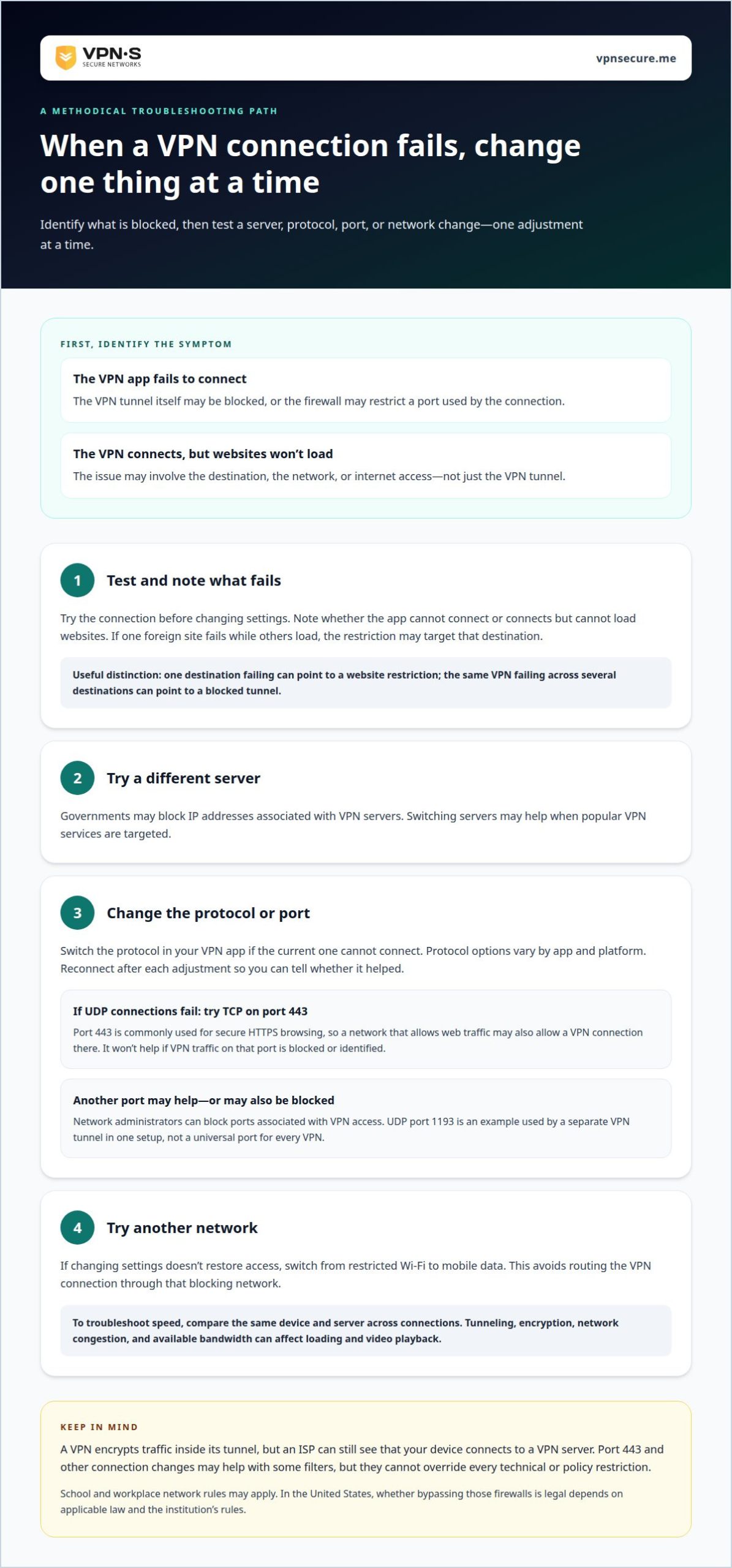
Changing ports, protocols, or network connections
On Windows, Mac, iPhone, or Android, install and open a VPN app, choose a server, then connect. If the tunnel fails, change one setting at a time to identify what the network blocks.
- Test the connection before changing settings. A firewall can block ports used by VPN traffic, preventing the tunnel from reaching its server. Note whether the app fails to connect or connects but cannot load websites. That distinction helps separate a blocked VPN connection from a broader network or internet problem.
- Switch the protocol in the VPN app if the current one cannot connect. IKEv2 is designed to work with IPsec and creates encryption keys. Protocol options vary across apps and platforms, so use a setting available on your device. Avoid changing several options together; reconnect after each adjustment to see whether it helped.
- Try another port when the firewall appears to block the current route. Changing ports may let a VPN connection pass, but network administrators can also block ports associated with VPN access. In one described setup, a separate VPN tunnel may use UDP port 1193. Treat that as a setup example, not a universal port for every VPN.
- Switch networks if changing settings does not restore access. Moving from restricted Wi-Fi to mobile data avoids routing the VPN connection through that blocking network. To troubleshoot speed, compare the same device and server across connections. Tunneling and encryption process traffic, while network congestion and available bandwidth can also affect loading and video playback.
Network administrators may also block ports used for VPN access. PPTP can transmit data quickly, which may make it suitable for watching videos or listening to high-quality audio.
Deep packet inspection and censorship circumvention
Use connection symptoms to distinguish traffic inspection from a DNS problem. Then choose a response that fits the failure instead of changing settings at random.
-
Understand Deep Packet Inspection
Check whether the VPN tunnel connects before testing individual websites. Deep packet inspection examines network traffic to identify VPN connections and can stop them. Encryption protects traffic contents, but doesn’t necessarily hide that a device is using a VPN. If the app cannot establish its tunnel, the VPN connection itself may be blocked.
-
Apply Censorship Circumvention
Try another server or an obfuscated connection if your VPN app supports one. Obfuscation can make VPN use harder to identify, while switching servers may help when particular VPN-associated IP addresses are blocked. On Android, VPN apps can help users bypass egress firewalls, but a network may still block connections it recognizes.
- Test DNS separately when a VPN connects but certain websites remain unreachable. DNS translates a site name into an IP address. If a lookup fails, the problem may be name resolution rather than inspection of the VPN tunnel. Compare access to the site by name with other destinations, and avoid changing DNS settings without understanding how the VPN handles DNS traffic.
- Change one setting at a time and note which connections fail. If switching servers restores access, the original server address may have been blocked. If every server fails while the internet works, filtering may target VPN traffic more broadly. This method helps distinguish DNS issues, server blocking, and deep packet inspection instead of treating them as the same problem.
For an encrypted connection, explore VPN options suited to your privacy needs.
Organizations can block VPN-associated IP addresses to prevent VPN use on their networks. Companies may also use egress firewalls to block social networking sites for employees on internal networks.
VPNSecure
VPNSecure offers private VPN subscriptions that encrypt internet traffic across major devices. For a personal connection for everyday browsing, choose between a Monthly VPN Subscription and an Annual VPN Subscription. A Dedicated IP may suit you if you need an IP address used only by you, which is less likely to be blocked than an address shared with other users.
Changing ports or using obfuscation can help with some network blocks, but no single setting defeats every restriction. Choose a VPN connection for encrypted traffic and use the troubleshooting steps above when a server or protocol fails. To explore VPNSecure’s subscription options, contact the company.
Choose Your Next Connection With Care
Restrictions can change, and a connection that works on one network may fail on another. Treat a VPN for bypassing firewalls as one part of your privacy plan, not a guarantee of access. Consider where you’ll connect, what you need to protect, and whether the network allows VPN use before relying on it.
Make your next move deliberately. Use settings that fit your situation, and keep another connection option in mind for when a network blocks your usual route. If you want encrypted browsing with a VPN, choose the subscription that fits how you plan to use it.
For help choosing a suitable option, Contact VPNSecure for help. Take the next step with a clearer plan and more control over your connection.
Frequently Asked Questions
How do VPNs bypass network firewalls and censorship?
A VPN routes your device’s traffic through an encrypted connection to a VPN server. This may help you reach a destination when a network blocks direct access by website address or IP address. For example, if a news site won’t load on a filtered network, a VPN may provide another route. Restrictions that block VPN connections themselves can still prevent access.
Which VPN protocols work best on restrictive networks?
No single protocol works best on every restrictive network. OpenVPN and WireGuard are common options, while IKEv2 is designed to work with IPsec. The network’s filtering rules and the VPN app’s available settings affect which connection succeeds. If one protocol repeatedly fails on a particular network, switch protocols and test again before changing other settings.
What VPN obfuscation features help bypass deep packet inspection?
Obfuscated servers are designed to make VPN traffic harder to identify. They may help when deep packet inspection targets recognizable VPN connections, but they don’t make a connection invisible or guarantee access. Look for a VPN app that offers obfuscation, then try it when ordinary connections fail. The network may still block the server address or connection.
How should you choose a VPN for restrictive networks in the United States?
Choose based on the settings you need, not a blanket ranking. If restrictive networks are a concern, look for protocol choices, server switching, and obfuscation. Read the privacy details to understand what the service says it protects, and match the plan to your intended use. A VPN’s performance on one US network doesn’t show how it will work on another.
Can a VPN bypass school, workplace, or public Wi-Fi firewalls?
Sometimes, provided the firewall allows the VPN connection and doesn’t block its server address or traffic pattern. School and workplace networks may have rules governing VPN use, so technical access doesn’t mean using one is permitted. On public Wi-Fi, complete any required sign-in page first, then connect. If the VPN fails, try another permitted network.