A VPN can encrypt Linux traffic, but the wrong fit may leave you struggling with setup or lacking support for your system. Choosing a VPN for Linux system privacy means looking beyond encryption: distribution and ARM support, app usability, and privacy protections all matter. A VPN can mask your IP address and encrypt your connection, including on public Wi-Fi, but it won’t prevent every kind of online tracking.
Linux users know that control comes with trade-offs. A command-line setup may suit one person, while another needs a clear app interface and straightforward support for their distribution. This comparison explains what to weigh before choosing, without assuming every VPN suits every Linux setup.
You’ll see how distribution and ARM compatibility, app interfaces, public Wi-Fi encryption, logging policies, DNS protection, and kill switches affect your decision. The goal is to find a practical match for your device and privacy needs, while understanding what a VPN can protect and where its limits remain.
Key Takeaways
- Match distribution and ARM support to your Linux setup before weighing other features.
- Choose an app interface that fits how you prefer to manage a VPN connection.
- Assess how encryption, DNS protection, and a kill switch address different privacy risks.
- Read the logging policy and remember that a VPN can’t prevent every form of website tracking.
Supported Linux distributions and ARM devices
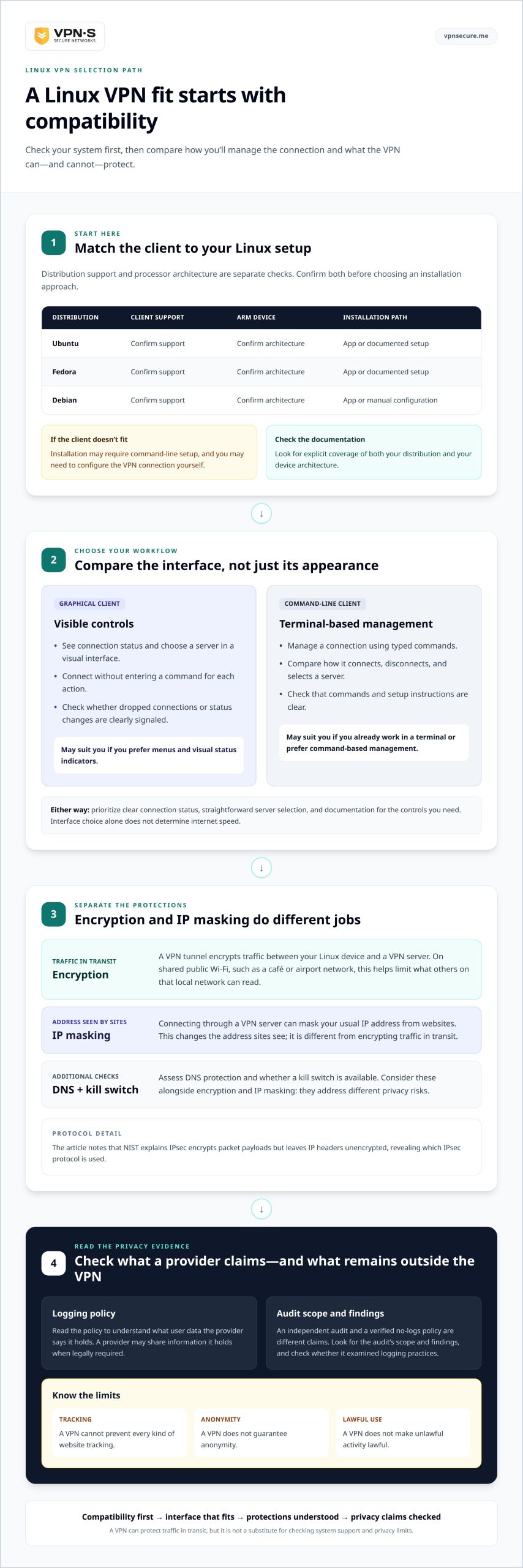
Distribution support is the first compatibility test. A Linux VPN client may support Ubuntu but not Fedora, or work on Debian only through manual configuration. Match the provider’s supported distributions to your device’s operating system, then confirm that its client supports your processor architecture. ARM compatibility matters because a client built for a different architecture may not install or run correctly.
ARM and distribution support are separate checks. A provider might support Ubuntu on a standard desktop but not offer the same client for an ARM device. Look for documentation that explicitly covers both the distribution and architecture. Without a compatible client, installation may require command-line setup, and you may need to configure the VPN connection yourself.
An independent audit and a verified no-logs policy are different claims. Look for providers that publish an audit’s scope and findings, and check whether the audit examined logging practices.
Installation options also vary. Some providers offer a dedicated Linux client, while others document manual setup for distributions such as Debian. A client can simplify connection management, but support for your distribution and device still determines whether it will work for you. VPN encryption protects traffic in transit, not compatibility with an unsupported system.
| Option |
Distribution support |
ARM support |
Installation approach |
| Ubuntu |
Confirm client support |
Confirm architecture support |
App or documented setup |
| Fedora |
Confirm client support |
Confirm architecture support |
App or documented setup |
| Debian |
Confirm client support |
Confirm architecture support |
App or manual configuration |
VPNs are legal in most countries, but rules vary, so follow local law; a VPN does not make unlawful activity lawful. A provider may share information it holds when legally required; its logging practices affect what user data it has available.
Choose a provider whose client or setup instructions match both your distribution and device architecture.
Command-line clients and graphical interfaces
A Linux VPN interface affects how you connect, switch servers, and manage internet traffic. Compare the actions each client makes clear and the controls it provides.
Graphical VPN Clients
A graphical VPN client puts connection controls in a visual interface. You can see your connection status, choose a server, and connect without entering a command for each action. That can make routine browsing simpler, especially if you prefer menus to terminal commands. The key is whether the app presents the controls you need clearly, not whether it looks polished.
For Ubuntu or Fedora, assess the Linux app as a whole: can you identify the active connection and find server options without digging through unrelated settings? A graphical interface may reduce the need to use the terminal, but it still needs to fit your system and workflow. Consider too how the app signals a dropped connection or a change in status.
Command-Line VPN Clients
A command-line client uses typed commands to manage a VPN connection. It may suit users who already work in a terminal or want to manage connections alongside other command-line tasks. Unlike a graphical app, it doesn’t rely on menus or visual status indicators. Usability depends on clear commands and documentation for the supported actions.
Compare how the client handles connecting, disconnecting, and selecting a server. A command-line approach can be direct, but unclear commands or setup instructions can make routine changes harder. For example, someone who frequently switches servers may prefer visible controls, while a terminal user may value command-based management.
Which providers offer reliable Linux apps or command-line support? Choose a provider whose documentation describes its Linux client, supported controls, and connection management.
Interface choice doesn’t determine internet speed by itself. Performance can vary with server availability, location, and your internet connection. Consider whether the app makes server selection straightforward, then weigh that against how easily you can manage traffic and check your IP address after connecting.
Choose a graphical client for visible controls and a command-line client for terminal-based management. Prioritize the interface that makes connection status and server changes easiest to understand on your Linux device.
Encryption and protection on public Wi-Fi
A VPN tunnel encrypts traffic between your Linux device and a VPN server. On a café network, that helps protect your connection from exposure to others on the local network.
Encryption and IP Privacy
Encryption makes intercepted VPN traffic harder to read, while the server connection can mask your usual IP address from websites. These protections work differently: encryption shields traffic in transit, and IP masking changes the address visible to sites. The National Institute of Standards and Technology (NIST) explains that IPsec encrypts packet payloads but leaves IP headers unencrypted, revealing which IPsec protocol is used.
Protocol choice matters, but a protocol’s name alone doesn’t establish how a provider handles privacy. Consider encryption alongside the logging policy and how the service handles DNS requests. A VPN can give you stable, secure access to your own accounts and services while you travel, subject to each service’s terms, but it doesn’t guarantee anonymity.
Public Wi-Fi Protection
At a café or airport, public Wi-Fi puts your device on a shared network. A VPN encrypts traffic through its tunnel, helping limit what others on that network can read. This differs from IP privacy: encryption protects data in transit, while IP masking changes the address websites see.
Connect the VPN before browsing or signing in to accounts on public Wi-Fi. If the connection drops, traffic may no longer travel through the encrypted tunnel. A VPN kill switch can stop internet access when the VPN connection fails, reducing that exposure.
Remaining Privacy Risks
A VPN doesn’t erase browser tracking. Websites can still use cookies or information you provide to recognize activity, and signing in to an account can identify you regardless of your IP address. Malware is a separate risk: a VPN encrypts a connection, but it isn’t antivirus protection.
Free VPN services may not provide the privacy or security Linux users want. Paid VPNs may offer stronger encryption and security, but they don’t guarantee maximum protection; the logging policy matters too.
VPN privacy and security benefits on Linux
A VPN can reduce network exposure while your Linux system downloads files or connects to online services. A VPN for Linux system privacy is useful when your priority is protecting traffic in transit, not replacing every other security measure.
What VPNs Protect
A VPN encrypts internet traffic and masks the IP address websites see. On Linux, that can help keep activity private while downloading an operating system ISO through a P2P network. These protections apply to the connection, not everything happening on the device.
Protocol names such as WireGuard and OpenVPN can identify a connection method, but they don’t prove a provider’s logging practices. A strict no-logs policy concerns what activity a provider says it records. A kill switch offers a different safeguard: it stops internet access if the VPN connection fails, limiting traffic outside the tunnel. Choosing a VPN for Linux system privacy means considering these protections together.
What VPNs Do Not Protect
A VPN doesn’t prevent every form of tracking. Websites can still recognize visitors through cookies or information entered into an account, even when the visible IP address changes. Signing in can link browsing activity to your identity, so encrypted traffic alone cannot make account use anonymous.
A VPN also doesn’t remove malware from a Linux device or stop someone from downloading a harmful file. Encryption protects traffic in transit; it isn’t antivirus software. Keep the distinction clear: a VPN addresses network privacy, while malware and account identification require different safeguards.
For Linux privacy, compare the provider’s logging policy, protection against connection failures, and supported protocols. A kill switch addresses a dropped connection, while a no-logs policy concerns activity data held by the provider. Neither replaces protection against malware or website tracking.
Choose a VPN for the risks it actually addresses, not as a cure-all. Explore encrypted VPN protection for a connection-focused privacy option.
VPNSecure
VPNSecure provides a private, no-log VPN service that encrypts internet traffic. If your priority is protecting your connection on public Wi-Fi, its VPN can add a layer of privacy between your device and the network. It can’t block malware or stop websites identifying you through account sign-ins, so it works best as one part of a broader privacy approach.
Choose a 1-week, 1-month, 1-year or 3-year plan, depending on how long you need the encrypted connection. A Dedicated IP is another option for users who need a consistent address. The right fit depends on how you use the internet and what you want your connection to protect. For more information about VPNSecure’s options, contact VPNSecure.
Make privacy part of your Linux routine
Your Linux setup can change. A new device, a different distribution, or a shift from desktop browsing to travel can change what you need from a VPN. Treat your privacy choice as an ongoing decision, not a box permanently checked. Revisit it when your system or habits change, and keep expectations grounded: a VPN protects network traffic, not every part of your digital life.
The right VPN for Linux system privacy should fit the way you use your device and the risks you want to reduce. If you’re ready to take the next step, contact VPNSecure about Linux VPNs. You can move forward with a clearer privacy plan and more confidence in how you connect.
Frequently Asked Questions
How to choose the best VPN for Linux?
Choose a VPN that fits your Linux device and privacy priorities. For example, a laptop running Ubuntu and an ARM-based device may need different client support. Compare app controls, connection methods, logging policies, and how clearly the provider explains its privacy claims. Then consider your routine: frequent server changes call for easy management, while occasional use may make a simpler interface more important.
How can a VPN provider help clients connect to a VPN server in Linux?
A provider can supply a Linux-compatible client or connection instructions, along with the credentials and server details needed to connect. The process depends on your distribution and connection method. For example, a graphical client presents controls in an app, while a command-line setup relies on terminal commands. Clear documentation should explain the method supported for your system without assuming every Linux installation works the same way.
Does Ubuntu include a VPN?
Ubuntu doesn’t include a subscription to a commercial VPN service. It’s an operating system, so VPN access depends on a provider or network connection configured for your needs. If you use a VPN provider, its Linux client or setup guidance determines how you connect. Before choosing, distinguish the operating system’s network tools from the encrypted service and server access a VPN provider supplies.
How can a VPN provider help clients use their own accounts securely on Linux?
A VPN can route your connection through an encrypted server, so you can reach your own accounts and services securely from where you are, subject to each service’s terms. On Linux, the provider’s client or connection method establishes that route. What each service offers can differ from country to country, and each service’s terms apply wherever you are. A VPN doesn’t grant permission to view content you aren’t entitled to access.
What should clients expect when a VPN provider sets up a VPN in Linux?
The process depends on your distribution, device architecture, and the provider’s Linux connection method. A provider may offer a Linux app or setup documentation; don’t assume every provider performs hands-on installation. VPNSecure supports Linux. Server locations, features, and performance may vary by platform, and the current list is on the Features and Locations pages.
What else can you do along with the VPN?
Protect the parts a VPN can’t cover. Use unique passwords for accounts, enable multi-factor authentication where available, and keep your browser and Linux system updated. Treat unexpected downloads cautiously, and review cookie settings if you want to limit browser-based tracking. These habits address account access, device vulnerabilities, and website recognition, risks encrypted network traffic alone won’t remove.