




A VPN won’t make a business trip risk-free. The right VPN for business travel privacy can encrypt your connection on hotel, airport, or conference Wi-Fi, but it won’t stop phishing, protect a compromised device, or secure every account for you.
It makes sense to want a safer way to work on unfamiliar networks. The key decision is whether to use your employer’s managed VPN, a personal subscription, or both. They serve different purposes, and a personal VPN isn’t a replacement for company security tools.
This guide compares VPN options using practical criteria: privacy claims, device support, server locations, and ease of use. It also explains what a VPN can and can’t protect, how to use it alongside your employer’s tools, and what to prepare before you leave. The goal isn’t an empty promise of anonymity. It’s a clear, workable privacy plan for every trip.
Key Takeaways
- Start with your threat model: decide which risks matter before comparing VPNs.
- Evaluate privacy policies, supported devices, server locations, and usability. Verify claims in current provider documentation.
- A VPN for business travel privacy is one layer of protection, not a fix for unsafe links, compromised devices, or weak account security.
- Check employer policy and get IT approval before installing or connecting a personal VPN on a work device.
- Use a five-point decision check: employer fit, privacy policy, device support, server needs, and day-to-day usability.
Why VPN for Business Travel Privacy Starts With Your Threat Model
Your work doesn’t stay inside the office network. You may check email at an airport gate, join a video call from a hotel, or open company files at a conference. Each connection brings different risks. Start by deciding what you need to protect and from whom. That’s your threat model, and it helps you choose suitable tools instead of expecting one app to solve every problem.
A virtual private network creates an encrypted connection between your device and a VPN server. This can make traffic harder for others on the local network to inspect as it travels to that server. For a foundational overview of what a virtual private network (VPN) is, see Wikipedia’s explanation. A VPN doesn’t make every connection beyond its server private, and HTTPS remains important for protecting data between your browser and websites.
A VPN can improve network privacy, but it can’t secure a compromised device or account, and it doesn’t make you anonymous online.
What privacy risks change when you work away from the office?
Airport Wi-Fi, hotel networks, and conference venues put your device on networks you don’t control. Their operators may be able to observe connection metadata, such as whether your device is communicating and how much data is moving. That doesn’t mean they can automatically read content protected by encryption, such as HTTPS traffic.
Other risks remain when you turn on a VPN. A lost, unlocked device can expose files or active sessions. A convincing phishing message can steal your login, and exposed credentials can put accounts at risk. Use a VPN for the network connection, then rely on separate safeguards such as a device lock, careful link-checking, and strong account security.
Personal VPN or company VPN: what is the difference?
An employer-managed VPN is configured to help authorized staff reach approved company systems and resources. Your IT team sets its access rules and may require you to use it for work. A personal VPN subscription instead routes general internet traffic through a VPN provider’s servers, according to that provider’s policies. It isn’t a substitute for your employer’s tools, and installing both can create connection conflicts or violate workplace rules.
Before connecting, ask IT which tools, devices, and connection methods are permitted. Confirm whether the company VPN should be used on public Wi-Fi, whether personal VPN software is allowed on a work device, and how to reach support if access fails. The right VPN for business travel privacy depends on those answers as much as on the provider’s features.
Which VPN Features Matter Most for Business Travel Privacy?
Choose based on what you need the connection to do, not the boldest promise on a provider’s homepage. For VPN for business travel privacy, compare the policy, supported devices, locations, ease of use, and available help if a connection fails. Then check the details in current provider documentation, since features and terms can change.
| What to compare | What to check |
|---|---|
| Privacy policy | What data does the provider collect, retain, and use? Look for clear explanations, not just a “no logs” slogan. |
| Device support | Confirm your actual laptop and phone are supported, and check current protocol and connection-feature documentation. |
| Server choice | Check whether locations fit your travel and browsing needs. A server affects the IP location websites see, not every aspect of your privacy. |
| Usability | Consider how easily you can connect, switch servers, and recognize when the VPN is active. |
| Support | Review the provider’s stated support options and instructions for troubleshooting connection issues. |
Encryption protects traffic on its route; a logging policy describes what the provider says it keeps; account security helps control who can access your account. Check each separately. Encryption can make intercepted traffic harder to read, but it won’t stop phishing or protect data on a compromised device.
How should you assess encryption and no-log claims?
Read the privacy policy to find out what information is collected, how long it’s retained, and why. A provider’s no-log statement is a claim. Look for supporting evidence and understand its scope rather than assuming the label proves nothing is stored. For a deeper review, consult guidance on how to assess a no-log VPN claim. Also check current documentation for the provider’s encryption and supported protocols.
Do server choice and a Dedicated IP matter on work trips?
A nearby server may suit everyday browsing, while a particular location may be useful when you need websites to see an IP from that region. Availability and performance vary. A Dedicated IP is a static, non-shared IP option, not an anonymity upgrade. Websites may associate repeated activity with the same address. Consider whether a VPN with a static IP for remote access fits your needs, and confirm any work-access requirements with IT.
Before travel, review the FCC’s official government cybersecurity tips for device and connection precautions. If a personal subscription fits your needs and workplace policy, you can review VPN Secure’s subscription options and check its current privacy and feature documentation.
VPN for Business Travel Privacy: What It Can and Cannot Protect
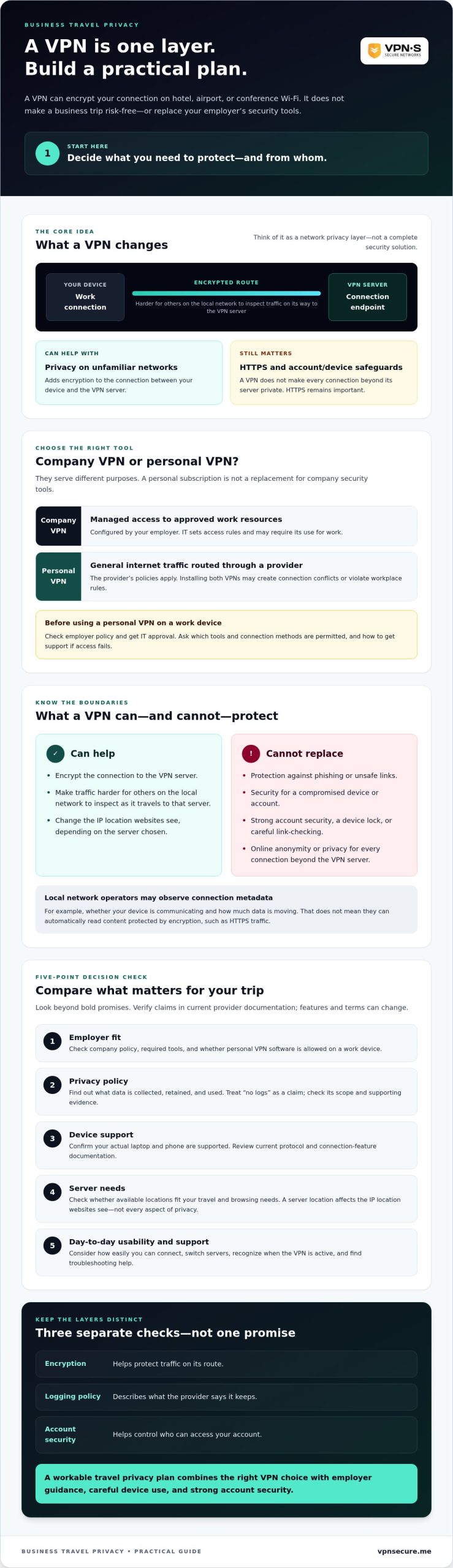
A VPN protects a specific part of the journey: the connection between your device and the VPN server. It can encrypt that traffic in transit, but it doesn’t create an invisible bubble around your work or personal life. Once traffic leaves the VPN server, HTTPS still helps protect the connection between your browser and a website. A VPN also can’t override employer policies or guarantee access to company systems.
| A VPN may help with | A VPN does not solve |
|---|---|
| Encrypting traffic between your device and the VPN server | Phishing, malware, or a compromised device |
| Reducing what a local network observer can see about that traffic | Stolen credentials or an account accessed by someone else |
| Changing the IP address and apparent location that a website sees | Employer management or monitoring under company policies |
| Routing personal browsing through a VPN provider | Access to a specific company resource unless IT has authorized and configured it |
Protocols and configuration matter too. For technical background on one VPN approach, see NIST’s guide to IPsec VPNs. A standards reference can explain how VPN security works, but it doesn’t certify every provider or guarantee that a particular setup fits your needs.
When does a personal VPN add value on a work trip?
A personal VPN may reduce exposure of your personal browsing traffic to observers on an untrusted network, if your employer permits it and your device is configured to use it. It won’t remove every network risk, and you shouldn’t assume it carries or protects company traffic in the way your organization requires.
Mobile data is another option. It avoids joining a venue’s Wi-Fi, but depends on coverage, your data plan, and whether tethering is available. Neither option is universally best. Choose a connection that suits your situation and follow your employer’s rules for work activity.
When is a VPN not enough for work data?
Use an employer-approved VPN or zero-trust access method for company resources when IT requires it. A personal VPN isn’t a substitute. Many organizations protect remote endpoints and corporate accounts with managed security specialists like CyberOne, so check what monitoring and controls apply under your company’s policies.
Build other safeguards into your routine: use multi-factor authentication, install device updates, and lock your screen when you step away. These measures address different gaps. A VPN won’t block a convincing phishing attempt, remove malware, recover a compromised account, or prevent authorized employer monitoring. Treat it as one layer of your travel setup, not the whole security plan. For small and mid-sized businesses evaluating proactive cybersecurity and comprehensive support packages, visit Trinity Networx, LLC to see how managed IT solutions can protect traveling and remote teams.
A connection problem is easier to fix at home than five minutes before a client call. Prepare your devices and test your VPN for business travel privacy before you leave, while you still have time to ask IT for help.
What should you check before leaving?
- Check employer policy first. Ask IT which connection method to use for company resources and whether personal VPN software is allowed on work devices. Don’t install or connect a personal VPN on a work device without approval.
- Confirm device compatibility. Check the provider’s current documentation to make sure its app supports every laptop, phone, or tablet you plan to carry. Don’t assume the app works the same way across devices.
- Update your devices and apps. Install available operating system and app updates before departure, when you have a reliable connection and time to resolve issues.
- Protect account access. Enable multi-factor authentication and check that your account recovery methods are current and accessible while travelling.
- Test before you go. On a trusted network, connect using the approved method, verify the VPN is active, and check access to the accounts and services you’ll need. Save legitimate provider or IT support instructions somewhere you can reach them.
What should you do when connecting away from the office?
- Verify the network name. Ask hotel or venue staff which Wi-Fi network is legitimate before joining. Don’t rely on a familiar-looking name alone.
- Use the approved connection method. Connect to the network, then start your employer-approved VPN or access tool as directed by IT. Confirm it’s active before opening work resources.
- Keep sensitive work on trusted devices. Avoid signing in to work accounts on public or unfamiliar devices. Sign out when you finish, especially if you used a shared workstation.
When choosing a secure VPN for travel, compare current device support, privacy terms, and connection features with your needs. If a personal VPN subscription is permitted and fits your plan, review VPN Secure’s subscription options before departure. A VPN can add a layer of protection, but preparation still means following company policy and keeping your accounts and devices secure.
Choosing a VPN for Business Travel Privacy: A Practical Decision Framework
Choose based on your actual travel routine, not a promise of total protection. Use this five-point check to compare options for VPN for business travel privacy:
- Employer fit: Confirm your company’s rules before installing or using a personal VPN on a work device. Use employer-managed access for company resources when IT requires it.
- Privacy policy: Read what the provider says it collects, retains, and uses. Treat “no-log” as a claim to evaluate, and look for clear supporting documentation.
- Device support: Check current compatibility for each phone, tablet, and computer you plan to carry.
- Server needs: Decide whether available locations suit your personal browsing. A server location changes the apparent IP location, not every part of your privacy.
- Usability: Consider whether you can connect and confirm the VPN is active without disrupting your travel routine. Review the provider’s stated support options before committing.
Keep the purpose clear. A personal VPN subscription can provide encrypted internet access on supported devices, subject to current compatibility and your employer’s rules. It doesn’t automatically provide access to company systems or replace your organization’s security tools.
How can VPN Secure fit a business traveler’s personal privacy plan?
VPN Secure describes its service as a no-log VPN and offers servers in more than 40 countries, along with a Dedicated IP option. Treat these as details to assess, not guarantees: review the current privacy information, verify feature availability, and consider whether a static, non-shared IP suits your personal needs. Distinguish the no-log statement from independently verified evidence. VPN Secure is a personal VPN service, not an employer-managed access tool. You can explore VPN Secure and compare its service and privacy information.
What should you do before choosing a subscription?
Before committing, check your employer’s rules, confirm device requirements, read the provider’s current privacy documentation, and understand the support options it lists. For broader context, consult a travel-security guide on VPN privacy while travelling, and keep your personal browsing needs separate from work access.
Choose a VPN that fits your workplace policy, privacy needs, and daily travel habits. You can review VPN Secure’s VPN options against your checklist.
Build a Travel Privacy Plan That Fits
Good travel privacy starts with clear priorities. Choose a VPN for business travel privacy based on the risks you want to reduce, the devices you carry, and your employer’s rules. A VPN can encrypt traffic to its server, but it won’t replace company access tools or protect against every threat.
Before choosing, read the provider’s privacy documentation and confirm current device compatibility, server availability, and features. VPN Secure states that it follows a no-log policy and lists servers in more than 40 countries, along with a Dedicated IP add-on. Review its available documentation and verify current availability rather than treating these details as guarantees.
If VPN Secure seems like a fit for your personal browsing needs, compare VPN Secure’s privacy features and choose the option that fits your travel needs. Keep your employer’s approved tools in place, prepare your devices before departure, and use a VPN as one layer in a broader plan. With the right checks done ahead of time, you can travel with more confidence and stay focused on the work that matters.
Frequently Asked Questions
Is a VPN enough to protect business data while travelling?
No. A VPN can encrypt traffic between your device and its VPN server, which may reduce what observers on the local network can see. It doesn’t secure a compromised device, prevent account theft, or replace your employer’s approved access controls. A practical VPN for business travel privacy plan combines the right connection method with updated devices, multi-factor authentication, and your organization’s security policies.
Can my employer see my activity if I use a VPN on a work device?
Possibly. A VPN doesn’t prevent your employer from managing a work device or account under company policy. Work-device settings, security software, account controls, and the VPN configuration can affect what the organization can observe. A personal VPN shouldn’t be treated as a way to conceal activity from your employer. Check your workplace policy or ask IT what monitoring applies and which connection tools you’re allowed to use.
Should I use my company VPN or a personal VPN when travelling?
Use the company VPN or other employer-approved access method for work resources when IT requires it. A personal VPN is generally for routing personal internet traffic through a provider, subject to its policies. It isn’t a replacement for company access tools, and using both may cause connection issues or conflict with workplace rules. Ask IT which devices and connection methods are permitted before installing or connecting a personal VPN on a work device.
Does a VPN protect me on hotel and airport Wi-Fi?
A VPN encrypts traffic between your device and its VPN server, which can reduce the information visible to someone observing the local Wi-Fi network. It doesn’t guarantee that the network or every connection is safe. HTTPS still matters for the connection from the VPN server to a website. Confirm the network name with hotel or airport staff, use your approved work connection method, and avoid entering sensitive details on unfamiliar devices.
Can a VPN stop phishing, malware, or account theft?
No. A VPN isn’t designed to identify deceptive messages, remove malware, or prevent someone from using stolen credentials. If you click a phishing link or sign in to a fake page, the VPN won’t make that action safe. Keep your device and apps updated, use multi-factor authentication, and check links before entering account details. For work accounts, follow your employer’s security guidance and report suspicious activity through its approved process.
Should business travellers use a Dedicated IP VPN?
Only if a static, non-shared IP fits a specific need. A Dedicated IP may be useful when you need to connect consistently from the same apparent IP address, but it isn’t an anonymity upgrade and doesn’t grant access to company systems by itself. Check whether your employer requires an approved IP or connection method before choosing one. Also confirm current availability and whether the option suits your personal browsing needs.
How do I check whether a VPN provider keeps logs?
Read the provider’s privacy policy and look for clear answers about what data it collects, how long it retains it, and why. Treat “no-log” as a provider claim, not proof by itself. Check whether the provider publishes supporting documentation, what that evidence covers, and whether it has been independently verified. VPN Secure states that it follows a no-log policy; review its available documentation before deciding whether that claim meets your privacy needs.