





















VPN & Privacy
VPN options for Mac compared by privacy, protocols, and protection
A Mac’s polished interface isn’t a privacy shield. Yes, MacBook Air and MacBook Pro can use a VPN, and macOS includes a client that supports L2TP,...

Your internet provider is actively sabotaging your game day. It is the bottom of the ninth or the final lap of a Grand Prix, and suddenly, the screen freezes into a spinning circle. You pay for high-speed fiber, yet your ISP throttles your connection the moment they detect a high-traffic broadcast. It feels like you are being punished for being a fan. We agree that it is time to take back control of your screen and stop letting middle-men dictate how well your stream runs.
By choosing a high-performance VPN for sports streaming, you can reclaim your bandwidth and keep your viewing private. This guide shows you exactly how to cut 4K buffering, reduce ISP lag, and secure your connection through an offshore shield that keeps your viewing habits private. We are diving into the technical tactics you need to stop ISP lag and stream the subscriptions you already pay for, from the EPL to the NBA, subject to each service’s terms. It is time to watch the game without artificial speed limits.
You sit down, jersey on, ready for kickoff. You open your streaming app only to watch the picture stall, buffer and collapse into a blurry mess. It is a digital punch in the gut. Live sport is one of the most demanding things you can stream, and every weak link between you and the broadcaster shows up on screen. Broadcasters spend billions on exclusive rights and set their own regional licensing rules, which apply wherever you connect. What you control is the speed and privacy of your own connection.
Your IP address acts as a digital passport. Every time you connect, your device broadcasts your approximate location to every site, tracker and network along the way. In 2026, with rights split between legacy networks, tech giants, and niche platforms, fans juggle more apps and accounts than ever, and each one is another place where data about you is collected. This problem is even more acute for anyone who needs a VPN for expats abroad: they travel with their own subscriptions and need a secure connection on unfamiliar hotel and airport networks.
Websites, ad networks and trackers use sophisticated IP mapping to link your connection to a specific zip code. Your IP reveals your physical location with surprising precision. Even when you use privacy software, poor tools often fall victim to DNS leaks. These leaks act like a hole in your pocket, dropping clues about your real location even when you think you are covered. Without a secure, leak-proof VPN for sports streaming, your browsing is always one click away from being exposed to trackers.
Keep in mind that a VPN does not change who holds the broadcast rights. Regional Sports Networks (RSNs) and streaming apps set their own territory rules, and their terms apply wherever you connect. Using a VPN for sports streaming is about the quality and privacy of your connection: encryption on public Wi-Fi, no ISP profiling of your viewing, and a stable route to the services you already pay for. That is how you reclaim your autonomy as a viewer.
Raw speed is a vanity metric. You can have a 1Gbps connection, but if your latency is high, you are essentially watching a replay. When using a VPN for sports streaming, you are fighting two distinct battles: throughput and delay. Most providers shout about their Mbps while ignoring the ping that actually ruins your experience. To get the technical breakdown, it helps to understand the relationship between Speed vs. Latency. One determines the quality of the picture, while the other determines when that picture actually reaches your eyes.
Latency is the time it takes for data to travel from the broadcast server to your device and back. High latency is why your neighbor cheers three seconds before you see the goal. It kills the immersion. During high-concurrency events like the World Cup or the Super Bowl, server load spikes and latency usually follows. We combat this with a network of high-performance servers in 40+ countries. By choosing a server physically close to the broadcast source, you minimize the distance your data travels. This keeps your feed in sync with the live action, ensuring you aren’t the last person on social media to see the score.
Streaming in 4K isn’t just a luxury; it’s a requirement for modern sports. A crystal-clear 60fps feed requires roughly 25Mbps of consistent bandwidth. If your VPN or ISP caps your data, your stream will degrade into a pixelated mess right as the tension peaks. Encryption overhead is another silent killer. Every layer of security adds a small amount of data to your connection. Our infrastructure is optimized to handle this overhead without choking your stream.
If you aren’t ready for a long-term commitment, you can check out The Truth About Affordable VPN Monthly Plans: Privacy Without the 2-Year Trap to see how we keep you flexible. We provide unlimited bandwidth on every plan because we know a weekend sports marathon shouldn’t be cut short by a data limit. For the ultimate edge, you might consider an Annual VPN Subscription to lock in consistent, high-performance streaming for the entire season.
Your ISP is watching you. Every time you connect, it can analyse your traffic and see what kinds of services you use. If they detect a high-definition sports feed consuming massive amounts of data, they pull the emergency brake. This isn’t a conspiracy; it’s a documented business practice. For example, the FTC lawsuit against AT&T proved that major providers have a history of intentionally slowing down customer data to manage their own costs. They want to preserve their network capacity, and your 4K stream is the first thing they sacrifice.
Beyond traffic analysis, there is the “peering” problem. ISPs often refuse to upgrade the connections between their networks and the servers where sports content lives. They intentionally create bottlenecks to force streaming companies to pay “interconnection fees.” When you use a VPN for sports streaming, your traffic takes a different route through our network, which can help you avoid these artificial traffic jams. By encrypting your data, you keep the content of your traffic private from your ISP. They see scrambled data rather than a live NBA game, so they cannot single out your stream for throttling. It is the best way to make sure the bandwidth you pay for is the bandwidth you actually get.
A VPN creates an encrypted tunnel between your device and our offshore servers. This shield prevents your provider from seeing that you are pulling 25Mbps for a 4K broadcast. ISP throttling is a proactive measure used to manage network congestion at your expense. Because the ISP can’t identify the traffic type, they can’t apply specific “speed brakes” to your stream. This is why many users find their connection is actually faster and more stable during peak hours when using a VPN for sports streaming. You are effectively skipping the line while everyone else is stuck in the provider’s artificial slow lane.
Catching your provider in the act is simple. Run a speed test on your standard connection during a major game, then connect to a VPN server and run it again. If your VPN speed is significantly higher or more stable, you’ve caught them throttling you. Other signs include buffering that only occurs during live events or a sudden drop in video quality when the stadium crowd gets loud. Don’t let your provider dictate your experience; use a secure shield to keep your bandwidth under your control.
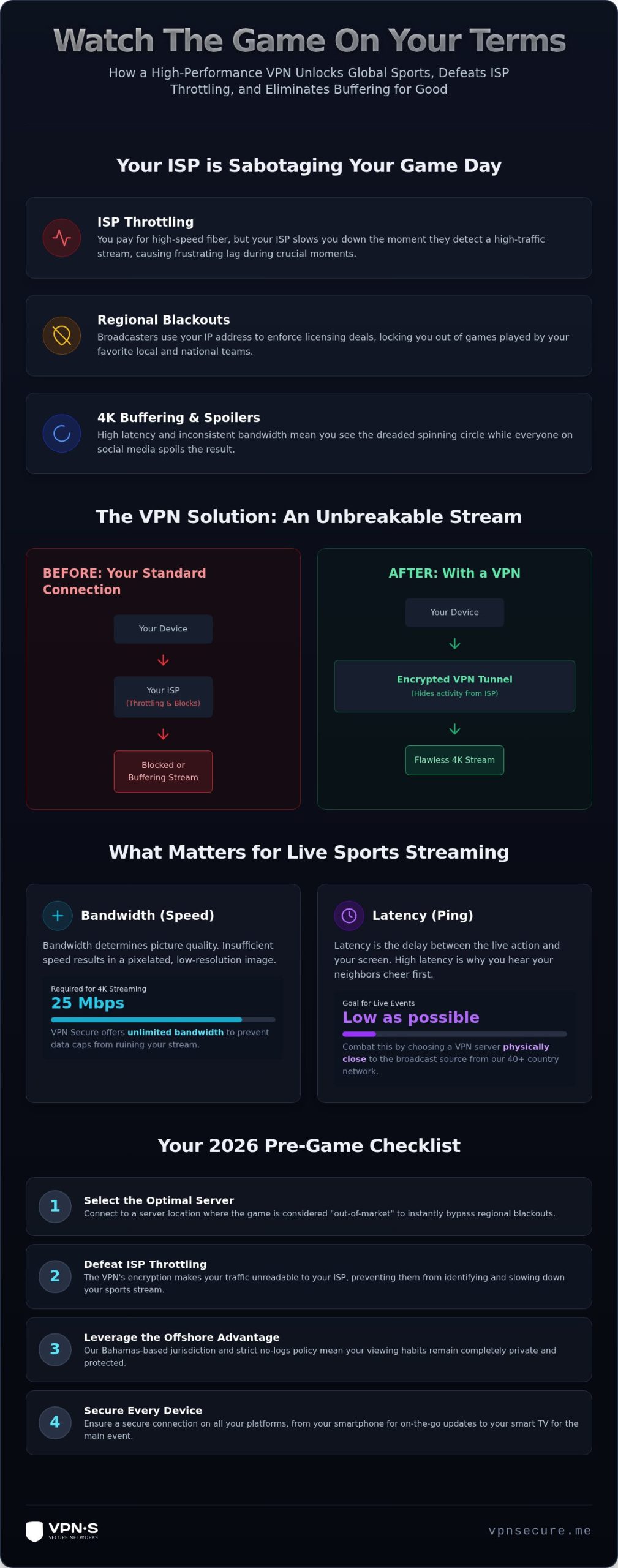
Preparation is the difference between watching the winning goal and staring at a buffering wheel. Your VPN for sports streaming is only as good as its configuration. Don’t leave your game day to chance; follow this methodical approach to ensure your shield is active and your connection is private, fast and leak-free.
Start by downloading the native app for your device. Don’t rely on browser extensions; they are often too weak to handle high-bandwidth 4K streams and lack the system-wide protection you need. Once installed, select the server closest to you, which usually gives the lowest latency. Our network offers servers in 40+ countries, so if one location is busy, you have plenty of nearby alternatives.
Next, dive into the settings menu. You must enable the Kill Switch and IPv6 Leak Protection. The Kill Switch is your ultimate safety net. If your VPN connection drops for even a millisecond, it cuts all traffic so your real IP address and unencrypted data never travel over the hotel or café network. Without it, one tiny glitch can expose your traffic. Finally, clear your browser cache or open an incognito window to limit cookie tracking.
Watching on a small phone screen isn’t the stadium experience you want. Most modern fans use an Android TV or Fire Stick. Using a dedicated VPN for sports streaming on your TV ensures you get the full resolution without the lag. If you are using a device that doesn’t support native apps, such as certain gaming consoles, check our setup guides for the options available for that device.
Whether you are at home or on the move, your setup needs to be bulletproof. If you are watching from a hotel or public network, check out our guide on Secure VPN for Travel in 2026: Why Your Privacy Needs an Offshore Shield to understand the risks of unsecured Wi-Fi. Before the game starts, perform these verification steps:
Ready to lock in your connection for the entire season? Get an Annual VPN Subscription and take back control of your sports experience today.
Choosing a VPN for sports streaming isn’t just about finding a server; it’s about finding a provider you can trust with your data. We operate out of the Bahamas. This jurisdiction sits outside the Five Eyes data-sharing alliance. It means we don’t answer to the same corporate data demands as providers based in the US or Europe. When you use our shield, you are placing your data in a region that prioritizes individual privacy.
We offer high-performance servers in 40+ countries, so there is almost always a fast server near you, at home or on the road. Our network is built for high-concurrency events. You don’t have to choose which screen to protect. Our service supports multiple simultaneous connections. You can stream the main event on your Android TV while tracking live odds or fantasy stats on your tablet with zero drop in performance.
Your viewing habits belong to you. In many jurisdictions, providers can be compelled to hand over user logs. Because we are based in the Bahamas, a Bahamas-based VPN is not subject to the same data subpoenas as US or EU providers. We’ve maintained a strict no-log policy since 2012. If we don’t have the data, we can’t give it away. You can learn more about why a No-Log VPN Audit is the only way to prove a provider is actually protecting you.
Speed is our priority. Our VPN for sports streaming is designed for a one-click connection so you don’t miss the opening whistle. We don’t believe in trapping you with complex setups or data caps. You get unlimited bandwidth for buffer-free 4K on every plan. If you are skeptical, test us out. We offer a 30-day money-back guarantee. Use it during the next major tournament to see how we handle the pressure. Get VPNSecure and Stream Your Team Today and keep your viewing private.
Your ISP shouldn’t have the power to decide how fast your connection is or who sees what you watch. You now have the technical blueprint to stop ISP throttling in its tracks and keep your viewing private. It’s about autonomy; you pay for your bandwidth, and you deserve to use every bit of it. By deploying a robust VPN for sports streaming, you turn your connection into an encrypted tunnel that keeps corporate trackers out and artificial speed limits away.
We provide the ultimate shield for fans who refuse to settle for a spinning buffer wheel. Our Bahamas-based jurisdiction offers a genuine offshore advantage, keeping your data far beyond the reach of intrusive data collection. We’ve stayed true to our no-log policy since 2012, ensuring your stream is your business alone. With unlimited bandwidth for crystal-clear 4K, you can finally enjoy the game as it was meant to be seen. It’s time to stop letting your provider dictate the score of your streaming experience.
Stream Sports Privately – Get VPNSecure Now
The game is waiting for you. Step onto the field with the protection you deserve and never miss another kickoff.
Using a VPN for privacy and security is legal in most countries; always follow local law where you are. Streaming services set their own terms of service, and those terms apply whether or not you use a VPN. A VPN is a legitimate tool for encrypting your connection and keeping your viewing private from your ISP. We operate from the Bahamas with a strict no-logs policy.
A high-quality VPN shouldn’t noticeably slow your connection. In fact, if your provider is intentionally capping your speeds during big games, our service can actually make your stream faster. We provide unlimited bandwidth and high-speed servers in 40+ countries to handle 4K feeds. By avoiding artificial bottlenecks, you get the raw performance you pay for instead of the throttled version your ISP wants to give you.
You can definitely use our service on your Smart TV. We offer native apps for Android TV and Amazon Fire Stick to bring the stadium experience to your living room. For devices like gaming consoles that don’t support native apps, check our setup guides for the options available. Your big screen gets the same encrypted, buffer-free connection without complex hardware setups or technical headaches. It is your screen, after all.
A VPN does not change a broadcaster’s licensing. Blackout rules are set by the rights holders, and each service’s terms apply wherever you connect. What a VPN does do is keep your viewing private from your ISP, protect your connection on public Wi-Fi, and give you stable, secure access to your own subscriptions while travelling, subject to each service’s terms. It is your connection, so you should decide who gets to see your data.
For both the Premier League and the NBA, the best location is usually the server closest to you, because a shorter distance means lower latency and less buffering. When travelling, connect to a high-performance server near where you are for stable, secure access to your own subscriptions, subject to each service’s terms. Choosing your location for speed is the secret to smooth 4K all season.
Streaming services set their own rules on VPN use, and their terms apply. If you see playback errors, check that the VPN is connected to a nearby server, clear your cookies or use an incognito window, and check for DNS leaks. Ensure your Kill Switch is active so your real IP doesn’t slip through on a dropped connection. If a service does not support VPN connections, respect its terms and pause the VPN for that app.
You should avoid free VPNs for live sports. These services often lack the bandwidth required for high-definition video, leading to constant buffering. More importantly, free providers frequently sell your browsing data to third parties to cover their costs. We don’t offer a free tier because quality infrastructure requires investment. Choosing a VPN for sports streaming with a proven no-log policy is the only way to protect your privacy and your stream.
You reduce throttling by keeping your traffic private. ISPs can analyse traffic to identify and slow down high-bandwidth video streams during peak hours. Our encryption wraps your data in a secure tunnel that your provider cannot peer into. Because they can’t see that you are streaming 4K sports, they cannot single it out for the speed brake. Your connection is handled like standard web traffic, helping you get full speed.
Keep reading
A Mac’s polished interface isn’t a privacy shield. Yes, MacBook Air and MacBook Pro can use a VPN, and macOS includes a client that supports L2TP,...

Planning a trip to China? Learn which VPN features matter, why Stealth VPN helps, how to prepare before departure, and what legal and access limits to consider.

A VPN for accessing region-locked games can change the IP location a game sees, but it won’t automatically change your Steam store region. Steam...
No logs, ever. Start with Free with ads in under a minute.