





















VPN & Privacy
VPN options for Mac compared by privacy, protocols, and protection
A Mac’s polished interface isn’t a privacy shield. Yes, MacBook Air and MacBook Pro can use a VPN, and macOS includes a client that supports L2TP,...
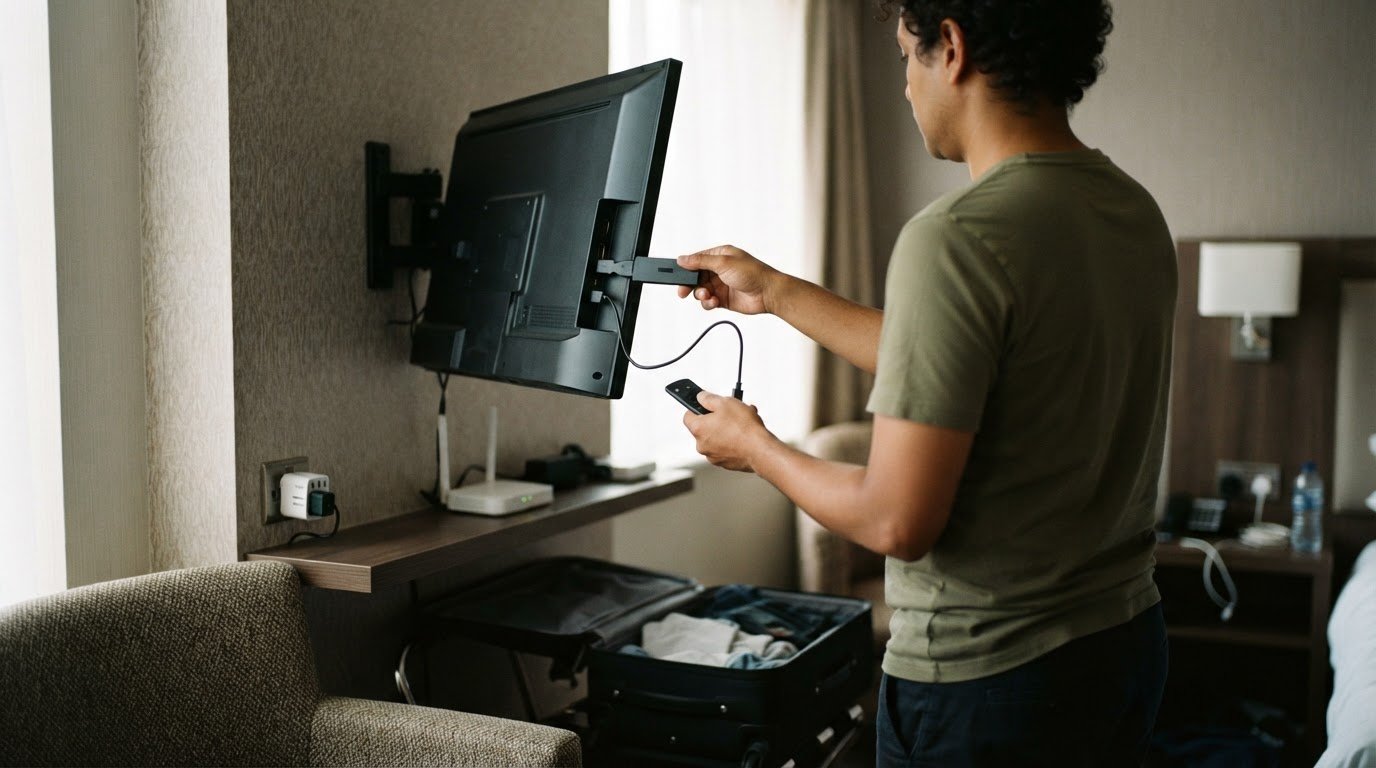
A VPN for streaming encrypts your traffic and hides your IP address from trackers and other users on your network, which is especially useful on hotel or public Wi-Fi. It can’t change a streaming service’s content licenses or terms, which apply whatever connection you use. VPNs are legal in most countries, but rules vary, so follow local law wherever you are.
It’s easy to assume a VPN changes what you can watch. In practice, what a platform offers depends on its licensing agreements and terms, and a VPN doesn’t change either. This guide explains what a VPN does for streaming privacy and security, what to compare across devices and connection options, and why rules differ between countries. Use the practical guidance to weigh privacy, compatibility, and speed before you press play.
A VPN routes your network traffic through an encrypted tunnel to a remote server, so websites and apps see the server’s IP address instead of yours. For smooth streaming, connect to a server near you, then open the streaming service.
A VPN network offers servers in different countries. For streaming, a nearby server usually gives the fastest, most stable connection, so coverage close to where you are matters most. Smart DNS works differently: it redirects selected requests, but doesn’t route all your traffic through an encrypted VPN tunnel or hide your IP address in the same way.
Choosing a server decides where your encrypted tunnel ends and which IP address websites see. To set up a VPN, pick a server close to you, connect, then reopen the streaming service. If playback is slow, try another nearby server. If the platform won’t play while the VPN is on, check its help pages; each service’s terms apply.
Compare the options by encryption, IP privacy, and setup:
| Option | Encryption | IP address | Streaming setup |
|---|---|---|---|
| VPN | Encrypts all device traffic | Masked by remote server | Connect, then open service |
| Smart DNS | Doesn’t encrypt traffic | Not masked in the same way | Configure supported settings |
| Direct connection | Only what sites protect with HTTPS | Your regular connection IP | Open the service directly |
For streaming, a nearby server is usually the best choice for speed and stability. Streaming services set their own rules about VPN connections, so check each service’s terms before you rely on a VPN for viewing.
Location-based prices can also vary across online storefronts. A changed IP address may affect the region or currency a site displays, but it doesn’t determine the final price. Your account country, billing details, and the seller’s regional pricing rules can still shape what you see. Compare the displayed currency and terms before making a purchase.
Netflix, Hulu, and BBC iPlayer set their own rules about VPN connections. A VPN for streaming can protect your connection and your privacy, but it can’t guarantee that a streaming platform will accept the connection.
A streaming library is the catalog a platform offers for your account and region under its licensing agreements. A VPN for streaming encrypts your connection; it doesn’t change the catalog your subscription covers. When choosing a VPN service, compare device support, speed, and privacy practices. Each platform’s terms apply, and some may not play through a VPN server.
HD and 4K playback rely on a fast, stable connection reaching your device. A distant server adds length to the route, while congestion and your home connection also affect speeds. If playback buffers, pause other downloads, reconnect to another nearby server, then test the stream again. Lowering resolution can also reduce buffering.
Streaming services decide for themselves how they handle VPN connections. If playback stops or an access message appears, the platform’s own terms apply; turning the VPN off for that app is usually the quickest fix. Don’t assume every service responds the same way.
Free VPN plans vary in available countries, data limits, speeds, and device support. Compare those limits with your intended viewing habits. A plan without a nearby server or enough capacity for a long film may not suit your needs.
Sports streams are also subject to regional licensing. A broadcaster may hold rights for a match in a specific region, and a virtual connection doesn’t change those rights. Check which platform carries the event where you are before setting up the stream.
For privacy, encryption can help protect traffic on public Wi-Fi, but signing into Netflix or another platform still identifies your account. Use the platform’s official app or site, and avoid entering credentials on unfamiliar pages.
For encrypted browsing alongside streaming, explore private VPN access.
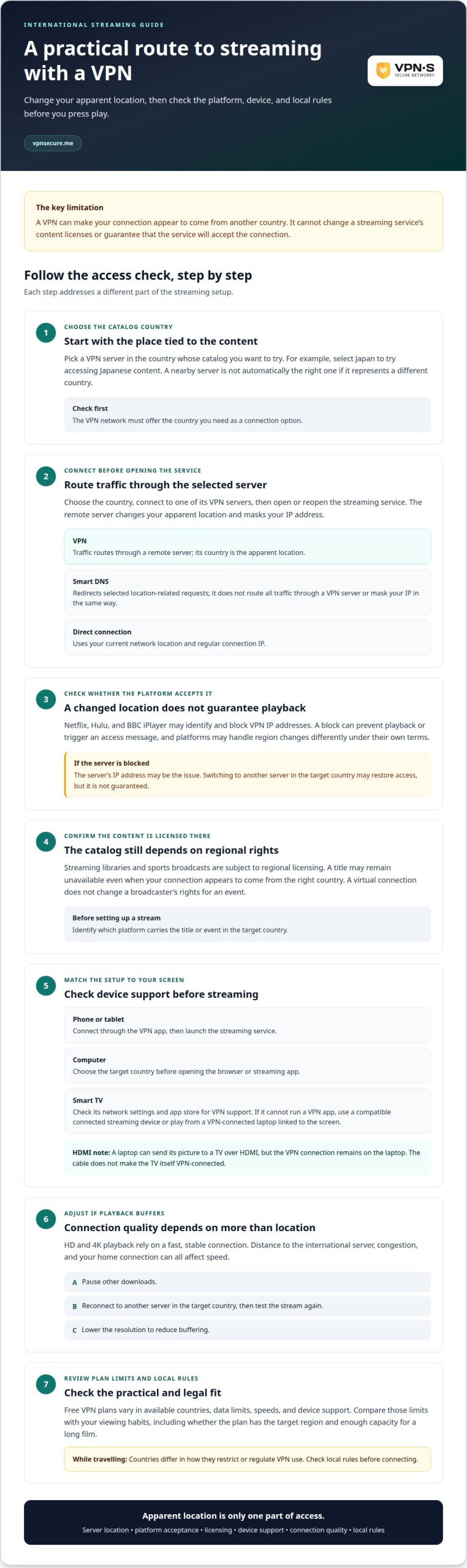
A VPN can protect traffic across major devices, but the viewing screen affects setup. Compare the device running the VPN with the one playing the stream, especially if a smart TV has limited network controls.
On a phone, tablet, or computer, install the VPN app, sign in, select a server, and connect before opening the streaming platform. The VPN encrypts traffic from that device. If you switch servers, reconnect before reopening the app so it starts a fresh session.
Smart TVs vary in operating systems and available apps. Check the TV’s network settings and app store for VPN support before choosing this route. If the TV can’t run a VPN app, use a compatible streaming device connected to the TV, or play the stream on a VPN-connected laptop linked to the screen.
Keep the setup simple. A VPN app on the device playing the stream protects that device’s traffic directly. Connecting a laptop to a TV by HDMI sends the laptop’s picture to the screen, while the VPN connection remains on the laptop. The cable doesn’t make the TV itself VPN-connected.
For a household with several screens, decide which devices need protected traffic and which need to display the content. A VPN connection on one phone doesn’t automatically cover a separate TV. Likewise, turning on the VPN on the phone won’t protect the TV’s connection unless the TV receives the stream from that phone or another VPN-connected device.
Before settling on a method, test the full path: connect the VPN, open the platform, start playback, and confirm the picture appears on the intended screen. If playback fails on a smart TV but works on a laptop, the difference may be the TV’s app or network setup, not the VPN server.
A VPN changes how your connection reaches a platform, not the rights attached to a film or match. Licensing agreements decide where each title is offered, so a title shown in one country may be absent from another country’s catalog, even when both viewers use the same platform.
That is why a VPN doesn’t change what your subscription lets you watch. A service’s catalog reflects regional licensing and its own terms. For example, a series available in one country may not be licensed for distribution in another. A VPN protects your connection; it can’t grant the platform new distribution rights or expand its agreement.
If a title you expect isn’t showing, use these steps:
Licensing can also affect live sports. A broadcaster may hold rights for a particular region, so a virtual connection doesn’t change which company can distribute the event there. Mobile connections add another variable: if your device switches between Wi-Fi and mobile data, the VPN may need to reconnect. Check that the app shows a connected status, then reload the streaming platform.
Streaming and legality are separate questions. VPNs are legal in most countries, but rules vary, so follow local law when you connect while travelling. A platform’s catalog rules are also separate from the laws where you are physically located. Don’t treat a working connection as proof that every use is permitted.
Use a VPN to protect your connection, not to change licensing. If you want encrypted internet traffic while using your streaming services, choose a VPN subscription that fits your needs.
VPNSecure offers a Monthly VPN Subscription for viewers who want encrypted connections while streaming at home or on the road. Choose it when you want a private VPN connection for a shorter commitment, or consider the Annual VPN Subscription for ongoing use. A VPN can protect internet traffic and hide your IP address from trackers, but it can’t override regional licensing or guarantee a platform will accept a server’s IP address.
For streaming, select a nearby server for speed, then connect before opening the platform. VPNSecure also offers a Dedicated IP, a separate option for users who need a consistent IP address. Choose between general VPN access and a dedicated address based on how you plan to use the connection.
Explore VPNSecure’s options or visit vpnsecure.me to learn more.
Your next move is to define what matters most: protecting everyday browsing, choosing a subscription for your viewing routine, or using a consistent IP address. A VPN for streaming can support a more deliberate approach to streaming, but it can’t replace a platform’s regional rights or local rules. Let your actual needs, not the promise of a bigger catalog, guide your choice.
VPNSecure offers a Monthly VPN Subscription, an Annual VPN Subscription, and a Dedicated IP. Consider which option fits how you expect to use a VPN, then decide with clear expectations about access and licensing.
Ready to take the next step? Contact VPNSecure about VPNs and explore the option that fits your needs. Choose with confidence, and make your next online connection a more intentional one.
VPNs are legal in most countries, but rules vary, so follow local law wherever you are, including while travelling. The rules where you’re physically located matter, even if your VPN server is in another country. A streaming platform’s terms and licensing are a separate matter, and they apply whatever connection you use.
A VPN can be useful while traveling, especially on public Wi-Fi at an airport or café. Encryption helps make intercepted internet traffic unreadable, but it doesn’t replace careful browsing or protect you from every online risk. For secure mobile connectivity without relying solely on public networks, travelers often set up international data plans through atlassesim.com. Before connecting abroad, check local law, since rules in your destination country may differ from those at home.
A VPN, or virtual private network, creates an encrypted connection between your device and a remote server. Websites and apps then see the server’s IP address rather than your regular connection address. For example, a work laptop can use a VPN to protect traffic on shared Wi-Fi. A VPN doesn’t make you anonymous to services where you sign in, such as an email or streaming account.
There isn’t one best choice for every viewer. Compare server locations near you, compatibility with your television or streaming device, connection stability, and the provider’s privacy practices. Also consider whether the subscription term suits your use. VPNSecure offers Monthly and Annual VPN Subscriptions, but no VPN can override a platform’s content licenses or guarantee access to a specific title.
Choose based on the devices you actually use and where you usually connect, not a broad ranking alone. Check that the service has servers near you and works with your viewing setup. Then weigh privacy practices and subscription options. VPNSecure offers servers in 40+ countries and Monthly and Annual VPN Subscriptions. A platform’s catalog depends on streaming rights, not on your VPN connection.
Compare providers’ published country coverage, then check whether they have servers close to where you live and travel. A large country count doesn’t show how many useful locations exist near you, or whether a platform accepts those server connections. VPNSecure offers servers in 40+ countries. For streaming, prioritize nearby servers and device compatibility over a provider’s overall count alone.
Keep reading
A Mac’s polished interface isn’t a privacy shield. Yes, MacBook Air and MacBook Pro can use a VPN, and macOS includes a client that supports L2TP,...

Planning a trip to China? Learn which VPN features matter, why Stealth VPN helps, how to prepare before departure, and what legal and access limits to consider.

A VPN for accessing region-locked games can change the IP location a game sees, but it won’t automatically change your Steam store region. Steam...
No logs, ever. Start with Free with ads in under a minute.