




In short
VPNs for Firefox come in two forms: a browser proxy extension, which changes the route used by Firefox, and a full VPN app, which is designed to protect traffic from the whole device. Choose an extension for browser-only location changes; choose a VPN app for public Wi-Fi, desktop apps, and broader traffic protection.
Key takeaways
- A Firefox VPN extension usually controls Firefox web requests, not traffic from other browsers, desktop apps, games, or torrent clients.
- A full VPN app is the better choice when more than Firefox needs protection, including work tools and connections on public Wi-Fi.
- Firefox lets extensions request access to browser data and settings, so review permissions and data-collection disclosures before installing an add-on.
- Private Browsing does not automatically mean a Firefox extension is active there; Firefox requires a separate permission decision.
- Browser-only proxy access can be useful when the goal is to change the IP address used by Firefox without routing the rest of the device through a VPN tunnel.
Contents
- Should I use a Firefox VPN extension or a full VPN app?
- What does a Firefox VPN extension actually protect?
- When is a full-device VPN the better choice?
- How do I install a Firefox proxy extension safely?
- What should I check before using a free VPN for Firefox?
- What else do Firefox users ask about VPNs?
Firefox users do not need to decide which service has the loudest marketing claim. The useful first decision is simpler: decide whether only Firefox needs a different IP route, or whether the whole device needs VPN protection.
Should I use a Firefox VPN extension or a full VPN app?
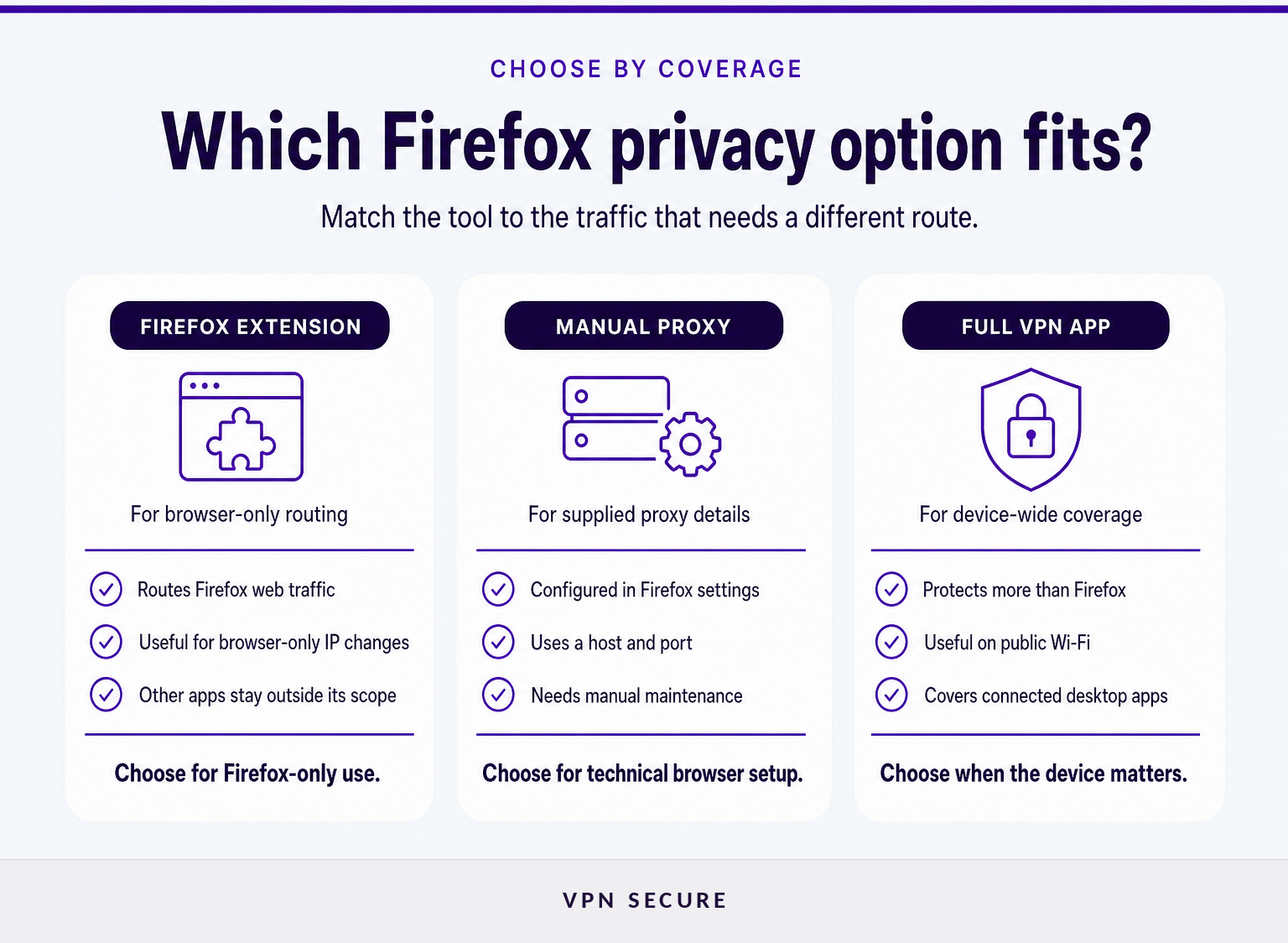
Use a Firefox extension when browser-only proxy routing is enough. Use a full VPN app when Firefox is only one part of what you do online, or when you need protection that reaches beyond the browser.
| Option | What it covers | Best fit | Main limitation |
|---|---|---|---|
| Firefox proxy extension | Firefox web requests managed by the extension | Browser-only browsing and location changes | Other device apps do not automatically use it |
| Manual Firefox proxy | Firefox traffic configured in Firefox connection settings | Users with provider-supplied proxy details | Requires manual configuration and stays browser-only |
| Full VPN app | Device traffic routed through the VPN connection | Public Wi-Fi, work apps, multiple browsers, and broader privacy needs | Routes more traffic than a browser-only setup |
Firefox supports proxy settings in its Connection Settings panel, and Mozilla documents a dedicated proxy API that extensions can use to route browser web requests. That is why a Firefox extension can be convenient without being the same thing as a device-wide VPN. Mozilla’s Firefox proxy documentation and Firefox Connection Settings guide describe those browser-level controls. (developer.mozilla.org)
A browser-only option is often the right answer when you want Firefox to use a different IP address while another app keeps its normal connection. For a clearer explanation of the broader alternative, see this guide to device-wide VPN protection.
The key decision is scope: use a Firefox extension for Firefox, and use a VPN app when the device needs protection beyond Firefox.
What does a Firefox VPN extension actually protect?
A Firefox VPN extension protects the Firefox traffic it is configured to proxy. It does not automatically protect traffic from a separate browser, a desktop messaging app, a game launcher, or another application on the same computer.
Mozilla explains that Firefox extensions can use the proxy API to proxy web requests, while Firefox itself also offers manual connection settings for a proxy. Those are browser controls. A VPN app works at a different level by establishing a VPN connection for the device. (developer.mozilla.org)
This distinction matters on a laptop with several active programs. If Firefox is the only program being used, a browser proxy can be a precise choice. If a video call, cloud-sync client, email application, or another browser is also connected, those programs need their own proxy configuration or a full VPN app.
Browser-only routing also does not make a person invisible to websites. A site can still recognize an account that is signed in, use cookies, or collect browser characteristics. VPN Secure’s own guidance notes that websites where a user logs in can still track activity, and that cookies and browser fingerprinting remain separate privacy considerations. (vpnsecure.me)
VPN Secure includes browser-level HTTP proxy access with its subscription and describes its Firefox extension as an option for browser-only protection. Its VPN privacy features page also distinguishes that HTTP proxy option from the service’s full VPN protocols. (vpnsecure.me)
A Firefox extension can change the network path for Firefox, but it is not a substitute for device-wide protection when other apps are online.
When is a full-device VPN the better choice?
A full VPN app is the better choice when the privacy need follows the device rather than one browser tab. That includes working on public Wi-Fi, using multiple browsers, accessing desktop apps, or switching between Firefox and other applications throughout the day.
A device-wide VPN is also simpler when you do not want to audit every application’s network settings separately. VPN Secure describes its VPN apps as available for Windows, macOS, iOS, Android, Linux, and other supported platforms, while its HTTP proxy option is intended for browser extensions or other proxy-aware apps. (vpnsecure.me)
There is a trade-off. A full VPN sends more traffic through the VPN connection, while a Firefox extension limits the routing change to Firefox. That narrower scope is useful when it is deliberate. It is a problem when someone assumes a browser add-on covers a device that is actually using several connected applications.
An app-specific proxy can still make sense for other services when you want only that application routed differently. For example, a telegram proxy setup is a separate configuration choice from a Firefox extension or a device-wide VPN.
Choose a full VPN app when the question is “what protects this device?” rather than “what changes Firefox’s connection?”
How do I install a Firefox proxy extension safely?
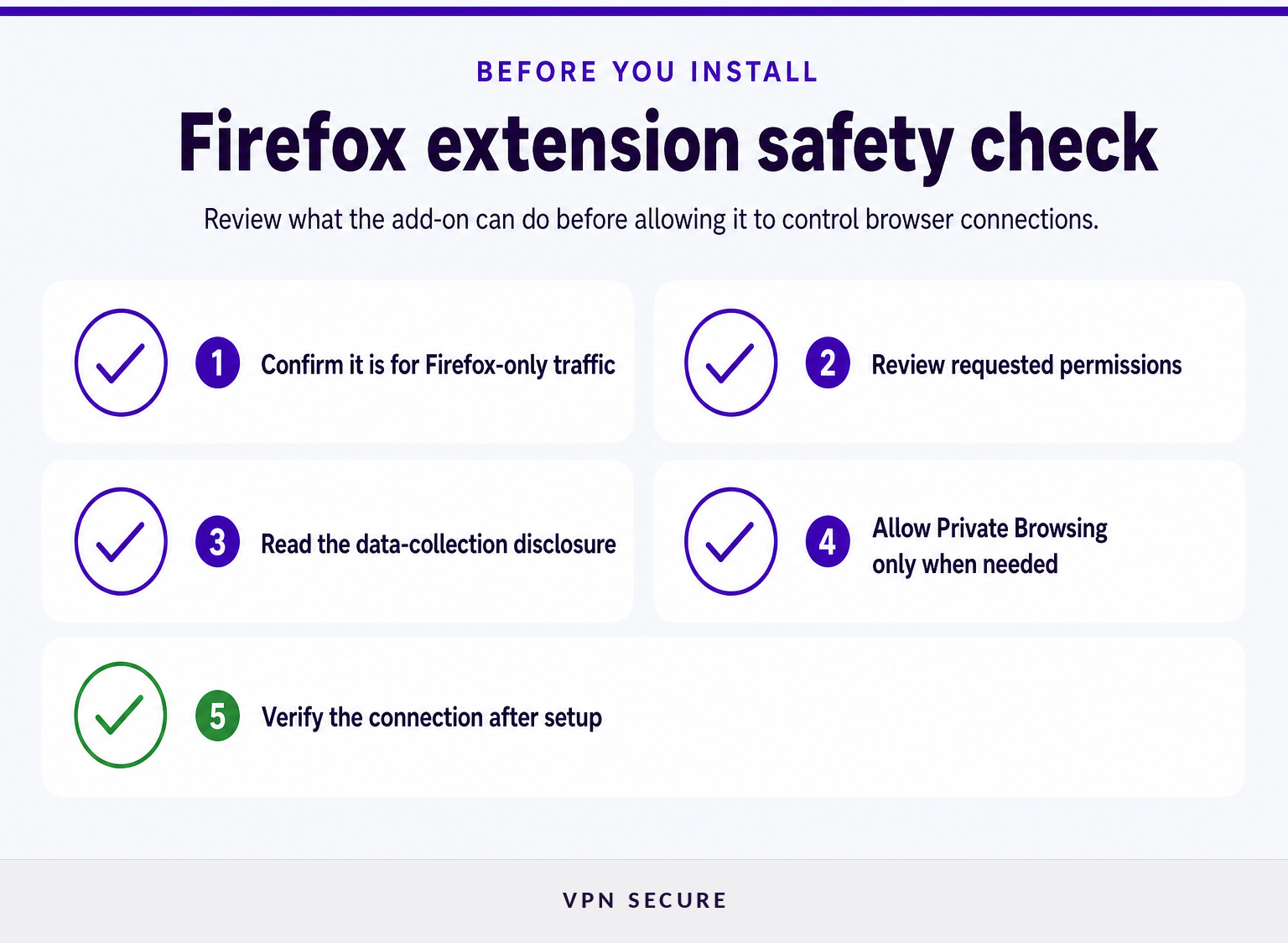
Install a Firefox proxy extension only after confirming what it changes, what permissions it requests, and whether it needs to work in Private Browsing windows. A short permissions review is more valuable than choosing an add-on based only on a free-price label or a server-count claim.
Use this sequence:
- Confirm the scope. Check that the extension is meant to proxy Firefox traffic and does not claim to protect unrelated applications.
- Read the requested permissions. Firefox shows which browser data or settings an extension wants to access, and its Add-ons Manager lets users review and manage optional permissions later. (support.mozilla.org)
- Check the data disclosure. Firefox’s extension data-collection information identifies categories such as browsing activity, website content, authentication information, and technical data that an extension may disclose during installation. (support.mozilla.org)
- Decide on Private Browsing access. Firefox does not enable extensions in private windows by default. Allow it only if you want the extension active there and trust it with that access. (support.mozilla.org)
- Verify the route after connecting. Use an IP-check page or the provider’s recommended verification method before relying on the connection for a privacy-sensitive task.
For subscribers who want browser-only proxy routing, the Firefox VPN extension is the direct next step. VPN Secure states that HTTP proxy access is included with its subscription and can be used through Firefox and Chrome extensions. (vpnsecure.me)
A safe Firefox extension setup begins with permissions and scope, then confirms the connection is behaving as expected.
What should I check before using a free VPN for Firefox?
Check who operates the extension, what it requests access to, what data it says it collects, and whether the plan’s limits match your use. “Free” answers a price question, not a privacy or scope question.
Start with the listing and installation prompt. Mozilla says Firefox can show requested permissions and data-collection information during add-on installation, and users can inspect permissions later in the Add-ons Manager. If an extension needs broad browser access, understand why that access is necessary for its stated function before accepting it. (support.mozilla.org)
Then check the product’s limits in plain language. Does it cover only Firefox? Does it work in Private Browsing if you want it to? Does the provider explain account requirements, available locations, bandwidth limits, or support? If the answers are unclear, the extension may not be suitable for banking, work, or other sensitive browsing.
Do not confuse an extension’s presence in a browser store with a guarantee that it meets every privacy need. Mozilla recommends reviewing installed extension permissions, reading descriptions, and considering user reviews as opinions rather than proof. (support.mozilla.org)
The right free Firefox VPN option is one whose scope, permissions, and data practices you can understand before you rely on it.
What else do Firefox users ask about VPNs?
Can I use a VPN extension in Firefox Private Browsing?
Yes, but only when the extension supports Private Browsing and you allow it to run there. Firefox does not enable extensions in private windows by default. Open the extension’s settings in Firefox, find the Private Browsing option, and grant access only if you want that extension to handle browsing activity in private windows. (support.mozilla.org)
Is a Firefox VPN extension enough for public Wi-Fi?
A Firefox VPN extension can route Firefox web traffic through its proxy, but it does not automatically cover other applications connected to the same public Wi-Fi network. Use a full VPN app when the goal is to protect the device connection used by browsers, work apps, messaging tools, and other software. (developer.mozilla.org)
Can a Firefox extension protect torrent traffic?
A Firefox extension is designed for Firefox web requests, so it does not automatically route traffic from a separate torrent client. A torrent client would need its own compatible proxy configuration or a full VPN connection. Decide based on the application producing the traffic, not on the fact that Firefox is installed. (developer.mozilla.org)
Does a Firefox proxy make me anonymous online?
No browser proxy or VPN should be treated as complete anonymity. A proxy can change the IP address seen by websites, but logged-in accounts, cookies, browser fingerprinting, and information voluntarily shared with a site can still identify or link activity to a user. (vpnsecure.me)
The useful question is not whether a Firefox VPN makes you anonymous, but which parts of your online activity it can and cannot affect.
Choose the smallest tool that covers the traffic you actually need to protect. For Firefox-only browsing, that may be an extension. For the rest of the device, use a full VPN app.